How to Fix TikTok Maximum Number of Attempts Reached Error
How to Fix TikTok Maximum Number of Attempts Reached Error
The TikTok maximum number of attempts reached error is a temporary lockout, not a ban. Here is what triggers it and how to get back in fast.
- 1Why Does TikTok Say Maximum Number of Attempts Reached
- 2How Long Does the Maximum Attempts Lockout Last
- 3How to Fix Maximum Number of Attempts Reached on TikTok
- 4Why the 24 Hour Wait Sometimes Does Not Work
- 5Login Lockout vs Age and ID Verification Limits
- 6How to Avoid the Maximum Attempts Error Next Time
- 7Frequently Asked Questions
- Does maximum number of attempts reached mean I am banned on TikTok?
- How long does the TikTok maximum attempts lockout last?
- How do I fix it without waiting 24 hours?
- Why do I still get the error after waiting a full day?
- Will using a VPN fix or cause the error?
- 8Quick Takeaways
TL;DR: TikTok’s “Maximum number of attempts reached. Try again later.” message is a temporary security lockout that leaves your account active, and every new attempt resets the cooldown clock. The fastest fixes are switching your network for a fresh IP or signing in with Google or Apple if your account is linked to one. Otherwise stop completely, since TikTok’s login help for business accounts says to wait at least one hour after too many code requests and to contact support if the error lasts past 24 hours.
I learned the hard way that the TikTok maximum number of attempts reached error punishes the exact instinct everyone has, which is to keep trying. Every time you tap login again or re-request a code, you reset the lockout timer and stretch a one hour block into a multi day one.
This block often sits on your IP address or device, and when it is the IP, switching networks can get you back in well before 24 hours pass.
This guide covers what triggers the error, how long each lockout tends to last, the order to try fixes in so you do not make it worse, and why the standard “wait a day” advice sometimes fails completely. Your account is almost certainly fine.
What is rate limiting: A security throttle that temporarily blocks repeated actions, like login or code requests, to stop bots and brute-force attacks. It is automatic and temporary.
Why Does TikTok Say Maximum Number of Attempts Reached
TikTok shows “Maximum number of attempts reached. Try again later.” when you trip its automatic rate limiter by repeating a sensitive action too many times, such as logging in, requesting codes, or resetting your password.
It is a security throttle that protects against brute-force attacks, and it does not mean your account is banned.
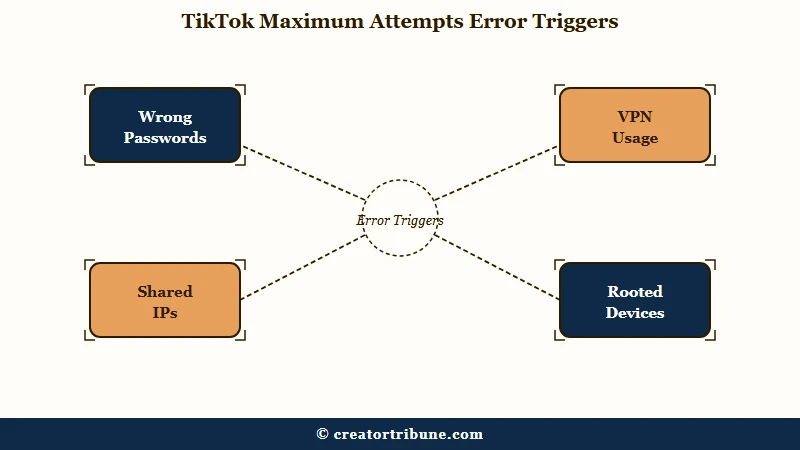
The error fires across more surfaces than most people realize. It shows up on the login password screen, on the sign-up screen, on SMS and email code requests, during two-factor setup, on password resets, and during age or ID verification. If you saw it in LIVE Studio next to a “suspicious activity detected” warning, our guide to TikTok LIVE’s suspicious activity restriction covers that side of it.
TikTok does not publish how many login attempts it allows, and the error can appear on the very first try, as one r/TikTok user reported from the password reset screen on August 31, 2026. It blocks sign-ups too: on September 14, another posted it from the password step of a brand-new email sign-up on the web, saying no browser got past it. For verification codes, TikTok’s own login help for its business tools is specific: after too many code requests in a short time, wait at least one hour before requesting another.
What surprised me most is how much your network and device matter here. A public VPN, an office network, or an Android emulator like BlueStacks can get you blocked even when your password is correct, and that same business login help lists turning off a VPN or firewall among its fixes for login network errors.
Logging in right after a factory reset, or on a rooted device, raises the same flag, and so does a burst of logins from several accounts on one phone or emulator.
How Long Does the Maximum Attempts Lockout Last
The lockout usually lasts between 30 minutes and 24 hours, with 24 hours being the standard reset window for a full login block.
Lighter triggers clear in about an hour, but some r/TikTok users still saw the error on the reset screen after waiting about three days.
The duration depends entirely on what you tripped and how hard. The single biggest mistake, and the one I made myself early on, is not respecting the clock, because the timer only counts down while you leave it completely alone.
Here is how the common triggers map to their cooldowns.
| Surface | What triggers it | Typical cooldown |
|---|---|---|
| Login password | Repeated wrong passwords, TikTok publishes no exact number | 30 minutes to 24 hours |
| SMS or email code | Too many code requests in a short time | At least 1 hour, per TikTok’s business login help |
| Age estimation (TikTok Shop) | 3 failed facial scans | That method locks, switch methods |
| ID or credit card check | 6 failed uploads | That method locks |
| Bots, emulators, many accounts on one device | Flagged as automated misuse | Longer, TikTok publishes no figure |
Any login or code request you make during the cooldown resets or extends it, so the clock never reaches zero until you genuinely stop. If it still has not cleared after 24 hours, contact TikTok support instead of waiting longer.
How to Fix Maximum Number of Attempts Reached on TikTok
The fix is to try three instant network and sign-in bypasses first, and only then stop and wait if they fail.
Random retrying makes it worse, so order matters more than any single trick.
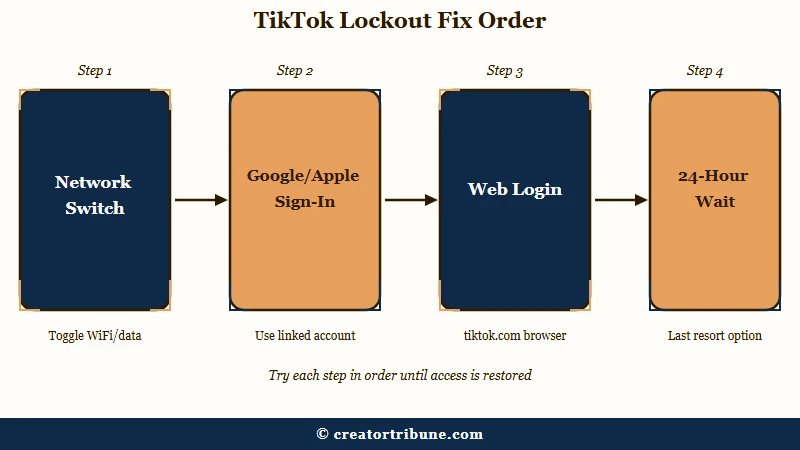
Most guides throw ten fixes at you in no particular order, which is how people accidentally extend their own lockouts. The sequence I would follow puts the IP-level and account-bypass options first, because they often get you straight back in without any wait at all.
- Switch your network. Move from Wi-Fi to mobile data, or the reverse, to grab a fresh IP address. Many lockouts are enforced on the IP, not the account.
- Sign in with Google or Apple, if your account is linked to one, since an unlinked ID opens a different account or starts a new one. Those buttons use Google’s or Apple’s own sign-in instead of TikTok’s password and code screens, so they can work when those screens are locked.
- Open tiktok.com in a phone or desktop browser. The web login is sometimes tracked separately from the app, so it can work when the app is blocked.
- If those three fail, stop completely. Do not request another code or try another method. Close the app and leave it alone for a full 24 hours.
A password reset through the “Forgot Password” link sometimes gets people in, but the reset screen can show the same error, so do not count on it. Clearing the TikTok cache on Android, or deleting and reinstalling on iOS, helps when corrupted app data is part of the problem. Deleting the app also wipes any drafts saved on the phone, as our guide to TikTok drafts that disappeared explains.
Before: You hit the error, so you keep tapping login and re-requesting the code every minute, which resets the block each time and turns a one hour cooldown into days.
After: You stop, switch to mobile data, tap “Continue with Google,” and you are back in within minutes without touching the password again.
If you suspect the lockout came from a deeper account problem rather than simple retries, the steps in TikTok account recovery cover the messier cases, and the TikTok ban appeal guide explains how to tell a temporary block from a real strike.
If the account turns out to be gone for good and you have to start over, some creators rebuild with an automation tool. SMTasker is one built for Instagram, TikTok and Threads that works through real Android phones, with a trial before you pay.
Why the 24 Hour Wait Sometimes Does Not Work
Sometimes you wait a full day and hit the same error instantly, usually because the timer was reset during the wait or the lockout is tied to your device or IP.
Three specific situations cause this, and each needs a different move.
The first is the reset trap. If you opened the app even once during the cooldown to “check,” you restarted the timer, so your 24 hours never fully elapsed.
The second is device fingerprinting. If you run more than two or three TikTok accounts on one phone, TikTok groups that activity and reads a burst of logins as a credential-stuffing attack from a single device, which locks all of them at once. Isolating accounts on separate devices is the only durable fix there.
The third is the VPN paradox, and the advice on it genuinely conflicts. TikTok’s business login help says to disable a VPN or firewall temporarily when a login hits a network error, yet plenty of locked-out users report that a VPN set to a fast nearby region is exactly what got them back in. My read is to try with your VPN fully off first, then, if you are still stuck, try a single clean VPN connection rather than flipping between servers.
One more edge case hits people after a factory reset. Some users get trapped in a loop where TikTok accepts the SMS code, then demands an authenticator app code they never set up, which the TikTok account not found fix walks through in more detail. The Google or Apple sign-in usually breaks that loop.
The reset screen can keep failing after a long wait, too. On September 19, 2026, an r/TikTok user with what they called a decent-sized following posted the same error from a password reset, saying they had waited nearly three days between attempts and that support twice replied with the standard advice to wait 24 hours.
When that happens, contacting support is the next step, and it can take persistence. In an r/TikTok thread started on August 31 about the same reset-screen error, one user said on September 13 that they got the password back after days of back-and-forth and at least five support tickets before a human answered, and told another user to attach screenshots or even a screen recording.
Login Lockout vs Age and ID Verification Limits
A login lockout is a temporary timeout, but the age and ID verification caps are stricter and can block a feature until you switch methods.
Mixing these two up is why some creators panic when they do not need to.
This is the distinction I most want creators to get, because almost every other guide skips it, and it matters most for TikTok Shop and monetization. The standard login error clears on its own. The verification caps do not work that way.
For age and identity checks, TikTok hard-caps retries at 3 attempts for facial age estimation and 6 attempts for a credit card or ID and selfie upload. Burn through those and that specific method locks, so you have to switch to a different verification path rather than wait it out.
There is also a quiet 15 minute cooldown if you exit the age-check partner flow before finishing. If you are wrestling with that side of things, the TikTok age verification fix covers it directly, and verify your age on TikTok walks the full process.
With nearly 2 billion monthly active users on the platform according to Statista, these automated checks run at a scale where false flags are common, so a calm second attempt usually beats a frustrated tenth one.
How to Avoid the Maximum Attempts Error Next Time
You avoid the error by pacing your attempts, keeping one stable network, and never mass-requesting codes. A few habits keep you off the rate limiter for good.
I treat this the way I would treat any lockout-prone system, which is slow and deliberate beats fast and repeated. The rules below are the ones that have kept my own logins clean.
- Wait at least 60 seconds before requesting a second verification code, and check spam before re-requesting.
- Use a password manager so you are not guessing and burning login attempts.
- Pick one network and stick with it during login instead of hopping between Wi-Fi, data, and VPNs.
- Keep no more than two accounts on a single phone, and log into the rest on separate devices.
- Update the TikTok app, since outdated versions throw more false security flags.
Getting locked out is a sharp reminder that you do not truly own your access to any platform. That is the strongest argument I know for moving fans somewhere you control, which is the whole point of the free Creator Money Page template and the playbook in converting views to subscribers.
Frequently Asked Questions
Does maximum number of attempts reached mean I am banned on TikTok?
No. It is a temporary security rate limit. Your account stays active, and you are only blocked from the specific action that tripped the limit, usually login or code requests.
How long does the TikTok maximum attempts lockout last?
Most login lockouts clear within 30 minutes to 24 hours, with 24 hours being the standard reset. For code requests, TikTok’s business login help says to wait at least one hour before asking again, while blocks tied to bots or emulators can last longer.
How do I fix it without waiting 24 hours?
Switch from Wi-Fi to mobile data for a fresh IP, then sign in with Google or Apple if your account is linked to one. You can also try the tiktok.com web login. A password reset is less reliable, since the reset screen can show the same error.
Why do I still get the error after waiting a full day?
Often because you opened the app during the cooldown and reset the timer. It can also mean the block is tied to your device or IP, common when several accounts share one phone. If it lasts past 24 hours, contact TikTok support.
Will using a VPN fix or cause the error?
Both happen. TikTok’s business login help says to disable a VPN or firewall temporarily when a login hits a network error, but some users fix it with one clean VPN connection to a nearby region. Try with the VPN off first, then test a single stable connection.
Quick Takeaways
- The maximum number of attempts reached error is a temporary rate limit, so your account is fine.
- Retrying during the cooldown resets the timer, which is why the 24 hour wait often seems to fail.
- Try the fast bypasses first: switch networks for a new IP, then sign in with Google or Apple if your account is linked to one.
- If the error outlasts 24 hours, including on the password reset screen, contact TikTok support and include screenshots.
- Age and ID verification caps are stricter than login lockouts, at 3 facial and 6 ID attempts before the method locks.
- Getting locked out is a reminder to move your audience somewhere you control.