How to Turn Off TikTok Shop and Which Controls Really Work
How to Turn Off TikTok Shop and Which Controls Really Work
TikTok has no single off switch for Shop content. See what the keyword filter, Not Interested and ad settings really do, and the order to use them.
- 1Can You Turn Off TikTok Shop Completely?
- 2Why Is My TikTok FYP Suddenly All Shop Content?
- 3How Do I Filter TikTok Shop Keywords Out of My Feed?
- 4Does Not Interested Stop TikTok Shop Videos for Good?
- 5Why Do Ad Settings Not Stop Dropshipper Videos?
- 6Should I Refresh My For You Feed to Escape Shop Content?
- 7Can I Remove the Shop Tab From the Bottom Bar?
- 8Frequently Asked Questions
- Can you completely block TikTok Shop?
- How many keywords can I filter on TikTok?
- Does turning off personalised ads reduce how many ads I see?
- Why does TikTok Shop content come back after I hit Not Interested?
- Does Restricted Mode hide the TikTok Shop tab?
- Will deleting and reinstalling TikTok reset my feed?
- 9Quick Takeaways
TL;DR: You cannot turn off TikTok Shop with one setting, because commerce reaches you in four separate forms and each one answers to a different control. Keyword filters and Manage Topics reduce organic seller videos, ad settings only touch paid ads, and nothing in the app removes the Shop tab. Set your filters before you refresh your feed, not after.
If you came here to turn off TikTok Shop, the short version is that no such switch exists, and most guides that promise one are describing a setting that does something narrower than they claim.
The most repeated fix on the internet is to add the hashtag for TikTok Shop to your keyword filter, with the promise that you will stop seeing shop content afterwards. TikTok’s own documentation describes that same setting as something that reduces how often content appears rather than blocking it.
So people apply the fix, see product videos again two days later, and assume they made a mistake somewhere in the settings menu. The more likely explanation is that they pointed one control at four separate problems.
The first thing I check on a feed like this is which kind of video is bothering me, because that decides which control can reach it. A labelled Shop ad and an unlabelled dropshipper video are different objects to the app, and only one of them responds to ad settings.
This guide covers what each control does, the order to apply them in, and the two pieces of common advice that backfire.
Can You Turn Off TikTok Shop Completely?
No setting turns off TikTok Shop. Commerce is built into the same For You feed ranking as everything else, so the controls available to you reduce how often shop content appears rather than removing it. The realistic goal is a large reduction, not a clean feed.
That is the honest answer, and it is the one I lead with because the alternative wastes an afternoon. People spend real time hunting for a toggle that was never shipped, then conclude their account is broken.
What you can do is reach each type of commerce content with the control that governs it. The table below is the whole strategy in one place.
| What you are seeing | Which control reaches it | What that control will not do |
|---|---|---|
| Videos labelled Ad or Sponsored | Ads settings and advertiser mute | Reduce the total number of ads you see |
| Seller and affiliate videos with no Ad label | Keyword filters, Manage Topics, Not Interested | Block them outright, only lower the frequency |
| Livestream shopping in your feed | Not Interested and Manage Topics | Stop shop livestreams from being recommended at all |
| The Shop tab in the bottom bar | Nothing available to a standard account | Be hidden, moved, or removed by any setting |
The third row is where most frustration lives. Unlabelled seller videos are the bulk of what people call “TikTok Shop content”, and they sit outside the ad system entirely.
Why Is My TikTok FYP Suddenly All Shop Content?
Your For You feed, the FYP, shifted because the recommendation system ranks on watch time rather than on content category.
Pausing on a product video, watching it twice, or reading the comments all register as interest, and the system has no separate rule that treats commerce differently from anything else you linger on.
A complaint filed by the Pennsylvania Attorney General on August 10, 2026 quotes internal TikTok documents describing the recommendation engine as content-agnostic, meaning it maps behaviour rather than judging what it distributes. Those are allegations in active litigation and TikTok has not conceded them.
The claim matters here regardless of how the case resolves, because it matches what people report. Nothing in the app decides to start selling to you on a given Tuesday. Your watch behaviour moved, and the ranking followed it.
What convinced me this is behavioural rather than a deliberate commerce quota is how fast it reverses. Feeds that flood with product videos in a week can thin out in a week once the watch signals change, which is not how a hard-coded ad load would behave.
Independent measurement of the scale is thin. A German audit of TikTok feeds published in February 2024 built 39 persona accounts and found paid promotions made up 15.3% of unique videos, appearing about one time in five, rising to roughly one in three for accounts trained on fashion interests.
That is a third-party study of a small persona set in one country, so treat it as an order of magnitude rather than a number that describes your account.
If your whole feed has changed character rather than just picking up more product videos, the wider FYP reset guide covers the other causes. A feed that has gone quiet instead of commercial is a different problem, closer to low FYP views.
How Do I Filter TikTok Shop Keywords Out of My Feed?
Keyword filters live under Profile, then the menu, then Settings and privacy, then Content preferences, then Filter video keywords.
You can hold up to 200 keywords, and switching on the smart filter extends each one to related terms rather than matching the exact string.
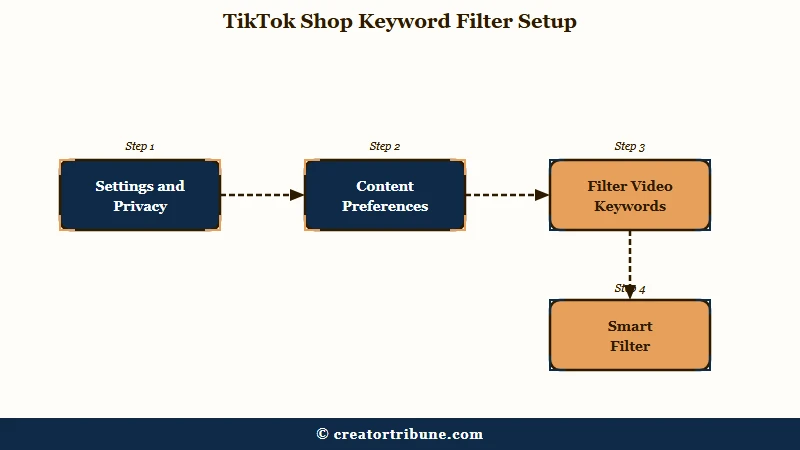
TikTok doubled that limit from 100 to 200 when it rolled the feature out globally, alongside Manage Topics, on June 3, 2025, as TechCrunch reported at launch. The smart filter is the part most guides skip. TikTok’s own example is that filtering “remodeling” also catches “renovation”.
Sellers do not caption videos with the word “shop”, which is why a one-word filter disappoints people. Filter the language sellers use instead.
Vague: shop
Specific: tiktokshop, tiktok shop, link in bio, code in bio, restock, running low, sold out soon, small business haul, unboxing, affiliate, use my code, grwm haul
My own list runs closer to twenty entries and I add to it whenever a new phrasing shows up. The 200-keyword ceiling is generous enough that there is no reason to be economical.
Two limits are worth knowing before you start. TikTok states that certain keywords cannot be filtered at all, and that these preferences apply to the For You and Following feeds, so search results and profiles stay unfiltered.
There is also a second, separate control set. On August 4, 2025 TikTok Shop launched its own content preferences inside the shopping surface, letting you filter words in product titles and descriptions and mute individual sellers.
Adjusting one does not adjust the other, which catches out people who set filters in one place and expect them everywhere.
Does Not Interested Stop TikTok Shop Videos for Good?
Not Interested is a ranking signal, not a block. It tells the system to show you less of something similar, and its effect fades as newer watch behaviour accumulates. Users consistently report commerce content returning within days.
Long press a video, choose Not interested, then tap Details to filter the specific hashtags that video used. That second step does more work than the button itself and almost nobody takes it.
The pattern that matches mine is a few clear days followed by a slow drift back. One user described making shop content disappear for a few days by hitting Not interested on every single one, which is the correct read of what the control does and how long it holds.
Muting an advertiser has a harder limit. That mute covers only recently seen advertisers and expires after about four weeks, and a seller operating under several business names reappears under a different one.
Why Do Ad Settings Not Stop Dropshipper Videos?
Ad settings only govern content served through TikTok’s paid ad system.
Organic seller and affiliate videos are posted from ordinary accounts, carry no Ad or Sponsored label, and are therefore untouched by every ads toggle in the app.
My position is that this single distinction explains most failed attempts. Someone turns off ad personalisation, sees no change in the dropshipper videos, and writes the setting off as broken.
The setting did its job on the inventory it governs. Those videos were never in that inventory.
One Reddit user put the problem precisely while describing a feed full of resellers who kept returning three or four videos after each Not interested tap, noting they were not marked as Ad or Sponsored at all.
There is a second misconception stacked on top. Turning off personalised ads does not reduce how many ads you see. TikTok’s Privacy Center states it plainly: “You’ll still see ads, but they may be less relevant to you.”
The paid side runs on a different scale. TikTok sells advertisers a keywords expansion tool for Shop ads that accepts up to 1,000 keywords per ad group with broad matching, while viewers get 200 filter terms.
TikTok has not published whether viewer keyword filters screen paid ad inventory at all, so treat the two systems as separate until it does.
Should I Refresh My For You Feed to Escape Shop Content?
Refreshing your feed makes commerce content worse before it gets better.
The refresh returns you to a cold start with no interest profile, and TikTok’s own description of that state is that it shows popular content while it rebuilds, which skews commercial.
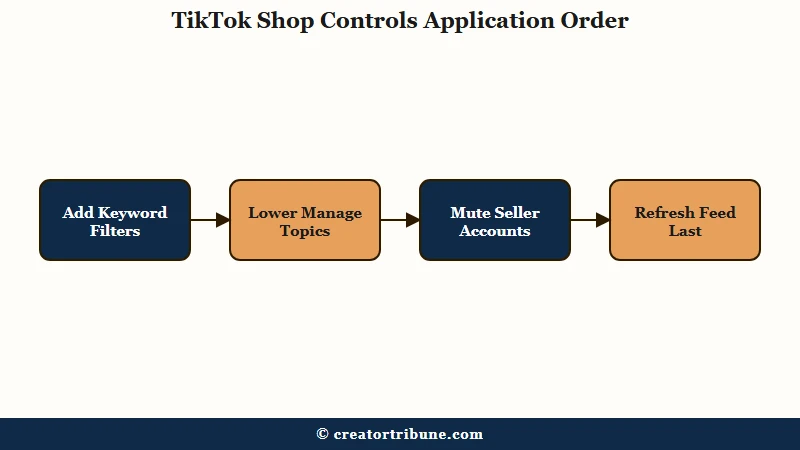
Set every filter you want first, then refresh. The refresh does not erase keyword filters, restricted content settings, or hidden creators, so filters applied beforehand are already working during the rebuild window when your feed is most generic.
Doing it in the other order is the mistake I would most want to talk someone out of. Refreshing on a bare profile hands you a week of broadly popular video, and broadly popular video in 2026 carries a lot of product.
Here is the sequence that holds up:
- Add your keyword list under Content preferences, then switch the smart filter on.
- Open Manage Topics and pull the commercial sliders down.
- Mute the seller accounts that show up most often.
- Only now use Refresh your For You feed.
- For the first few days after the refresh, watch and finish the content you want more of, and scroll past product videos without pausing.
Step five carries more weight than the four settings above it. Watch time is the signal the system trusts most, so a fast scroll past a product video teaches it faster than any toggle.
Deleting and reinstalling the app does nothing here, since your interest profile belongs to the account rather than the installation. It survives the reinstall untouched, and so does everything in your TikTok watch history.
Can I Remove the Shop Tab From the Bottom Bar?
No standard account setting hides the Shop tab. TikTok has never shipped a toggle for it, and the workarounds circulating are display tricks rather than settings.
One piece of advice worth correcting: Restricted Mode does not hide the Shop tab. TikTok’s documentation lists what it affects, which is access to the Following feed, going LIVE, and gifting on LIVE.
Guides that credit it with hiding the shop are confusing it with the separate Under 13 Experience, which does hide the tab because it is a locked-down account type rather than a setting you can switch on.
The tab also appears and disappears on its own for reasons outside your control, since placement varies by region and account and shifts during server-side rollouts. If yours vanishes and returns a few days later, that was a rollout reaching your account rather than anything you did.
Instagram removed its dedicated Shop tab from the navigation bar in 2023. TikTok has moved the other way, and I would not expect a user-facing off switch for something that central to the business.
If unlabelled seller audio is part of what you are seeing, blocking the sound itself reaches trends that keyword filters miss, since a filter reads captions rather than audio.
Frequently Asked Questions
Can you completely block TikTok Shop?
No. TikTok provides no setting that disables Shop, and its own documentation describes keyword filters and Manage Topics as tools that reduce how often content appears rather than blocking it. A large reduction is achievable, a clean feed is not.
How many keywords can I filter on TikTok?
You can add up to 200 keywords, doubled from 100 when the feature rolled out globally in June 2025. Turning on the smart filter extends each keyword to related terms automatically, so you get wider coverage without spending entries on variations.
Does turning off personalised ads reduce how many ads I see?
No. TikTok’s Privacy Center states that you will still see ads and that they may be less relevant. The setting changes ad targeting, not ad volume, so expect the same quantity with worse matching.
Why does TikTok Shop content come back after I hit Not Interested?
Not Interested is a ranking signal that fades as newer watch behaviour accumulates. It usually buys a few clear days. Scrolling past product videos without pausing reinforces it, because watch time carries more weight than the button.
Does Restricted Mode hide the TikTok Shop tab?
No. TikTok’s documentation limits Restricted Mode to the Following feed, going LIVE, and gifting on LIVE. The Under 13 Experience does hide the Shop tab, but that is a separate locked account type rather than a setting you can enable.
Will deleting and reinstalling TikTok reset my feed?
No. Your interest profile is tied to your account rather than the app installation, so it survives a reinstall. Use Refresh your For You feed under Content preferences instead, and set your keyword filters before you run it.
Quick Takeaways
- No setting turns TikTok Shop off, so aim for a large reduction rather than a clean feed.
- Ad settings only reach labelled ads, which is why they never touch unlabelled dropshipper videos.
- Filter the words sellers use, not the word “shop”, and switch the smart filter on to catch variants.
- Set your filters first and refresh your feed second, because a cold-start feed serves more commercial content, not less.
- Scroll past product videos without pausing for a few days, since watch time moves the feed faster than any toggle.