How to See Your TikTok Watch History and Manage Who Sees You
How to See Your TikTok Watch History and Manage Who Sees You
How to see your TikTok watch history in 2026, why it goes missing, and who can tell what you watched. Find it, fix it, and clear it fast.
- 1Where to Find Your TikTok Watch History in 2026
- 2Why Your TikTok Watch History Is Missing or Not Updating
- 3The Three TikTok History Clocks Most Guides Blur Together
- 4Can Other People See Which Videos You Watched?
- 5How to Delete Your TikTok Watch History or Reset the Algorithm
- 6What Your Watch History Reveals About You
- 7Frequently Asked Questions
- How far back does TikTok watch history go?
- Why did my TikTok watch history disappear?
- Can someone tell if I watched their TikTok video?
- Does clearing my watch history reset the algorithm?
- Can I turn off TikTok watch history completely?
- 8Quick Takeaways
TL;DR: Your TikTok watch history lives under Profile, the three-line menu, Settings and privacy, Activity center, then Watch history, and it holds the last 180 days of videos you viewed. If it is missing, the cause is almost always the 180-day cap, a hidden button after an app update, or a 2026 server glitch, not something you did. TikTok also runs two other history clocks that most guides blur together, and only one of them can tell other people what you looked at.
Finding your TikTok watch history should take five seconds, yet half the people searching for it end up tapping around Settings convinced the feature was removed. It was not removed. It moved, and TikTok quietly renamed the menu around it more than once in the past year.
I have gone looking for a specific video I watched last week and hit the same wall everyone hits: the history is there, but the path to it is buried, and the old shortcut people passed around on Reddit stopped working. So this guide covers the exact 2026 menu path, why your history sometimes shows up empty, and how to wipe it when you want a clean slate.
There is also a part almost nobody explains properly. TikTok does not keep one history. It keeps three separate ones, each with its own clock and its own privacy rules.
Confusing them is why people panic that strangers can see every video they have ever watched. You will finish this guide knowing exactly which history is private, which one can expose you, and how to control both.

Where to Find Your TikTok Watch History in 2026
Your TikTok watch history is under Profile, the three-line menu, Settings and privacy, Activity center, then Watch history, and it stores the last 180 days of videos you viewed.
That 180-day window is a hard cap, so anything older will not appear at all.
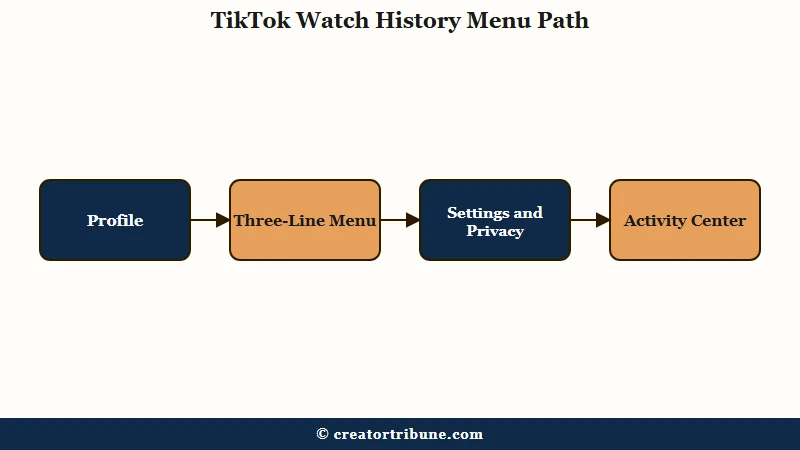
Here is the sequence I walk through, and the first time it pays to go slowly because the Activity center label is easy to scroll past:
- Open TikTok and tap Profile in the bottom right.
- Tap the three-line menu in the top right corner.
- Choose Settings and privacy.
- Scroll to the Content and Display group and tap Activity center.
- Tap Watch history to see your videos in reverse order, newest first.
What is Watch History: A private log TikTok keeps of every full video you have watched in the last 180 days, visible only to you inside the Activity center.
If you are hunting for one specific clip rather than scrolling the whole log, there is a faster route. Tap the search icon on your home screen, type a keyword from the video, run the search, then tap the Watched filter at the top of the results. That narrows everything down to videos you have already seen, which beats endless scrolling through six months of history.
One trick you will still see recommended is typing a single period into the search bar to jump straight to your history. I would not rely on it anymore. Several users report it stopped working after recent updates, and it never worked consistently across regions in the first place.
Why Your TikTok Watch History Is Missing or Not Updating
A missing or empty TikTok watch history is almost always caused by the 180-day retention limit, a Watch history button hidden after an app update, or a 2026 server-side glitch, rather than anything you did wrong.
The fix depends on which of the three you are hitting.
The button-vanishing problem is the one I find most maddening because the app looks broken. After certain updates, the Watch history option disappears from the Activity center entirely for a slice of users caught in A/B testing.
The workaround I trust is to open TikTok Help inside Settings, start the chat, and ask it “how can I see my watch history?” The automated system hands back a direct link to the page even when the menu button is gone.
The second cause is timing. TikTok only holds 180 days, so a video you watched seven months ago is not hiding, it has aged out. There is no setting to extend that window.
The third cause is bigger than TikTok usually admits. After the platform moved to US ownership in early 2026, a hardware failure at an Oracle data center in Ashburn, Virginia triggered a cascading systems failure that left users staring at repeated videos, blank squares in place of clips, and uploads stuck under review with zero views.
According to reporting from Popular Science and separate outage coverage, these front-end symptoms trace straight back to that backend mess.
| Symptom | Likely cause | Fix |
|---|---|---|
| History shows videos but not old ones | 180-day retention cap | Nothing to fix, older views are gone permanently |
| Watch history button gone from menu | App-update A/B test hiding it | Update the app, or use TikTok Help chat for a direct link |
| History empty or frozen, blank squares on FYP | 2026 server or data-center glitch | Log out and back in, then wait for the server issue to clear |
| New videos not logging | Sync or cache lag | Log out, clear cache, reload |
If the history is not updating with new videos at all, logging out and back in clears it up more often than any other fix. It forces a fresh sync and resolves the display bug that leaves the log looking stuck.
The Three TikTok History Clocks Most Guides Blur Together
TikTok runs three separate history systems with three different clocks: Watch History keeps your viewed videos for 180 days, Profile View History logs who visited your profile for 30 days, and Post View History shows who watched your posts for 7 days.
They are not the same feature, and mixing them up is why people misunderstand what is private.
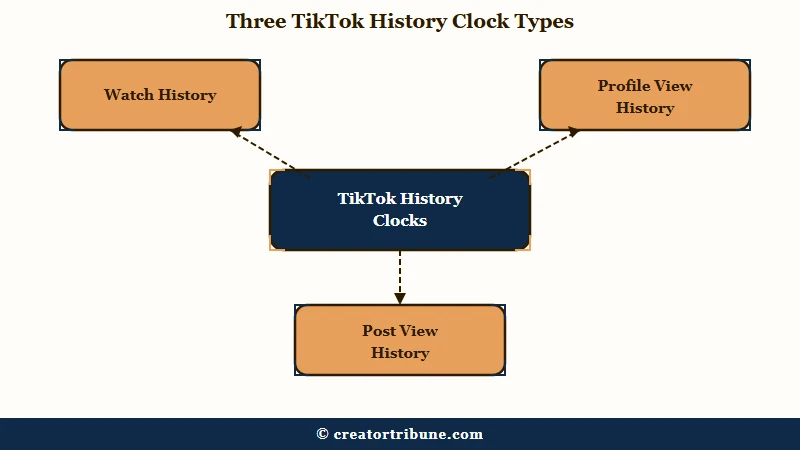
This is the piece that clears up most of the confusion. Watch History is entirely private and about you, while the other two are about other people and only work under strict conditions.
Both Profile View History and Post View History require you to be 16 or older and to have fewer than 5,000 followers. Once you cross 5,000 followers, TikTok switches the profile-view feature off automatically.
What is Profile View History: A 30-day log of accounts that visited your profile, visible only when both you and the visitor have the feature turned on and both are under the 5,000-follower ceiling.
| History type | What it tracks | How long | Can others see it |
|---|---|---|---|
| Watch History | Videos you watched | 180 days | No, private to you |
| Profile View History | Who visited your profile | 30 days | Only with mutual opt-in, under 5,000 followers |
| Post View History | Who watched your posts | 7 days | Only with mutual opt-in, under 5,000 followers |
The way I read these clocks, the takeaway is simple. Your own viewing is logged the longest and shared with nobody, while the two features that could expose you have the shortest windows and demand that both people flip the setting on.
If you want to know more about the profile side specifically, who views your TikTok profile goes deeper on the mutual-opt-in mechanics.
Can Other People See Which Videos You Watched?
No, other people cannot see your private Watch history, and they can only tell you watched their specific post if you both enabled Post View History, both follow each other, and you are both under 5,000 followers.
Turn Post View History off and nobody gets a notification when you watch their content.
This is the fear that sends people searching in the first place, so let me be direct about it. The 180-day log of everything you have watched is yours alone. Nobody, not TikTok friends, not the creators, can pull up that list.
There is one honest caveat where the sources disagree. On whether TikTok actively notifies you that someone viewed your profile, one privacy guide states plainly that “users do not receive alerts when someone views their account,” while Geekflare and TikTok’s own support page say you do get an inbox notification.
I lean toward the official documentation here, but the practical answer is that the feature is inconsistent enough that you should not treat a lack of notification as proof nobody looked.
Your likes and comments are a different story. Those stay public regardless of your history settings, so switching off Post View History hides the silent watch but not the heart you tapped. If real privacy matters to you, the only fully invisible way to watch a specific account is logged out, which strips the view from every tracking log.
How to Delete Your TikTok Watch History or Reset the Algorithm
You can bulk-delete your watch history from the Watch history page, but TikTok no longer lets you fully turn off the logging, so purging manually is the only way to browse without a trail.
Clearing it also weakens the algorithm’s grip on your For You feed.
Deleting is quick once you are on the Watch history screen:
- Open Watch history through the Activity center path above.
- Tap Select in the top right corner.
- Tap Select all watch history at the bottom left.
- Tap the red Delete button to wipe the log.
Here is where I think it connects to something bigger than tidiness. Your watch history is the raw fuel for your recommendations, so a stale feed and a cluttered history usually travel together. Clearing history, tapping “Not interested” on bad recommendations, and using the official Refresh feature together force a genuine reset.
Before: You delete a few videos one at a time and wonder why the For You feed still serves the same tired content.
After: You clear the whole history, then go to Settings and privacy, Content preferences, and tap Refresh your For You feed, and the algorithm rebuilds around fresh signals within one to three days.
If your feed problem is really a views problem on your own posts, that is a separate diagnosis. why FYP views stay low and reset the TikTok FYP both cover the reach side rather than the privacy side.
What Your Watch History Reveals About You
Your TikTok watch history is not just a convenience log, it is a behavioral profile, and how much of it you can retrieve depends heavily on where you live.
That gap between what TikTok tracks and what it shows you is the part that matters here.
A 2026 academic audit of platform data-access rights found something most tutorials skip. When users formally request their data, a GDPR data-access study reported that TikTok’s exported watch history ran anywhere from roughly 180 to 455 days depending on the user’s region, an inconsistency that undercuts the neat “180 days” figure the app shows. For comparison, YouTube hands over a lifetime of viewing while Instagram exports only about two weeks.
That data does not sit still either. TikTok, now operating under US ownership with Oracle as an infrastructure partner, combines your on-platform viewing with signals from the roughly 1.6 billion monthly active users Statista tracks and data pulled from thousands of other apps carrying TikTok’s tracking code. Your watch history is one input into a much larger picture.
The lesson I keep coming back to is that you do not own any of this. TikTok controls your history, your reach, and whether either survives the next server glitch or policy change, which is why smart creators route fans somewhere they genuinely control.
A simple creator money page is the cleanest insurance against a platform that can erase your footprint overnight, and turning passive views into subscribers is the habit that makes it stick.
Frequently Asked Questions
How far back does TikTok watch history go?
TikTok watch history goes back exactly 180 days, or about six months. Videos you watched before that window drop off permanently and cannot be recovered inside the app, though a formal data request may return a slightly different range depending on your region.
Why did my TikTok watch history disappear?
The most common reasons are the 180-day cap aging out old videos, the Watch history button being hidden after an app update, or a server-side glitch. Update the app, use TikTok Help chat for a direct link, or log out and back in to force a resync.
Can someone tell if I watched their TikTok video?
Only if you both enabled Post View History, follow each other, and are both under 5,000 followers. If you turn Post View History off, nobody is notified when you watch their posts, although your likes and comments stay visible.
Does clearing my watch history reset the algorithm?
Clearing watch history weakens the algorithm’s reliance on past viewing, but a full reset also needs the Refresh your For You feed tool under Content preferences. Together they rebuild recommendations within one to three days.
Can I turn off TikTok watch history completely?
No. TikTok removed the option to fully disable watch history logging, so the feature always records what you watch. The only control you have is manually selecting and deleting entries to clear the log.
Quick Takeaways
- Your watch history lives under Profile, the three-line menu, Settings and privacy, Activity center, then Watch history, and holds 180 days of videos.
- A missing history is almost always the 180-day cap, a hidden button after an update, or a 2026 server glitch, not user error.
- TikTok keeps three separate histories: Watch (180 days, private), Profile View (30 days), and Post View (7 days), and only the last two can expose you.
- You can bulk-delete watch history but not disable the logging, so purge manually and pair it with the Refresh For You feed tool for a true reset.
- Because TikTok owns and can erase your history and reach at any time, route your best fans to a channel you control.