How to Contact TikTok Support and Get a Real Human to Reply
How to Contact TikTok Support and Get a Real Human to Reply
TikTok has no phone number and its support is mostly bots. Here are the channels that reach a real human and the exact words that break the loop.
- 1How Do You Contact TikTok Support in the App
- 2Does TikTok Have a Phone Number or Live Chat
- 3How Do You Reach a Real Human at TikTok
- 4What Are TikTok’s Support Email Addresses
- 5How Long Does TikTok Support Take to Respond
- 6How Do You Escalate an Ignored TikTok Appeal
- 7Frequently Asked Questions
- Does TikTok have a customer service phone number?
- Why does TikTok support never reply to me?
- What is TikTok’s support email?
- How do I contact TikTok if I am banned or locked out?
- Can EU users escalate a TikTok ban outside the app?
- 8Quick Takeaways
The Short Answer: TikTok has no customer service phone number, and general accounts only get automated support, so the real goal is reaching one of the few channels staffed by humans. In the app, open Report a Problem, then keep rejecting the bot until a ticket form appears. Business, advertiser, and Shop accounts get live chat, and EU users can force a free human review through the Digital Services Act.
Figuring out how to contact TikTok support is less about finding a secret email and more about knowing which doors have a human behind them. Most of them do not. The general support system is a wall of bots designed to close your ticket before a person ever sees it.
I have sat with creators watching the same automated reply land three times in a row, each one telling them to check a help article they already read. It is maddening, and it is also predictable once you understand how the system is built. TikTok routes almost everyone into automation and reserves live humans for accounts that spend money.
Here is what you will walk away with: the exact in-app path that opens a real ticket, the channels that reach a person versus the ones that dead-end in a bot, the specific wording that breaks the automated loop, the email addresses that matter, honest response times, and the free legal route EU users can use to force a human review.
How Do You Contact TikTok Support in the App
The main way to contact TikTok support is Profile, then the menu, then Settings and privacy, then Report a problem, where you describe your issue and submit a ticket.
The catch is that the flow tries to answer you with help articles before it ever files a ticket.
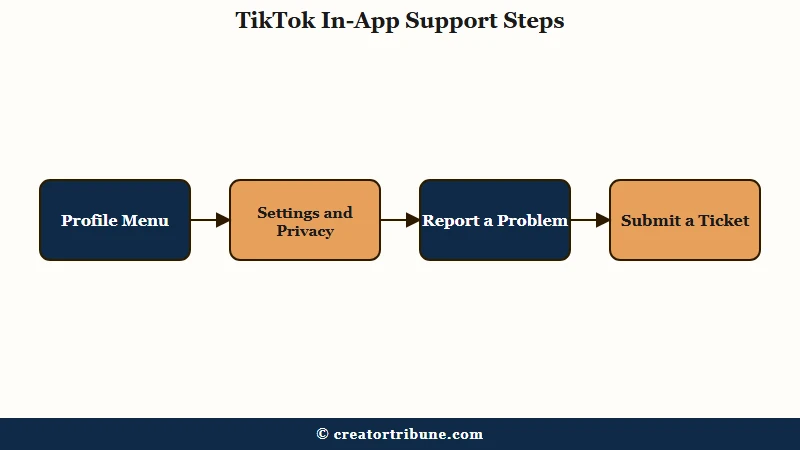
The way I see it, the in-app route is still your best first move because it ties your ticket to your account automatically. Here is the sequence I would follow:
- Open your Profile and tap the menu icon in the top corner.
- Go to Settings and privacy, then Support, then Report a problem.
- Pick the topic closest to your issue, or open Help Center and tap Chat with us.
- When the bot offers articles, tap “This didn’t help” until a Submit a ticket or Contact us option appears.
That last step is the one most people miss. The system is built to loop you through suggested articles, and it only surfaces a real ticket form after you reject its answers three or four times. If you give up at the first help article, you never reach the queue at all.
If you are locked out and cannot open the app at all, skip straight to the web form at tiktok.com/legal/report/feedback and choose the account access options. Our guide to recovering a hacked TikTok account covers that locked-out path in detail.
Does TikTok Have a Phone Number or Live Chat
TikTok has no public support phone number, and live chat is reserved for business, advertiser, and TikTok Shop accounts, not regular users.
Any phone number claiming to be TikTok support is a scam.
I want to be direct about this because the scam angle is real. There is no call center you can dial, and the numbers that show up in search results belong to unaffiliated operators, some of them outright fraudulent. Do not call them, and never share a login code with anyone over the phone.
Live chat does exist, but it sits behind a paywall of sorts. Advertisers using the TikTok for Business portal at ads.tiktok.com/help get a chat option that typically answers in 5 to 30 minutes during business hours. TikTok Shop sellers reach a live agent through the Seller Center chat, staffed daily from roughly 9:00 AM to 9:00 PM Pacific.
That gap is a quiet loophole. If you run anything close to a business, registering a business or advertiser account is the single fastest way to unlock human support that regular creators cannot reach.
How Do You Reach a Real Human at TikTok
You reach a human by refusing the bot’s automated answers and stating plainly that your issue needs manual review, which forces the system to escalate the ticket.
Vague messages get closed; specific, firm ones get routed to a person.
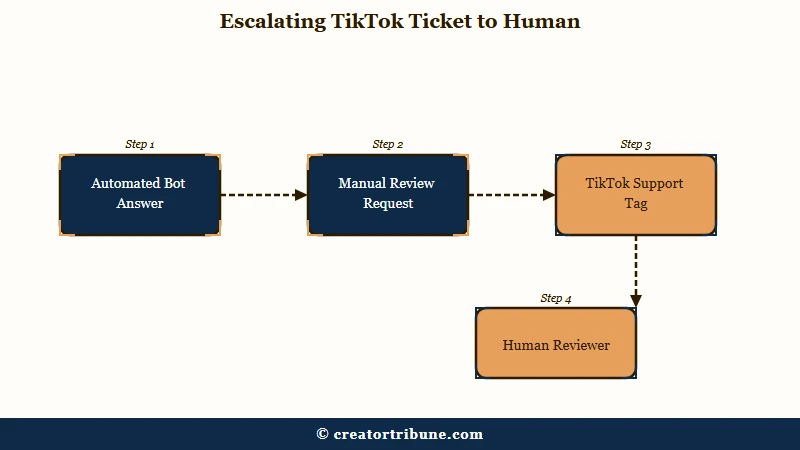
This is the part worth getting right, because the bot is designed to deflect. When it keeps sending the same canned reply, the move is to answer in a way it cannot resolve on its own. Creators have had luck with a message that explicitly rejects the loop, along these lines:
My issue is not about a single removed post. It is an account-wide problem
affecting all of my uploads. The link is already submitted in this ticket and
under review, so please do not ask me to send it again. If you cannot resolve
this here, escalate the case to a human reviewer rather than sending another
automated reply.
The point of that phrasing is to close every exit the bot normally uses, so the only path left is a person. Public pressure helps too: tagging @TikTokSupport on X can get eyes on a stuck case, and their team is generally active 8:00 AM to 5:00 PM Pacific, though they often just point you back to a form.
One warning I would take seriously. Spamming ten fresh tickets feels productive, but several guides and TikTok’s own Shop rules say duplicates get flagged as bot behavior and pushed to the back of the queue. I would rather send one sharp, complete ticket than ten sloppy ones.
What Are TikTok’s Support Email Addresses
TikTok routes email support through department-specific addresses, and using the right one for your issue beats emailing the general feedback inbox.
Email is slow, so treat it as a backup, not your first move.
Here is something most listicles get wrong: they hand you [email protected] and stop there. That inbox is monitored, but it runs 5 to 10 business days behind, and if you email it before trying in-app support, you usually get an automated reply telling you to use the app first. Matching your issue to the right address is what saves you a week.
| Your issue | Email address |
|---|---|
| General feedback or a bug | [email protected] |
| Legal or copyright | [email protected] |
| TikTok Shop seller | [email protected] |
| Business or advertising | [email protected] |
Whatever address you use, keep the message short and factual. Include your exact @username, the email or phone number on the account, and the date the problem started, then attach a screenshot of the error.
How Long Does TikTok Support Take to Respond
TikTok support response times range from minutes for advertiser live chat to over a week for email, with most in-app tickets landing in 24 to 72 hours.
Where you send your request matters more than how urgently you word it.
The sources openly disagree on email speed, and I would rather show you the honest spread than promise a number. One guide claims a reply within a day; another says feedback emails routinely take 5 to 10 business days, longer if you send them on a Friday. My read is that the fast anecdotes are the exception, so plan for the slow end.
| Channel | Typical response time |
|---|---|
| Advertiser or Business live chat | 5 to 30 minutes during business hours |
| In-app support ticket | 24 to 72 hours |
| TikTok Shop or ban appeal | 3 to 14 business days |
| Email to a support address | 5 to 10 business days |
One timing trick I have found reliable is to file early in the week. A ticket submitted Monday or Tuesday morning tends to move before one that lands Friday afternoon and sits through the weekend.
If your problem is a rejected payout rather than a ban, our guide on why Creator Rewards get rejected covers that specific queue.
How Do You Escalate an Ignored TikTok Appeal
If your appeal is ignored or denied, you can file one revised second appeal, and EU users can force a free independent review through the Digital Services Act.
Outside those routes, your options narrow fast, so the first appeal has to count.
There is a real contradiction in the advice out there, and it matters. Reddit threads tell you to flood support with tickets, while TikTok’s own Shop rules cap you at two appeals per case and warn that duplicates get flagged. I side with the official limit, so send one strong second appeal within the allowed window, not a barrage.
What is DSA dispute settlement: A European Digital Services Act right that lets EU users challenge a platform’s moderation decision through a free, certified independent body instead of the platform’s own review.
The route most guides ignore is the legal one. In the EU, the Digital Services Act gives you the right to challenge a ban through certified out-of-court bodies like Appeals Centre Europe, entirely free, with up to six months to file and a target decision inside 90 days. The European Commission’s overview of out-of-court dispute settlement explains who qualifies.
Two mistakes I would avoid at all costs. Do not delete a flagged video you are appealing, since removing it forfeits the review and keeps the strike, and do not spin up a backup account while banned, because TikTok links accounts by device and can ban both.
Before: “Please, TikTok, this account is my whole life and I did nothing wrong, I am begging you to bring it back or I am leaving the platform forever.”
After: “My account @handle was removed on June 28 for alleged Community Guidelines violations. I have reviewed the guidelines and believe this was a mistake because the flagged video contained no violating content. I am requesting a manual review.”
The second version wins because reviewers discount long emotional pleas and reward short, factual appeals under about 200 words. A support black hole is also a good argument for owning your audience elsewhere, which is exactly what our Creator Money Page is built to help you do.
Frequently Asked Questions
Does TikTok have a customer service phone number?
No. TikTok does not offer a support phone line for regular users, and any number claiming to be TikTok support is unaffiliated and often a scam. The closest thing to live help is the chat option available to advertisers and TikTok Shop sellers.
Why does TikTok support never reply to me?
Most general tickets are handled by automation that closes them with a canned response before a human sees them. Vague subject lines, duplicate submissions, and Friday timing all make it worse. A single specific ticket that demands manual review has a far better chance.
What is TikTok’s support email?
General issues go to [email protected], but it can take 5 to 10 business days. Department-specific addresses like [email protected], [email protected], and [email protected] reach the right team faster than the general inbox.
How do I contact TikTok if I am banned or locked out?
If you can still open the app, tap the ban notice to file an in-app appeal. If you are fully locked out, use the web form at tiktok.com/legal/report/feedback and select the account access options to submit your case without logging in.
Can EU users escalate a TikTok ban outside the app?
Yes. Under the Digital Services Act, EU users can bring a ban or content decision to a certified out-of-court dispute body such as Appeals Centre Europe for free. You have up to six months to file, and these bodies aim to decide within 90 days.
Quick Takeaways
- TikTok has no support phone number, and any number online claiming to be one is a scam.
- General accounts get bots, so tap “This didn’t help” until a real ticket form appears.
- Business, advertiser, and Shop accounts unlock live chat, the fastest route to a human.
- Match your issue to the right email, keep appeals under 200 words, and never spam duplicate tickets.
- EU users can force a free, independent human review through the Digital Services Act.