Why TikTok Flags or Blocks Your Messages and How to Fix It
Why TikTok Flags or Blocks Your Messages and How to Fix It
TikTok messages flagged as unsafe or blocked? Learn the real triggers, how long restrictions last, and the exact steps to fix and avoid it.
- 1What Does the Unsafe Flag on TikTok Messages Mean
- 2Why Is TikTok Blocking My Messages
- 3Why Is TikTok Blocking a Message That Says Nothing Wrong
- 4How Long Does a TikTok Message Restriction Last
- 5How to Fix TikTok Messages Flagged as Unsafe
- 6How to Avoid Getting Your TikTok DMs Blocked
- 7Frequently Asked Questions
- Why does TikTok say my message is unsafe?
- How long does a TikTok messaging block last?
- Can I turn off the TikTok unsafe message filter?
- Why can’t I send messages to someone on TikTok?
- Does being under 16 stop you from using TikTok DMs?
- I just turned 16, so why can I still not send TikTok messages?
- How do I appeal a TikTok message restriction?
- Why does TikTok block a message that just says hello, how are you?
- 8Quick Takeaways
TL;DR: A TikTok “Unsafe” message flag is usually either Safe Mode hiding one sensitive message, often a false alarm, or an account-level block that stops you sending anything, which TikTok’s help says typically lasts 24 to 48 hours. A notice that a message “has not been sent to protect our community” means TikTok stopped that one message before delivery, even a plain “hey,” and tapping “let us know” asks for a review. If a message fails with no notice at all, the cause is more often a messaging limit or an age setting than a ban, so check Account check in TikTok Studio first.
If TikTok keeps flagging your messages as unsafe or has stopped you from sending DMs entirely, you are running into one of the platform’s least-explained systems. The same word, “unsafe,” gets used for two completely different problems, and the fix for one does nothing for the other.
Most creators panic and assume their account is banned the moment a message gets hidden. In reality, the majority of these flags are the per-message safety filter doing its job, often on a false positive. The smaller share are real account-level restrictions, and those follow a predictable timeline you can plan around.
Read on and you will know how to tell the two apart in under a minute, what triggers each, how long a block lasts, and the exact sequence to clear it. If your reach has also dropped, our TikTok shadowban recovery guide covers that side of the problem.
What Does the Unsafe Flag on TikTok Messages Mean
The “Unsafe” flag is either a per-message Safe Mode filter hiding one sensitive message, or an account-level restriction that suspends your ability to send any messages.
They look similar but come from different systems and need different fixes.
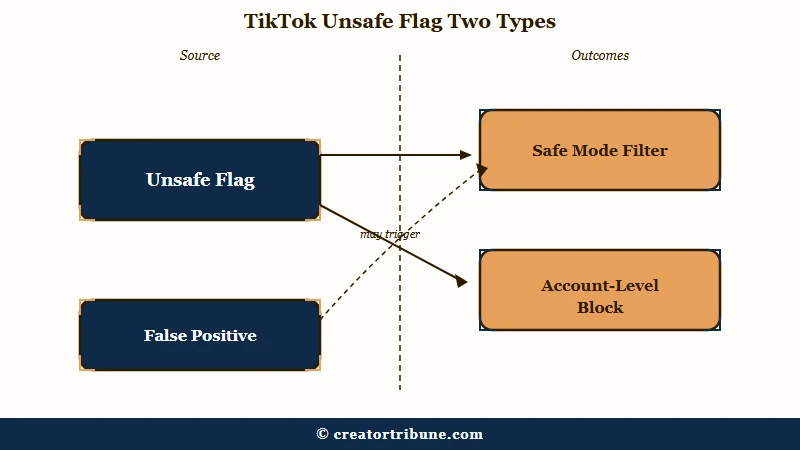
What is Safe Mode: A TikTok direct message setting, on by default, that, depending on your location, hides messages containing sensitive content and filters messages from potentially unsafe sources until you choose to view them.
Safe Mode acts on a single message. TikTok’s Manage direct messages help says it hides messages with sensitive content, and that you can add your own filtered keywords. A hidden message was still delivered, and the recipient can choose to view it.
An account-level block is different. When TikTok suspends your messaging feature, you cannot send anything at all, and some accounts drop into a view-only state where you can read but not reply. That is a moderation action against your account rather than a filter applied to one message, and it is the version worth taking seriously.
A third case reads differently. When TikTok says a message “has not been sent to protect our community,” it stopped that one message on your side before delivery, while other messages may still go through.
Why Is TikTok Blocking My Messages
TikTok blocks or flags messages because of links and phone numbers on new accounts, flagged keywords picked up by image and text scanning, rapid sending that looks automated, recipient reports, or age rules.
Knowing which trigger hit you points straight at the fix.
The reported triggers cluster into a few patterns. Here is how the common symptoms map to causes and fixes.
| Symptom | Likely cause | Fix |
|---|---|---|
| One message hidden as “unsafe” | The recipient’s Safe Mode hid it as sensitive content | Tap to view, or ask the recipient to |
| A plain message refused with “has not been sent to protect our community” | TikTok’s check on outgoing messages stopped that one message | Tap “let us know” to request a review, or reword it; check Account check if it hits every message |
| Cannot send to someone new | One-request limit to non-followers reached | Wait for them to accept before sending again |
| All sending blocked for a day or two | First feature restriction, often spam-like bursts | Wait out the 24 to 48 hours, stop bulk activity |
| Brand-new account blocked fast | Cold-account flag in the first 72 hours | Slow down, avoid links and mass actions while warming up |
| Teen account cannot DM at all | Under-16 messaging is fully disabled | No workaround; this is a hard age rule |
A few of these deserve a flag. New or recently migrated accounts are most fragile in their first 72 hours, where an external link or an aggressive call to action reads as high-risk behavior.
TikTok also scans on-screen text and captions with image recognition, so a sensitive word baked into a video you share in a DM can trip the filter even when the message text looks clean.
The age rules are worth stating plainly because they are absolute. TikTok’s messaging sits inside a wider age model: 13 to open an account, 16 to use direct messages, and 18 for LIVE and monetization.
Accounts registered as under 16 cannot use direct messaging at all, and the setting is locked, so there is no in-app workaround. Accounts registered as 16 or 17 have their messaging restricted by default and cannot open it to everyone, and you can check the current rules on TikTok’s minimum-age support page.
Why Is TikTok Blocking a Message That Says Nothing Wrong
When TikTok refuses a harmless message like “hey” and says it “has not been sent to protect our community,” its own check on outgoing messages stopped that one message before delivery. That check has blocked greetings and single emoji, so the wording is often not what tripped it.
The full notice reads: “This message may be in violation of our Community Guidelines, and has not been sent to protect our community. If you believe this was a mistake, let us know so we can review this along with recent messages.”
The other person never receives a message blocked this way. None of the 218 English articles in TikTok’s Help Center, read on November 11, 2026, quotes this notice. The closest is TikTok’s direct messages help, which says a message containing content that violates the Community Guidelines “may be automatically blocked” and that a message flagged in a group chat by mistake can be appealed.
Rolling Stone reported the same wording on January 27, 2026, when direct messages naming “Epstein” were refused for about a day, and TikTok told the magazine it had no rules against sharing the name. Ordinary messages have hit it since. On r/TikTok it stopped “hey” from a new account on September 27, a waving-hand emoji on October 19 and a first “hi” to a friend on November 5.
Rewording or resending sometimes gets through. A September 8 screenshot shows “Ja dan begrijp ik het” (Dutch for “yes, then I understand it”) blocked while “Dan begrijp ik het” went through, and the same poster said a blocked sticker sent fine on the second try.
To ask for a review, tap “let us know” under the notice. Appeals have not reliably cleared it: one poster’s appeal was denied, and another was told appeals were approved while the notice kept returning for months.
If the notice hits every message you send, open Account check and look for a restriction on direct messages. Two users in those threads said the problem started on a new account, and one of them said an older account never had it.
A harmless message that arrives but sits behind a warning is Safe Mode on the recipient’s side. One that fails with no notice at all points somewhere else, because Safe Mode hides messages and does not stop them. Content violations can still cost you the messaging feature, but that shows up as a restriction on everything you send.
For a message that fails with no notice, check four things in this order.
- Whether you are messaging someone who does not follow you and have already used your one request.
- Whether the recipient’s own settings limit who can message them.
- Whether the account is registered as under 16, which disables direct messages outright.
- Whether Account check reports a restriction on direct messages.
Only the last of those is a moderation action against you. The first three are the design of the product working as intended, which is why they produce no warning, no notification and nothing to appeal.
How Long Does a TikTok Message Restriction Last
TikTok’s help says a DM suspension typically lasts 24 to 48 hours and view-only mode 72 hours to a week, and that violations expire after 90 days. Creators report that repeat violations push restrictions to 7 to 30 days.
The per-message filter, by contrast, is not timed at all.
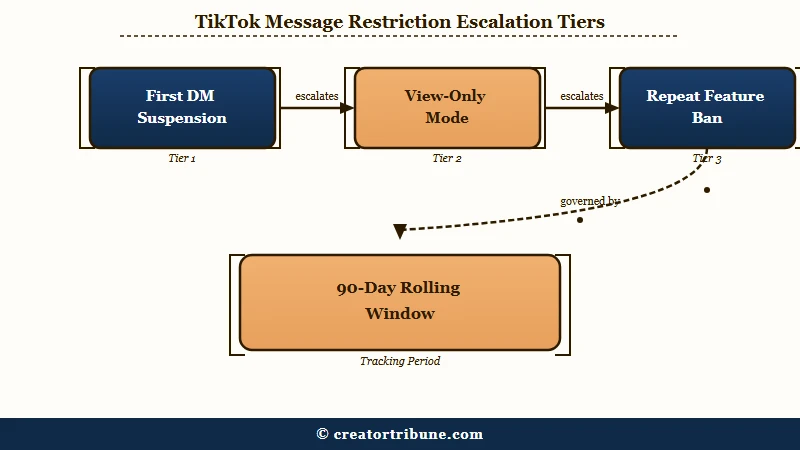
The system escalates, so a first block is short and a repeat one is not. The suspension and view-only ranges below are the typical figures in TikTok’s help on direct messages, while the repeat-ban range comes from creator reports.
| Restriction | Typical duration |
|---|---|
| Per-message Safe Mode filter | Not timed, applies per message |
| First DM suspension | 24 to 48 hours |
| View-only messaging | 72 hours to 1 week |
| Repeat feature ban | 7 to 30 days |
| Strike record on account | 90-day rolling window |
That last row decides whether your next mistake is treated as a first offense. TikTok’s content violations help says violations “will expire after 90 days and will no longer be taken into consideration.”
Some accounts describe a heavier tier that runs for weeks alongside near-zero reach, which tends to arrive shortly before a full suspension. Durations there vary too widely across reports to put a number on.
How to Fix TikTok Messages Flagged as Unsafe
To fix it, confirm whether the block is per-message or account-level using Account check, audit your recent messages and videos for triggers, revoke third-party apps, and appeal if the flag was a genuine mistake.
Doing these in order saves you from “fixing” a problem you do not have.
Most people skip the diagnosis and lose a day to it. Run this sequence in order.
- Open Account check. Go to Profile, then the menu, then TikTok Studio, then Account check. A warning sign next to Direct Messages confirms an account-level restriction; a clean check means you are only seeing the per-message filter.
- Identify the tier. If restricted, note whether you are fully suspended (usually 24 to 48 hours) or in view-only mode (72 hours to a week) so you know what you are waiting on.
- Audit recent activity. Review your last 30 videos and recent DMs for flagged keywords, prohibited hashtags, risky links, or unlicensed audio that could have triggered the flag.
- Revoke third-party access. In Settings, then Security, then Apps and Websites, remove any scheduling, growth, or analytics tools, since these often trip spam detection.
- Clear the app cache. In Settings, then Free Up Space, clear the cache to reset local session states that sometimes interfere with messaging.
- Appeal only if it was a mistake. Tap the violation notice in your inbox, or open it from Account check, and select Appeal. Keep it short and factual.
If the issue is just the per-message filter, the fix is faster. The message was flagged for a reason the system saw, so rewrite it without the offending element.
Before: “Hey, check out my merch, link in bio, DM me your number to order” sent from a two-day-old account.
After: “Thanks for following. I just posted something I think you’ll like, take a look when you get a chance.” Sent after the account has a week of normal activity behind it.
One more note on appeals. Creators widely report a waiting period before a second appeal on the same action and a review that takes several business days, though TikTok publishes neither figure, so treat one careful appeal as your real attempt. For the full account-recovery path, our TikTok ban appeal walkthrough goes deeper.
How to Avoid Getting Your TikTok DMs Blocked
Avoid blocks by warming up new accounts slowly, keeping links and phone numbers out of early DMs, watching on-screen text for sensitive words, respecting the one-request limit, and using native TikTok audio.
Prevention is almost entirely about not looking automated.
Pacing helps as much as content here. TikTok has never published a daily cap on outbound message requests, but sending them in bursts is the behavior its spam detection is built to catch, and the TikTok daily action limits guide covers what is known about the caps.
Treat the first two weeks on any new account as probation. These five habits keep you off the radar.
- Warm up new accounts over 14 days instead of posting or messaging in bursts on day one.
- Keep external links, phone numbers, and hard calls to action out of DMs during the first 72 hours, when cold accounts are most fragile.
- Watch on-screen text and captions, since TikTok’s image recognition reads them for sensitive topics, including euphemisms and phonetic spellings.
- Respect the one-message rule, where you can only send a single request to someone who does not follow you back until they accept it.
- Use audio from the native TikTok library rather than copyrighted tracks, which are a fast-growing trigger for automated suppression.
A reasonable amount of caution goes a long way here, because TikTok’s moderation is built to act first and hear you out afterwards. Its Q1 2026 enforcement report shows 178,014,154 of the 184,012,576 videos it removed that quarter were taken down by automated detection, with 8,838,710 put back after review.
Slower, more human-looking behavior is what keeps your messaging open. If your views also cratered, our guide on low TikTok FYP views covers the reach side.
Frequently Asked Questions
Why does TikTok say my message is unsafe?
Safe Mode, a direct message setting TikTok turns on by default, hides messages with sensitive content behind a warning. The message is still delivered and the recipient can choose to view it, so this is often a false positive rather than a ban.
How long does a TikTok messaging block last?
TikTok’s help says a DM suspension typically lasts 24 to 48 hours and view-only restrictions 72 hours to a week, and that violations expire after 90 days. Creators report repeat violations escalating to 7 to 30 days.
Can I turn off the TikTok unsafe message filter?
You can turn Safe Mode off under Settings and privacy, Privacy, Direct messages, where TikTok also lets you edit filtered keywords. TikTok’s help lists no setting for the check that stops your own message with “has not been sent to protect our community.”
Why can’t I send messages to someone on TikTok?
If they do not follow you, TikTok allows only one message request until they accept it. If you cannot message anyone at all, check Account check in TikTok Studio for an account-level restriction instead.
Does being under 16 stop you from using TikTok DMs?
Yes. Accounts registered as under 16 cannot use direct messaging at all, and the setting is locked. Accounts registered as 16 or 17 have messaging restricted by default and cannot open it to everyone, so there is no settings workaround.
I just turned 16, so why can I still not send TikTok messages?
Direct messages unlock at 16, but only when your account’s registered birthday reflects it. If you signed up with a date of birth under 16, messaging stays locked even after your real birthday passes, so check Settings then Manage account and confirm the date. If it was set too young, you have to clear it through TikTok’s minimum-age appeal before DMs turn on.
How do I appeal a TikTok message restriction?
Tap the violation notification in your inbox, or open it from Account check, and select Appeal. Creators report a waiting period before a second appeal on the same action and a review that takes several business days, though TikTok publishes neither figure. Treat one careful appeal as your real attempt.
Why does TikTok block a message that just says hello, how are you?
If TikTok says the greeting “has not been sent to protect our community,” its check on outgoing messages stopped it, as r/TikTok users have reported for “hey,” “hi” and a single emoji; tap “let us know” to ask for a review. If it fails with no notice, one of four things is true: you have used your one message request to someone who does not follow you, the recipient limits who can message them, the account is registered as under 16, or Account check shows a direct message restriction.
Quick Takeaways
- The TikTok “unsafe” flag is two things: a per-message Safe Mode filter (often a false positive) and an account-level block (a real restriction). Check Account check in TikTok Studio to tell which.
- A notice that a message “has not been sent to protect our community” means TikTok stopped that one message before delivery. Tap “let us know” to ask for a review, or reword and resend it.
- TikTok’s help puts a DM suspension at typically 24 to 48 hours and view-only at 72 hours to a week, and says violations expire after 90 days. Repeat bans of 7 to 30 days come from creator reports.
- Fix it in order: confirm the tier, audit recent videos and DMs, revoke third-party apps, clear cache, then appeal only if the flag was wrong.
- Avoid future blocks by warming up new accounts over 14 days, keeping links out of early DMs, and using native TikTok audio.