How to Turn Off Sensitive Content on Instagram When Locked
How to Turn Off Sensitive Content on Instagram When Locked
How to turn off sensitive content on Instagram, why the More option is greyed out, and the Family Center trick that unlocks it when you are locked out.
- 1Where Is the Sensitive Content Setting on Instagram?
- 2Why Is the More Option Greyed Out or Missing?
- 3How Do You Unlock Sensitive Content With the Family Center Fix?
- 4Does Turning It Off Unblock Everything?
- 5What Do the New 2026 Age Laws Mean for This Setting?
- 6Frequently Asked Questions
- Where is the sensitive content setting on Instagram in 2026?
- Why can’t I select More on sensitive content?
- How do I verify my age to turn off the filter?
- Does turning off sensitive content fix my reach as a creator?
- Will I still be able to turn off sensitive content in 2027?
- 7Quick Takeaways
TL;DR: To turn off sensitive content on Instagram, go to Settings and activity, then Content preferences, then Sensitive content, and pick More. If the More option is greyed out or missing, Instagram’s AI has flagged your account as under 18, and the only reliable fix is verifying your age through the Family Center. Turning the filter off changes what you see, but it does not undo a shadowban on a creator you follow.
Most people who search how to turn off sensitive content on Instagram are not doing it wrong. They open the setting, expect three choices, and find the one they want is greyed out or gone entirely.
That is not a bug you caused. Instagram’s age-estimation AI has quietly decided you might be under 18, and it strips the More option the moment it makes that call, even when your birthday says otherwise.
I have watched adults in their late twenties get locked into a teenager’s version of the app with no warning and no obvious way out.
So this guide covers the real menu path, why the toggle disappears, the Family Center workaround that unlocks it, and one thing no tutorial mentions: turning the filter off does not always show you what you think it will.
Where Is the Sensitive Content Setting on Instagram?
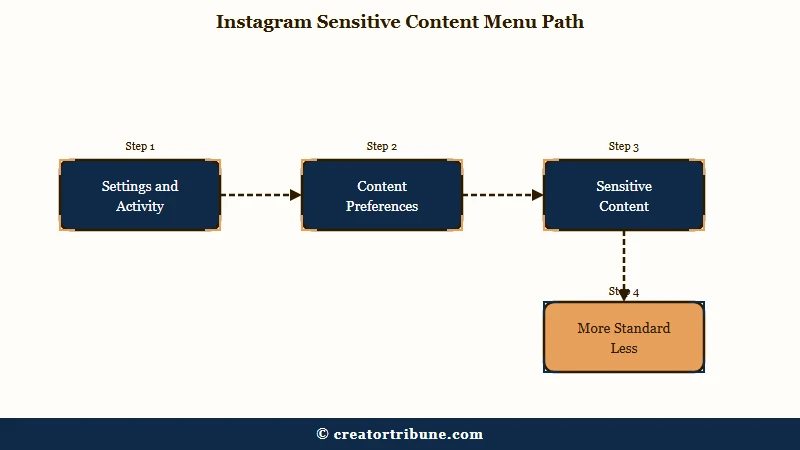
Instagram’s sensitive content setting lives under Settings and activity, then Content preferences, then Sensitive content, where you choose Standard, More, or Less.
More shows more flagged posts, Less restricts them, and Standard is the default middle ground.
Instagram launched this control in July 2021 for Explore, then expanded it in 2022 to cover Reels, Search, hashtags, and recommendations from accounts you do not follow. So the setting governs far more of the app than most people realize.
Here is the path I use, and it pays to go slowly because Meta renamed these menus more than once:
- Tap your Profile, then the menu icon (three lines) in the top right.
- Tap Settings and activity.
- Scroll to Content preferences.
- Tap Sensitive content.
- Choose More, Standard, or Less.
What is Sensitive Content Control: An Instagram setting that decides how much flagged content, meaning posts that do not break the rules but may be graphic or suggestive, appears in your Explore, Reels, and recommendations.
| Setting | What it shows | Who can pick it |
|---|---|---|
| More | The most flagged content across Explore and Reels | Verified adults only, 18 and over |
| Standard | An average amount, the default | Everyone by default |
| Less | Restricts most flagged posts | Everyone, forced default for teens |
If all three options are visible and tappable, you are done. If the More option is missing, the next section is the one you need.
Why Is the More Option Greyed Out or Missing?
The More option is greyed out because Instagram believes you are under 18, either from the birthday on your account or because its age-estimation AI guessed your age from your behavior.
Regional filtering laws and occasional app glitches account for the rest.
This is where the frustration lives, and I get why. You know your own age, yet the app has decided otherwise and given you no notice and no appeal button.
The behavioral AI guess is the part almost nobody explains. Instagram does not just read your stated birthday. It estimates age from how you use the app, and it regularly flags adults in their twenties and thirties as minors, then silently removes the More option to match that guess.
Instagram leans on this kind of quiet demotion far more than outright bans. One analysis of Meta’s own moderation data found the platform reduced the reach of roughly nine times more content than it removed outright, around 167 million posts reduced against 18 million removed in a single period.
The lockout you are hitting is a small piece of a much larger machine that prefers to limit quietly rather than block loudly.
| Symptom | Likely cause | Fix |
|---|---|---|
| Only Standard and Less appear, no More | AI or birthday says under 18 | Verify your age through Family Center |
| More was there, now gone after an update | Age re-estimation or app glitch | Update the app, then re-verify age |
| Setting missing entirely | Parental supervision is active | The supervising parent must remove the link |
| Region blocks the option | Local content laws | No user fix, the law overrides the toggle |
If a parent has your account under supervision, none of the self-serve fixes will work until they remove the link from their Family Center. For everyone else, age verification is the path back.
How Do You Unlock Sensitive Content With the Family Center Fix?
To unlock the greyed-out More option as an adult, go to Settings, then Family Center, then Supervision for teen accounts, and verify your age with a video selfie or a government ID.
It feels backward to use a teen-supervision menu to prove you are an adult, but that flow is what triggers Instagram’s verification.
The first time I saw this workaround I assumed it was wrong, because you are opening a feature built for parents watching their kids. It works because that menu is where Meta hides the age-check prompt.
Here is the sequence that has the best success rate:
- Go to Settings, then Family Center.
- Tap Supervision for teen accounts.
- When prompted, choose to verify your age.
- Pick the video selfie method rather than ID upload if you can.
- Wait for approval, usually under an hour for the selfie route.
The choice of method matters more than any guide admits. Instagram’s selfie check runs on Yoti’s facial age-estimation, which reports a mean error of about 1.52 years for teenagers and a 99.65 percent rate of correctly reading 13-to-17-year-olds as under 23, per Biometric Update. That accuracy is why the selfie route clears fast while ID uploads stall.
The contradiction shows up constantly in user reports. The video selfie tends to approve within the hour, while people uploading a driver’s license hit an error reading “Can’t set up supervision. This may be because of a technical issue or your account may not be eligible.” If the ID route dead-ends, I would switch to the selfie and skip the document entirely.
Before: You keep re-entering your birthday in your profile, saving it, and nothing changes because the AI guess overrides the date you typed.
After: You run the Family Center selfie verification once, Instagram confirms you are over 18, and the More option reappears in Sensitive content within the hour.
If your verification loops or fails outright, the same pattern that fixes Instagram selfie verification applies here, and the broader Instagram age restriction fix covers the account-status side.
Does Turning It Off Unblock Everything?
No, turning off your sensitive content filter only changes what you are shown, it does not lift a shadowban on a creator whose reach Instagram has already throttled.
The setting is a viewer control, not a master switch over the algorithm.
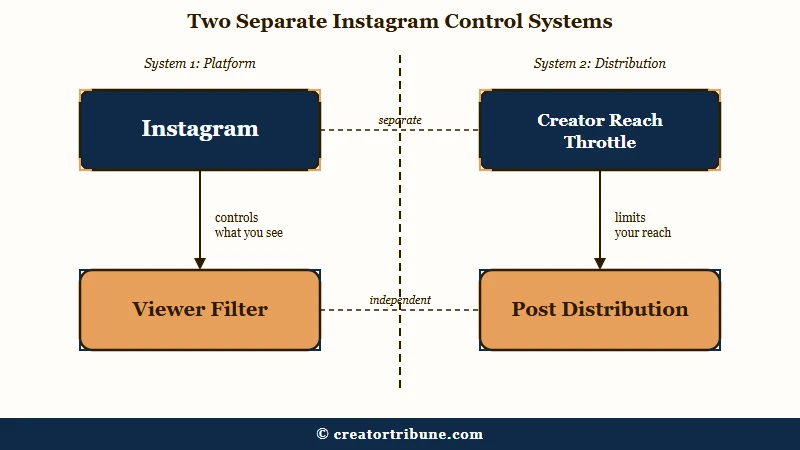
This is the trap I see catch creators hardest. Meta markets Sensitive Content Control as giving you power over your feed, but the same “sensitive” label doubles as a reach penalty on the posting side.
When a creator’s post gets tagged as borderline, Instagram strips its eligibility to appear in Explore, Reels, and non-follower recommendations. So even if every one of their followers sets the filter to More, that post can still be buried, because the suppression happened at the algorithm level before it ever reached a feed.
There is a real difference between the two systems, and mixing them up wastes hours. If your reach cratered rather than your feed, you are dealing with the creator-side throttle, which the Instagram shadowban diagnostic and the guide on why Instagram reach suddenly drops both walk through. The viewer toggle in this article will not touch it.
The uncomfortable takeaway is that the default filter quietly outsources moderation to you. Because most people never change the setting, the audience ends up enforcing reach limits on creators simply by leaving the defaults alone.
What Do the New 2026 Age Laws Mean for This Setting?
New 2026 age-verification laws in the EU and UK are moving Instagram toward mandatory identity checks, which will replace the simple toggle with hard age proof in some regions.
The manual switch is on its way to becoming a government-backed verification step.
The pace here surprised me. On June 15, 2026, the UK government announced a social media ban for under-16s, with enforcement set for Spring 2027 and a requirement that platforms verify the age of every user, not only suspected minors, according to the UK government child-protection rules.
The EU is moving on a parallel track. The European Commission urged member states to roll out a standalone age-verification app by the end of 2026. Instagram also tightened Teen Accounts in April 2026, filtering content by criteria modeled on 13-plus movie ratings and adding a stricter Limited Content mode parents can enforce.
What this means for you is simple to state and harder to accept. The days of flipping a setting are ending, and access to your own feed will increasingly depend on handing a platform your face or your ID.
That is exactly why leaning on rented reach is risky. When a platform can gate your access, throttle your posts, and change the rules midyear, the smartest move is to own the audience directly through a simple creator money page and steadily turn passive viewers into subscribers you can reach without asking permission.
Frequently Asked Questions
Where is the sensitive content setting on Instagram in 2026?
Go to your Profile, tap the menu icon, then Settings and activity, then Content preferences, then Sensitive content. From there you pick More, Standard, or Less. Older app versions kept it under Settings, then Account.
Why can’t I select More on sensitive content?
The More option only appears for verified adults. If it is greyed out, Instagram believes you are under 18, either from your stated birthday or its age-estimation AI. Verify your age through Family Center to restore it.
How do I verify my age to turn off the filter?
Open Settings, then Family Center, then Supervision for teen accounts, and start age verification. Choose the video selfie method for the fastest approval, usually under an hour. ID upload works too but fails more often.
Does turning off sensitive content fix my reach as a creator?
No. The viewer filter only changes what you see. If your posts are being throttled, that is a separate creator-side reduction, and no viewer setting undoes it. Diagnose it as a shadowban instead.
Will I still be able to turn off sensitive content in 2027?
Maybe not with a simple toggle. New UK and EU laws taking effect around 2026 and 2027 will require verified age proof, so the switch is shifting toward mandatory ID or facial verification in many regions.
Quick Takeaways
- The path is Settings and activity, Content preferences, Sensitive content, then pick More, Standard, or Less.
- If More is greyed out, Instagram thinks you are under 18, usually from its age-estimation AI, not your birthday.
- The reliable unlock is the Family Center route, and a video selfie clears faster than an ID upload.
- Turning off your filter changes what you see, it does not lift a creator-side shadowban or reach throttle.
- New 2026 age laws are replacing the toggle with mandatory verification, so own your audience instead of renting reach.