Remove an Instagram Age Restriction and Get Your Reach Back
Remove an Instagram Age Restriction and Get Your Reach Back
An Instagram age restriction does not just block minors, it throttles your reach to adults too. Here is how to remove it and recover your views.
- 1Why Instagram Put an Age Restriction on Your Content
- 2How an Age Restriction Quietly Kills Your Reach
- 3How to Remove an Instagram Age Restriction
- 4Post Restriction vs Account 18+ Label vs Silent Shadowban
- 5How to Appeal When the Account Status Dashboard Is Empty
- 6How to Avoid Future Age Restrictions
- 7Frequently Asked Questions
- Why is my normal reel age-restricted with no sensitive content?
- How do I remove the age restriction from my profile?
- How much does an age restriction cut my reach?
- How long does an Instagram appeal take?
- What if Account Status shows no violations but my reach is gone?
- 8Quick Takeaways
TL;DR: An Instagram age restriction hides your content behind an 18+ wall, and it quietly tanks your reach to adults too, because most adults never enter their age and the algorithm excludes them by default. Clean content on new accounts often gets auto-flagged within minutes. You can usually remove it in Creator Tools under Minimum Age, with a country-specific workaround if the setting keeps re-adding itself.
The first thing to understand about an Instagram age restriction is that it does far more damage than blocking teenagers. When your post or profile gets the 18+ label, the algorithm also withholds it from the large share of adult users who never set a birthdate in the app.
That is the part almost no guide explains. A restriction sold as “protecting minors” ends up cutting your reach to grown adults who would happily watch, only because Instagram cannot confirm they are over 18.
It gets worse for newer accounts. Perfectly clean reels, no skin, no violence, nothing remotely sensitive, get walled off within five to ten minutes of upload, purely because a young account has not earned enough trust yet.
This guide shows you how to tell which kind of restriction you are facing, how to remove the one you can control, and how to claw back the reach the 18+ flag has been quietly draining.
What is an age restriction: A block Instagram or you place on a post or profile that requires a viewer to be logged into an account verified as 18 or older. It is different from the Sensitive Content Control, which is a personal viewing filter.
Why Instagram Put an Age Restriction on Your Content
Instagram applies an age restriction either because you set a minimum age yourself, or because its automated systems flagged the content or account as sensitive or low-trust.
Telling those two apart is the whole game, because only one of them is yours to switch off.
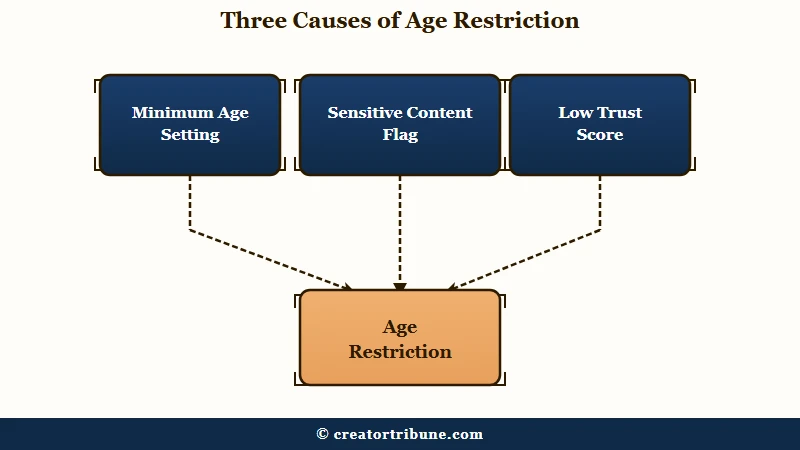
There are three common triggers, and I want you to know which one you are dealing with before you touch anything. The first is self-applied: a Minimum Age toggle in your Creator or Business tools that you, or Instagram by default, flipped to 18.
The second is automated content flagging. Posts touching suggestive themes, violence, regulated products, or viral danger challenges get age-gated, and the classifier is aggressive enough to catch borderline-clean content too.
The third is the new-account trust trap, and it is the one that blindsides people. On an account that is only a couple of weeks old, Instagram’s AI assumes a fresh profile might be spam or a repost farm, so it slaps an age wall on normal reels until the account proves itself. None of these means your account is banned.
How an Age Restriction Quietly Kills Your Reach
An age restriction throttles reach because it removes your content from recommendations to anyone Instagram cannot confirm is an adult, which is a huge slice of the audience.
The damage shows up in your non-follower reach long before you see any warning.
Here is the math that matters, and it is the first number I check in my own Insights. On a healthy account, somewhere between 30 and 60 percent of your reach comes from non-followers discovering you in Explore and the Reels feed.
When an 18+ flag or a recommendation restriction hits, that non-follower reach collapses to under 10 percent, often overnight. Your existing followers can still see your posts, which is exactly why so many creators miss it: the account “works,” but the growth engine is switched off.
The reason the drop is so brutal ties back to the intro. Minors are blocked outright, and the wide band of adults who never entered a birthday get excluded as a precaution, so the pool of eligible viewers shrinks far past the under-18 crowd.
If your numbers look like this, the diagnostic in the am I shadowbanned test and the deeper read in why reels reach is low will confirm whether a restriction is the cause.
How to Remove an Instagram Age Restriction
You remove a self-applied age restriction in Settings under Creator Tools or Business Tools, in the Minimum Age menu, by clearing the 18 limit.
When the setting fights back and re-adds itself, a country-specific workaround forces it off.
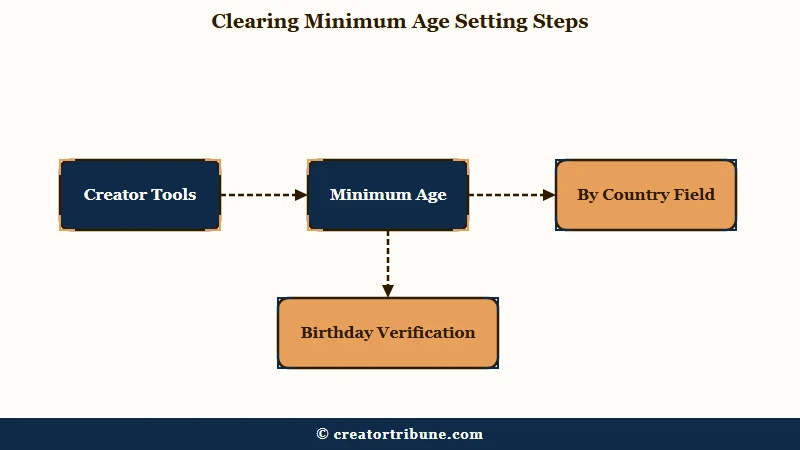
The straightforward path works for most people, so start there. I would walk through it in this order before assuming anything is broken.
- Open Settings and privacy, then Creator Tools or Business Tools, then Minimum Age.
- Remove “18” from the default global setting and tap the checkmark to save.
- If “18” keeps re-adding itself, add an obscure country like Vatican City to the “By Country” field, set its limit to 18, then clear the “18” from the global default.
- Confirm your own account birthday is verified as 18 or over, because an unverified or under-18 birthday re-triggers the wall.
That third step is the fix almost nobody documents, and it is a lifesaver when the app refuses to let go of the global 18 limit. Parking the restriction on a zero-traffic country satisfies the setting without gating your real audience.
Before: You delete the “18” from Minimum Age, it silently re-adds itself, and your profile stays stuck behind a “you must be 18” wall.
After: You assign the 18 limit to Vatican City in the By Country field, clear the global 18, and the wall drops while a country with no real traffic keeps the toggle satisfied.
If the restriction is not in your settings at all, then it is one Instagram applied, and removing it means clearing the flag or the behavior behind it. The next two sections cover how to tell which.
Post Restriction vs Account 18+ Label vs Silent Shadowban
There are three distinct restrictions, and each looks different and needs a different fix.
Diagnosing the exact one saves you from deleting content that was never the problem.
This is the distinction I most want creators to walk away with, because the generic advice treats all three as one thing. A single post can be gated, your whole profile can be labeled 18+, or your account can be silently held back from recommendations with no visible flag at all.
The silent one is the cruelest. Your Account Status dashboard shows a clean, all-green report with nothing to delete or appeal, yet your reach to non-followers has cratered. Here is how to read each case.
| Restriction type | What you see | How to fix it |
|---|---|---|
| Post-level | One post blurred or walled with an age or sensitive warning | Request Review on that post in Account Status |
| Account 18+ label | “You must be 18 to see this profile” on the whole account | Clear Minimum Age in Creator Tools, or appeal if Instagram set it |
| Silent shadowban | Reach to non-followers under 10 percent, dashboard all green | Pause activity, remove triggers, wait 48 to 72 hours |
For a full walkthrough of the silent case, the Instagram shadowban guide and the reach dropped breakdown map the recovery steps in detail.
How to Appeal When the Account Status Dashboard Is Empty
When Account Status shows no violations but your reach is gone, you treat it as a silent restriction by removing likely triggers and pausing, since there is nothing to formally appeal.
The fix here is behavioral, because there is no form to submit.
The maddening part is that Instagram penalizes you while showing you nothing to fix. When the dashboard is empty, I work through the known silent triggers one at a time rather than waiting for a flag that never appears.
The most overlooked trigger is the link in your bio. A raw third-party link tree can quietly suppress your non-follower reach, and creators have restored discovery within a day just by removing the bio link. If you funnel traffic off-platform, route it through a cleaner setup like the options in free link in bio tools instead of a flagged URL.
After that, revoke any unauthorized growth or automation apps, stop using banned hashtags, and pause posting and engagement for 48 to 72 hours. When a post is genuinely flagged, the Request Review button in Account Status returns a decision within 24 to 72 hours, so plan your recovery around that window and do not keep posting while you wait.
If your account got disabled rather than just restricted, that is a different and more urgent process, and the Instagram account disabled guide covers the strict 30-day appeal window before data is deleted.
How to Avoid Future Age Restrictions
You avoid future age restrictions by warming up new accounts, keeping your bio and content clean of known triggers, and checking Account Status before they cost you a launch.
A few habits keep the 18+ wall off your work.
I treat restriction-proofing as routine maintenance now, the same way I would protect any account I rely on for reach. The steps below are the ones that have kept my own posts out of the age-gate.
- Warm up a new account for a couple of weeks with light, original posting before you scale, since young accounts get auto-flagged on low trust.
- Keep raw third-party link trees out of your bio, since they can silently restrict reach.
- Avoid banned or spammy hashtags and stay off unauthorized growth and automation apps.
- Post original content, because reposted or stitched-together material loses recommendation eligibility.
- Check Account Status weekly so you catch a flag early instead of mid-campaign.
The bigger lesson under all of this is that your reach sits entirely at Instagram’s discretion, and one quiet flag can erase it. That is why I keep pushing creators to move fans somewhere they own, which is the whole point of the Creator Money Page template and the playbook in converting views to subscribers.
Instagram’s tightening teen rules, which CBC reports now default most teens into a PG-13 style feed, only shrink the discovery pool further, as covered in reporting on the PG-13 rollout.
Frequently Asked Questions
Why is my normal reel age-restricted with no sensitive content?
Usually because your account is new and has a low trust score, so Instagram’s AI restricts it as a precaution within minutes of upload. Clean content on accounts under about two weeks old gets auto-flagged until the profile earns trust.
How do I remove the age restriction from my profile?
Go to Settings, then Creator Tools or Business Tools, then Minimum Age, and clear the 18 limit. If it keeps re-adding itself, set the 18 limit on an obscure country in the By Country field, then remove the global one.
How much does an age restriction cut my reach?
A lot. Healthy non-follower reach runs 30 to 60 percent, and an 18+ flag or recommendation restriction drops it to under 10 percent, because minors and the many adults who never set an age are both excluded.
How long does an Instagram appeal take?
A Request Review on flagged content in Account Status usually returns a decision within 24 to 72 hours. Recommendation eligibility takes 1 to 4 weeks to restore after you remove the cause, and a silent shadowban often lifts in 48 to 72 hours.
What if Account Status shows no violations but my reach is gone?
That is a silent restriction with nothing to formally appeal. Remove your bio link, revoke unauthorized apps, drop banned hashtags, and pause all activity for 48 to 72 hours to let reach recover.
Quick Takeaways
- An Instagram age restriction blocks minors and the many adults who never set an age, so it cuts reach far more than expected.
- Clean content on new accounts gets auto-flagged within minutes because the profile has not earned trust yet.
- Remove a self-applied limit in Creator Tools under Minimum Age, using the By Country workaround if it keeps re-adding itself.
- A green Account Status with collapsed non-follower reach means a silent restriction, so remove triggers and pause for 48 to 72 hours.
- Reach you do not control can vanish overnight, so move your audience somewhere you own.