How to Save Instagram Drafts So They Never Vanish on You
How to Save Instagram Drafts So They Never Vanish on You
Instagram drafts live only on the phone that saved them, so deleting the app or clearing its storage wipes them, and Story drafts last 7 days.
TL;DR: Instagram saves drafts on the one phone where you made them, never in your account, so deleting the app or clearing its storage erases them for good. Clearing only the cache on Android is usually safe, and so is Offload App on iPhone. Back the raw video up to your camera roll before you add Instagram music, and post Story drafts within their 7 days.
You spent forty minutes editing a Reel, tapped save, and closed the app. The next morning the draft was gone. If you want to save Instagram drafts and trust that they will still be there tomorrow, the first thing to understand is that Instagram never really saved it anywhere safe.
Instagram drafts do not live in the cloud. Instagram’s help page on post drafts, checked on October 3, 2026, puts it in three sentences:
“Drafts are saved onto your device. You won’t be able to access a saved draft from another device, even if you log in to your account. If you uninstall the app, your drafts will be lost.”
That local-only design is why deleting the app or clearing its storage can erase weeks of work with no undo button, and why a new phone starts empty. App updates have done it too. In April 2026, one iPhone user’s update left an account’s whole reel drafts folder missing, while their other accounts kept theirs.
Below is where each draft type is stored, what deletes them, and how to protect a draft you cannot afford to lose. Story drafts run on a 7-day countdown, so timing matters too.

How Do You Save Instagram Drafts on Posts, Reels and Stories
Saving an Instagram draft means tapping the back arrow after you edit, then choosing Save Draft, which writes the file to local storage on that one phone.
Feed posts and carousels save this way, while a reel saves from its last screen, where Save draft sits at the bottom. Post and reel drafts stay until you publish or delete them.
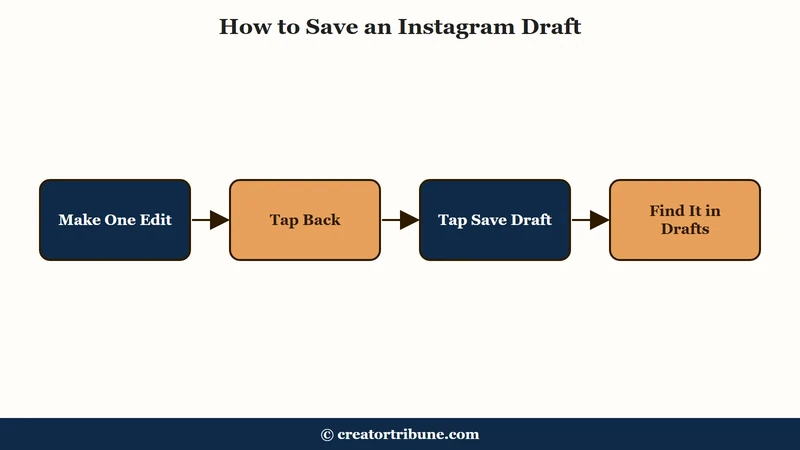
The steps are almost identical across post types, and the save prompt is where people slip. Instagram’s help page says you cannot save a post as a draft unless you edit it, tag people, or add a caption or location.
- Tap Create at the top of Feed, or swipe right, and pick your photo or video.
- Add at least one change: an edit, a tag, a caption or a location.
- Tap Back in the top left, twice on iPhone and sometimes twice on Android.
- Tap Close, then tap Save draft.
To find a post draft later, tap Create and look for Drafts below the photo or video. Reel drafts sit in Drafts on the Reels tab of your profile, and a reel saves as a draft when you tap Next twice, then Save draft at the bottom.
Two limits catch people out. Drafts never leave the phone that saved them, so you cannot start one on your phone and finish it on a laptop. Carousels take up to 20 photos and videos, per Instagram’s carousel help page.
Saved drafts can be stubborn about new media, so add every slide before you save. An August 19, 2026 report says a saved draft no longer accepts new photos, and a September 8 Google Play review says a post draft did not keep all of its images.
What is a local draft: A post, reel or Story saved inside the Instagram app on one phone, so no other device can open it and uninstalling the app deletes it.
Where Are Story Drafts on Instagram?
Story drafts sit in the Story camera’s gallery. Open the Story camera, tap the gallery icon, and your drafts appear at the top with the days left before each one expires.
You can save a Story as a draft by backing out of the Story editor with the back arrow and tapping Save draft. Instagram rolled Story drafts out to all users in July 2021 and told Social Media Today at the time that they “will save for seven days before disappearing.”
A search of Instagram’s help center on October 3, 2026 found no Story drafts article, so the location above comes from Pallyy’s guide updated August 4, 2026. The 7 days are not a guarantee, though. A July 2026 poster lost Story drafts a few hours after saving them, with 7 days still left on the clock.
That July 26 thread drew replies from people who said the same bug had hit them for months. If a Story matters, tap Save on iPhone or Download on Android at the top of the Story editor first. Instagram’s Story saving help page says this saves the photo or video to your phone.
Why Do Instagram Drafts Disappear Without Warning
Instagram drafts disappear because they are stored only on your phone, so deleting the app or clearing its storage erases them permanently, and a new phone never sees them. App updates and Story draft bugs wiped drafts in 2026 too, and there is no Recently Deleted folder for drafts.
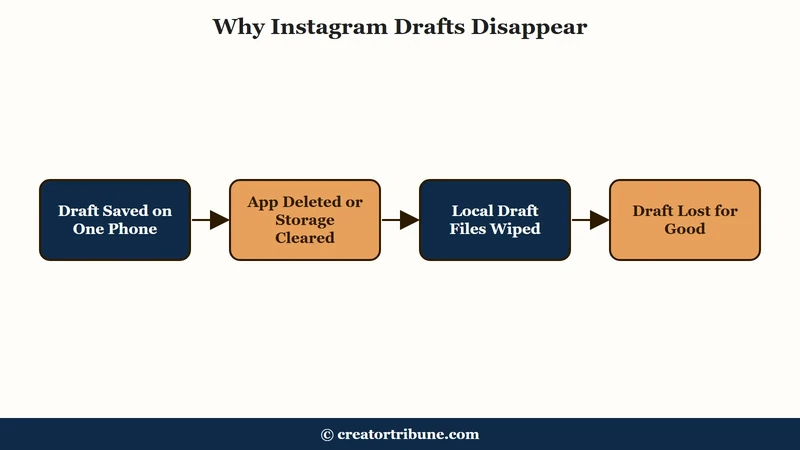
Routine actions destroy a draft silently. You will not get a warning, and the work does not sync to your account, so signing in on another device shows nothing.
Logging out is a gray area, because Instagram’s three help pages on drafts say nothing about it. Pallyy’s August 2026 guide lists a logout as a way to lose reel drafts, so back up anything important before you sign out.
Story drafts also expire on their own after 7 days, with the days left shown in the Story gallery.
Here is the quick map of what wipes a draft and what you can do about it.
| Symptom | Likely cause | Fix |
|---|---|---|
| All drafts gone after signing back in | A logout, which some guides list as a risk but Instagram does not document | Back drafts up to your camera roll before you log out |
| Drafts vanished after freeing up space | You cleared the app’s storage or data, or deleted the app | On iPhone use Offload, not Delete; on Android clear cache only, never storage |
| Nothing appears on a new phone | Drafts are device-bound, they do not sync | Export the raw media to cloud storage before you switch |
| Drafts folder missing after an update | An update bug that several people reported in 2026 | Keep a copy of the media outside Instagram and report it in the app |
| Story draft missing after a week | The 7 day Story expiry deleted it | Publish the Story draft before day 7 |
| Story drafts gone within hours | A Story draft bug reported through mid-2026 | Save the Story to your phone from the editor before you leave it |
How to Back Up a Draft You Cannot Lose
The only reliable way to save an Instagram draft is to back the raw video or photo up to your camera roll or a cloud service before you add native audio. A local draft can vanish at any time. Treat the in-app draft as temporary, not storage.
The catch that trips up creators is music. Instagram’s reel drafts help page warns that “downloading your reel won’t save any music you added from the Instagram music library,” so the copy you keep has only your original sound or voiceover.
The sequence below protects both the footage and the trending audio. It separates two jobs: keep a clean copy of the edit off the app, then add the licensed track natively at the last moment before posting.
- Edit your raw clip in an external app or your phone’s editor first.
- Save that finished cut to your camera roll and, ideally, a cloud folder.
- Import it into Instagram only when you are close to posting.
- Add the trending Instagram audio natively as the final step.
Instagram also has a built-in route for reels. Its help page says you can swipe up to edit, swipe left to right, then tap Save at the bottom to put a reel draft in your camera roll, without its library music.
Before: You build the whole Reel inside Instagram, add a licensed song, and save it as a draft. Deleting the app to free space wipes it, and the song would have been stripped on download anyway.
After: You keep a silent master cut in your camera roll and cloud, then drop the trending audio on inside Instagram right before publishing. If the draft dies, you rebuild in two minutes from the master.
This is also the moment to think past a single post. A draft is your unpublished work, and the same logic that says back up your footage says own the audience you build rather than renting it from one app. If you have hit draft-loss bugs, our guide on why TikTok drafts disappear covers the same local-storage trap on the other platform.
How to Clear Space Without Wiping Your Drafts
On iPhone, use Offload App instead of Delete App, because offloading removes the app binary but preserves the Documents and Data folder where your drafts live.
On Android, clearing only the cache is usually safe, but clearing storage or data deletes drafts.
Apple’s iPhone storage page spells out the difference. Offload “frees up storage used by the app, but keeps its documents and data,” while Delete “removes the app and its related data.” People try to fix a sluggish app by wiping it, then lose every draft because they picked the wrong button.
The safe path depends on your operating system. Some guides, Pallyy’s among them, list clearing the cache as a draft risk too, so back up first if a draft matters. Here is what each option does to your drafts.
| Action | Platform | What happens to drafts |
|---|---|---|
| Offload App | iPhone | Safe. Frees space but keeps your login and drafts in Documents and Data. |
| Delete App | iPhone | Destroys them. Wipes all local data including every unsaved draft. |
| Clear Cache | Android | Usually safe. Clears temporary files while leaving saved drafts in place. |
| Clear Storage or Data | Android | Destroys them. Resets the app and deletes local drafts. |
If your real goal is a faster app rather than a fresh start, our walkthrough on clearing the Instagram cache covers the draft-safe method on both systems in more detail.
What to Do When the Drafts Button Vanishes
If the Drafts button disappears, first check that you are on the phone that saved the drafts, because Instagram shows them only there. If you are, an app update may have hidden the folder for that one account, which several people reported in 2026.
In an April 2026 case, the poster updated Instagram on an iPhone and found the reel drafts folder missing entirely on one account, while three other accounts kept theirs. Saving new drafts failed too, and commenters reported the same thing. Nothing in Instagram restores a vanished draft, so report it in the app and treat your camera roll copy as the real backup.
Editing a saved draft carries its own risk, even though tutorials call it safe. A July 19, 2026 poster added stickers, text and audio to a draft, saved it, and reopened it to find only the original video. Duplicate the source media before you touch an important draft, so a glitch cannot cost you the only copy.
If a draft does refuse to save at all, a stuck app is often the reason, and the same reload steps in our guide on Instagram Stories that won’t upload tend to clear it.
For multi-photo work, planning slides ahead of time using our notes on adding multiple photos to Stories reduces how long a fragile draft has to survive.
Quick Takeaways
- Instagram drafts are stored locally on one phone, not the cloud, so treat them as temporary, not saved.
- Deleting the app or clearing its storage erases drafts with no undo, a new phone never sees them, and a logout is worth a backup too.
- Back up the raw clip to your camera roll and cloud before adding native audio, since downloading a reel drops library music.
- On iPhone use Offload App, never Delete App, to free space without losing drafts.
- Story drafts expire after 7 days and sometimes sooner, so save an important Story to your phone from the editor.