How to Mention Someone on Instagram Story and Get Reshared
How to Mention Someone on Instagram Story and Get Reshared
A Story mention is really a reshare trigger. Here is how to mention someone on Instagram Story so it notifies them and spreads.
- 1How Do You Mention Someone on an Instagram Story?
- 2Why Does the Person I Tagged Never Get Notified?
- 3Mention vs Tag vs Collab vs the New Untagged Reshare
- 4How the 2026 Reshare Without a Tag Changes Your Strategy
- 5How Do You Use a Story Mention to Get Reach?
- 6How to Fix a Missing Mention or Greyed-Out Reshare
- 7Frequently Asked Questions
- How many people can you mention in one Instagram Story?
- Does someone get notified when you mention them in a Story?
- Can you mention someone after posting a Story?
- How do you hide a mention on your Instagram Story?
- Can someone reshare my Story if I did not tag them?
- 8Quick Takeaways
The Short Answer: To mention someone on an Instagram Story, add the Mention sticker or type @ followed by their username, then tap their handle when it appears. That sends them a DM with an “Add This to Your Story” button, which is how a mention turns into a reshare to their audience.
A Story mention looks like a simple shoutout, but for a creator it is really a reshare trigger. When you mention someone on an Instagram Story, the goal is not the tag itself, it is the “Add This to Your Story” button that lands in their messages and pulls your Story in front of their followers.
That is why the mechanics matter more than they seem. Get the mention right and a tagged partner can reshare you to a whole second audience. Get it wrong and the notification quietly dies in a message requests folder they never open.
There is also a 2026 change that rewrites the old playbook. Instagram now lets anyone reshare a public Story without being tagged at all, which flips why and when you should still mention people. I will cover the exact steps, the notification trap that kills reshares, and how to use a mention to earn real reach.
Instagram passed 2 billion monthly users, per Statista, so a single well-placed mention that earns a reshare can put you in front of an audience many times your own.

How Do You Mention Someone on an Instagram Story?
You mention someone on an Instagram Story with the Mention sticker or by typing @username in text.
Both send the person a notification. The sticker is the cleaner route, the text method gives you more control over placement.
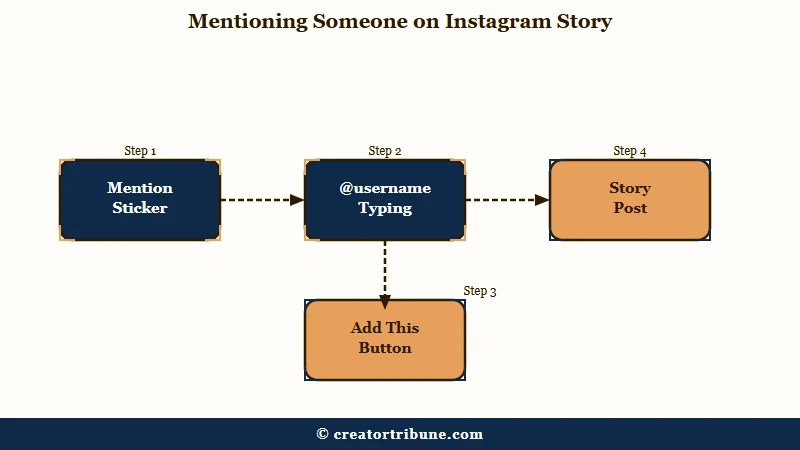
The way I do it depends on whether I want the tag visible. Here is the sequence I use most often:
- Take or upload your Story photo or video.
- Tap the sticker icon at the top, then choose the Mention sticker.
- Start typing the username and select the right account from the list.
- Or skip the sticker, tap the text tool, and type @ then the username, then tap it when it appears.
- Post the Story, and the person gets a message that you mentioned them.
One limit worth knowing before you start: Instagram caps you at 10 mentions in a single Story. That is plenty for a genuine shoutout, and going anywhere near it reads as spam, so I rarely use more than two or three.
What is a Story mention: A temporary tag that references someone’s username in your Story, notifies them by direct message, and lets them reshare your Story to their own followers.
Why Does the Person I Tagged Never Get Notified?
A Story mention no longer lands in a mentions tab, it arrives as a direct message.
For anyone who does not already follow you, that message drops into their DM requests folder, which most people never check. That is the single biggest reason a mention never turns into a reshare.
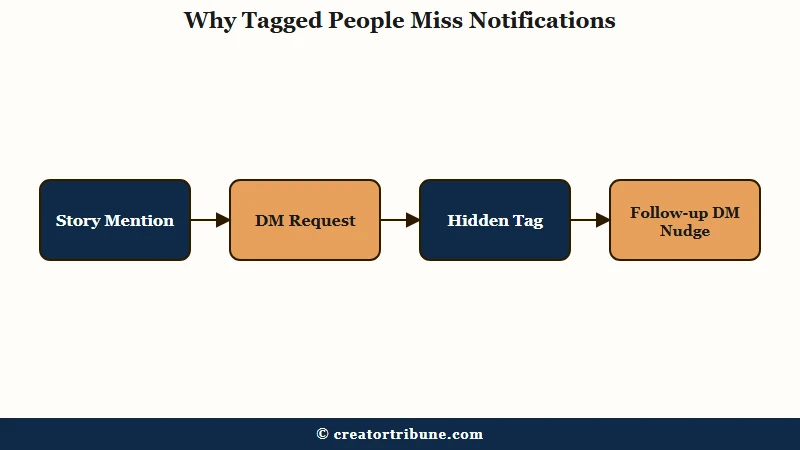
This trips up more creators than any other part of the feature. You tag a bigger account hoping for a repost, the tag looks perfect on your end, and nothing happens because your alert is sitting unopened in a request inbox.
There is a clean workaround I lean on. If you want the notification without cluttering the Story, add the mention, then pinch it small and drag it behind a sticker or off the visible frame. The person still gets the message, but your Story stays clean, and a follow-up DM saying “tagged you in my Story” is what gets a busy creator to look.
Mention vs Tag vs Collab vs the New Untagged Reshare
These four features do different jobs, and mixing them up costs you reach.
A mention is a temporary Story shoutout, a tag links an account to a permanent feed post, a collab co-authors one post across both profiles, and the new untagged reshare lets anyone repost a public Story. Pick the one that matches your goal.
I see people reach for a mention when they really want a collab, and lose the shared audience as a result. The differences are easier to hold side by side, so here is how they compare.
| Feature | What it does | Where it lives | Best for |
|---|---|---|---|
| Story mention | Temporary shoutout, notifies by DM | Their messages, gone in 24 hours | Prompting a reshare to their audience |
| Feed tag | Links an account to a post or Reel | Their permanent Tagged tab | Lasting credit and discovery |
| Collab | Co-authors one post on both profiles | Both grids, shared engagement | Pooling reach with a partner |
| Untagged reshare | Reposts any public Story, auto credit | The resharer’s Story | Amplifying a public post you like |
If your real aim is a co-authored post that lands on both grids, my walkthrough of Instagram collab posts covers that path, which pools engagement instead of just borrowing it for a day.
How the 2026 Reshare Without a Tag Changes Your Strategy
Instagram now lets anyone reshare a public Story without being tagged, so mentions are no longer the only path to a repost.
An “Add to Story” button appears on public Stories, and resharing automatically credits the original creator with a clickable link back. That quietly rewires how you should think about mentions.
The old habit was to tag a partner purely so they had permission to repost you. With the update, per reporting from the Inquirer, that mechanical reason is gone for public accounts, since anyone can already reshare. What I would keep the mention for now is the relationship, giving a real shoutout and nudging a specific person to amplify you, rather than just unlocking a button.
There is a control most people miss. If you do not want strangers resharing your public Story, open Settings and Activity, then Privacy, then Story, and turn off “Allow sharing to story.”
The same update was built to kill screenshot-and-repost aggregator accounts, because credited resharing now sends the engagement back to you instead of the scraper.
How Do You Use a Story Mention to Get Reach?
A mention gets you reach when the tagged person reshares it to followers who are not yours yet.
That reshare opens a second-degree audience, their viewers see your Story and can tap straight through to your profile. The hard part is earning the reshare.
The reach math is simple here. The Stories algorithm favors existing relationships, so Stories rarely reach strangers on their own. A reshare from a well-chosen account is one of the few ways a Story jumps to a fresh audience, which makes who you tag more important than how often.
Here is the playbook I would run. Tag people who have a real reason to share, a partner you featured, a customer you thanked, a creator whose work you built on, then follow up with a quick DM so the notification does not rot in requests.
This is also why I keep telling creators to build an owned audience, because a reshare spikes for a day while an email list or a channel you control compounds, the same logic behind converting views into subscribers.
Before: You bury a bare @mention in the corner of a busy Story and hope a big account notices and reshares.
After: You mention one relevant partner, keep the tag legible, and send a short DM that says you featured them, which is what earns the reshare.
How to Fix a Missing Mention or Greyed-Out Reshare
Most mention and reshare failures trace back to privacy settings, a private account, or an outdated app.
When a tag will not send or the “Add to Story” button is missing, the cause is usually a setting rather than a bug. Work through the common ones before assuming it is broken.
The reshare option disappears most often because the original account is private, since private Stories are protected from untagged resharing entirely. If your own reshare toggle is off, or the app is out of date, the button also vanishes, and a quick update or a settings check brings it back. If you forgot to tag someone, you can now add a mention after posting by editing the live Story rather than deleting and reposting it.
| Symptom | Likely cause | Fix |
|---|---|---|
| Mention will not send | Username typed wrong or account restricted | Retype the exact handle and pick it from the list |
| Tagged person never responded | Alert sat in their DM requests | Send a short follow-up DM pointing to the mention |
| No “Add to Story” button | Original account is private | Untagged reshares only work on public accounts |
| Reshare option greyed out | Your sharing toggle is off or app outdated | Turn on “Allow sharing to story” and update the app |
I check the screenshot and privacy behavior whenever a share feature acts strange, because Instagram’s sharing rules shift often, and reach problems that look like a bug are frequently a setting instead, the same pattern behind a sudden drop in Story reach.
Frequently Asked Questions
How many people can you mention in one Instagram Story?
Instagram lets you mention up to 10 people in a single Story. Going near that limit reads as spam and can hurt how the Story performs, so two or three genuine mentions works better than a crowd of tags.
Does someone get notified when you mention them in a Story?
Yes, but the alert arrives as a direct message, not in a mentions tab. If the person does not follow you, that message lands in their DM requests folder, which many people never check, so a follow-up message often helps.
Can you mention someone after posting a Story?
Yes. You can now add a mention to a live Story by editing it, rather than deleting and reposting. Open the Story, use the edit options, add the Mention sticker or @username, and save the change.
How do you hide a mention on your Instagram Story?
Add the mention so the person still gets notified, then pinch the tag to shrink it and drag it behind a sticker or off the visible frame. The notification still sends, but your viewers do not see a cluttered tag.
Can someone reshare my Story if I did not tag them?
Only if your account is public. Instagram’s 2026 update lets anyone reshare a public Story with an “Add to Story” button that credits you. Private Stories cannot be reshared by untagged viewers.
Quick Takeaways
- A Story mention is really a reshare trigger, its job is to earn a repost to the tagged person’s audience.
- Mentions notify by direct message, and for non-followers that lands in DM requests, so send a follow-up nudge.
- You can mention up to 10 people, hide a tag behind a sticker, and add a mention after posting by editing the Story.
- Instagram’s 2026 update lets anyone reshare a public Story untagged with auto credit, so use mentions to build relationships now, since permission is no longer the reason to tag.
- Turn borrowed reshare reach into an owned audience, because a reshare spikes for a day while a list you control compounds.