How to Unarchive an Instagram Story and What You Cannot Undo
How to Unarchive an Instagram Story and What You Cannot Undo
Instagram has no unarchive button for Stories. See where your old Stories live, what Share really resets, and how long you have to restore one.
- 1How Do You Unarchive a Story on Instagram?
- 2Can You Unarchive an Instagram Story Before 24 Hours?
- 3What Changes When You Reshare an Archived Story?
- 4Why Is the Share Button in Your Stories Archive Not Working?
- 5How Long Do You Have to Restore a Deleted Instagram Story?
- 6Is There a Way to Restore Archived Stories in Bulk?
- 7Can You Unarchive an Instagram Story on a Computer?
- 8Frequently Asked Questions
- Is there an unarchive button for Instagram Stories?
- Can I get back a Story I archived by accident before 24 hours?
- Do my followers get notified when I reshare an archived Story?
- How long do deleted Instagram Stories stay in Recently Deleted?
- Can I see who viewed a Story after I unarchive it?
- Why do my old Stories not show up in the archive at all?
- 9Quick Takeaways
TL;DR: Instagram gives you no unarchive button for Stories. The archive holds two controls, Share and Highlight, and Share posts the Story again as a brand new one with a fresh 24 hour clock and an empty viewer list. If you deleted the Story rather than archived it, your deadline to get it back is either 24 hours or 30 days, and which one you get depends on whether it had been archived first.
Learning how to unarchive a story on Instagram almost always starts with a mistake. Your thumb lands on Archive when it was aiming for Highlight, and the Story you posted twenty minutes ago drops out of your ring while people are still watching it.
Then comes the part that costs real time. You go looking for the undo button, and there is not one. The Stories Archive gives you Share and Highlight, and neither one puts a Story back where it was.
I count that as a design failure rather than a user error, because the archive control sits a thumb-width from the highlight control and fires with no confirmation step. Instagram last published a Stories figure of 500 million daily users back in January 2019, so this is not a rare corner of the app.
This page covers the four-tap path to the Stories Archive, which is also where your old Stories live, and what a reshare quietly drops. It also covers why the Share button sometimes does nothing, and the two restore deadlines that decide whether you have a day or a month.

How Do You Unarchive a Story on Instagram?
Unarchiving an Instagram Story means resharing it, because Instagram never built a restore control for Stories.
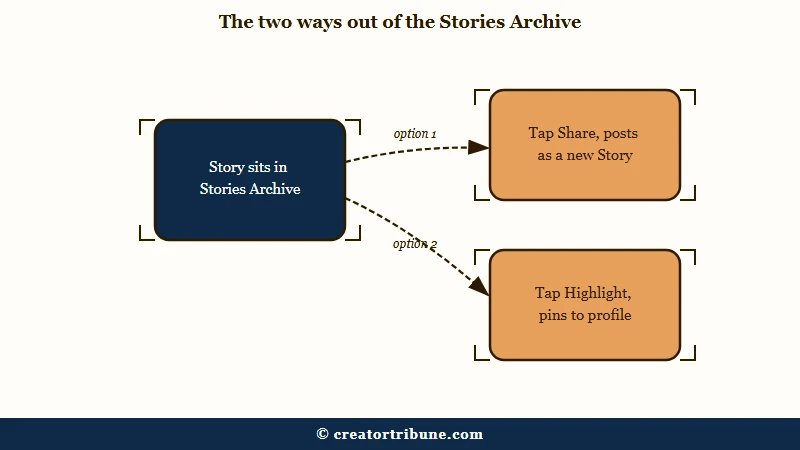
Open the Stories Archive, tap the Story, then tap Share to post it again or Highlight to pin it to your profile.
The path I use takes four taps and lands in the same place every time:
- Open your profile and tap the three-line menu at the top right.
- Tap Archive.
- Tap the dropdown at the top of the screen and switch it to Stories Archive, since the app often opens on Posts Archive instead.
- Tap the Story you want, then tap Share at the bottom to post it again, or Highlight to add it to a highlight circle.
The same screen is how you see your old Instagram Stories. Instagram’s help on finding archived content also lists a second route: Menu, then Your activity, then Archived under Removed and archived content. The archive holds every Story you posted and kept while Save story to archive was switched on.
Someone else’s old Stories are a different matter. Instagram’s Stories help says they disappear after 24 hours unless the poster adds them to a highlight, and its mentions help says Stories you are mentioned in do not appear on your profile.
A friend’s expired repost of your Story is out of reach unless they send it to you from their own archive. One reply in an October 2026 r/Instagram thread adds that a repost you reshared yourself sits in your own archive. While a public account’s Story is still live, Inflact can save a copy by @username with no Instagram login, though it cannot reach private accounts.
Feed posts work differently, and that difference is the source of most of the confusion. An archived feed post has a real restore control, and archiving Instagram posts covers how a post drops back onto your grid at its original date with its old likes and comments intact. Stories have no equivalent.
Before: You archive a live Story by accident, hunt for an unarchive button for ten minutes, and post nothing while the moment passes.
After: You open the Stories Archive, tap Share on that same Story, and it is back in front of people inside two minutes, with a new timestamp.
Can You Unarchive an Instagram Story Before 24 Hours?
No. Archiving a live Story ends it immediately, and nothing returns it to its original slot with its original timer or viewers.
Your only route is to post it again as a new Story.
The false hope here is what bothers me most. A bad answer circulating widely says to tap the three dots on the archived Story and choose Show in Story or Show on Profile, but Instagram’s help describes Show on profile only for feed posts. One person hunting for them in an r/Instagram thread wrote back: “We are supposed to be able to click ‘show on profile’ but it’s not an option….that is so dumb.”
The same thread names the underlying complaint precisely: “There should be a confirmation tab after clicking the story archive option. This is just plain stupid UI design.” Archive and Highlight sit next to each other, and one of them is destructive.
Reposting also carries a social cost that no tutorial mentions. One person in the same thread had already been seen by two hundred people when the Story disappeared, and chose not to put it back up at all.
There is one genuine oddity worth knowing. A Story archived inside its live window can vanish from the Stories Archive for a while, which makes it look permanently gone. The person who started that thread later added that it came back on its own, well before the 24 hour mark.
Instagram’s archive help still documents the move that causes all this: tap Options on a live Story, then Archive, to archive it before the 24 hours run out. An r/Instagram post on 16 October 2026 said the option was missing, and the same help page notes that Stories Archive and Highlights aren’t available for all accounts.
Instagram Plus adds a second clock. Meta began testing the paid subscription in March 2026 with an option to keep a Story up for an extra 24 hours, per TechCrunch. A Plus subscriber posted on 16 October that the Stories they forgot to extend archived at the 24 hour mark, and that Instagram offered no way to archive one early either.
What Changes When You Reshare an Archived Story?
A reshared Story is a new Story. It gets a fresh 24 hour clock, a new viewer list that starts empty, and it appears at the front of your ring with today’s date rather than back in its old position.
What surprised me is how much can change before you even reshare. The same archive help says a photo Story with a music or GIF sticker may be saved with the music muted or the GIF frozen, to keep up with storage needs. Those changes are permanent, and a reshare from the archive won’t include anything that was removed.
Licensing is a separate problem. One r/Instagram poster on 2 October 2026 found highlighted Stories marked unavailable for licensing issues while the same songs could still be added to a new Story.
| What you had | Survives a reshare? | What to do about it |
|---|---|---|
| Original 24 hour timer | No, the clock restarts at 24 hours | Treat it as a fresh post and expect fresh reach |
| Original viewer list | No, it starts empty | Screenshot the old list first if you need it |
| Close Friends audience | Not automatically, you pick the audience again | Tap Close Friends again before sharing |
| Music sticker | Not always, photo Stories can be muted in the archive for good | Re-add the track from the sticker tray |
| Image and video quality | Built from the archived copy, which can already be soft | Post the original file from your camera roll |
That last row is the one creators feel. Three r/Instagram posts between 6 September and 17 October 2026 described archived Stories going soft, one calling them worse than 240p, and blurry Instagram Stories covers the compression behind it. Posting the original file from your camera roll beats resharing the archived copy every time.
The named viewer list has a deadline. Instagram’s Stories page puts it at up to 48 hours after posting, 24 hours live plus 24 in the archive. The counts outlast it, since Instagram’s Story insights help keeps insights available for up to two years on a public account, and a reshare cannot bring the names back.
Why Is the Share Button in Your Stories Archive Not Working?
A dead Share button in the archive is almost always a client-side fault rather than an account restriction.
The control greys out or does nothing, and the fix is a force quit, an app update, or a swipe away and back.
I treat this as an app problem first and an account problem last, because the archive is one of the least-maintained screens in Instagram. An error overlay can sit on top of an archived Story while its audio keeps playing underneath, which is a rendering bug rather than a permissions block.
| Symptom | Likely cause | Fix |
|---|---|---|
| Share is greyed out | Stale app session | Force quit Instagram, reopen, try again |
| Tapping Share does nothing | Rendering bug on that Story | Swipe to the next Story and swipe back |
| Story shows an error panel, audio still plays | Overlay stuck on the frame | Swipe away and return, then reshare |
| No Share option at all | You are in Posts Archive | Tap the top dropdown and pick Stories Archive |
| Story missing from the archive entirely | Save story to archive was off when you posted | Nothing to recover, turn the setting on now |
| No Highlight option on an archived Story | Option missing on that screen | Press and hold a highlight on your profile, tap Edit highlight, add it there |
The missing-Story row is the one people get wrong. The archive setting is not retroactive, so switching it on today does nothing for a Story you posted last week without it.
If your archive is showing errors or gaps across many old Stories rather than one, that is a different failure and Instagram Stories not available covers what is recoverable and what is gone for good.
A missing Highlight button has a second way in. Instagram’s highlights help says you can add Stories by pressing and holding an existing highlight and tapping Edit highlight, which is what one 4 October 2026 reply on r/Instagram suggested.
How Long Do You Have to Restore a Deleted Instagram Story?
Either 24 hours or 30 days, and the difference is whether the Story had been archived.
Instagram’s help page on recovering deleted content says items in Recently deleted are “automatically deleted 30 days later, or up to 24 hours for stories that aren’t in your stories archive”.
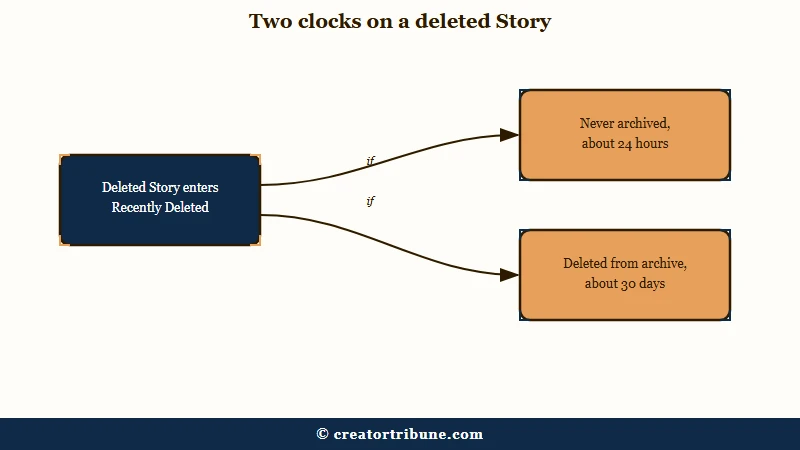
This is the number I would check before doing anything else, and it is the fact most pages on this topic get wrong in one direction or the other. Some tell you every deleted Story is gone in 24 hours. Others tell you everything gets 30 days.
Both answers are half right. Picking the wrong half either wastes a month you did not know you had, or costs you the files while you take your time.
| What you did | Where it went | Time to restore it |
|---|---|---|
| Deleted a live Story that was never archived | Recently Deleted | About 24 hours |
| Deleted a Story out of your Stories Archive | Recently Deleted | About 30 days |
| Archived a live Story | Stories Archive | No deadline, but no restore either |
| Posted with archiving switched off | Nowhere | Gone once the 24 hours ends |
To restore one, open your profile, tap the three-line menu, then Your activity, then Recently deleted under Removed and archived content. Tap Stories at the top, open the Story, tap the three dots, and choose Restore twice. The same help page places the folder in the Instagram app for Android and iPhone.
A restore can also fail on Instagram’s side. One r/Instagram poster on 6 October 2026 and another on 17 October got a “Network Error” saying the item wasn’t restored, and switching between Wi-Fi and mobile data did not help either of them. One reply said Instagram let them restore a stuck reel about four days later, so keep retrying inside the window.
One thing to be clear about: restoring a Story from Recently Deleted returns it to your archive, not to your live ring. Getting it in front of people again still means resharing it, with everything in the table above still applying.
Deleting old Stories on purpose runs on the same 30 day clock. Instagram’s help on deleting content lists Stories in your archive and in highlights among what you can delete. Its archive page adds one more reason: archived Stories you shared publicly “will be used to improve AI at Meta unless you delete them or change your account to private”.
One r/Instagram poster on 3 October 2026 said an ex’s old Stories kept popping up every time they edited their highlights. Instagram’s help on deleting archived Stories lists the route: Your activity, then Archived, open the Story, then Options, Delete story and Delete again. That also removes it from any highlight.
Is There a Way to Restore Archived Stories in Bulk?
No. Instagram has no restore all control, so every Story comes back one tap at a time.
That is the whole answer, and it is the reason a large accidental deletion turns into a week of work.
I don’t buy the idea that this is a rare edge case. A creator who lost a full archive described it plainly in an r/Instagram thread: “Instagram only allows restoring them one by one, and there is no option to restore everything at once.”
Someone in the same thread said support gave them the same answer: “Nope, I contact meta and the only solution was to restore it one by one!”
The arithmetic gets grim fast. One person in that thread set a pace of 200 restores a day and worked out they had 27 days of tapping left. Another hit a second wall: “every time i get closer to the bottom the app crashes.”
It still happens. In September 2026 an r/Instagram poster said they had accidentally deleted more than 20,000 Stories from their archive, and that Recently deleted would only restore them one by one.
Requesting your data through Account Center is the obvious fallback, and it is not reliable either. Someone chasing years of missing Stories in that first thread got an export covering only 2017 to 2018.
The practical move is to protect the ones you still have, so a server-side problem cannot take the only copy. Switch on saving Stories to your camera roll, back that folder up to iCloud or Google Photos, and save older ones from the archive with Options, then Save photo or Save video.
Can You Unarchive an Instagram Story on a Computer?
No. Instagram’s help gives no computer route to the Stories Archive, and it places Recently deleted in the Instagram app for Android and iPhone.
Unarchiving and restoring are phone-only jobs.
The desktop gap annoys me more than it should, because the people most likely to have a large archive worth managing are the ones working at a desk.
A browser does reach the archive setting: Instagram’s computer help puts Save story to archive under More, then Settings, then Archiving and downloading.
Plan around it instead. Do your archive work on the phone, and if a Story is important enough to reshare later, save the original file somewhere your desktop can see it on the day you post it.
Anything that never uploaded in the first place is a separate problem, and Stories that will not upload covers that path.
Frequently Asked Questions
Is there an unarchive button for Instagram Stories?
No, the Stories Archive offers Share and Highlight only. Share posts the Story again as a new one, and Highlight pins it to your profile. The Show on profile control that returns an archived feed post to your grid does not exist for Stories.
Can I get back a Story I archived by accident before 24 hours?
Not to its original slot. Archiving ends a live Story straight away, and resharing it starts a fresh 24 hour timer with an empty viewer list. The Story itself is safe in your archive, so nothing is lost except its place and its numbers.
Do my followers get notified when I reshare an archived Story?
They see it the way they see any new Story, at the front of your ring with today’s timestamp. Anyone who turned on Story notifications for your account gets the usual alert, though anyone who watched it the first time will recognise it.
How long do deleted Instagram Stories stay in Recently Deleted?
Around 24 hours for a Story that was never in your archive, and around 30 days for anything else, including Stories deleted out of the archive. Restoring one returns it to your archive rather than to your live Story ring.
Can I see who viewed a Story after I unarchive it?
Instagram shows the named viewer list for up to 48 hours from the first post, 24 hours live plus 24 in the archive. Story insights last up to two years on a public account, and resharing does not bring the names back.
Why do my old Stories not show up in the archive at all?
The Save story to archive setting was switched off when you posted them, or your account is one of those Instagram says Stories Archive isn’t available for. The setting only applies going forward, so turning it on now protects future Stories and cannot recover older ones.
Quick Takeaways
- Instagram has no unarchive control for Stories, only Share and Highlight, and Share creates a new Story with a fresh 24 hour clock.
- Archiving a live Story ends it on the spot, and the Show on profile advice circulating for this problem belongs to feed posts.
- Your restore deadline in Recently Deleted is about 24 hours if the Story was never archived and about 30 days if it was.
- There is no bulk restore, so a large accidental deletion is a one-by-one job measured in days.
- Switch on saving Stories to your camera roll today, and back that folder up off the phone.
- Your old Stories live in the Stories Archive, and Instagram’s help says publicly shared ones are used to improve AI at Meta unless you delete them or go private.