
How to Archive Instagram Posts Without Hurting Your Reach
How to Archive Instagram Posts Without Hurting Your Reach
Archiving hides an Instagram post from everyone but you and keeps its likes and comments. Steps for one post or many, where it goes and how to restore it.
TL;DR: To archive an Instagram post, open it, tap Options in the top right and choose Archive. The post disappears from your profile for everyone but you, keeps every like and comment, and goes back to its original spot when you tap Show on profile. Instagram has published no rule that archiving or deleting old posts lowers your reach, and since June 8, 2026, Reorder grid can tidy a profile without hiding anything.
If you want to know how to archive Instagram posts, it takes three taps: open the post, tap Options in the top right, then Archive. Instagram’s archive page says the post is hidden so “your followers and other people on Instagram can’t see it,” and that it “keeps all its likes and comments.”
The harder choice is usually between archiving, deleting and, since June 2026, reordering. Archiving can be undone at any time, deleting starts a 30-day countdown in Recently Deleted, and Reorder grid moves posts around without hiding any of them.
This guide covers the steps for one post or many, what archiving does, where archived posts go, Reels and Stories, a missing Archive button, and a grid cleanup that keeps your history.
How to Archive Instagram Posts
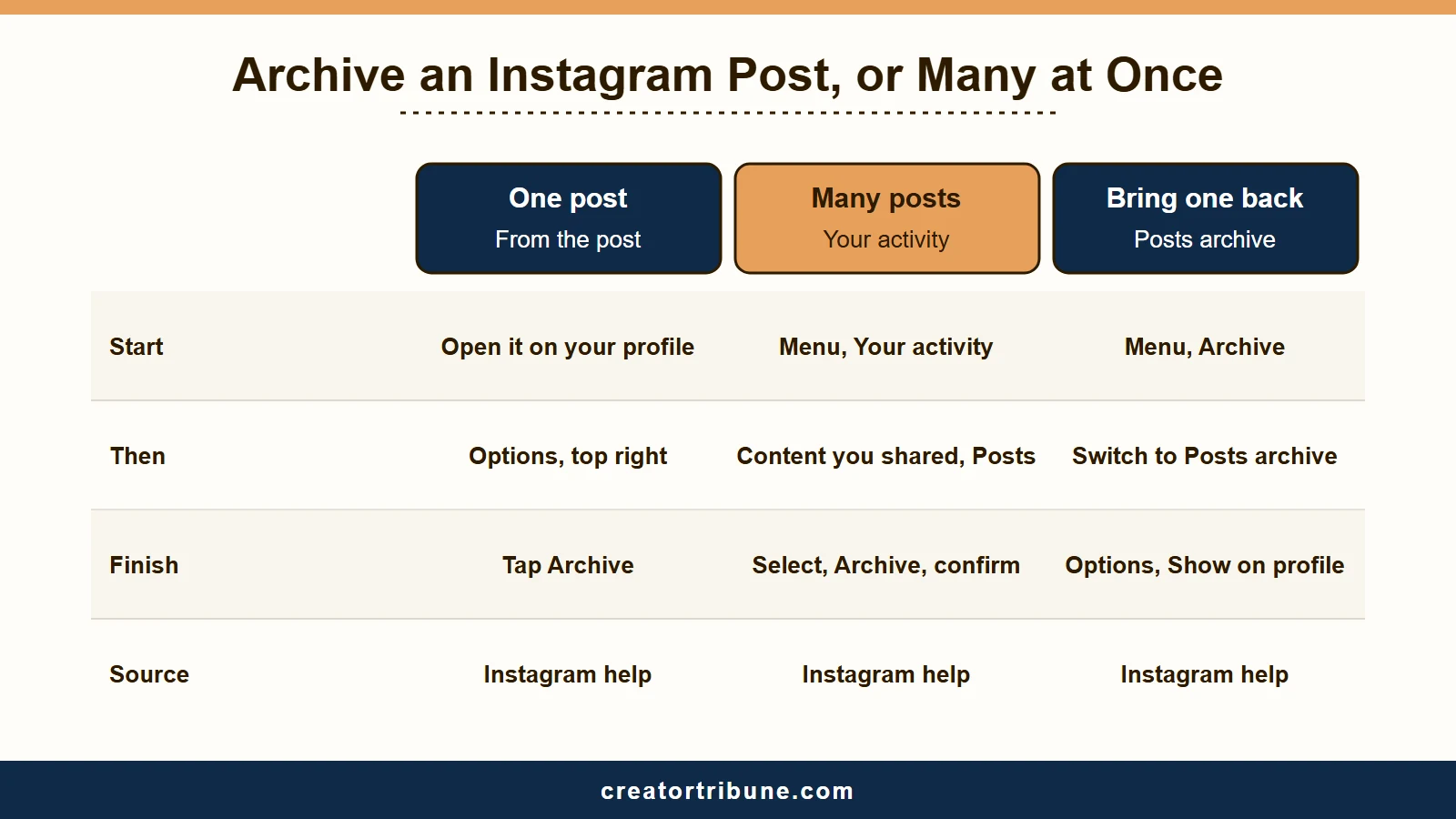
To archive an Instagram post, open it from your profile, tap Options in the top right and select Archive. It leaves your profile at once and moves to a Posts archive that only you can see, with every like and comment kept.
What does archiving mean on Instagram: Hiding a post you’ve shared from your profile while Instagram keeps it, likes and comments included, in a private Posts archive. You can show it on your profile again at any time.
For a single post, the Options menu is all you need. To clear a batch at once, Instagram’s bulk archive page gives this route in the app:
- Go to your profile and tap Menu in the top right.
- Below How you use Instagram, tap Your activity.
- Below Content you shared, tap Posts.
- Tap Select in the top right, then select each post you want to hide. Newest to oldest and All dates let you sort or narrow the list first.
- Tap Archive at the bottom, then tap Archive again to confirm.
That page gives no maximum per batch. For a big cleanup, the All dates filter lets you work through one year at a time. A reel has its own route: open it, tap Options, then Manage and Archive, as Instagram’s page on managing reels shows.
Archiving hides a post from everyone at once. To keep just one person away from a future post, you can hide a post from someone with Close Friends before you share it, without blocking them.
An archived post still lives only inside your Instagram account, so save a copy of any post you can’t lose before you hide it. Inflact saves posts from a public profile by username, in original quality and without an Instagram login, but it can only reach posts that are still showing.
What Happens When You Archive a Post on Instagram?
When you archive a post on Instagram, it disappears from your profile for everyone but you and moves to your private Posts archive, likes and comments included. Show on profile puts it back in its original spot on your grid.
To find it, go to your profile, tap Menu, then Archive below How you use Instagram. The archive opens on Stories archive, so tap that label at the top and switch to Posts archive, as Instagram’s restore page describes. Instagram’s page on archived content gives a second route through Your activity, then Archived, and lists Live archive in the same menu.
In Posts archive, tap the post, tap Options and choose Show on profile. Instagram says the post “will return to its original spot on your profile,” so the archive can’t move an old post to the top of your grid.
Instagram’s archive pages mention no notification for archiving or unarchiving. In an October 23, 2026 thread, two users who had unarchived many posts said none of them drew new likes or comments (r/Instagram).
Open the archive in the app. In an August 2026 thread, a user on a phone browser found only a Stories archive, and the archived photo showed up once they opened the Instagram app (r/Instagram).
Does Archiving Instagram Posts Hurt Your Reach?
Instagram has published no rule that archiving posts, or deleting them, lowers the reach of the posts you share next. You can bring an archived post back with its likes and comments at any time, while a deleted one is gone for good after 30 days.
Instagram’s ranking explainer, written by Adam Mosseri in May 2023, names four main signals for Feed. They are your activity, information about the post, information about the person who posted, and your history of interacting with them. It lists no reach penalty for archiving or deleting posts.
So the common warning that a mass delete gets your account flagged has no Instagram source behind it. If your numbers already look off, rule out the causes behind a dropped Instagram reach, or an Instagram shadowban, before you start hiding posts.
Deleting is the step that can’t be fully taken back. Instagram’s page on deleted content says a deleted post moves to Recently Deleted and is “automatically deleted 30 days later,” and until then you can restore it in the app on Android or iPhone.
| Action | What happens | Can you undo it | Likes and comments |
|---|---|---|---|
| Archive | Hidden from your profile for everyone but you | Yes, Show on profile returns it to its original spot | Kept |
| Delete | Moves to Recently Deleted, then deleted after 30 days | Only within those 30 days | Gone after the 30 days |
| Remove from profile grid (Reels) | Off your main grid, still on your Reels tab | Yes, Add to profile grid puts it back | Kept |
How to Archive Instagram Reels and Stories
Archive a reel from the reel itself: tap Options, then Manage, then Archive. Stories save to your Stories archive automatically after 24 hours, as long as Save story to archive is turned on.
If a reel only needs to leave your main grid, removing it from the grid is enough. Instagram’s reels page lists Add to profile grid in the same Manage menu, so that choice can be reversed later.
What is Remove from profile grid: A Reels option that takes a reel off your main grid while it stays on your Reels tab.
Stories work differently from feed posts. To turn automatic saving on or off, go to Menu, Your activity, Archived, then Options, Settings and Save story to archive, per Instagram’s Stories archive page.
You can also archive a story before its 24 hours are up: open it, tap Options, then Archive. Instagram says archived stories “can’t be seen on Instagram unless you choose to share them.”
Stories have no Show on profile control, so bringing one back means resharing it or adding it to a Highlight, and unarchiving an Instagram Story covers what a reshare costs you.
The same Instagram page warns that some stories change when they are saved to the archive, “muting music or freezing videos or gifs,” and that those changes are permanent. It also says archived stories you shared publicly “will be used to improve AI at Meta unless you delete them or change your account to private.”
Why Is My Instagram Archive Button Missing?
If Archive is missing from a post’s Options menu, long-press the post on your profile grid, and update the app if it still doesn’t appear. Instagram also says Stories Archive and Highlights “aren’t available for all accounts,” so a missing Stories archive isn’t always a bug.
The long-press menu holds Pin to main grid, Archive and, since June 2026, Reorder grid, as Engadget described it. An r/Instagram user found the same workaround in August 2024, when Archive vanished from the three-dot menu after an update (r/Instagram).
One user reported an archive that stayed broken for weeks. On October 21, 2026, they said it had shown only the last eight or nine days for about eight weeks, despite daily reports to Instagram, before everything came back (r/Instagram).
| Symptom | Likely cause | Fix |
|---|---|---|
| Archive not in the Options menu | A changed menu after an update | Long-press the post on your profile grid |
| Archive missing everywhere | An outdated app | Update Instagram, then reopen the post |
| No Posts archive in a browser | Reported as app-only | Open Archive in the Instagram app |
| Stories archive empty or short | Saving switched off, or an archive outage | Check Save story to archive, then report it |
| Music muted on an archived story | Instagram’s storage changes | Permanent, so keep your own copy |
How to Use the Archive to Clean Up Your Grid
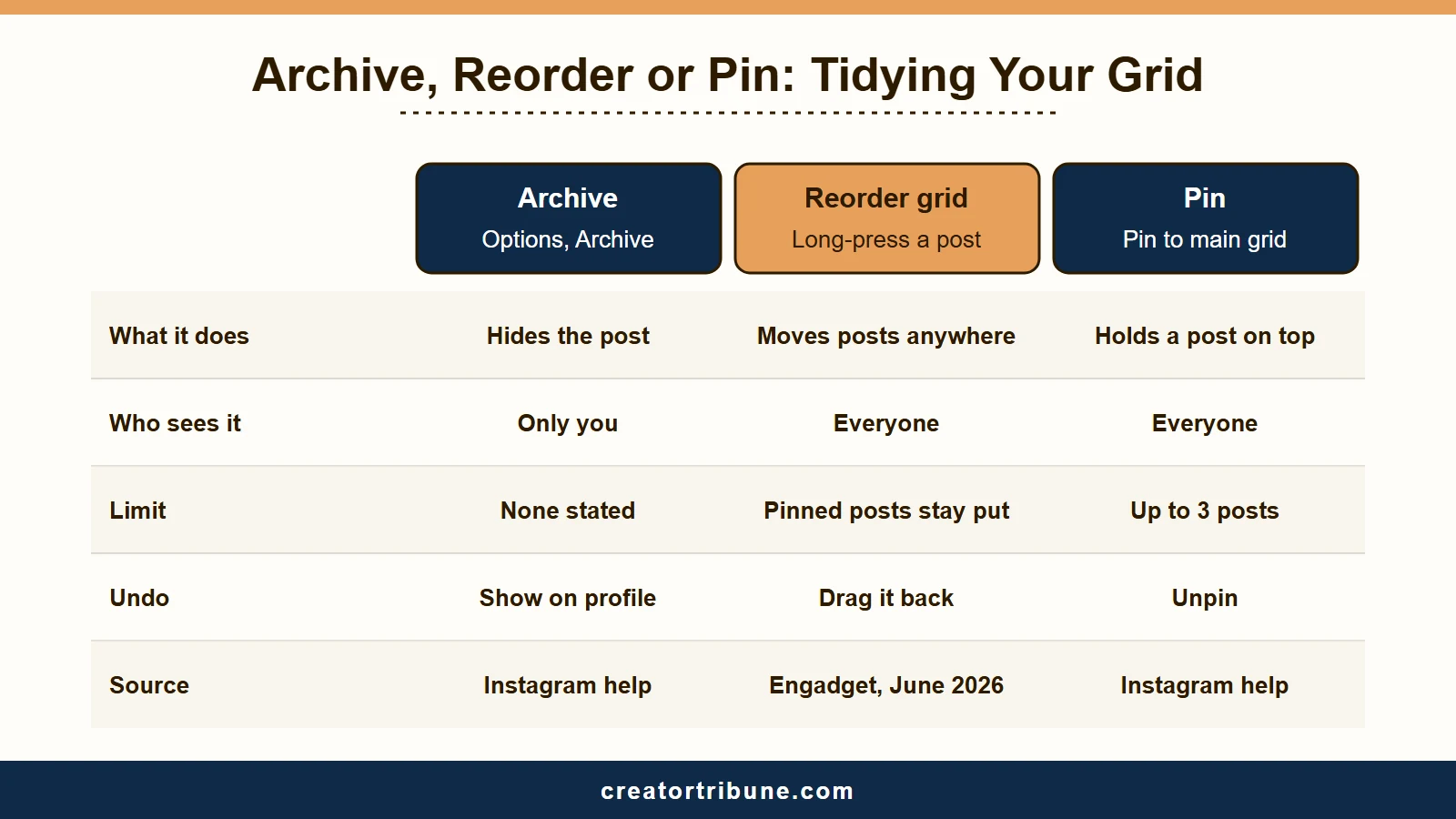
For a grid cleanup, archive the posts you no longer want seen and use Reorder grid to rearrange the ones you keep. Both can be undone later, unlike a delete, which Instagram makes final after 30 days.
In January 2025 Instagram switched the profile grid from squares to taller rectangles, as PetaPixel reported, which threw off grids that photographers had lined up as squares. A tip PetaPixel quoted from Reddit is to open the post’s settings, choose Adjust preview and pick Fit.
You no longer have to hide posts to change the order of your grid. On June 8, 2026, Engadget reported that anyone, “anywhere you are in the world,” can long-press a post, tap Reorder grid and drag posts into a new order. Pinned posts stay at the top.
The full steps, and the glitches people hit with the new button, are in our guide on how to reorder your Instagram grid. Pinning is the third tool: Instagram’s pin page allows up to 3 posts at the top, and an unpinned post returns to its original spot.
A grid rebrand is also a good time to give followers a way to reach you off Instagram. The free Creator Money Page template turns your bio link into an email list you own, and setup takes about two minutes.
Quick Takeaways
- To archive a post, open it, tap Options in the top right and choose Archive, and it keeps every like and comment.
- Archive many posts at once from Menu, then Your activity, then Posts below Content you shared.
- Show on profile returns a post to its original spot rather than the top of your grid.
- Instagram has published no rule that archiving or deleting lowers your reach, but a deleted post is gone after 30 days.
- Since June 8, 2026, Reorder grid rearranges your profile without hiding anything.