Why Does It Say Post Unavailable on Instagram and What to Do
Why Does It Say Post Unavailable on Instagram and What to Do
Post unavailable on Instagram means the post was deleted, archived, private or limited by age or country. Run the 30-second check to find yours.
- 1Why Does It Say Post Unavailable on Instagram?
- Does Post Unavailable Mean Someone Blocked You?
- 2How Can You Tell Which Cause You Have in 30 Seconds?
- 3Why Does a DM Say Message Unavailable on Instagram?
- Why Can’t a Teen Open a Post Someone Sent?
- What Happens to Messages From a Deleted Account?
- 4Why Is My Instagram Post Unavailable to Some People?
- How Do You Check If Instagram Hid Your Account From Teens?
- Which Settings Hide a Post From Part of Your Audience?
- What Does Unavailable in Some Locations Mean?
- 5Does Restricting Someone Make Your Posts Unavailable to Them?
- 6Will Clearing the Cache Fix Post Unavailable on Instagram?
- 7Frequently Asked Questions
- What does post unavailable mean on Instagram?
- Does post unavailable mean I’m blocked?
- Why is my Instagram post unavailable to some people?
- Why does Instagram say message unavailable?
- Can you see an Instagram post that says unavailable?
- How do I turn off post unavailable on Instagram?
- 8Quick Takeaways
TL;DR: Instagram shows Post unavailable when a post was deleted or archived, belongs to a private account you don’t follow, or is held back by the owner’s audience settings, your age or your country. If a friend can open it and you can’t, the limit applies to your account, and clearing the cache won’t lift it. Creators seeing this on their own posts should open Account Status and check Availability to people under 18 first.
Why does it say post unavailable on Instagram when the post was fine a minute ago? Instagram uses those same two words for deleted posts, private accounts, age limits and country blocks. It never tells you which one you hit.
One creator on r/Instagram found their post opened for their mom but not their sister, and for friends in China but not in Spain or Thailand. The thread ends months later with a second creator asking the same question, and nobody posting a fix.
The screen I send creators to first for that problem is Account Status, where Instagram now keeps a check called Availability to people under 18. It takes about a minute to read, and it answers the some-people-can-see-it question faster than any setting on this page.
Below you’ll find what each version of the message means and a 30-second test for viewers. After that come the reasons a chat says Message unavailable, and the settings creators should check when a post disappears for part of their audience.
Why Does It Say Post Unavailable on Instagram?
Instagram says Post unavailable when a post was deleted or archived, or when a rule stops your account from seeing it. The usual rules are a private account you don’t follow, an age limit, a country block or a block by the owner.
The exact wording is your first clue. Reels and videos fail the same way as photo posts, so every cause below applies to them too.
| What you see | What it usually means | Check this first |
|---|---|---|
| Post unavailable | Deleted, archived, private, or limited by age or country | Tap the account name and see if the profile opens |
| This post is unavailable because it was deleted | The post is gone for everyone | Ask the sender for a screenshot |
| Message unavailable | A shared post or reel you can’t open from a chat | Whether you follow the account that posted it |
| Cannot find this user | Deactivated, deleted, or you are blocked | A logged-out browser tab |
| Unavailable in some locations | Meta restricted the account or post in a country | Account Status, if it’s your account |
Stories have their own causes, because they expire after a day and can be hidden from one viewer at a time. The story version of this error has its own guide.
The deleted message is the only one I treat as final. Every other wording on that list leaves at least one thing you can try.
Does Post Unavailable Mean Someone Blocked You?
A block is rarely the reason when only one post fails. Instagram’s post visibility page names blocking as the way to stop one person seeing your posts. A block takes the whole account out of view at once.
If the whole profile has vanished for you, the block versus deactivation test sorts it out in about two minutes. Run it from a logged-out browser tab or a friend’s phone, never from your own second account.
Instagram’s blocking pages are written for the person doing the blocking. One of them says a block can reach “other existing accounts they may have or any new accounts they may create.” Read from your side, that means your backup account may be blocked too.
How Can You Tell Which Cause You Have in 30 Seconds?
You can find the cause in about 30 seconds with two checks. See whether the account’s profile opens for you, then whether the post still opens for the person who sent it.
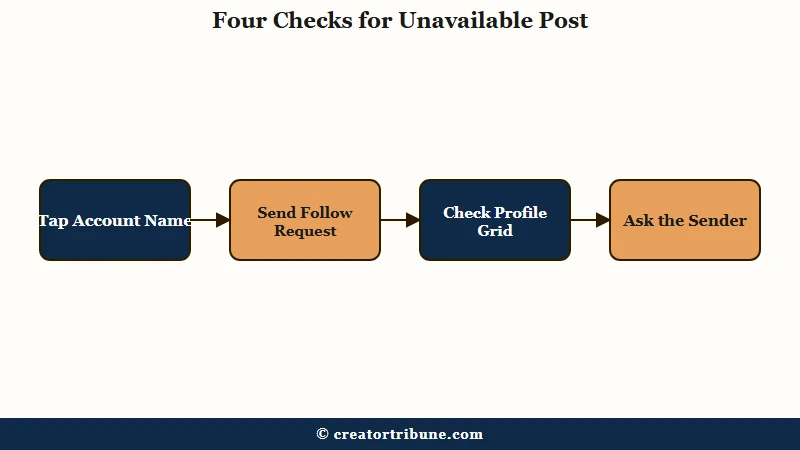
This is the order I run it in, because each step rules out a whole group of causes at once:
- Tap the account name above the post, or search the username.
- If the profile says This account is private, tap Follow and wait for approval.
- If the profile opens but the post isn’t on the grid, it was deleted, archived or shared to a smaller audience.
- If the profile won’t open at all, try a logged-out browser tab or a friend’s phone.
- Ask the person who sent it whether it still opens for them.
| What you find | What it means | What to do |
|---|---|---|
| The profile says it’s private | You don’t follow a private account | Send a follow request |
| The profile opens, the post is missing | Deleted, archived, or shared to a list you’re not on | Ask the sender for a screenshot |
| The post opens for the sender but not for you | A limit on your account, such as age or country | Read the chat and creator sections below |
| The profile only loads when logged out | You are most likely blocked | Nothing to fix on your side |
| The profile is gone for everyone | Deactivated or deleted | Wait, since deactivation can be undone |
The sender can still see the account name even when your chat shows nothing, so ask them in words that get a useful answer.
Vague: “it says unavailable”
Specific: “The reel you sent says Post unavailable for me. Does it still open on your phone, and which account posted it?”
Send that message before you touch a single setting.
Why Does a DM Say Message Unavailable on Instagram?
A chat says Message unavailable when the shared post was deleted or hidden, or when your account isn’t allowed to see the account that posted it, most often because it’s private and you don’t follow it.
The full text reads “This content may have been deleted by its owner or hidden by their privacy settings,” the wording quoted in this r/Instagram question. Instagram’s sharing help page explains the privacy half: “when you send a private account’s post as a message, only people who follow that account will be able to see the post.”
Shared private posts used to show the account name and a prompt to follow it. That changed in early 2021, as an r/Instagram thread from February 2021 records, and today the chat gives no clue about who posted it. That change is why my first question to the sender is always the account name.
Archived posts fail the same way. Instagram’s archive page says archiving hides a post so “your followers and other people on Instagram can’t see it,” while keeping its likes and comments, and the owner can undo it at any time.
Why Can’t a Teen Open a Post Someone Sent?
Teen accounts add one more cause. Meta says that when someone sends a teen a link to content from an account that regularly shares age-inappropriate posts, “they won’t be able to open it,” in its update on teen content settings.
The rule reached the US, UK, Australia and Canada first, as TechCrunch reported on 14 October 2025. Meta took it international on 9 April 2026.
Teens are placed in a 13+ content setting by default and need a parent’s or guardian’s permission to change it, per Instagram’s sensitive content page. If the person who can’t open your link is under 18, check this cause before any other.
What Happens to Messages From a Deleted Account?
Messages from an account that was later deleted can turn into an unavailable message too. An answer on r/Instagram says they “eventually” show up that way, and Instagram has not published a timeline.
If whole conversations vanished instead, the guide to disappearing messages covers that case. Ask the sender for the account name, then follow it if it turns out to be private.
Why Is My Instagram Post Unavailable to Some People?
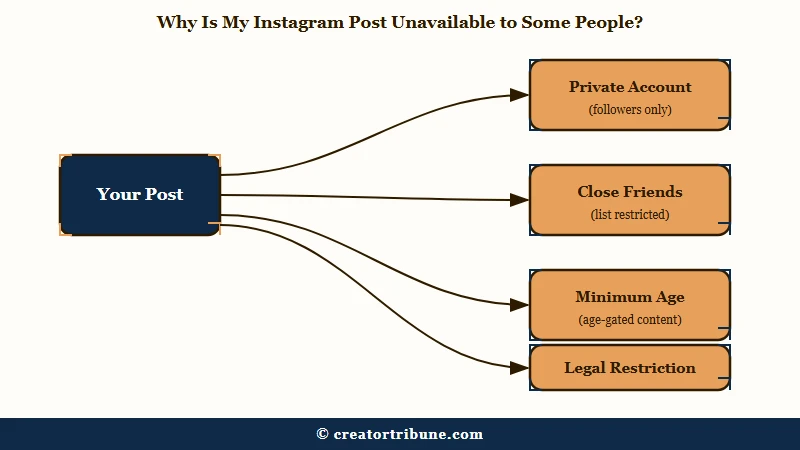
Your post shows as unavailable to some people when an audience limit filters them out, such as a private account they don’t follow, a Close Friends list, a minimum age, a country block, or Instagram hiding your account from teens.
The fastest check is one most creators never open. Account Status now includes Availability to people under 18, and a warning there means people under 18 “may not be able to” see your “profile picture, bio, profile, stories, posts or reels,” per Instagram’s Account Status page.
That warning splits an audience by age, so followers under 18 lose the post while everyone older sees it as normal. It’s the first place I look when a post reaches some people in a family and not others.
How Do You Check If Instagram Hid Your Account From Teens?
Instagram’s help page gives this path in the app:
- Tap Profile or your profile picture in the bottom right.
- Tap Menu in the top right.
- Scroll to More info and support, then tap Account Status.
- Tap Limits to your reach or Availability to people under 18.
- Read the icon, since a warning means your account and content aren’t being shown to teens.
If you’re flagged, tap Actions you can take. Instagram lets you edit the flagged content, archive it, or update your bio and links, and it says the review “could take up to 24 hours.”
Archiving the flagged post is the move I make before anything else, since it keeps every like and comment and takes one tap to undo. If you think the flag is wrong, look for a Request review link, which Instagram offers some accounts without any edits.
Which Settings Hide a Post From Part of Your Audience?
Five settings can hide a post from some people and not others, and three of them are switches you may have set yourself.
| Setting | Who can’t see the post | Where to check |
|---|---|---|
| Private account | Anyone who doesn’t follow you, even when your post is sent to them | Menu, then Account privacy |
| Close Friends | Everyone who isn’t on your list | The audience you picked when posting |
| Minimum age | Anyone under the age you set, overall or by country | Menu, Account type and tools, Other, Minimum age |
| Branded content limits | People under the post’s minimum age or in blocked countries | Partnership label and ads, then Add audience restrictions |
| Legal restriction | Everyone in one country | Account Status |
Only professional accounts can set a minimum age, according to Instagram’s minimum age page, and you can add “ages by country” on top of a default. The same page warns that people under your limit “may not be able to see your profile’s comments,” including comments you leave on other accounts.
If an age limit keeps coming back or you never set one, removing an Instagram age restriction walks through the fix.
Branded content has its own switches on each post. Instagram’s branded content page offers a minimum age and “Location restrictions” that “prevent people in specific countries or regions from seeing this content,” and some categories, such as alcohol, require the age limit.
Close Friends covers feed posts as well as stories. Instagram’s Close Friends page lets you limit “a post, note, reel, or story” to your list, so anyone outside it can’t see that post even when a friend sends it to them.
Private accounts work the same way for everyone who doesn’t follow you. Instagram’s public and private accounts page adds that accounts for people under 18 are private by default, and that posts shared from a private profile to a broadcast channel show non-followers “that the content is unavailable in the channel.”
What Does Unavailable in Some Locations Mean?
It means Meta restricted the account or post in one or more countries under local law. Instagram’s legal restrictions page says that when content is found illegal in a country, “we make it unavailable in the relevant country or territory,” and gives Holocaust denial in Germany as its example.
The wording appears in Account Status. On 6 August 2026, Aam Aadmi Party leader Arvind Kejriwal shared a screenshot of his Account Status page reading “Unavailable in some locations,” and said Meta’s India office told him the account was unavailable in India, PTI reported.
No setting turns this off. My advice is to screenshot the Account Status page the day you find it, because Meta may not explain the restriction anywhere else.
Does Restricting Someone Make Your Posts Unavailable to Them?
No, Restrict doesn’t hide your posts. Instagram’s own list of what Restrict does covers comments, messages and online status, and it says nothing about posts.
Restrict is the quiet alternative to blocking, and the person you restrict keeps seeing your posts. Instagram’s Restrict page names three effects on the restricted person:
- They can’t see when you’re online or whether you’ve read their messages.
- Their new comments on your posts are visible only to them until you approve them.
- You stop getting notifications for their comments.
Restrict is the one setting I rule out straight away when a post goes missing, because none of those three effects touches a post. The guide to spotting a restriction covers the same tool from the other side.
Will Clearing the Cache Fix Post Unavailable on Instagram?
Clearing the cache fixes Post unavailable only when your app is glitching, and you can confirm that in two minutes by opening the same post on instagram.com in a browser, logged in as you.
Most causes on this page live on Instagram’s servers, so reinstalling changes nothing. In one r/Instagram thread from January 2026, clearing the cache, reinstalling, logging out and a short deactivation all failed to bring back reels that friends could still see.
A true app glitch looks different. Another r/Instagram thread describes shared posts failing for weeks and then fixing themselves with no action taken.
I test the app before touching the cache, in this order:
- Update Instagram from the App Store or Google Play.
- Open the same post at instagram.com in a browser, logged in to the same account.
- If it opens there, restart your phone.
- On Android, go to Settings, Apps, Instagram, Storage and tap Clear cache.
- On iPhone, go to Settings, General, iPhone Storage, Instagram and tap Offload App, then reinstall.
Post or save any unfinished drafts before steps 4 and 5. Instagram keeps drafts on one phone rather than in the cloud, and offloading or reinstalling the app erases them for good. Reports disagree on whether Android’s Clear cache takes them too, so treat drafts as at risk on both paths.
Reinstalling has no wins in the threads on this page. It failed in the January 2026 case alongside the cache, a logout and a short deactivation, and the case that did resolve fixed itself with nobody touching a setting.
If the post fails in the browser too, the cause is one of the limits above, and no cache setting will change it. If the whole chat won’t load, not only one post, the DM loading guide is the better fit.
A common tip is to switch Sensitive Content to More. Instagram’s page on that control says it shapes Explore, Search, Reels, Comments, Accounts You Might Follow and feed recommendations, and that it “only limits this type of content from accounts you don’t follow.”
Chats aren’t on that list, so I treat the switch as a two-minute test and change it back if nothing opens. Changing your sensitive content setting shows where it lives.
If More isn’t offered at all, that is itself a clue. A reply in the January 2026 thread above says Instagram gates the option by age and region, and that accounts for people under 18 typically don’t get it.
That fits a 15-year-old in the same thread whose reels were stuck at the 13+ level. Check the age on the account before hunting for a setting that was never there.
If the post opens in the browser and never in the app, report it through Help, then Report a problem, in the app’s settings.
Vague: “posts not working”
Specific: “Every post shared to me in chats shows Post unavailable since Monday, even from public accounts I follow. The same posts open at instagram.com on my laptop. iPhone 15, latest app version.”
The browser detail is the part support can act on, which is why I leave it in every report. Update, test in a browser, and only then clear the cache.
Frequently Asked Questions
What does post unavailable mean on Instagram?
It means your account can’t open that post. The post was deleted or archived, belongs to a private account you don’t follow, or is limited by age, country, a Close Friends list or a block.
Does post unavailable mean I’m blocked?
Usually not. A block hides the whole account, so check whether the profile opens. If the profile loads but one post fails, the post was deleted, archived or limited to an audience you’re not in.
Why is my Instagram post unavailable to some people?
An audience limit is filtering them out. Check Account Status for Availability to people under 18, your Minimum age setting, the post’s Close Friends or branded content settings, and whether your account is private.
Why does Instagram say message unavailable?
The shared post can’t be shown to you. The original was deleted or archived, or it comes from a private account you don’t follow. Teens also can’t open links to content from accounts Instagram rates as age-inappropriate.
Can you see an Instagram post that says unavailable?
Only when the limit is on your side and you can change it, such as by following a private account. A deleted post is gone for everyone, so ask the sender for a screenshot instead.
How do I turn off post unavailable on Instagram?
There is no single switch. Viewers can follow the account or ask for a screenshot. Creators can lift limits in Account Status, the Minimum age setting or the post’s audience settings, or by making the account public.
Quick Takeaways
- Post unavailable covers deleted, archived, private, age-limited and country-limited posts, and the wording alone won’t tell you which.
- Tap the account name first, because a profile that opens while one post fails rules out a block.
- Message unavailable in a chat usually means a private account you don’t follow, so ask the sender for the account name.
- Creators should open Account Status and check Availability to people under 18 before changing anything else.
- Clearing the cache only helps when the same post opens on instagram.com in a browser.