Why Instagram Keeps Unblocking Someone You Blocked and the Fix
Why Instagram Keeps Unblocking Someone You Blocked and the Fix
Instagram unblocked someone you blocked? Check your blocked list, their other accounts, who can log in and Threads, then make the block stick.
- 1Why Does Instagram Keep Unblocking Someone I Blocked?
- 2How Do I Check Whether My Instagram Block Is Still On?
- Why Can’t I Find Someone on My Instagram Blocked List?
- How Do You Unblock Someone on Instagram When It Says User Not Found?
- 3Can Someone I Blocked Come Back on Another Instagram Account?
- 4Could Someone With Access to My Account Have Unblocked Them?
- 5Does Blocking Someone on Threads Also Block Them on Instagram?
- 6What Should I Do if My Instagram Block Keeps Coming Undone?
- What Can You Use Instead of a Block While You Wait?
- 7What Can Someone See Once Instagram Unblocks Them?
- 8Quick Takeaways
TL;DR: Instagram has no documented setting that lifts a block on its own, and Meta’s help pages never say a block expires. When someone you blocked is back, the causes worth checking first are a second account your block never reached, someone else with access to your account, and a Threads block that did not carry over. Open Settings, then Blocked, and work through the checks below.
If you are asking why Instagram keeps unblocking someone you blocked, start with what Meta documents. Its help pages explain how a block works and how to lift one, and none of them describes a block expiring or reversing itself.
The complaint is still real, and it keeps coming back. A December 2025 post on r/Instagram describes an ex who “randomly became unblocked” in late 2022 and seemed to come unblocked again in December 2025. The poster “never touched blocked list after blocking someone.”
A July 2026 post found “a few people had been unblocked automatically.” In September, a post in r/InstagramSupport described a block that “keeps getting unblocked every 3 to 4 days.” For a creator dealing with an ex or a harasser, that turns one safety setting into a chore repeated twice a week.
Most cases take about five minutes to trace, and the blocked list is the first thing I open. Below are the five checks in the order I run them, what each one rules out, and how to make the block hold.

Why Does Instagram Keep Unblocking Someone I Blocked?
A block that comes undone usually has a cause you can trace, because nothing on Meta’s help pages describes Instagram lifting a block by itself. The causes you can check are an account your block never covered, someone else with access lifting it, and a Threads block that stopped short of Instagram.
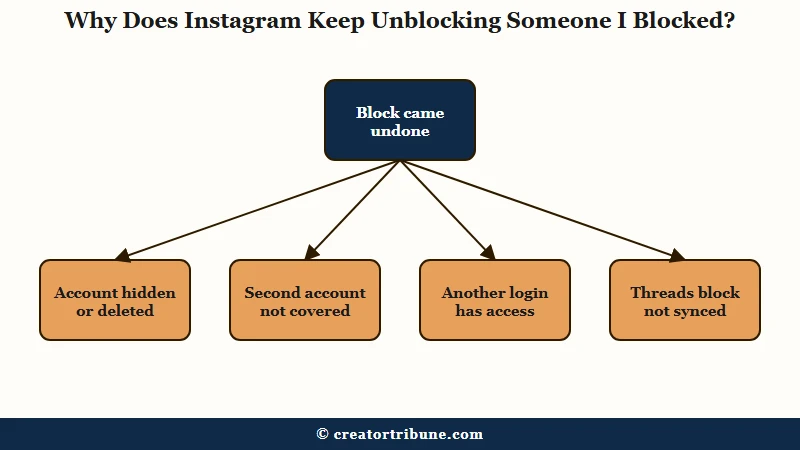
Meta runs an AI-generated answer page on Facebook for this exact question. Labelled “AI-generated summary based on public discussions,” it says “Instagram doesn’t automatically unblock someone you blocked.”
That page summarizes public posts, so it carries less weight than a help article, and a June 2026 Threads post still asks “Anyone else have Instagram unblock people recently?” I don’t treat either side as settled, which is why every check below starts with something you can see on your own screen.
Here is the quick map from what you are seeing to its likely cause.
| What you see | Likely cause | What to do |
|---|---|---|
| They show up in search or Suggested for you | Not proof the block lifted | Open Settings, then Blocked |
| Their name is gone from your blocked list | The account was deactivated or deleted | Check their profile in a logged-out browser |
| They are back under a different username | A second account your block did not reach | Block that account from the app |
| A block you never touched has lifted | Someone else can open your account | Log out other sessions and change your password |
| Blocked on Threads, still visible on Instagram | Threads blocks no longer carry over reliably | Block them on Instagram too |
| The same block lifts again within days | A possible app fault | Update the app and report it |
How Do I Check Whether My Instagram Block Is Still On?
Your blocked list in Settings is the record that counts, and it takes under a minute to open. On a phone, go to your profile, tap Menu in the top right, then tap Blocked below Who can see your content. On a computer, click More, then Settings, then Blocked.
I start every one of these with that list, because search results and suggestions are not a record of anything. If the name is still there, the block is on, whatever else the app has shown you.
What is Accounts Center: Meta’s shared settings area for the Facebook and Instagram accounts you add to it, which turns on connected experiences such as logging in from one account to another.
One section at the bottom of that list catches people out. If your Instagram and Facebook are connected in Accounts Center, Instagram can show “a list of accounts you may want to block.” Per Instagram’s blocked-list help page, that list is built from “accounts you’ve blocked from messaging your Facebook account.”
Names under You may want to block are only suggestions. Each one stays unblocked on Instagram until you tap Block next to it.
Why Can’t I Find Someone on My Instagram Blocked List?
A name that drops off your blocked list most likely belongs to a deactivated or deleted account, which is a different thing from being unblocked. Instagram’s deactivation page says a deactivated profile’s “photos, comments and likes will be hidden until you reactivate it by logging back in.”
I treat a missing name as a hidden account until the profile turns up again. Nothing on Meta’s block or deactivation pages says deactivating cancels a block, and an owner can deactivate as often as “once a week,” so a name can vanish and return more than once.
A logged-out browser tab tells you which it is. A deactivated or deleted account shows “Sorry, this page isn’t available” to everyone, and telling a block from deactivation walks through that test from the other side.
How Do You Unblock Someone on Instagram When It Says User Not Found?
Unblock them from the blocked list in Settings, where Instagram puts an Unblock button next to every name, rather than from their profile or a search. “User not found” only means their profile will not load for you.
A block, a deactivation, a deletion or a suspension can all produce that screen. If the name is on your list, tap Unblock and confirm. If it is not there, the account is most likely hidden or gone, and the list has nothing for you to tap.
Can Someone I Blocked Come Back on Another Instagram Account?
Yes, a blocked person can reach you from a second account, and Instagram’s wider block covers only some of them. Instagram says a block made from the app “will block their account, other existing accounts they may have or any new accounts they may create,” per its block help page.
The same page sets two limits. The wider block “will not apply to other accounts of theirs that you already follow,” and its wording covers blocks made “from the Instagram app.”
Instagram added the new-accounts option in 2021, when TechCrunch reported users could “proactively block people even if they try to contact the user in question over a new account.” Meta still hedges on how far it reaches: if the person “has multiple Instagram or Facebook accounts, you may need to block each account,” says Meta’s blocking page.
For an ex or a persistent harasser, a second account is the cause I rule out first. Compare the username, profile photo and post history with the account you blocked, then block the new one properly.
- Open their profile in the Instagram app, from a post or by searching the username.
- Tap Options in the top right, then tap Block.
- Choose the option that also blocks other accounts they may have or create.
- Tap Block to confirm.
- Block any account of theirs that you already follow, one at a time.
Could Someone With Access to My Account Have Unblocked Them?
Yes, anyone who can open your account can lift a block, and since early 2026 that includes any account in your Accounts Center. Instagram’s account login page says that starting early 2026, “all accounts will be able to log into each other by default.”
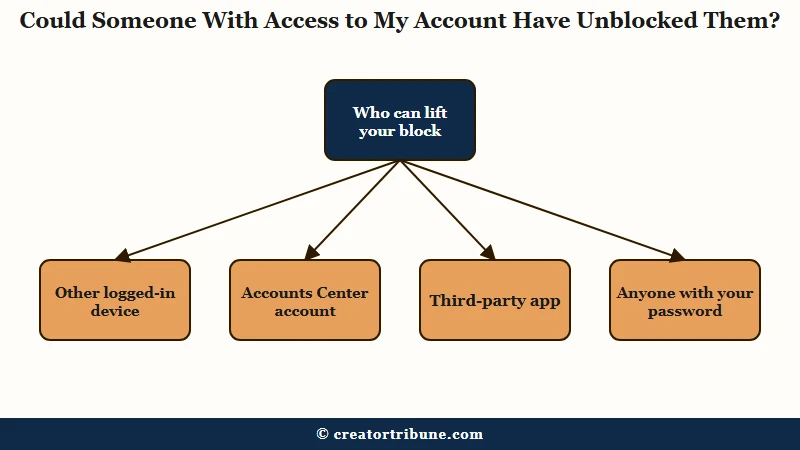
That means an account someone else also uses, such as a shared brand account or one a manager runs, can open your Instagram if it sits in your Accounts Center. The same update can move some Facebook and Instagram accounts into separate Accounts Centers, which affects blocks too.
Meta’s block page says a Facebook account outside your Accounts Center can still be messaged or called by someone you blocked on Instagram, “unless you also block them on Facebook.” Other doors stay open as well: another phone still logged in, an assistant with your password, or a third-party app. Once given your login, such an app “can gain complete access to your account,” per Instagram’s security page.
I don’t buy the theory that a block undid itself while any of those doors is open. Close them in this order.
- Open Accounts Center, then Password and security, then Where you’re logged in, a path SlashGear’s guide walks through, and log out any session you don’t recognize.
- Change your password, because “any devices logged into your Instagram account will automatically be logged out” when you do. Back up drafts to your camera roll first, since a logout can risk drafts.
- Open Logging in with accounts in Accounts Center and move out any account you don’t control, which Meta says is how you “disable login access for an account.”
- Remove third-party apps you no longer use, then turn on two-factor authentication.
If you find a session you don’t recognize, our hacked-account recovery steps cover what to lock down next.
Does Blocking Someone on Threads Also Block Them on Instagram?
Not reliably anymore, so block the person on Instagram and on Threads separately. When Threads launched, Meta’s July 5, 2023 announcement said “any accounts you’ve blocked on Instagram will automatically be blocked on Threads,” which covers one direction only.
How-To Geek wrote in December 2024 that a block on Threads carries to Instagram “and vice versa.” Then the posts turned. A Threads post from December 15, 2025 says “apparently that has changed and now you need to manually block both.”
Another, on December 30, says “If you block someone on IG today, they are no longer automatically blocked on Threads.” An April 2026 post says the two are still linked “as long as your accounts are connected.”
I block on both apps now, every time, because I can’t rely on a sync nobody can confirm. Here is where each kind of block reaches.
| Block made on | Does it reach | What the record says | Safe move |
|---|---|---|---|
| Threads | Yes, per Meta’s 2023 launch post, disputed in posts since December 2025 | Block them on Threads too | |
| Threads | Yes, per How-To Geek in 2024, disputed since | Block them on Instagram too | |
| Your Facebook messages | Only if that Facebook account is in your Accounts Center | Block them on Facebook too | |
| Instagram app, one account | Their other and new accounts | Yes, except accounts of theirs you already follow | Block those one at a time |
What Should I Do if My Instagram Block Keeps Coming Undone?
If a block keeps lifting after you have closed every access route, treat it as an app fault: update Instagram, block again from the app and report it with dates. Meta’s block page tells you to “update your Instagram app to the latest version to have the most up-to-date experience for blocking.”
Instagram’s technical-problem page says to report a broken feature if it is “still not working after updating.” Here is the order I’d work through when the same block lifts twice.
- Screenshot your blocked list and write down the date.
- Update Instagram from the App Store or Google Play.
- Close the access routes in the section above, starting with a password change.
- Block again from the app, with the option that covers their other and new accounts.
- Block them on Threads and Facebook as well.
- Report it: go to your profile, tap Menu, tap Help below More info and support, then tap Report a Problem.
Instagram asks for “the kind of phone or tablet you were using, what you were doing when the problem occurred and adding a screenshot.” Mine always carries two dates, because a report without them reads like a guess.
Before: “Instagram keeps unblocking someone. Please fix it.”
After: “I blocked @username from the Instagram app on 2 September and again on 20 September, and both times the account was gone from my blocked list within four days. No other device is logged in. iPhone 14, latest app version, screenshots attached.”
What Can You Use Instead of a Block While You Wait?
Restrict and a private account are the two backups worth setting while a block misbehaves. A restricted person “won’t be able to see when you’re online or if you’ve read their messages,” per Instagram’s restrict help. Their new comments on your posts “will only be visible to that person.”
What Restrict means on Instagram covers the rest of that tool, and removing a follower without blocking is a quieter option. A private account takes an extra step if you run a business profile, because those cannot go private. Instagram says to “first switch back to a personal account.”
What Can Someone See Once Instagram Unblocks Them?
Once a block lifts, the person can find your profile and message or follow you again, but their old likes, comments and blocked-period messages stay gone. Instagram says “Unblocking someone won’t restore their previous likes and comments,” and messages sent during the block “won’t be delivered later if you unblock them.”
Instagram’s pages say people aren’t notified when you block them, and they say nothing about an alert for an unblock. The person can still notice. In a September 2026 thread, someone unblocked an old contact and was followed again within 2 to 3 days, and a reply there pointed at suggestions: “You probably showed up as somebody they might know.”
The gap worries me more than the lost likes, because the person can turn up in your notifications before you notice the block has gone. Check your blocked list after every app update until the problem stops, and stop Instagram suggesting your account to other people in the meantime.
Quick Takeaways
- No Meta help page says an Instagram block expires or lifts itself, so trace the cause before blaming a bug.
- Your blocked list under Settings is the record that counts, and names under You may want to block are not blocked.
- A block made from the app is meant to cover their new accounts, but not accounts of theirs you already follow.
- Since early 2026 any account in your Accounts Center can log into your Instagram, so remove the ones you don’t control and change your password.
- Block on Threads and Instagram separately, and report a block that keeps lifting with dates and screenshots.