Recover a Hacked Instagram Account in Four Levels
Recover a Hacked Instagram Account in Four Levels
Hacked Instagram account? A 4-level recovery tree based on what the attacker changed, the first-hour fix that beats every other step, and the hardening pass after.
- 1How To Diagnose The Level Of The Hack
- 2The Golden Hour Versus Day One Timeline
- 3Level 1, Password Only Changed
- 4Level 2, Password And Email Changed
- 5Level 3, Password Email And Phone All Changed
- 6Level 4, Username Changed And 2FA Enabled By Attacker
- 7The Hardening Pass After You Get Back In
- 8Avoiding The Recovery Phish
- 9What To Do About The Damage The Hacker Caused
- 10Frequently Asked Questions
- How long does Instagram take to recover a hacked account?
- What if I do not have a face photo on my Instagram for the video selfie?
- Can I recover my account if the hacker changed my username?
- Should I pay the hacker if they DM me demanding money for the account back?
- Why am I not receiving the password reset email Instagram is supposed to send?
- Do I need Meta Verified to get faster recovery support?
- 11Closing Note
TL;DR: A hacked Instagram account recovers fastest when you match your response to exactly what the attacker changed. Level 1 is just the password. Level 4 is password, email, phone, and username all gone. The right move differs at each level, and the first hour matters more than the next three days combined.
You opened Instagram and you cannot log in. The password you have memorised does not work. Maybe the email on the account changed, maybe the phone number is gone, maybe the profile photo has been replaced with a crypto logo at this exact moment.
Take a breath. Most hacked Instagram accounts come back, but the path back depends on what the attacker changed, and the first sixty minutes carry more weight than the next seventy-two hours.
Almost every recovery guide presents the same flat list of steps, but they all miss the part that matters. The right first move when only your password was changed is completely different from the right first move when the email, phone, username, and two-factor authentication are all in the attacker’s hands.
This guide walks the recovery as a four-level decision tree, then covers the hardening pass that keeps the same person from getting back in.
How To Diagnose The Level Of The Hack
The level of an Instagram account hack is defined by exactly what the attacker changed before you noticed.
Most recovery failures come from running a Level 1 fix on a Level 3 problem, then waiting for a code that is being sent to the attacker.
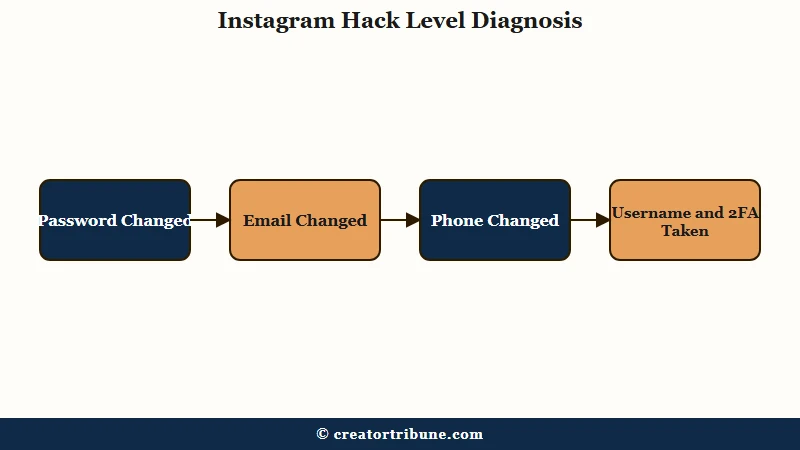
There are four levels. Walk through them in order and stop at the first one that matches your situation.
| Level | What the attacker changed | Your fastest path |
|---|---|---|
| 1 | Password only | Use “Forgot password” on the login screen, request the link to your existing email or phone |
| 2 | Password and email | Find the original “[email protected]” notification and click “secure my account” |
| 3 | Password, email, and phone | Use “Need more help” plus “My account was hacked”, then video selfie verification |
| 4 | Password, email, phone, username, and 2FA enabled | Same as Level 3 plus the trusted-friends 24-hour verification path |
The way I see it, most people read a generic guide, try every step in order, and only get to the right one after burning the first hour. That is exactly the window where Level 2 recovery is easiest. Diagnose first, act second.
The Golden Hour Versus Day One Timeline
The first hour after an Instagram account is hacked is when the email reversal link is still alive in your inbox, the attacker may not have rotated everything yet, and Instagram has not started rate-limiting your reset requests.
After that hour, recovery shifts from instant to manual.
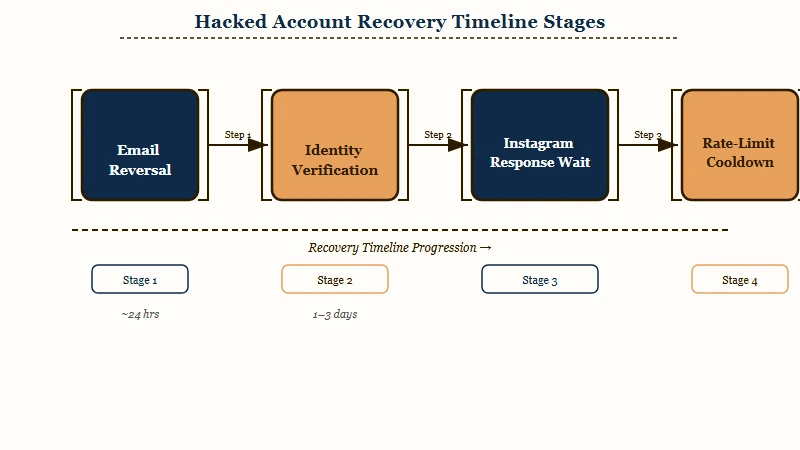
Here is what I would do at each time mark, working from the moment you realise the account is compromised.
- Minute 0 to 60. Search your email for
[email protected]. If a message is there with the subject “Your Instagram email was changed”, click the secure-my-account reversal link inside. This single step has the highest success rate of any recovery move and the link can expire fast. - Hour 1 to 6. Lock down the linked email account first. Change that password, sign out all sessions, check for any forwarding rules the attacker may have added. The email is the master key. If it is still compromised, every Instagram recovery you run will just be reversed.
- Hour 6 to 24. Start the “My account was hacked” flow on the login screen. Submit a new secure email address that has never been linked to any Instagram or Facebook account. Be ready for video selfie verification within minutes of submitting.
- Day 1 to 3. Expect Instagram to take 5 to 24 hours to respond on a clean case, and 2 to 3 days on suspicious or repeated submissions. Check the spam folder of the new secure email obsessively, since the response often lands there.
- Day 3 to 7. If you get rate-limited (Instagram stops sending codes after too many failed attempts), wait 24 hours between attempts rather than spamming the form. Each failed submission resets the cooldown.
From what I have seen, the people who get their accounts back same-day all hit step 1 inside the first hour. The people who wait a full day to start almost always end up on a 3-to-7 day timeline.
Level 1, Password Only Changed
A Level 1 hack means the attacker changed only the password and left the original email and phone in place.
This is the easiest recovery on Instagram and the fastest, often inside ten minutes.
Run this exact sequence:
- Open Instagram and tap “Forgot password?” on the login screen.
- Enter your username, email, or phone number. Pick the email or phone you can still access.
- Open the password-reset email Instagram sends. Click the link, set a new password.
- Log in with the new password.
- Immediately go to Settings, Account Center, Password and Security, Where you are logged in. Remove every device you do not recognise.
- Turn on two-factor authentication using an authenticator app, not SMS, before doing anything else.
Before: account is locked, password reset email arrives in your inbox within 60 seconds, you click and reset.
After: you are back in within ten minutes and the attacker is logged out as soon as you remove their device.
The reason this works fast is that attackers commonly forget to change the linked email or phone in the first few minutes of a takeover. They are rushing to monetise the account and the “rotate every contact field” step is often left for later. That delay is your window.
Level 2, Password And Email Changed
A Level 2 hack means the attacker rotated the email on the account but the original notification from Instagram is still sitting in your inbox.
The reversal path uses that notification, and it bypasses everything else.
Here is what to do, in order.
- Search your inbox for the address
[email protected]. Filter by “last 24 hours” to find the relevant message faster. - Look for a subject line about your email being changed. Inside that email there is a link that says “Revert this change” or “Secure my account”.
- Click the link. It opens an Instagram page that asks you to confirm you did not make this change.
- Confirm. Instagram reverts the email change and locks the account from the attacker’s side.
- Run the Level 1 password reset against your now-restored email. Reset the password, sign out all other sessions, enable two-factor authentication.
This path is the single most important reason to keep an inbox that surfaces every “your account was changed” email rather than burying them in a filter. If the message is in spam, the link is still good. If you have already deleted it, this level becomes a Level 3.
The the Instagram account disabled walkthrough covers the appeal path if the reversal link has expired or the attacker has already moved past this stage.
Level 3, Password Email And Phone All Changed
A Level 3 hack means the attacker swapped the email, the phone number, and the password before you found the reversal link.
Standard reset paths do not work because every code goes to the attacker. The path back is identity verification through the “My account was hacked” flow.
The sequence is fiddly but well-trodden:
- Open Instagram, tap “Forgot password?”, then tap “Need more help?” on the next screen.
- Choose “My account was hacked”.
- Enter your original username, plus any email or phone you have ever linked to the account in the past, even one you no longer use.
- Submit. Instagram will email a verification code to the new secure email address you provide. Use an email that has never touched Instagram or Facebook before.
- Wait for the video selfie request. When prompted, record a short video turning your head left, right, and through different angles. Do this in bright lighting, against a plain background.
- Wait 5 to 24 hours for the verification response. Check the spam folder of the new email obsessively.
The video selfie matches against face photos already on your profile. Accounts with no face photo (logos, product shots, pets only) have a much lower success rate at this level. If your profile is faceless and you have been hacked, identity verification will likely fail and you have to move to Level 4 tactics.
From my experience, the two failure modes at Level 3 are bad lighting on the selfie and using a recovery email that has any prior Instagram or Facebook association. Instagram treats both as fraud signals and bounces the submission.
Level 4, Username Changed And 2FA Enabled By Attacker
A Level 4 hack means the attacker has not just rotated the contact fields, they have enabled two-factor authentication on their own device and changed the username.
Both moves are designed to brick recovery. The path back is still real but it requires the trusted-friends verification feature on top of identity proof.
The full Level 4 path:
- Run the Level 3 “My account was hacked” flow first. Submit your original username (not the attacker’s new one), every old email and phone you can remember.
- When the video selfie request lands, complete it the same way as Level 3.
- In parallel, look for the “Get help from friends” option in the recovery form. If it is offered, Instagram will let two trusted friends confirm your identity inside a 24-hour window.
- Pre-message two people you trust who follow you on Instagram and tell them what is happening. They need to be ready to receive a confirmation request from Instagram and act on it within 24 hours.
- Submit. Both friends accept. Identity verification combines the selfie and the social proof.
- Once you regain access, immediately disable the attacker’s two-factor authentication setup before doing anything else. Then enable your own 2FA with an authenticator app.
The trusted-friends feature is the underrated piece of Level 4. Plenty of recovery guides skip it because it is offered conditionally based on account age and follower history. If your account qualifies, it is the single fastest way through an otherwise locked-down recovery.
The Hardening Pass After You Get Back In
Recovering the account is half the job. Hardening it against the same attacker returning is the other half, and most recovery guides skip this part entirely. A hacker who got in once has often left a backdoor.
Run this checklist within the first hour of regaining access:
- Change the password. Use a long unique password, not a variation of an old one.
- Sign out all other sessions. Settings, Account Center, Password and Security, Where you are logged in. Remove every device you do not recognise on every Meta account linked to this one.
- Audit linked Meta accounts. Account Center, Accounts. Remove any Facebook account you do not recognise. Attackers often link their own Facebook to retain access.
- Revoke third-party app permissions. Settings, Apps and websites. Remove any third-party app you did not authorise yourself. Attackers add “offline access” tokens through third-party apps to bypass password changes.
- Disable the attacker’s 2FA, then enable your own. Use an authenticator app, not SMS. SMS 2FA is bypassable via SIM swap.
- Rotate the linked email password too. The email is the master key. If the attacker got in via email, every Instagram fix is temporary until that email is clean.
- Check the “Recently Deleted” folder. Instagram stores deleted posts and DMs for 30 days. If the attacker deleted content during the takeover, you can restore it from this folder before the window closes.
The most overlooked of these is the linked-Meta-account audit. An attacker who linked their Facebook to your Instagram Account Center can request password resets and re-enter the account through the Facebook side, even after you change every Instagram credential. Severing that link is the only fix.
Avoiding The Recovery Phish
The second wave of attacks after an Instagram hack is the recovery scam.
Hackers monitor public “I got hacked” posts and DMs on X, Reddit, and Threads, then message victims pretending to be Instagram support or an ethical hacker offering paid help. Spotting these in advance saves both money and time.
The rules are simple and they all stack:
- Instagram never DMs you on another platform. Real support never comes from a Twitter, Telegram, or WhatsApp DM. Block and report any account claiming to be Instagram outside of Instagram itself.
- Instagram never asks for payment to restore an account. Anyone asking for money to “speed up your case” is a scam. Per Statista’s social platform user data, over 2 billion people use Instagram monthly, and the support volume is exactly why scammers target the recovery period.
- Do not pay the original hacker. If the attacker DMs your other accounts demanding payment to release the Instagram account, paying does not get it back. Most ransom-paying victims lose both the account and the money.
- Verify any “ethical hacker” through real-world signals. A real security professional has a verifiable identity, a real company, and does not cold-DM hacked-account victims.
The hardening tactics above also feed into broader account safety. The comprehensive Instagram account disabled walkthrough covers what happens when recovery flows are exhausted, and the Instagram shadowban diagnostic guide helps once you are back in and notice reach has collapsed from the spam the attacker posted.
What To Do About The Damage The Hacker Caused
Recovering the account does not undo the spam DMs sent to your contacts, the crypto posts shared from your handle, or the unfollows the attacker triggered.
A short cleanup pass restores trust faster than letting the activity linger.
A practical order for the cleanup:
- Post one clean message that you were hacked. A single Story plus a single grid post acknowledging the takeover and apologising for any spam DMs your contacts received. Keep it short.
- Delete the attacker’s posts and Stories. Go through the grid, Reels, and Stories. Remove anything the attacker created. Check Highlights too, since hackers often hide spam links there.
- Send a follow-up message to anyone who replied to a spam DM. A direct apology in DM beats a public post for the contacts who engaged with the spam in real time.
- Audit your tagged photos. Attackers sometimes tag you in spam posts on burner accounts. Remove every tag you do not recognise.
- Re-engage your existing audience. Post twice in the next 48 hours to signal the algorithm that the account is back to normal. The Instagram reach drop diagnostic covers the longer recovery if reach takes a hit.
The mass-unfollow problem is real but usually self-corrects. Instagram detects attacker-driven unfollows as anomalies and most accounts see their follower count partially restore within a week, no manual action needed.
Frequently Asked Questions
How long does Instagram take to recover a hacked account?
Instagram typically responds to a recovery request within 5 to 24 hours on a clean submission. Complex cases, suspicious verification, or repeated attempts can push the wait to 2 to 3 days. Check the spam folder of the new recovery email since the response often lands there.
What if I do not have a face photo on my Instagram for the video selfie?
The video selfie matches against face photos already on the account. Accounts with only logos, products, or pets have a much lower verification success rate. You may need to use the trusted-friends recovery option instead, or supply other proof of ownership through the “Need more help” flow.
Can I recover my account if the hacker changed my username?
Yes, you can still recover the account by entering your original username or any email or phone number ever linked to the account. Instagram’s deep recovery uses historical login data to track ownership even when current profile details have all changed.
Should I pay the hacker if they DM me demanding money for the account back?
No. Paying almost never gets the account back. The attacker keeps the money and the account, and the recovery flow through Instagram is the only reliable path that costs nothing.
Why am I not receiving the password reset email Instagram is supposed to send?
The most common reason is that the attacker changed the email on the account, so the reset link is going to the attacker’s inbox. The second most common reason is Instagram rate-limiting your requests after several attempts. Wait 24 hours between requests and use the “My account was hacked” form instead.
Do I need Meta Verified to get faster recovery support?
Meta Verified provides access to a live support chat that standard users do not get. For an active high-value account where the recovery flow has stalled, some creators buy Meta Verified on a separate account to access support. It is not officially required and is not a guaranteed path, but it is a real option creator communities use.
Closing Note
A hacked Instagram account is recoverable in most cases if you act inside the first hour, diagnose the level of the hack before trying random fixes, and harden the account properly after you get back in. Skip the random-step approach. Match your response to exactly what the attacker changed, in the order above.