
Instagram Account Disabled and the Recovery Path That Works
Instagram Account Disabled and the Recovery Path That Works
Instagram account disabled? Most creators use the wrong recovery form. Walk through every path from standard appeal to hidden support channels.
- 1What Are the Four Types of Instagram Account Disabling
- 2Why Most Instagram Account Recovery Attempts Fail
- 3How to Appeal a Suspended Instagram Account Step by Step
- If You See the Appeal Button
- If You Cannot Access the App
- 4What to Do When the Standard Instagram Appeal Gets No Response
- Facebook Ads Support Chat
- Meta Verified Subscription
- Instagram Shopping Support
- 5What Are Realistic Instagram Account Recovery Timelines
- 6How to Prevent Future Instagram Account Disabling
- 7Frequently Asked Questions
- Can I recover a permanently disabled Instagram account?
- How long does Instagram take to respond to an appeal?
- What documents does Instagram require for identity verification?
- Should I create a new Instagram account if mine is disabled?
- What happens to my Instagram Shop and monetization if I get disabled?
- Does paying for Meta Verified help with account recovery?
TL;DR: A disabled Instagram account is recoverable in most cases if you identify the correct account status first and use the right appeal path. The standard “My Instagram Account Was Disabled” form works for first-time violations, but the Facebook Ads support chat and Meta Verified subscription unlock faster resolution when the form fails. Most creators lose their accounts permanently because they use the wrong recovery method for their situation.
Your Instagram account got disabled and the notification gave you almost nothing to work with. A vague reference to Community Guidelines, maybe a link to a form, and no timeline for what happens next. That is the standard experience for the majority of creators who land on this page.
The Instagram account disabled recovery process is not one path. It is four completely different paths depending on what happened to your account, and the reason most people fail is that they start down the wrong one.
A temporarily deactivated account needs a login. A deleted account needs speed. A suspended account needs an appeal. A permanently disabled account needs a workaround that Instagram does not advertise.
What I want to walk you through here is each of those four paths in order, with the exact forms, timelines, and escalation channels that produce results. You will know which status applies to you, what to do in the first 24 hours, and what to try when the standard appeal goes nowhere.
If your issue is more about losing reach than losing the account entirely, the Instagram shadowban diagnostic covers the separate problem of invisible content suppression.
What Are the Four Types of Instagram Account Disabling
Instagram enforces four distinct account statuses, and each one requires a completely different recovery method.
Using the wrong method for your status wastes time and can make the situation worse.
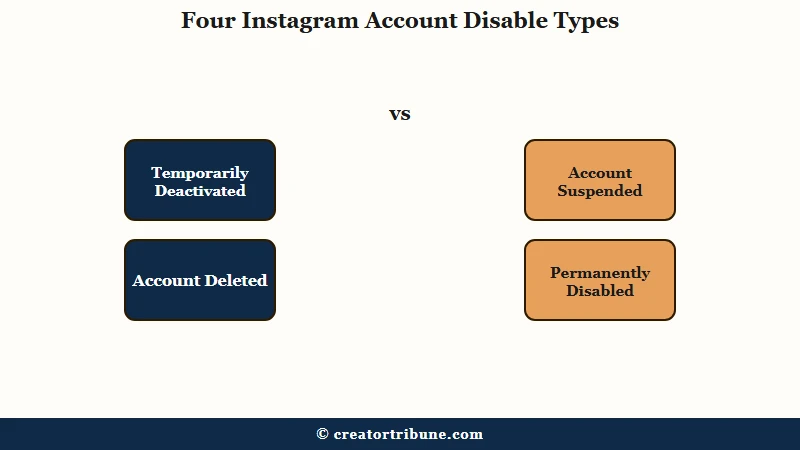
From what I’ve seen, this is where the confusion starts for most creators. They search “Instagram account disabled” and follow generic advice that applies to only one of the four types. Here is what each status means and how to tell which one you have.
| Account Status | What You See | Recovery Difficulty | Time Sensitivity |
|---|---|---|---|
| Temporarily deactivated | Login screen, no violation notice | Easy, instant | None |
| Deleted (within 30 days) | Login screen, deletion notice | Easy if within window | 30-day hard deadline |
| Suspended | Violation notice with Appeal button | Moderate | Submit within 24 hours |
| Permanently disabled | No appeal option at login | Very difficult | Act within first week |
A temporarily deactivated account is one you turned off yourself. Log in with your username and password and everything restores automatically. No appeal needed, no waiting period.
A deleted account has a 30-day grace window. If you or someone with access deleted the account, logging in before that window closes restores everything. Miss the 30-day mark and the account is gone permanently.
A suspended account shows a clear violation notice when you try to log in, along with an Appeal button. This is the most common status creators encounter, and it has the highest recovery rate when you appeal correctly.
A permanently disabled account is the serious tier. There is no appeal button visible at login, and Instagram’s standard support channels often produce no response at all. This is where the alternative recovery methods covered later in this guide become critical.
Why Most Instagram Account Recovery Attempts Fail
Most recovery attempts fail because creators submit the wrong type of appeal for their account status, not because their case is unwinnable.
The appeal system works when you match the right method to the right problem.
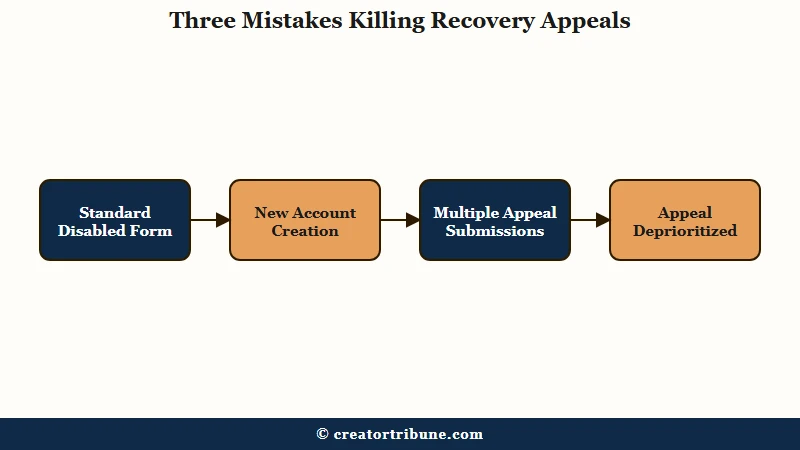
What I’d recommend understanding first is the three mistakes that kill your chances before you even reach the review stage.
Mistake 1: Using the standard appeal form for a permanently disabled account. The “My Instagram Account Was Disabled” form in the Help Center is designed for suspended accounts with a visible violation.
If your account is permanently disabled with no in-app appeal option, this form often produces zero response. You need an alternative support channel instead.
Mistake 2: Creating a new account immediately. Instagram cross-references email addresses, phone numbers, and device identifiers. A new account created from the same device gets flagged within days.
The new account also damages your recovery case on the original account. Instagram treats it as an attempt to circumvent enforcement, the same pattern that applies across TikTok ban appeals and other platforms.
Mistake 3: Submitting multiple appeals simultaneously. Instagram detects duplicate submissions and deprioritizes them. One well-documented appeal outperforms five identical ones every time. Wait at least 5 to 7 business days before following up on any single submission.
Before: You see the disabled notice, panic, and submit the same generic appeal three times in 20 minutes while also creating a backup account on the same phone.
After: You identify your exact account status from the table above, choose the matching recovery path, gather your documentation, and submit one thorough appeal through the correct channel.
The first approach gets you flagged for spam behavior. The second approach gives you the best chance of getting reviewed by a human.
How to Appeal a Suspended Instagram Account Step by Step
The in-app appeal for suspended Instagram accounts has the highest success rate when submitted within 24 hours with government-issued ID attached. This path only works if you see the Appeal button on your violation notice screen.
In my experience, the in-app appeal gets reviewed faster than the web form. Here is the sequence I’d walk through.
If You See the Appeal Button
- Open the Instagram app and log in with your credentials.
- Tap the Appeal button on the suspension notice screen.
- Follow the on-screen prompts for identity confirmation.
- Upload a clear photo of your government-issued ID (passport, driver’s license, or national ID card).
- Write a concise explanation of why you believe the action was an error.
- Submit and screenshot the confirmation for your records.
If You Cannot Access the App
- Go to Instagram’s Help Center at help.instagram.com.
- Navigate to the “My Instagram Account Was Disabled” form.
- Enter your username, full name, and the email address linked to the account.
- Upload your government-issued ID through the web form.
- Write your appeal explanation in the text field.
For business accounts, Instagram accepts business documents instead of personal ID. Utility bills, business licenses, or incorporation certificates all qualify. In my experience, business documents that show the business name matching the account name exactly get processed faster.
The appeal text itself should be 200 to 400 words, professional in tone, and focused on one specific point: why the violation notice does not match what your account was doing. Reference the specific Community Guideline cited in the notice and provide context for any flagged content.
According to Statista’s social media data, Instagram has over 2 billion monthly active users globally. The moderation system handling that volume depends heavily on automated detection, which means false positives are a persistent issue and well-documented appeals have a genuine path to reversal.
What to Do When the Standard Instagram Appeal Gets No Response
When the standard appeal form produces no response after 7 to 14 days, three alternative support channels can bypass the standard queue.
The Facebook Ads chat method is the most reliable of the three.
What surprised me about the recovery data is how consistently the standard form fails for permanently disabled accounts. Users report waiting weeks or months with no response at all. The alternative paths exist, but Instagram does not advertise them.
Facebook Ads Support Chat
This method works because purchasing even a small Facebook ad unlocks access to Facebook’s advertising support chat, which can escalate Instagram account issues.
- Create a Facebook Page if you do not already have one.
- Set up a paid ad campaign through Facebook Ads Manager with a minimum budget of $5.
- Wait for the ad charges to process on your credit card.
- Navigate to Ads Manager, then locate “Contact Advertising Support.”
- Select the reason “Account hacked or taken over” to initiate a live chat.
- Explain your Instagram account situation to the support representative.
What I’d recommend knowing about this method is that success depends on the representative you reach. Some reps handle it immediately with a 24 to 48 hour resolution. Others cannot help.
If the first attempt does not work, try again the next day with a different representative.
Meta Verified Subscription
Meta Verified costs $11.99 to $14.99 per month and includes direct access to account support. If you have a secondary Instagram account or can access verification through a linked Facebook account, this subscription provides the fastest support channel available.
Instagram Shopping Support
Setting up Instagram Shopping at business.instagram.com/shopping and navigating to Commerce Manager reveals an additional support button. This path is inconsistent, but it has worked for creators who had no other way to reach a human reviewer.
Here is how the three methods compare.
| Support Method | Cost | Resolution Time | Reliability |
|---|---|---|---|
| Standard appeal form | Free | 7 to 30+ days | Low for permanent bans |
| Facebook Ads chat | $5 minimum ad spend | 24 to 48 hours once escalated | High, may need multiple attempts |
| Meta Verified | $11.99 to $14.99 per month | 1 to 3 business days | High |
| Instagram Shopping support | Free (requires business setup) | 3 to 7 business days | Inconsistent |
What Are Realistic Instagram Account Recovery Timelines
Standard Instagram appeal response times range from 24 hours for simple suspensions to 30 or more days for permanent disabling, with alternative support channels cutting that timeline significantly.
Planning around these windows prevents the panic-driven mistakes covered earlier.
Here is how the timeline breaks down by account status and recovery method.
| Account Status | First Response | Full Resolution | Best Method |
|---|---|---|---|
| Temporarily deactivated | Instant | Instant on login | Log in |
| Deleted (within 30 days) | Instant | Instant on login | Log in before deadline |
| Suspended (first offense) | 1 to 3 business days | 3 to 7 days after appeal | In-app Appeal button |
| Suspended (repeat offense) | 3 to 7 business days | 7 to 14 days | Appeal form with ID |
| Permanently disabled | 7 to 30+ days via form | Often no response | Facebook Ads chat |
What I’d recommend during the waiting period is not posting about Instagram on other platforms in a way that attacks the company. Public complaints during your review period can be flagged by moderators, the same pattern that affects Facebook page restrictions.
The same appeal psychology plays out across every major platform. YouTube channel termination appeals use an identical tiered violation system, and understanding the pattern across platforms helps you build a stronger case on each one.
How to Prevent Future Instagram Account Disabling
The most reliable prevention strategy is understanding which behaviors trigger automated flags, because the majority of disabling actions start with AI detection, not human review.
Most creators get disabled for patterns they do not realize the system is watching for.
What I’d recommend focusing on is the top five triggers that account for the majority of Instagram account disabling.
- Community Guideline violations. This includes harassment, hate speech, misinformation, and safety-related content. The AI flags keywords, image patterns, and audio elements. If your content is educational or satirical, add clear context in the caption.
- Copyright and DMCA takedowns. Using copyrighted music, images, or video clips without authorization is the second most common trigger. Stick to Instagram’s royalty-free audio library or use original content. The Instagram copyright claim guide covers the audio library rules in detail.
- Spam and fake engagement. Automated following, purchased likes, and repetitive comment patterns all trigger this flag. If you use any third-party growth tools, stop immediately. The Instagram action blocked guide explains the specific rate limits that trigger throttling.
- Suspected underage accounts. If the AI thinks you look underage based on facial analysis, this flag can trigger without any content violation. Appeal with photo ID showing your date of birth.
- Mass reporting attacks. Other users can weaponize the report system. If you receive a coordinated reporting attack, include this context in your appeal and provide evidence of normal engagement patterns before the reports.
Enabling two-factor authentication, keeping your email and phone number current, and using a strong unique password are the baseline defenses. These do not prevent content-based flags, but they protect you from account compromise that leads to third-party violations on your account.
Frequently Asked Questions
The most common questions about disabled Instagram accounts cover recovery timelines, required documents, and whether alternative support channels can help.
Can I recover a permanently disabled Instagram account?
Yes, but not through the standard appeal form. The Facebook Ads support chat ($5 ad spend), Meta Verified subscription ($11.99 to $14.99 per month), and Instagram Shopping support are the three alternative channels that can bypass the missing in-app appeal button.
How long does Instagram take to respond to an appeal?
Standard appeal responses take 1 to 7 business days for suspended accounts. Permanently disabled accounts may wait 30 or more days with no response through the standard form. The Facebook Ads chat method resolves in 24 to 48 hours once you reach the right representative.
What documents does Instagram require for identity verification?
Personal accounts need a government-issued photo ID such as a passport, driver’s license, or national ID card. Business accounts can submit business documents including utility bills, business licenses, or incorporation certificates showing the business name.
Should I create a new Instagram account if mine is disabled?
No. Instagram cross-references email addresses, phone numbers, and device identifiers. A new account from the same device gets flagged within days. This also damages your appeal case on the original account because Instagram views it as enforcement circumvention.
What happens to my Instagram Shop and monetization if I get disabled?
All pending payouts and active partnerships freeze upon disabling. If your appeal succeeds, they resume on the normal schedule. If the appeal fails, outstanding balances may be permanently forfeited depending on how long the account remains disabled.
Does paying for Meta Verified help with account recovery?
Yes. Meta Verified subscribers ($11.99 to $14.99 per month) get direct access to account support that non-verified users cannot reach. This is one of the most reliable escalation paths for permanently disabled accounts.

My account was disabled incorrectly. I have not violated any rules. I use this account personally and it is very important to me. Please review and restore my account.
please review my instagram account. I have not violated any community standards. It says review takes over a day but it has been days already. Please reactivate my personal account. Thankyou.
USERNAME: h4nxw_qy
EMAIL: