
Delete Your Instagram Account Permanently and What Happens Next
Delete Your Instagram Account Permanently and What Happens Next
The old Instagram delete link now opens a help page. See the current Accounts Center steps, the export to start first, and what the wait means.
- 1How Do You Delete Your Instagram Account Permanently?
- 2How Do You Download Your Instagram Data Before Deleting?
- 3What Happens When You Delete Your Instagram Account?
- Does Deleting Instagram Delete Your Threads Profile?
- 4Can You Delete Your Instagram Account Immediately?
- Can You Get a Deleted Instagram Account Back?
- 5Should You Deactivate Instagram Instead of Deleting It?
- 6Why Can’t You Delete Your Instagram Account?
- 7How Do You Delete an Instagram Account Without the Password?
- How Do You Delete a Deceased Person’s Instagram Account?
- 8Quick Takeaways
TL;DR: To delete your Instagram account, open Accounts Center (some people now see Meta Account settings instead), tap Deactivation or deletion, pick the account, then tap Delete account and confirm. Other people stop seeing the profile once you ask, and Instagram’s help page puts permanent deletion 30 days after the request while noting that the cancel window varies by region. Export your photos before you start, because the export can take up to 30 days to arrive.
The steps for how to delete your Instagram account take a few minutes once you find the right menu. Getting your photos out first can take up to 30 days, according to Instagram’s export help page, so that is where to start.
Two shortcuts that still circulate no longer hold. The old instagram.com deletion link now forwards to Instagram’s help article instead of a deletion form.
The flat 30-day wait in Google’s AI answer also leaves out a caveat that Instagram’s own help page has carried since January 2025.
The order matters more to me than the menu path: export, wait for the file, then delete. Request deletion first, and the export tool stays locked until you cancel it.

How Do You Delete Your Instagram Account Permanently?
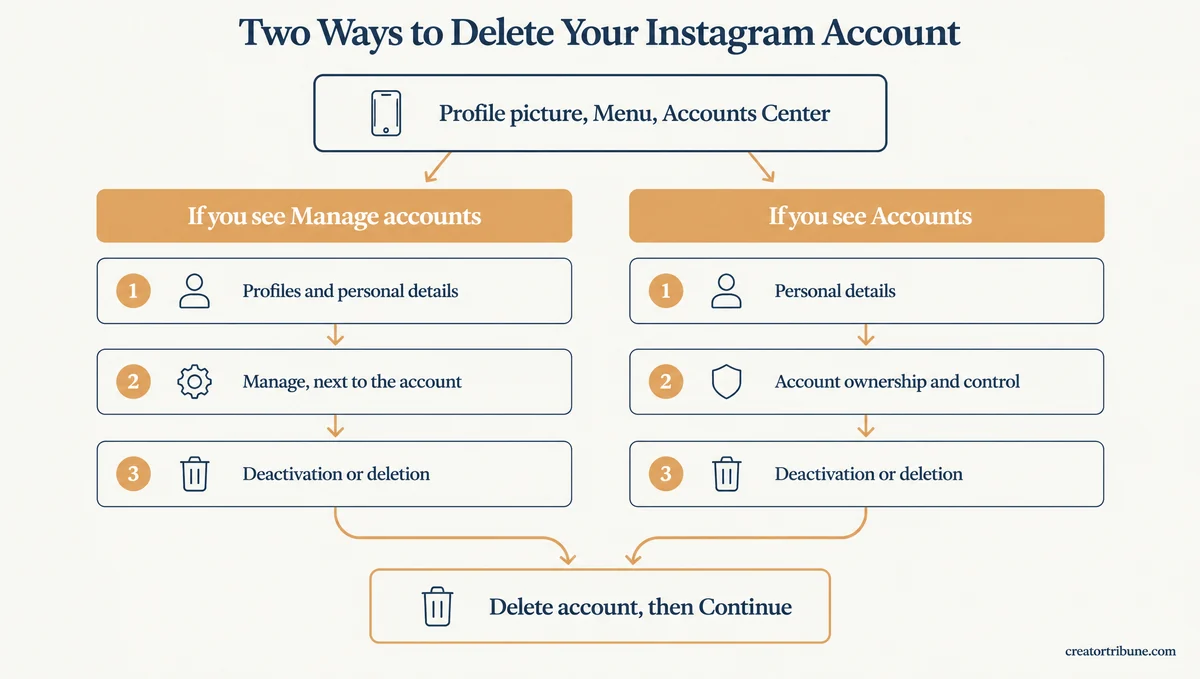
You delete your Instagram account permanently from Accounts Center. Open Settings, find Deactivation or deletion, choose the account, then tap Delete account and Continue. The button names in between depend on which of two layouts your app shows.
What is Accounts Center: Meta’s shared settings area for your Instagram, Facebook and Threads profiles, shown to some people as Meta Account settings.
Instagram’s deletion help page splits the steps by what you see at the bottom of Accounts Center, as of October 31, 2026. I go by that bottom row rather than the button names, because Meta’s own help pages disagree on what the first button is called.
If you see Manage accounts at the bottom of Accounts Center:
- Open Instagram and tap your profile picture in the bottom right.
- Tap Menu (the three lines) in the top right, then tap Accounts Center.
- Tap Profiles and personal details.
- Tap Manage next to the account type you want to delete.
- Tap Deactivation or deletion, then tap the account you want gone.
- Tap Delete account, tap Continue, and enter your password when asked.
If you see Accounts at the bottom of Accounts Center:
- Tap your profile picture, then Menu in the top right, then Accounts Center.
- Tap Personal details, under Account Settings.
- Tap Account ownership and control, then Deactivation or deletion.
- Choose the account you want to delete.
- Select Delete account, tap Continue, and follow the prompts to confirm.
On a computer, start at More in the bottom left, then Settings, then Accounts Center, and the rest of the path is the same. Accounts Center can list several Instagram and Facebook profiles, and the deletion applies only to the one you pick.
If you only want an account off your phone, that is a different job. Removing it from the app logs you out of it and leaves the account alive. Before you tap Delete account, start the export in the next section.
How Do You Download Your Instagram Data Before Deleting?
You download your Instagram data from Accounts Center under Your information and permissions, then Export your information. Do it before you request deletion, because Instagram says the export link can take up to 30 days and a profile scheduled for deletion cannot export.
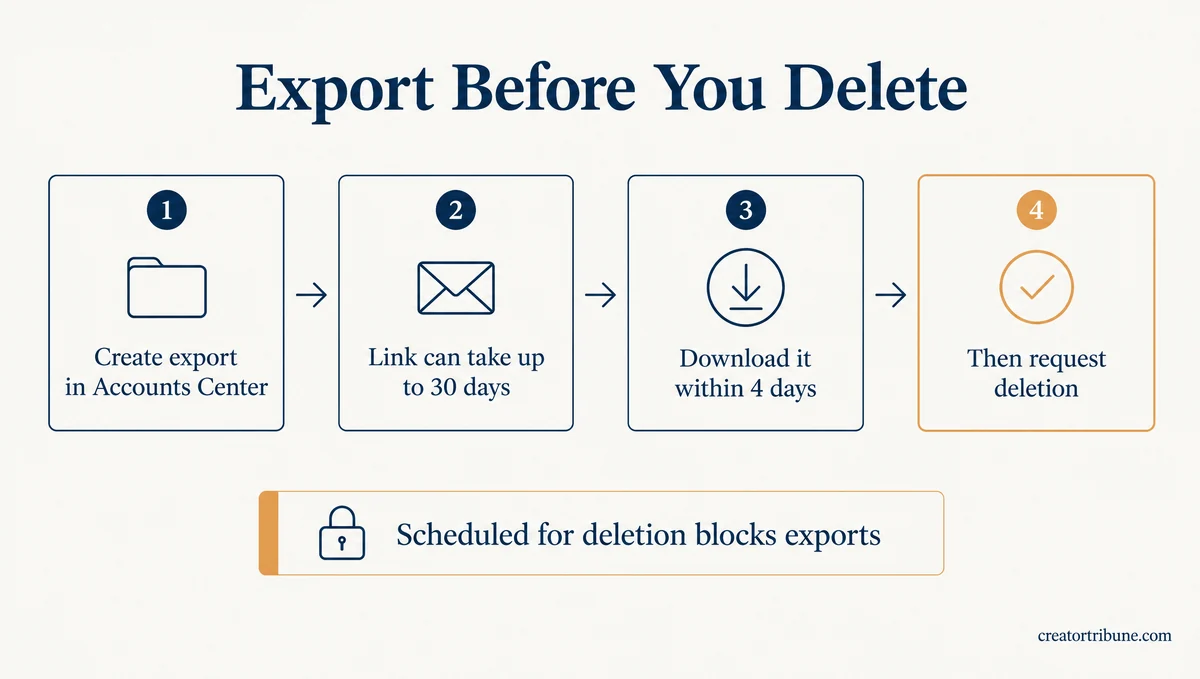
Instagram’s deletion page stopped calling this tool Download your information in 2025 and now calls it Export your information, so older guides send you looking for a label that has changed. The steps on Instagram’s export help page run like this:
- Open Accounts Center (or Meta Account) from Settings.
- Tap Your information and permissions, then Export your information.
- Tap Create export and choose the Instagram profile.
- Pick Export to device, then choose the information, date range, format and media quality.
- Tap Start export and wait for the email.
The timing is where people lose photos. Once the link arrives, you have 4 days to download the file from Available downloads.
The same page lists “Scheduled for deletion” as a reason a profile cannot export. Getting the export after that point means cancelling the deletion, and a fresh deletion request means a fresh wait.
To me, the export matters more than the deletion itself, because nothing brings the photos back once the date passes. Hold off on the deletion request until the export file opens on your computer.
What Happens When You Delete Your Instagram Account?
When you delete your Instagram account, other people stop seeing it, and Instagram permanently deletes the profile, photos, videos, comments, likes and followers 30 days after the request. Finishing the deletion can take up to 90 days, and backup copies can outlast that.
During those 30 days your content “is not accessible to other people using Instagram,” and once they pass you won’t be able to retrieve it. What goes and what can linger:
- Removed: your profile, photos, videos, comments, likes and followers.
- Can outlast the 90 days: backup copies kept for disaster recovery, plus information kept for legal issues, terms violations or harm prevention.
- Not on Instagram’s list: messages already sitting in other people’s inboxes.
Your sent DMs are the least predictable part, since chats can stay readable for a while and Instagram does not say when they stop displaying.
Your username goes back into the pool. You can sign up again with it, or add it to another profile, as long as nobody else has taken it first. A profile removed for breaking the Community Standards may not get its old name back.
To anyone who visits your profile link, a deleted account can look a lot like a blocked or deactivated one, and telling those apart takes a few checks.
The followers are the loss I would plan around, because an export can list who they were but cannot bring them with you. If the account has an audience, post where people can find you next before you delete it, such as a free email sign-up page template.
Does Deleting Instagram Delete Your Threads Profile?
Plan on losing it if you signed up for Threads with that Instagram account. Threads’ supplemental terms end your Threads agreement when the Instagram account used to sign up is deleted, while deleting Threads on its own leaves Instagram untouched.
The two used to be tied tighter. At launch in July 2023, Meta told TechCrunch that a Threads profile could only be deleted by deleting the Instagram account.
Today Threads’ deletion page says deleting Threads won’t delete your Instagram or Facebook profile. It also sets a 90-day wait before you can sign up for Threads again with the same Instagram profile, and the Threads supplemental terms cover the other direction.
A Facebook profile in the same Accounts Center is a separate profile, and it stays unless you pick it on the deletion screen too.
If you turned on fediverse sharing, which lets people on other social apps such as Mastodon see your Threads posts, delete Threads on its own first. Its deletion page says Threads then asks those servers to remove your profile and posts.
Can You Delete Your Instagram Account Immediately?
No, Instagram has no setting that skips the waiting period. The profile disappears from other people’s view once you request deletion, and Instagram’s help page says the number of days you can cancel the deletion varies by region.
That regional line has been on the page since early 2025. An archived copy from November 2024 has no such note, and a January 2025 copy adds: “The number of days that you can cancel an account deletion varies by region.”
Google’s AI answer for this search still gives a flat 30 days, as of October 31, 2026. I treat 30 days as Instagram’s default rather than a promise, because the help page will not promise one number for everyone.
The wait frustrates people who want out now. One late-October r/Instagram post asks how to delete an account at once because its deletion was not scheduled until November 28.
Its replies float getting banned on purpose, which can backfire. Instagram says it may keep information over terms violations, and a profile removed for breaking its rules may lose its username for good.
Instagram’s deletion page does not say how cancelling works. Meta’s Threads page describes cancelling a Threads deletion as logging back in and tapping Log in to confirm. If you want the Instagram deletion to go through, stay out of the account until the date passes.
Can You Get a Deleted Instagram Account Back?
Only before the deletion date. After it, Instagram’s help page says you won’t be able to retrieve your information, though you can sign up again with the same username if nobody has taken it.
A deactivated account is a different case, since it comes back when you log in. Reactivating an Instagram account has its own steps and its own quirks.
Should You Deactivate Instagram Instead of Deleting It?
Deactivate if you want a break, because deactivation hides your profile until you log back in. Delete if you want the account and its data gone, since nothing comes back after the deletion date.
Deactivation is the option I point people to when the real goal is time away. Instagram’s deactivation help page says your photos, comments and likes stay hidden until you log back in, and that you can deactivate only once a week.
| Question | Deactivate | Delete |
|---|---|---|
| What others see | Profile, photos, comments and likes hidden | Profile not accessible, then removed |
| How to undo it | Log back in | Cancel before the deletion date (window varies by region) |
| Your data | Kept until you return | Deleted 30 days after the request, up to 90 days to finish |
| Exporting your data | Only after you reactivate | Only after you cancel the deletion |
| Your username | Stays yours | Free for anyone to claim once deleted |
| Limits | Once a week | Permanent once the deletion date passes |
Limits checked against Instagram’s deletion, deactivation and export help pages on October 31, 2026.
Both options need you to log in first, so neither works on an account you are locked out of. If a break is the goal, deactivate now and decide about deletion after a week or two away.
Why Can’t You Delete Your Instagram Account?
Instagram will not delete an account you cannot log into. The option is also easy to miss, because Meta moved it into Accounts Center, reworked its menus twice in 2026 and turned the old direct link into a redirect.
The old link is a dead end now, and it is the shortcut people still go looking for:
Before: Going to instagram.com/accounts/remove/request/permanent/ asked you to log in, then opened the deletion form. An archived copy from December 2024 still shows that login step.
After: On October 31, 2026, the same address redirected to Instagram’s deletion help article, so every deletion now starts inside Accounts Center. The deactivation link at /accounts/remove/request/temporary/ still sends you to log in and then on to deactivation.
The menus moved too. A March 2026 copy of the help page listed one path through Personal details. A May copy split it into two layouts and added a note that Meta is “gradually updating people to Meta Accounts.”
The first button in the Manage accounts layout changed again by October 2026, from Manage accounts to Profiles and personal details.
| What you see | Why it happens | What to do |
|---|---|---|
| The deletion link opens a help page | Instagram turned the link into a redirect | Go through Accounts Center instead |
| No Account ownership and control option | Your app shows the newer layout | Tap Profiles and personal details, then Manage |
| Settings shows Meta Account, not Accounts Center | Meta is moving people to a Meta account | Open Meta Account, then Manage account |
| The Android app has no delete option | The help page tells Android users to use a browser | Log in at instagram.com in a phone or computer browser |
| The account you want is not listed | It is likely not linked to this Accounts Center | Log into that account and delete it from its own settings |
| Instagram asks for a password you do not have | Deletion needs a working login | Reset the password first, as in the next section |
The Android line bothers me most. Instagram’s help page tells Android users they “need to go to Instagram.com on a computer or mobile browser” to delete, then lists in-app Android steps right under it.
Try the app first, and switch to the browser if the option is missing.
How Do You Delete an Instagram Account Without the Password?
You cannot delete an Instagram account without logging in. Instagram’s help page says “we can’t delete a profile for you” and that you must be able to log into your profile to request deletion, so get back in first, then delete.
I’d recover the account first even when deletion is the only goal, because Instagram will not delete it on your behalf. Start with Forgot password on the login screen, using the email, phone number or username tied to the account.
If someone else changed the password or email, follow the levels in recovering a hacked account before you think about deleting. If Instagram keeps asking you to log in on another device, that lock has its own fixes.
If the account was hacked, your photos are at risk while you work on recovery. If the profile is public, Inflact can save its posts by username with no Instagram login, though it cannot reach private accounts or messages.
Instagram’s export page also says you can contact Instagram for a copy of your information when you cannot access the account.
How Do You Delete a Deceased Person’s Instagram Account?
A verified immediate family member can ask Instagram to remove a deceased person’s account with proof such as a birth certificate, a death certificate or proof of legal authority. Anyone can ask Instagram to memorialize the account with an obituary or news link instead.
Instagram’s page on deceased people’s profiles links the removal form and says it never hands over login details for a memorialized profile. Gather the documents before you open the form, since the request needs proof of the relationship.
Quick Takeaways
- Instagram deletion starts in Accounts Center or Meta Account settings under Deactivation or deletion, and the old direct link now redirects to a help page.
- Export first: the link can take up to 30 days, the download lasts 4 days, and a profile scheduled for deletion cannot export.
- The profile is hidden once you ask and deleted 30 days later, with up to 90 days to finish the process and a cancel window that varies by region.
- Instagram’s page does not say how a deletion gets cancelled, so stay out of the account until the deletion date passes.
- If a break is the goal, deactivate now and decide about deletion after a week or two away.