How to See Who Shared Your Instagram Post and Who Stays Hidden
How to See Who Shared Your Instagram Post and Who Stays Hidden
Instagram shows you some shares and hides others. Here is how to see who shared your Instagram post, what stays private, and which shares grow you most.
- 1Can You See Who Shared Your Instagram Post
- 2How to See Who Shared Your Post to Their Story
- 3Why You Can’t See Who Shared Your Post in a DM
- 4Why the Shares You Can’t See Matter Most
- 5Apps That Claim to Show Who Shared Your Post
- 6Frequently Asked Questions
- Can I see exactly who shared my Instagram post?
- Why is View Story Reshares not showing up?
- Does the Shares number tell me who shared my post?
- Do apps that show who shared your post really work?
- Why do my shares matter if I cannot see who they are?
- 7Quick Takeaways
TL;DR: You can see who reshared your post to their public Story through the View Story Reshares menu, but Instagram never shows you who sent it privately in a DM. That is by design, and here is the twist: those invisible DM shares are the single most valuable signal the algorithm tracks in 2026. This guide covers exactly what you can and cannot see, plus what to do with the data.
If you have been trying to figure out how to see who shared your Instagram post, you have probably already noticed the frustrating gap. The Shares number sits right there in your Insights, but tapping it gives you no names. That is not a bug.
Instagram splits sharing into two buckets. Public reshares to Stories are visible to you, private sends in DMs are not, and the app deliberately blends both into one count so you cannot reverse-engineer who did what. The reasons are part privacy, part algorithm.
Here is what most guides miss, and what I want you to walk away understanding. The shares you cannot see are the ones that matter most, because private DM sends are now weighted far more heavily than likes. So chasing names is the wrong game.
You will finish this guide knowing how to see every share Instagram lets you see, and why the hidden ones are worth more than the visible ones.

Can You See Who Shared Your Instagram Post
You can see who shared your Instagram post to their public Story, but you cannot see who shared it privately in a DM or from a private account.
Instagram only reveals identities for public reshares, and even then only for 24 hours.
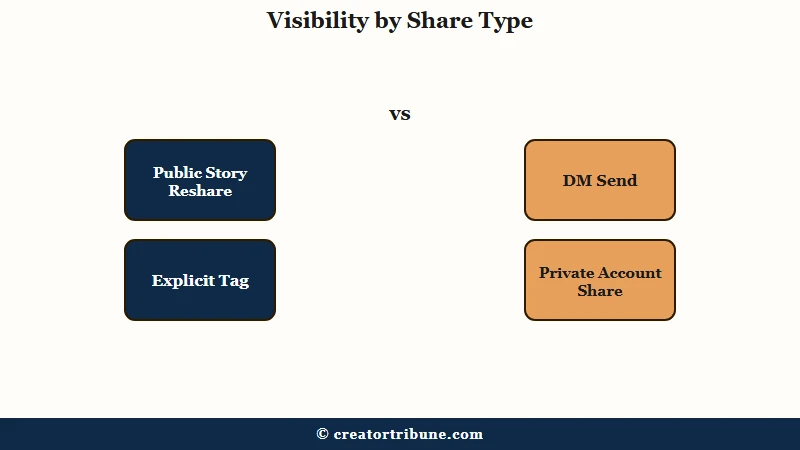
The way I read it, the cleanest way to hold all of this in your head is a simple map of share types against what each one really reveals. Some shares hand you a name, some hand you a number, and some hand you nothing at all.
| Share type | What you can see | Notification? |
|---|---|---|
| Public Story reshare | Exact account, via View Story Reshares | Only if they tag you |
| Private account reshare | Nothing | No |
| DM send to friends | Adds to total Shares count only | No |
| Add Yours sticker response | Each account, tap the sticker | Yes, in Activity |
| Explicit @mention or tag | Exact account | Yes |
| Copy link or external share | Nothing, but the link carries a tracking ID | No |
Notice the pattern. The only shares that reveal a name are the public and tagged ones, which are a small slice of how content really travels. Most sharing on Instagram happens in DMs, and that whole column stays dark on purpose.
What is a reshare: When someone reposts your content to their own Story or feed, or forwards it to another person in a DM. Instagram counts all of these as shares but only surfaces identities for public Story reshares.
How to See Who Shared Your Post to Their Story
To see who shared your post to their Story, open the post, tap the three dots, and select View Story Reshares, which lists every public account currently featuring your post.
You need a professional account and you have a 24-hour window.
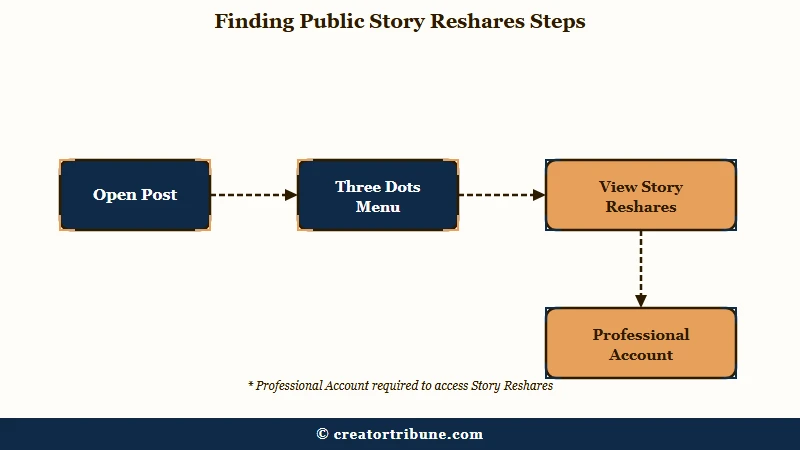
I would set expectations before you go looking, because this feature disappoints people who expect a full history. It shows only accounts whose reshare Story is still live, and the list empties the moment those Stories expire. Here is the sequence:
- Switch to a Business or Creator account if you have not already (Menu, then Account type and tools, then Switch to professional account).
- Open the feed post or Reel you want to check.
- Tap the three dots in the top right of the post, or the bottom right of a Reel.
- Select View Story Reshares to see the public accounts currently sharing it.
If that option is missing, it usually means one of four things: nobody has reshared your post to a public Story yet, the reshares already expired past 24 hours, the sharer has a private account, or you are still on a personal account. There is a real 2026 wrinkle worth knowing too.
Instagram now lets people reshare public Stories even without an @mention, as long as you have not switched off sharing in your privacy settings, so your content can travel further than your tag notifications suggest.
Our guide to how resharing works on Instagram covers the mechanics from the sharer’s side.
Why You Can’t See Who Shared Your Post in a DM
You cannot see who shared your post in a DM because Instagram treats private messages as protected conversations and never attaches names to the share count.
The Shares number blends public and private sends into one figure you cannot split.
This is the part that trips people up, and the confusion runs deep enough that Instagram users openly argue about it. Some insist a reshare only counts when someone reposts to their own Story.
Others point out their share count climbs even when nobody reposted, because a DM forward, and even a flame-emoji reaction that bounces the Story back into your DMs, can register as a share.
Both camps are partly right, which is exactly why the number feels unreliable. To find your total share count, tap the post, tap View Insights, and read the paper-airplane figure for photos or the Shares line under Content Interactions for Reels.
I would read that number as volume, not a guest list. For the related question of profile visibility, seeing who viewed your profile runs into the same privacy wall.
Why the Shares You Can’t See Matter Most
The private DM shares you cannot see are the most valuable engagement on Instagram in 2026, because sends are weighted three to five times higher than likes when the algorithm decides who sees your content next.
The invisible shares are the ones driving your reach.
This is the reframe I wish more creators made. Instagram has told us plainly that “sends per reach,” the ratio of DM shares to the number of people who saw a post, is the strongest signal of content value right now. With Instagram serving roughly 2 billion monthly users, that ratio scales into an enormous ranking input.
A like is cheap, but a send means someone thought of a specific person while watching your video, and the algorithm reads that as real demand. Sprout Social’s take on the 2026 Instagram algorithm lays out why private shares now outrank public vanity metrics.
So the metric that matters is sends per reach, and here is where the current benchmarks land.
| Signal | Benchmark | Why it matters |
|---|---|---|
| Average share ratio | 1 share per 200 reach | The baseline a typical post hits |
| High-performance ratio | 1 share per 50 reach | Content the algorithm pushes to non-followers |
| Send vs like weight | 3 to 5 times higher | One send beats a handful of likes |
What is Sends per Reach: The number of times people shared your post in a DM divided by how many accounts saw it. Instagram uses it as a top-tier ranking signal in 2026.
One more thing changed in your favor. The old penalty for resharing other people’s posts to your Story was quietly removed in June 2026, so curating community content no longer suppresses your reach.
There is still a ceiling worth respecting. Pushing 10 or more reposts of unedited feed content in a 30-day window can trip an aggregator penalty that collapses reach by 60 to 80 percent, and if your own reach has slipped for other reasons, why Instagram reach drops walks through the usual causes.
Before: You refresh View Story Reshares hoping to catch the three public accounts that reposted you, and treat the other 40 shares as noise.
After: You track sends per reach week over week, make posts more DM-worthy, and let the invisible shares do the growth work.
Apps That Claim to Show Who Shared Your Post
Any app that claims to reveal who shared your Instagram post in a DM is lying, because that data is not accessible through Instagram’s systems at all.
These tools exist to harvest your login, not to give you insight.
I would treat every “see who shared” or “profile viewer” app as a threat, full stop. They cannot reach private share data, so they fabricate numbers and ask for your password, and some hijack the account to follow, unfollow, or message people without your say-so.
The money at stake is not small. The Federal Trade Commission reports people lost around 2.1 billion dollars to scams that started on social media, and fake analytics apps sit squarely in that funnel.
If you want real ownership of who engages with you, the durable move is to pull your most engaged followers somewhere you control the relationship instead of renting it through a metric Instagram hides.
That is the whole idea behind building an audience you own outright, and it starts with the people already resharing you. For tracking legitimate Story performance over time, why Story views drop covers the metrics that are safe to trust.
Frequently Asked Questions
Can I see exactly who shared my Instagram post?
Only partly. You can see public accounts that reshared your post to their Story through View Story Reshares, but you cannot see who sent it in a DM or shared it from a private account. Those remain anonymous by design.
Why is View Story Reshares not showing up?
The option only appears when someone has reshared your post to a public Story that is still active. It disappears if the Story expired, the sharer is private, no reshares exist yet, or you are on a personal rather than professional account.
Does the Shares number tell me who shared my post?
No. The Shares figure in Insights is an aggregate count of all shares, both public Story reshares and private DM sends combined. It gives you volume, never identities.
Do apps that show who shared your post really work?
No. There are no legitimate apps that can access private share data. Tools claiming to reveal DM sharers or profile viewers fabricate data, steal login credentials, and can get your account banned.
Why do my shares matter if I cannot see who they are?
Because sends are the strongest ranking signal on Instagram in 2026, weighted three to five times more than likes. Driving invisible DM shares is what pushes your content to non-followers, even though you never see the names.
Quick Takeaways
- You can see public Story reshares through View Story Reshares, but only for 24 hours and only on a professional account.
- DM shares stay anonymous permanently, and the Shares count blends public and private sends into one number.
- Sends now beat likes by three to five times, so the shares you cannot see drive the most reach.
- Skip every “who shared your post” tracker app. They harvest logins and can get your account banned.