How to Turn Off Reels on Instagram and Which Fixes Hold Up
How to Turn Off Reels on Instagram and Which Fixes Hold Up
Instagram has no setting to turn off Reels. Here is which native fix holds, which quietly resets, and the one place Meta does switch Reels off.
- 1How Do You Turn Off Reels on Instagram?
- 2Where Has Instagram Turned Reels Off Completely?
- 3Why Does the Following Feed Keep Switching Back to For You?
- 4Does Tapping Not Interested on Reels Do Anything?
- 5What Is Your Algorithm and How Do You Use It?
- 6What Does Reset Suggested Content Really Reset?
- 7Can You Hide the Reels Tab Itself?
- 8How Do You Remove Your Own Reels From Your Profile Grid?
- 9Quick Takeaways
TL;DR: There is no setting anywhere in Instagram that turns Reels off for an adult account. Meta has built a working Reels off switch, but it only runs for under-18s in participating US states, between midnight and 6am, and nobody gets to choose it. Everything else is a dial you turn down, and one of the most recommended dials was ruled illegal in Europe because it refuses to stay where you put it.
Every guide on how to turn off Reels on Instagram hands you the same four workarounds in the same order. Tap Not interested, switch to the Following feed, use the browser, or mute the accounts posting them.
What none of them tell you is which of those four hold overnight and which quietly undo themselves while you sleep. That gap is the whole problem, and it cost me about a week of tapping buttons that were never going to work before I went looking for the reason.
So here is the honest version. I will show you the one place Reels genuinely does get switched off, the setting a European court has already ruled Meta cannot keep resetting on you, and the native control Instagram shipped last December that almost nobody writing about this topic mentions.
How Do You Turn Off Reels on Instagram?
You cannot turn off Reels on Instagram. There is no toggle, no hidden menu and no account setting that removes Reels from the app. What exists is a set of controls that reduce how many Reels reach you, and they vary enormously in whether the change sticks.
That distinction matters more than the workaround list itself. A setting that resets every time you close the app just becomes a chore you repeat forever.
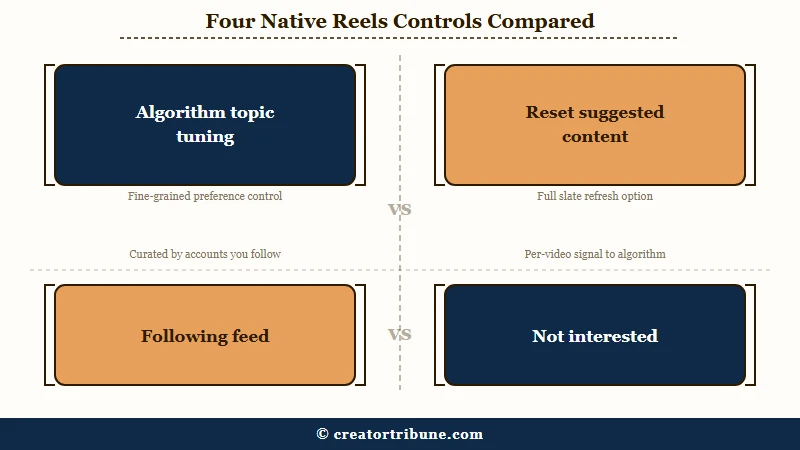
This is the ladder I walk people through, ordered by how well each rung holds:
| What you try | What it does | Does it stick? |
|---|---|---|
| Your Algorithm topic tuning | Tells Instagram which subjects to show less of across Feed, Reels and Explore | Yes, it is a saved preference |
| Reset suggested content | Wipes your recommendation history and starts over | Yes, but it cannot be undone |
| Following feed | Shows only accounts you follow, chronologically, with no suggestions | No outside the EU, it reverts on relaunch |
| Not interested | Sends one weak negative signal about one Reel | Partly, and only as a pattern |
| Mute or unfollow | Removes that account’s posts and Reels | Yes, but only for that account |
| Browser plus a content blocker | Hides Reels elements on the web version | Yes on desktop, and it breaks when Instagram changes its code |
Notice what is missing from that table. Not one row removes the Reels tab from the bottom of the app, and not one of them is a switch.
Where Has Instagram Turned Reels Off Completely?
Instagram has built a complete Reels off switch, and it is called Night Mode.
It is a default block between midnight and 6am during which teens cannot post or view Feed, Stories, Explore or Reels. It applies only to under-18s, only in participating US states and territories, and it is not something anyone opts into.
Meta announced it on 26 August 2026 as part of an agreement with 52 attorneys general across US states and territories. Direct messaging is carved out so teens can still reach friends and family. If other platforms sign the same agreement, the block widens to 10pm until 7am.
So the problem was never that a Reels off switch is hard to build. Meta built one, shipped it to millions of accounts, and made it mandatory for the group it was designed around.
Adults get the dials instead. Hold that fact in mind through the rest of this page, because it explains why every remaining option negotiates with the recommendation system instead of leaving it.
Why Does the Following Feed Keep Switching Back to For You?
The Following feed reverts to the algorithmic For You feed every time you relaunch the app, everywhere except the European Union.
Tap the Instagram logo at the top left of Home and pick Following and you get a chronological feed of accounts you follow with no suggested Reels in it. Close the app and it is gone.
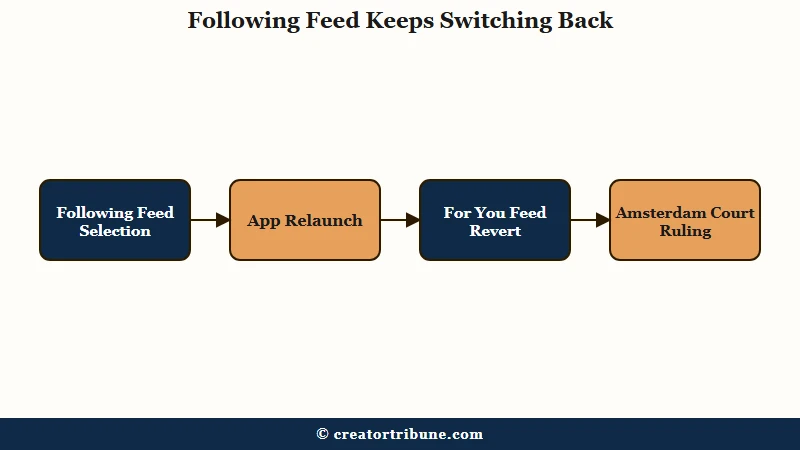
This is the single most recommended fix on the internet for this problem, and outside the EU it survives exactly one session. That asymmetry is the part that bothers me most, because a reader following that advice concludes the setting is broken rather than working as designed.
In Europe it now has to hold. On 2 October 2025 the Amsterdam District Court ruled in a case brought by the digital rights group Bits of Freedom that automatically reverting people to a profiling feed is a prohibited dark pattern under Article 25 of the EU Digital Services Act. Meta was given two weeks to change the interfaces, as the DLA Piper analysis of the judgment sets out.
Two specifics from that ruling are worth knowing. Meta was ordered to make the non-profiled option directly and easily accessible for each content type, and the judgment names the homepage, comments and reels individually.
It was also ordered to make the selected option persist rather than reset back to the profiling system, which is precisely the behaviour non-EU users still get talked out of by their own app.
The suggested accounts guide covers the Following feed in more depth, including what it does to the Stories tray.
Instagram head Adam Mosseri has been direct about why the company resists this. Speaking to an Australian press briefing on 10 September 2026, two days after the Albanese government proposed forcing platforms to offer an algorithm opt-out, he said the average user experience gets much worse without the algorithm and that engagement fell by as much as 50 per cent when people switched away.
His comments to ABC News included the line that stuck with me: “You miss a lot more content … and you spend a lot less time on the platform.”
Read that as a warning if you like. I read it as a fairly precise description of what most people asking this question want.
Does Tapping Not Interested on Reels Do Anything?
Not interested sends one weak signal about one Reel, and a single tap barely registers.
It works only as a repeated pattern across many Reels, and it competes against watch time, which the system weighs far more heavily.
The practical consequence is that pausing on a Reel to tap the three dots and choose Not interested can feed the system more than the tap removes. Lingering is engagement. I stopped treating it as a switch a long time ago and now use it the way it was designed, as a nudge applied dozens of times over days.
There is a documented pattern of Instagram’s user-facing controls being weaker than they look. Former Meta engineering director Arturo Béjar testified before a Senate Judiciary subcommittee on 7 November 2023 that safety and time-management features introduced after public pressure functioned as a placebo, singling out Quiet Mode and the Take a Break prompt as examples that were not built to work.
Before: Tapping Not interested on one fitness Reel and expecting the category to disappear.
After: Opening Your Algorithm, typing fitness into the see-less field, and having Feed, Reels and Explore all drop it together.
The second one is a stated preference the system stores. The first is a vote.
What Is Your Algorithm and How Do You Use It?
Your Algorithm is Instagram’s own topic-tuning panel, and it is the strongest native control on this list.
It shows an AI-generated summary of the topics driving your recommendations and lets you type in subjects you want more or less of. Changes apply to Feed, Reels and Explore together.
Instagram launched it for Reels on 10 December 2025, extended it to Explore on 15 April 2026, and unified it across all three surfaces on 10 June 2026. It is the control I point people to first, and almost none of the popular guides mention it.
Two ways in:
- Open Reels or Explore and tap the icon at the top right, the one that looks like two lines with hearts.
- Or go to Settings and activity, then Content preferences, then Your algorithm.
- Read the topic summary at the top, then type the subjects you want fewer of into the see-less field.
- Do it for categories, not individual videos. Fitness, cars, pranks, and so on.
It has a real limit and I would rather say it plainly than oversell the feature. Your Algorithm changes what kind of Reels you see, not how many.
So if your objection is to short-form video as a format rather than to its subject matter, this will make your feed more pleasant and no shorter.
In June 2026 Mosseri previewed prototypes that move these controls out of settings entirely, including a pull-down gesture in the feed and a swipe-up prompt on Reels. Worth watching, not worth waiting for.
What Does Reset Suggested Content Really Reset?
Reset suggested content wipes your recommendation history across Explore, Reels and the suggested posts in your feed, and treats the account as new for recommendation purposes.
It does not unfollow anyone, remove ads, delete your posts or clear your messages.
The path is Profile, then the hamburger menu at the top right, then Content preferences, then Reset suggested content. Instagram puts a confirmation screen in front of it headed “Want a fresh start?”, warns that it cannot be undone, and offers to walk you through unfollowing accounts instead.
Take that friction seriously. A reset means unfamiliar content for a while as the system relearns, and there is no way back to the profile you had. I reset mine once and would not rush to do it a second time, because the fresh feed is only as good as the retraining you do in the first week afterwards.
Pair it with blocking AI content on Instagram if generated video is part of what you are trying to clear out.
Can You Hide the Reels Tab Itself?
No native setting hides the Reels tab, and the 2026 navigation redesign made it more prominent, not less.
The redesign moved the create button to the top left and kept Reels anchored in the primary bottom bar. Removing it requires tools outside the app.
On desktop web, a content blocker such as uBlock Origin can hide or blur Reels elements using cosmetic filters that target the Reels link and suggested-post blocks. Community filter lists for this exist and are maintained on GitHub. They break whenever Instagram changes its markup, which it does often, so treat this one as ongoing maintenance.
On mobile there are third-party blocker apps that hide the feed and Reels inside a wrapper. They come with side effects worth knowing about in advance: filtering the home feed aggressively can stop shared post links opening properly from your direct messages.
This is where I draw the line, and I mean it as a real caution. Instagram’s own third party apps policy is the document to read before installing anything.
The rule that matters is simple. A browser extension that restyles a page you are already logged into is a different category from an app that asks for your Instagram username and password, and you should never hand your credentials to the second kind.
If the Explore tab is part of what is annoying you, the Explore page fix covers the separate controls that sit inside it.
How Do You Remove Your Own Reels From Your Profile Grid?
Removing your own Reels from your profile grid is a different task from hiding other people’s Reels, and it is one Instagram does let you do.
Open the Reel, tap the three dots, choose Edit, and turn off the option to show it on your profile grid. The Reel stays live and stays in the Reels tab.
A fair number of people searching this question want that, not a quieter feed. My rule is to check which one you are before you start changing settings, because the two problems have nothing in common besides the word Reels.
If you are a creator trying to reduce how much of your output has to be short-form in the first place, growing on Instagram without Reels is the better starting point.
Quick Takeaways
- No Instagram setting turns Reels off for an adult account, and the pages telling you otherwise are describing notification toggles or a menu path that does not exist.
- Meta did build a real Reels block called Night Mode, but it runs midnight to 6am for under-18s in participating US states and is not optional.
- The Following feed is the most recommended fix and the least durable one, reverting on every relaunch outside the EU, where a court ruled that reset an illegal dark pattern in October 2025.
- Your Algorithm is the strongest native control available and the one almost nobody mentions. It changes which Reels you see, not how many.
- Reset suggested content works but cannot be undone, so do it once and commit to retraining the feed properly afterwards.