How to Reactivate an Instagram Account That Will Not Come Back
How to Reactivate an Instagram Account That Will Not Come Back
Logged back in and your Instagram profile is still missing? Here is how to tell which account state you are in and the fix for each.
- 1How Do You Reactivate an Instagram Account?
- 2Do You Have to Wait 7 Days to Reactivate Instagram?
- 3Why Does Logging In Not Bring My Profile Back?
- 4What Does the Account Does Not Exist Error Mean?
- 5What If You Deactivated While Instagram Was Reviewing Your Account?
- 6Why Is Your Profile Blank Right After Reactivating?
- 7What Should Creators Check After Reactivating?
- 8Frequently Asked Questions
- Do I have to wait 7 days to reactivate Instagram?
- Can I reactivate an Instagram account I deleted?
- How long can an Instagram account stay deactivated?
- Will my followers know I deactivated my account?
- Why does Instagram say my password is incorrect when I reactivate?
- Do my direct messages come back after reactivating?
- 9Quick Takeaways
TL;DR: Reactivating an Instagram account takes one action, logging back in, and it works instantly. If logging in does not restore your profile, you are not stuck in a waiting period, you are in one of six different account states that all look identical from the login screen. The fix depends entirely on which one, and the 7 day rule most people worry about does not apply to reactivating at all.
Learning how to reactivate an Instagram account is supposed to be the easy part. You deactivated it yourself, on purpose, and the app told you everything would come back when you logged in again.
Then you logged in, and your profile is still gone.
The confusing part is that Instagram gives you almost no information at this point. A deleted account, an account waiting on a moderation review, and an account that reactivated correctly but has not finished loading yet can all show you the same blank screen or the same unhelpful error.
Most guides answer this question with four words: log back in. That is technically correct and completely useless if you already tried it. What you need is a way to tell which state your account is in, because there are six of them and each one has a different fix.
I have mapped each state to the exact thing you see on screen. Work down the list, match your symptom, and you will know within a minute whether you are looking at a two day wait, a form to fill in, or an account that is genuinely gone.
How Do You Reactivate an Instagram Account?
You reactivate an Instagram account by logging back in with your username and password. There is no reactivate button and no setting to toggle, because deactivation is reversed by the act of signing in.
This catches people out because deactivating took a deliberate walk through several menus. It feels like reactivating should live in the same place, so people go looking for a switch that was never there.
For reference, the path you originally took on mobile was Profile, then the three line menu, then Accounts Center, then Personal details, then Account ownership and control, then Deactivation or deletion. On desktop it was instagram.com, then Edit Profile, then Temporarily disable my account.
What is deactivation: A reversible pause that hides your profile, posts, reels, comments and likes from everyone, while keeping all of it stored on Instagram’s servers.
What I would check first is whether you are logging in with the right credentials. Instagram accepts your username, the email address on the account, or the phone number, and people who deactivated a year ago often reach for an email they have since replaced.
When a standard deactivation reverses correctly, everything returns: your posts, reels, comments, likes, follower count, privacy settings, two-factor authentication, and connected apps.
Instagram sends no notification to your followers, so nobody gets an alert announcing that you are back.
Do You Have to Wait 7 Days to Reactivate Instagram?
No. There is no waiting period to reactivate, and you can do it the same minute you deactivated. The 7 day limit runs the other direction, it caps how often you can deactivate again, not how soon you can come back.
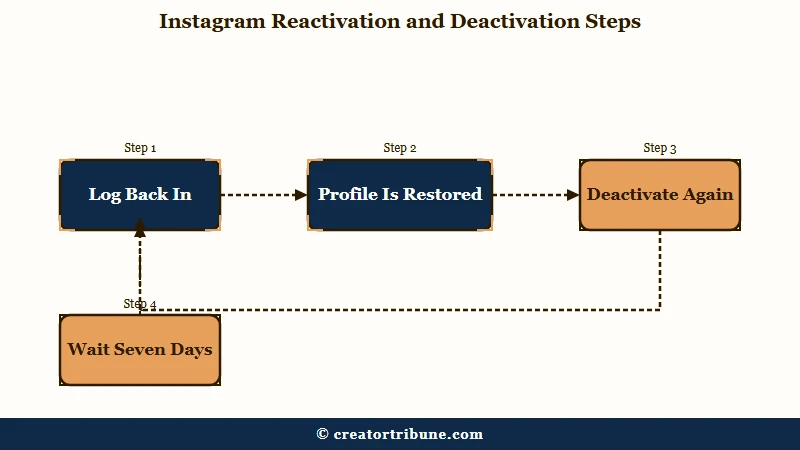
This is the single most misunderstood rule on the subject, and I think the wording of Instagram’s own notice is responsible. The app tells you that you can only deactivate once a week, people read that while they are anxious about losing their account, and they come away believing they have locked themselves out for seven days.
The rule works like this. Deactivate today, log back in an hour later, and the reactivation goes through with no delay. What you cannot do is deactivate a second time until seven days have passed from the first one.
So if you reactivate and change your mind the next morning, that is the point where you hit a wall. Instagram will refuse the second deactivation and you will need to wait out the rest of the week.
One detail worth knowing: the limit is attached to the account, not the device. Switching to a laptop or borrowing a friend’s phone will not reset it, and hammering the option repeatedly is a good way to attract a temporary login restriction on top of the problem you started with.
You will find guides claiming the cooling-off period is 24 hours rather than seven days. That figure does not match the notice Instagram shows in the app, and I would plan around the seven-day version rather than the shorter one.
Why Does Logging In Not Bring My Profile Back?
Logging in fails to restore a profile for one of six reasons, and the error on screen tells you which. The most common are a deletion that passed the 30 day window, a moderation review running in the background, and a sync delay that resolves on its own.
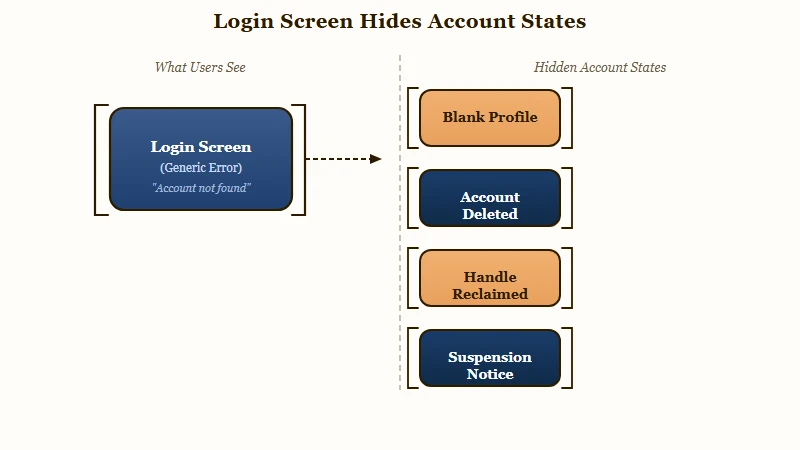
Instagram’s login screen is deliberately vague about account states, which means the same blank profile can mean “wait two days” or “this account no longer exists.” Matching the exact on screen symptom is the only reliable way to tell them apart, and it is the step almost every guide skips.
| What you see | Which state you are in | What to do |
|---|---|---|
| Profile returns normally | Standard deactivation reversed | Nothing, you are done |
| Login works, profile blank or empty | Sync still propagating | Wait 24 to 48 hours, do not deactivate again |
| Account does not exist | Deleted more than 30 days ago | Unrecoverable, start a new account |
| Incorrect password on a username you know | Handle was released and reclaimed | Recover by email or phone, not username |
| Straight to a suspension notice with Appeal | Enforcement action, not deactivation | File the appeal, do not retry the login |
| Notice with only a log out button | Permanently disabled | Appeal route is closed, see the enforcement section |
| Login accepted, code never arrives | Two factor delivery failure | Use backup codes or a trusted device |
Work top to bottom and stop at your match. Each of the sections below takes one row and explains what is happening underneath it.
What Does the Account Does Not Exist Error Mean?
It usually means the account was deleted rather than deactivated, and more than 30 days have passed. Deletion carries a 30-day grace period during which logging in cancels it, and after that window the data is genuinely gone.
Deletion and deactivation are different actions that sit next to each other in the same menu, which is why people mix them up under stress. Requesting deletion starts a 30-day countdown. Nothing is wiped straight away, and everything stays hidden while the clock runs.
Inside those 30 days the fix is the same as any reactivation. Log in, and the deletion request is cancelled automatically.
Past 30 days, I want to be straight with you rather than send you on an errand. The account and its contents are removed from Instagram’s servers, and no support form, email, or phone call brings them back. Guides that tell you to contact support at this stage are describing a route that does not lead anywhere.
There is one variation that fools people badly. Instead of a missing account message, you get told your password is incorrect on a username you are certain about.
That happens because a deleted username is eventually released, and somebody else may have taken it. Your password is fine, it is being checked against a stranger’s account.
Log in with your email address or phone number instead of the handle and you will find out quickly whether anything of yours survives.
What If You Deactivated While Instagram Was Reviewing Your Account?
Then logging in routes you to an appeal instead of your profile. A self deactivation does not pause or cancel a moderation action already in progress, so the enforcement outcome lands while you are away and greets you when you return.
This state gets almost no coverage anywhere, and it is the one that leaves people most confused. Guides treat voluntary deactivation and platform enforcement as two separate stories, so a reader in this position matches neither description and assumes something is broken.
The tell is specific. Instead of the usual password prompt followed by your feed, the app jumps almost immediately to a suspension notice with an Appeal button, or pushes you into identity verification asking for a phone number or a video selfie.
If you see that, you are no longer troubleshooting a reactivation. You are handling an enforcement action, and our guide to an Instagram account disabled walks the appeal path in full. If the flag looks like a mistake, the write up on being suspended by mistake covers what tends to work.
Two things not to do here. Do not retry the login repeatedly, because repeated attempts against an enforcement screen can read as evasion, and do not create a replacement account on the same device while an appeal is open.
The appeal system deserves a caveat. Meta’s own Oversight Board concluded in June 2026 that the company’s account ban process lacks due process and transparency, taking up permanent bans as a subject for the first time in its five year history. Expect the process to be slow and to give you little explanation.
That is also why I would treat the popular Meta Verified workaround with suspicion. The advice circulating is to subscribe on a separate account and use its support chat to reach a human, but paying subscribers have reported getting little help during mass ban waves, including a creator with 325,000 followers who was told he could not request another review. It is not a reliable purchase.
While we are clearing out bad advice: the phone number that circulates as Instagram support is Meta’s corporate switchboard and does not handle account recovery, and the support email address behaves as an unmonitored auto-responder. Neither is a fix.
Why Is Your Profile Blank Right After Reactivating?
Because reactivation is not instant everywhere at once. Your login succeeds, then follower counts, posts and message threads can take 24 to 48 hours to finish repopulating, and during that gap the profile looks empty or broken.
This is the state that causes real damage, because the obvious reaction makes it worse. People see an empty grid, conclude the reactivation failed, and deactivate again to try a clean run.
That second deactivation is what traps them. It burns the once a week allowance, so now they are genuinely locked out of deactivating, and the original account was never broken in the first place.
Before: Profile looks empty ten minutes after logging back in, so you deactivate again to reset it and immediately hit the seven day wall with a half loaded account.
After: Profile looks empty ten minutes after logging back in, so you close the app, leave it alone for a full day, and check again on a different network before touching any setting.
What I would do in the meantime is nothing at all. Do not deactivate, do not delete, do not change your username and do not start editing your profile, because writes during a sync gap are where odd side effects show up.
Reach is a separate question from visibility. Coming back after a long gap often means a slow restart in the feed, and the breakdown on why reach drops after a break covers what to expect.
If the account stays quiet for weeks, the steps to revive a dead account are the next place to look.
One more thing that surprises people. Your existing direct message threads never disappeared from other people’s inboxes while you were deactivated, though your username and photo were hidden and new messages could not reach you.
The observer side of all this, telling apart blocked, deactivated, or deleted, follows the same logic in reverse.
What Should Creators Check After Reactivating?
Creators need to check five things beyond the profile itself, because business assets do not always reconnect the way personal features do. Scheduling tools, linked Pages, monetization status, ad accounts and insights each fail independently and silently.
Every guide on this topic is written for personal accounts, worrying about whether followers notice and whether messages vanish.
Nobody addresses what a creator wakes up to, which is a professional setup with several moving parts that were pointed at an account that stopped existing for a while.
The failure here is quiet rather than loud, which is what makes it expensive. Nothing announces itself as broken, and you find out two weeks later when a client asks why nothing posted.
- Third party schedulers. Access tokens break when the account goes dark, and queued posts either fail silently or start firing at the wrong times once the connection is re established. Reauthorize the tool and rebuild the queue rather than trusting what is still sitting in it.
- Linked Facebook Pages and Business Suite. Check that your Page connection and asset permissions survived, because a broken link here also breaks tagging, shopping and cross posting.
- Monetization and payouts. Payout eligibility and creator marketplace visibility pause while you are deactivated, and reinstatement is not always same day. Confirm your status before you count on a payment date.
- Active ad campaigns. Anything running through the account needs checking for spend and delivery, since a paused or rejected campaign will not restart itself.
- Insights continuity. Expect a gap in your analytics covering the deactivated period. The data for those days does not backfill, so note the gap before it looks like a performance collapse.
The broader lesson I would take from this is about dependency. An account you do not control can vanish for a week and take your entire distribution with it, which is the argument for owning a direct line to your audience.
Our free Creator Money Page template is built for exactly that, and if the account was compromised rather than deactivated, the guide to recover a hacked account is the right starting point.
| Account state | Reversible | Time limit | How it reverses |
|---|---|---|---|
| Temporarily deactivated | Yes | None, stays hidden indefinitely | Log in |
| Deletion requested | Yes | 30 days | Log in, cancels the request |
| Deleted past the window | No | Expired | Nothing, data is removed |
| Suspended | Sometimes | Appeal window varies | Appeal button on the notice |
| Permanently disabled | Rarely | No stated route | Log out only, no appeal shown |
Instagram’s own documentation on temporarily deactivating a profile confirms the basic mechanic, that your photos, comments and likes stay hidden until you reactivate by logging back in.
What it does not do is help you tell these states apart from the login screen, which is the gap this guide exists to fill.
Frequently Asked Questions
Do I have to wait 7 days to reactivate Instagram?
No. Reactivation is immediate, you log in and the account comes back. The seven day limit only restricts how soon you can deactivate a second time, so it never blocks you from returning.
Can I reactivate an Instagram account I deleted?
Yes, if fewer than 30 days have passed since you requested deletion. Logging in cancels the request and restores the account. After 30 days the data is removed and cannot be recovered.
How long can an Instagram account stay deactivated?
Indefinitely. Instagram publishes no expiry for temporary deactivation, so a profile can sit hidden for months or years and still restore when you log in.
Will my followers know I deactivated my account?
No notification goes out when you deactivate or reactivate. Your profile disappears from search and from their following list while it is off, and your follower count returns intact afterwards.
Why does Instagram say my password is incorrect when I reactivate?
Usually because the username was released after deletion and someone else claimed it, so your password is being checked against their account. Try logging in with your email address or phone number instead.
Do my direct messages come back after reactivating?
Yes, your message history returns. Existing threads also stayed visible in other people’s inboxes the whole time, though your username and profile photo were hidden and new messages could not be delivered.
Quick Takeaways
- Reactivating is one action: logging in, and it works immediately. There is no reactivate button because there was never meant to be one.
- The 7-day limit points the opposite way from how most people read it. It restricts deactivating again, never coming back.
- Match the exact error on screen before trying anything. A blank profile, an account does not exist message, and a suspension notice mean three different things with three different fixes.
- If your profile looks empty right after logging in, wait 24 to 48 hours and change nothing. Deactivating again to reset it is the one move that genuinely traps you.
- Creators should verify schedulers, linked Pages, payouts, and ad campaigns separately, because those reconnect silently and fail without telling you.