Instagram Action Blocked and How Long It Really Lasts
Instagram Action Blocked and How Long It Really Lasts
Instagram action blocked? Here is how long each block type really lasts, what extends it, the recovery sequence that works, and what to do when it persists.
- 1The 4 Block Types Instagram Fires
- 2How Long Each Block Lasts
- 3How to Tell Which Block You Have
- 4The Shadowban Hashtag Test
- 5The 4 Things That Extend Your Block
- 6The Recovery Sequence (Hour 0 to Day 14)
- 7The Link-to-Facebook Trick and What It Really Does
- 8When and How to Submit a Support Review
- 9What Does Not Work (Skip These)
- 10Why Inactivity Can Trigger a Block (The Counterintuitive One)
- 11When the Block Persists Past Two Weeks
- 12Frequently Asked Questions
- How do I know if I am action blocked vs shadowbanned?
- Will my action block clear faster if I delete the post that caused it?
- Does Meta Verified protect me from action blocks?
- Will my account survive multiple action blocks in a year?
- Can I move to a new account if my current one is permanently disabled?
- What if my account got blocked from someone else logging in?
- 13Quick Reference
TL;DR: A first-offense Instagram action block lasts 24 to 48 hours. Repeat offenses stretch to 3 to 7 days. Indefinite blocks can run weeks to months. The fastest path back is total inactivity for 24 hours, then 25 percent of normal activity for 3 days, scaling back over two weeks. Failed attempts during the cooldown extend the block. Password resets and reinstalls do nothing. Skip the rumored bypasses.
The first time I got hit with an Instagram action block, I spent two hours trying to “test” if it was lifted, and the block extended from 24 hours to 72 hours. Every failed tap was logged.
That mistake cost me three days of growth on a campaign that was running well. The lesson took me a year to fully internalize, and I have since walked four creator accounts through the recovery sequence below without a single one getting a second block during the cooldown.
This guide is the operational manual I wish I had that afternoon. It covers the four kinds of blocks Instagram fires, how to tell which one hit you, how long each really lasts, and the exact recovery sequence that does not extend the penalty.
The 4 Block Types Instagram Fires
There are four distinct restriction states, not one “action block.” Telling them apart in the first 10 minutes determines whether you wait 24 hours, 14 days, or 3 months to come back.
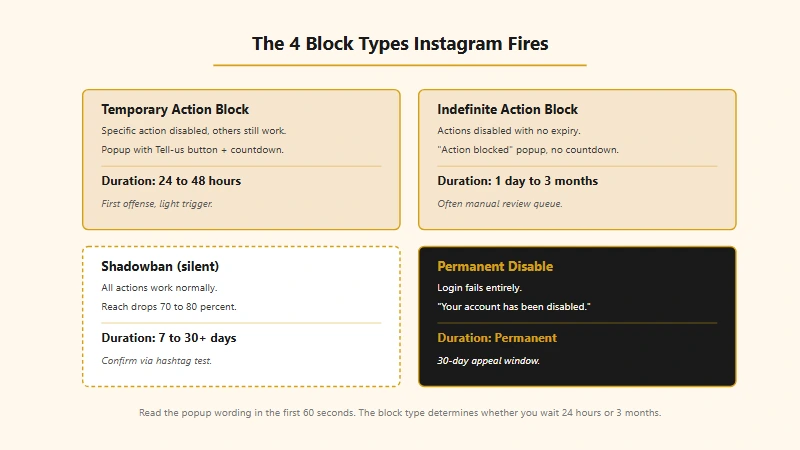
Most ranking guides treat “action blocked” as a single thing. It is not. The four states are:
| Block type | What happens | Duration | What it looks like |
|---|---|---|---|
| Temporary action block | Specific action (follow / like / comment) is disabled, others still work | 24 to 48 hours | Popup: “We restrict certain activity to protect our community” |
| Indefinite action block | Specific actions disabled with no end date shown | 24 hours to several months | Popup: “Action blocked. To protect our community we can’t let you do that right now” with no expiry |
| Shadowban | All actions still work but reach drops 70 to 80 percent | 7 to 30+ days | No popup. You just stop showing in hashtag results and Explore |
| Permanent disable | Account fully locked, login fails | Permanent unless appealed | Login screen: “Your account has been disabled” |
The temporary block is the gentle cousin. It tells you exactly what’s wrong and gives you a ticking clock. Wait it out, run the recovery, move on.
The indefinite block is harder. No countdown, no clarity. It usually fires when the algorithm thinks you crossed a line but is not yet sure how serious. The path back is identical to a temporary block but the timeline is unpredictable.
The shadowban is the silent killer. You can keep posting and engaging normally, the account “feels” fine, but your Reels stop showing in non-follower feeds and your hashtag positioning vanishes. Many creators run for weeks before noticing. Our cross-platform shadowban test covers how to detect this across Instagram, TikTok, and other platforms.
The permanent disable is the last resort. Once you see the disabled-account login screen, you have 30 days to file an appeal, as our Instagram account disabled guide details. After 30 days, the account is unrecoverable.
How Long Each Block Lasts
Block duration scales with offense count, severity, and behavior during the cooldown. First offenses on legitimate accounts almost always resolve within 48 hours. Persistent abuse compounds fast.
Here is what duration looks like by scenario:
| Scenario | Typical duration |
|---|---|
| First offense, light trigger (hourly burst slip) | 24 hours |
| First offense, moderate trigger (clear bot pattern) | 24 to 48 hours |
| Second offense within 30 days | 3 to 7 days |
| Third offense within 30 days | 7 to 14 days |
| Indefinite block, low severity | 24 to 72 hours |
| Indefinite block, moderate (third-party tools detected) | 7 to 14 days |
| Indefinite block, high (multiple violations + appeal pending) | Several weeks to months |
| Shadowban, light (banned hashtag) | 7 to 14 days |
| Shadowban, moderate (aggressive actions) | 14 to 21 days |
| Shadowban, severe (terms violation) | 21 to 30+ days |
| Permanent disable | Permanent unless appeal succeeds |
The “indefinite block, high severity” tier is the one that produces the “12-day”, “3-week”, and even “3-month” stories you see on Reddit. These almost always involve either (a) repeated third-party automation tool use, (b) a previous violation tied to the same account or device, or (c) an active appeal that’s sitting in Meta’s review queue.
If a block goes past 14 days with no apparent cause, it is almost certainly stuck in a manual review queue. The path forward is patience plus a properly-formatted support submission, not retry attempts.
How to Tell Which Block You Have
The popup wording, the URL of the failure, and which actions still work tell you the type within 60 seconds. Do not start the recovery sequence until you have classified the block.
Run this check the moment the first failure happens:
- Read the popup wording carefully. “We restrict certain activity to protect our community” with a “Tell us” button = temporary action block. “Action blocked” with no Tell-us option = indefinite action block. No popup at all but reach feels off = shadowban candidate.
- Try a different action type. If your follow button is dead but you can still like and comment, this is a follow-specific block, not full account restriction. The recovery is faster.
- Check whether the popup gives you a date. “Try again on [date]” = temporary with clear timeline. No date = indefinite, plan for the longer recovery window.
- If no popup fired, run the shadowban hashtag test (described below). Reach issues without popups are the diagnostic for shadowbans.
I have seen creators panic-spam recovery steps for indefinite blocks that turned out to be temporary blocks with a 28-hour timer. Reading the popup carefully saves a week of wasted effort.
The Shadowban Hashtag Test
The fastest way to confirm a shadowban is to post with a small unique hashtag and check whether a non-follower can find it within 15 minutes.
Step-by-step:
- From your account, post a Reel or feed image with a hashtag of 100 to 1,000 total uses (small enough to scan completely, large enough that “Recent” is populated). Use one obscure hashtag and four or five normal ones.
- Open Instagram on a different device or in a private browser window logged out of your account, OR ask a friend who does not follow you.
- Search the obscure hashtag and switch to the “Recent” tab.
- Wait 15 minutes after your post. If your post does NOT appear, you are shadowbanned for that hashtag (and probably for many others).
- To confirm full shadowban (not just one-tag suppression), repeat with two more independent hashtags. Three failed checks = full shadowban.
If you only fail one hashtag test, you may have used a banned or limited hashtag without realizing. The fix is to delete the post containing that hashtag and replace with a clean version. Light hashtag-specific suppressions self-resolve in 7 to 14 days.
The 4 Things That Extend Your Block
These are the behaviors that turn a 24-hour block into a 7-day one. Avoid all four during the cooldown.
- Failed attempts to perform the blocked action. Every tap on the disabled follow / like / comment button is logged as continued spam-pattern behavior. The algorithm extends the block by 24 to 72 hours per “test.” If you see the popup once, do not try again until at least 24 hours later.
- Logging in from a new device or new IP during the block. This reads as evasion and triggers an additional security review. Stay on the device and network the block fired on.
- Creating a new account on the same device. Instagram links accounts by device fingerprint (IDFA on iOS, advertising ID on Android, plus other signals) and by IP. New accounts inherit the parent account’s restriction state and add a “circumvention attempt” flag, which extends the original block significantly.
- Continuing to use the third-party tool that caused the block. If you got blocked while a growth-bot was running, kill the tool’s session AND revoke its API access from Settings → Security → Apps and Websites before doing anything else. Sessions left active during the cooldown trigger immediate re-blocking.
If you have already done any of these, restart the recovery sequence at hour zero with a doubled inactivity window (48 hours of total quiet instead of 24).
The Recovery Sequence (Hour 0 to Day 14)
The Quarter-Capacity Method recovers the account without re-triggering blocks. It works because it gives the algorithm a slow re-establishing trust window.
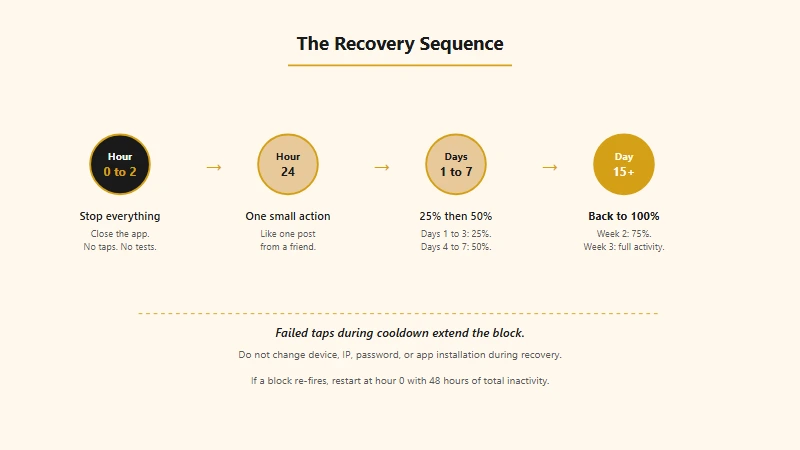
The sequence:
- Hour 0 to Hour 2. Stop everything. No follows, no likes, no comments, no DMs. Even passively scrolling counts as light activity, but actions are what matter. Close the app entirely.
- Hour 2 to Hour 24. Do nothing in the app. Resist the urge to check whether the block has lifted. The “test” is a flag in itself. Every attempted action is logged and counted, even if the action fails.
- Hour 24. Perform exactly one innocuous action. Like one post from someone you already follow. If it succeeds, the block is lifted. If you get the popup again, wait another 24 hours and try again. Do NOT keep tapping.
- Days 1 to 3 (after block clears). Run at 25 percent of your normal daily activity. If you usually do 100 follows a day, do 25. If you usually leave 30 comments, do 7 or 8.
- Days 4 to 7. Move to 50 percent of normal activity.
- Days 8 to 14 (Week 2). Move to 75 percent of normal activity.
- Day 15+ (Week 3). Return to 100 percent of normal activity.
Here is what this looks like end-to-end with a worked example:
Before: A creator gets blocked at 7pm Tuesday after a follow burst. They wait two hours, try one follow at 9pm, get the popup again. Try at 11pm, get it again. Try at 1am Wednesday. The block extends from a 24-hour first-offense to a 72-hour repeat-offense. They spend Wednesday and Thursday locked out and only resume on Friday.
After: Same creator, same Tuesday 7pm block. They close the app immediately. They do nothing in-app for 24 hours. Wednesday 7pm they like one post from a friend, the like succeeds, block is cleared. They run 25 percent of normal Wednesday through Friday, 50 percent Saturday and Sunday, 75 percent the following week. By day 14 they are back to full activity with no further blocks.
The “after” version takes the same calendar time but produces zero risk of a second block. The “before” version typically lands a creator a 7 to 14 day extended cooldown within a month because the next provocation triggers a higher-tier escalation.
The Link-to-Facebook Trick and What It Really Does
Linking your Instagram to a verified Facebook profile signals account authenticity to Instagram’s trust model and modestly raises your block-recovery speed. It is not a magic override. It does not bypass the underlying penalty.
The mechanism: Meta’s spam-detection model uses cross-platform identity signals. An Instagram account linked to a Facebook profile with real friends, photos, and posting history scores higher on the “this is a real human” axis than a standalone Instagram account. The trust score affects:
- How quickly an indefinite block resolves
- Whether a manual review escalates to a human reviewer faster
- The action limits available once the block lifts
The catch: linking only helps if the Facebook account is real, has been active for at least 6 months, and is verified with a phone number. A blank Facebook account created to “trick” Instagram does not raise trust because the linkage signal also includes the linked account’s quality.
If you are setting this up after a block has already fired, link the accounts via Settings → Accounts Center → Profiles → Add account before submitting the support review. The support flow weights the linkage when triaging.
When and How to Submit a Support Review
Submit a manual review after 7 days of inactivity if the block is still showing or if no end date was given. Submitting earlier wastes the review (the algorithm hasn’t had time to reset) and the queue treats early submissions as lower priority.
Path: Settings → Help → Report a Problem → Something Isn’t Working → Describe the block. Include:
- Account username
- Date the block started
- Type of block (temporary, indefinite, shadowban-like reach drop)
- A brief, specific description of what you were doing when it fired
- Whether you have used third-party tools (be honest; lying makes the review reject)
- That you have ceased all activity since the block
Reviews take 3 to 14 days. Be brief. Meta employees triaging these tickets do not have time to read essays. The shortest, clearest submissions get prioritized.
If the support review goes 14+ days with no response, you can resubmit once. Don’t resubmit more than that, as repeat tickets get auto-deprioritized.
For Creator accounts active 90+ days, the in-app Account Status feature provides a faster path. It surfaces recent restrictions with per-item “Request review” buttons and routes those to a different (faster) queue than the general Help Center.
What Does Not Work (Skip These)
A non-trivial amount of advice on Reddit and YouTube is wrong, and acting on it can make blocks worse. The list below is the things creators try that produce no results:
- Resetting your Instagram password. Does nothing. The block is tied to the account ID, not the credentials.
- Uninstalling and reinstalling the app. Cosmetic. The block state is server-side.
- Switching to a different phone. Adds an “unfamiliar device” flag, which can EXTEND the block. Stay on the device the block fired on.
- VPN to switch your IP. If anything, switches you to a “datacenter IP” range that lowers your trust score further. Don’t.
- Creating a new account to “wait it out.” New accounts on the same device fingerprint inherit the parent’s restriction state. The new account often gets blocked within hours.
- Posting more “good” content to compensate. Posting during a block does nothing toward unblocking and can trigger additional flags if the post itself is flagged.
- DMing Meta support directly. There is no DM channel. The Help Center flow is the only legitimate path.
- Buying “unblock” services from third-party vendors. Scams. They cannot bypass Meta’s spam model.
The Wi-Fi to cellular data switch is the only environmental change worth trying. Some soft IP-tied restrictions clear faster after a network change. It does not work for full action blocks but occasionally helps with reach suppression.
Why Inactivity Can Trigger a Block (The Counterintuitive One)
Long inactive periods followed by sudden activity are flagged as account compromise. Even if you are well under daily limits, returning from a multi-week dormancy and immediately doing 30+ follows can trigger an indefinite block because the activity pattern matches a hijacked-account signature.
If you have been off Instagram for 14+ days, ramp activity back up gradually:
- Day 1 of return: scroll for 15 minutes, like 3 posts from accounts you follow, leave the app.
- Day 2: scroll, like 5 to 10 posts, watch a few Stories.
- Day 3: same as day 2 plus 1 to 2 follows.
- Day 4: scale to roughly 25 percent of your historical normal activity.
- Day 7: 50 percent normal.
- Day 14: full normal activity.
This warm-back-up sequence is shorter than the post-block recovery sequence because the trust score is not actively damaged, just suspicious. But skipping it after a long break is one of the most common sources of “out of nowhere” blocks for established accounts.
When the Block Persists Past Two Weeks
Blocks that go past 14 days with no progress are almost always in a manual review queue. The path forward is patience, not retry attempts.
If you have been at zero activity for 14 days and still see the block:
- Check Account Status in the app (Settings → Account Status). If it shows recent restrictions, click “Request review” on each.
- If Account Status shows nothing, submit through Help → Report a Problem.
- Verify your identity if requested. Meta sometimes asks for a photo of your government ID or a selfie video. These verification requests are legitimate. The verification routes the case to a human reviewer 5 to 10 days faster.
- Do not delete the account. Deleted accounts sit in a 30-day grace period during which support cases auto-close.
- While waiting, do not factory-reset your phone, do not log in from a new device, and do not change your phone number.
For background context on how creators have recovered from extreme cases, the follow limit guide’s recovery section walks through a parallel scenario with the 7,500 cap, and the daily limit cheat sheet covers the per-action ceilings that will keep you out of new blocks once you are back.
Frequently Asked Questions
How do I know if I am action blocked vs shadowbanned?
Action blocks fire a popup that says “We restrict certain activity to protect our community” or similar, and they prevent specific actions like following or commenting. Shadowbans never fire a popup. Your account works normally but your reach drops 70 to 80 percent and your posts stop appearing in hashtag and Explore results. Run the hashtag test described above to confirm a shadowban.
Will my action block clear faster if I delete the post that caused it?
For comment-spree blocks, yes. Deleting the most recent 5 to 10 flagged comments before the cooldown starts can reduce the recovery window. For follow-spree or like-spree blocks, deletion does not help because the actions are not surface content the algorithm can clear.
Does Meta Verified protect me from action blocks?
No. Meta Verified raises support priority slightly but provides zero protection against action blocks. The same daily and hourly limits apply, the same triggers fire, and the same recovery timelines hold.
Will my account survive multiple action blocks in a year?
A single block has no long-term impact if you run a clean recovery. Two to three blocks within 6 months meaningfully lowers your trust score, slowing future post reach by 10 to 20 percent for the rest of the year. Four-plus blocks in 6 months risks permanent disable on the next provocation.
Can I move to a new account if my current one is permanently disabled?
You can create a new account, but Instagram links accounts by device fingerprint and IP. The new account starts with reduced trust and lower limits than a typical fresh account. Plan for a 2-to-3-month warm-up period and avoid linking the disabled account or its phone number to the new one.
What if my account got blocked from someone else logging in?
If a friend, employee, or compromised third-party tool triggered the block, the recovery is identical except you must change your password AND revoke all third-party app access (Settings → Security → Apps and Websites) before starting the inactivity window. Otherwise the same trigger may fire again during recovery.
Quick Reference
If you just got blocked and want the 60-second version:
- Stop everything for 2 hours. No taps, no scrolling, no testing.
- Stay off the app for 24 hours.
- Try ONE small action at hour 24. If it succeeds, block is lifted. If not, wait another 24 hours.
- Run 25 percent normal for 3 days, 50 percent for 4 days, 75 percent for week 2, 100 percent in week 3.
- Do not change device, IP, password, or app installation during the cooldown.
- For indefinite blocks past 7 days, submit a manual review through Settings → Help → Report a Problem.
- For shadowbans, post with a small unique hashtag and check from a non-follower account.
- Skip third-party “unblock” tools. They make the situation worse.
The accounts that recover cleanly are the ones that respect the cooldown timer. The accounts that lose months are the ones that try to outsmart the algorithm with retries, new devices, and bypass tools.
For ongoing prevention, the Instagram daily limit cheat sheet lists the safe per-action ceilings that keep blocks from firing in the first place. And for the 7,500 follow ceiling specifically, the follow limit deep-dive covers the cap and the unfollow audit pattern that keeps it usable. You can also check Instagram’s official Help Center for the platform’s framing of automated behavior, which complements the practical playbook above.
If you are looking at the popup right now: close the app, set a 24-hour timer, and walk away from the phone. The single biggest cost of an action block is what you do in the first hour, not what fired it.