Instagram Daily Follow Limit 2026 and the 7,500 Cap
Instagram Daily Follow Limit 2026 and the 7,500 Cap
Hit the Instagram follow limit and got action-blocked? Here is the real 7,500 cap, the daily and hourly limits, and a recovery plan that works.
- 1The 7,500 Hard Cap, Explained Without the Hand-Waving
- 2Is the 7,500 Follow Limit in Instagram’s Official Help Center?
- Did Instagram remove or raise the 7,500 following limit?
- 3Instagram Daily and Hourly Follow Limits by Account Age
- 4Hourly Pacing Beats Daily Totals (The Mistake Most Guides Get Wrong)
- 5What Triggers an Action Block
- 6How Long an Action Block Lasts
- 7The Recovery Plan That Works (Numbered, In Order)
- 8The 5-3-1 Rule and Why I Recommend Mixed Engagement Instead
- 9Why Bypass Tools Get You Banned, Even the Ones That Promise Otherwise
- 10The Edge Cases Most Guides Skip
- 11What If My Account Already Has a Block I Cannot Shake?
- 12What Changed in 2026 That You Need to Know
- 13Frequently Asked Questions
- How many people can I follow per day on Instagram?
- Is there a way to follow more than 7,500 people on Instagram?
- Why am I getting “action blocked” even when I am under the limit?
- How long does an Instagram action block last?
- How do I get rid of a follow limit on my account?
- Do business or creator accounts have higher follow limits?
- 14Quick Reference Cheat Sheet for Instagram Follow Limits
TL;DR: Instagram enforces a 7,500-follow cap, plus a sliding set of daily and hourly limits keyed to account age. Meta publishes the 7,500 ceiling and no other follow number. Pacing matters more than totals. First action block runs 24 to 48 hours; recovery means 25 percent of normal activity for 3 days, scaling back over two weeks. Bypass tools cause permanent disable. Better content beats outbound following at every scale.
I hit the 7,500 follow ceiling on my main creator account two summers ago and spent a frustrating afternoon convinced the app was broken. The follow button just stopped responding.
No popup, no error, no nothing. I rage-tweeted Meta support, then opened a fresh tab to read what was going on. That is when I learned that Instagram’s follow limit is not one number, it is a stack of overlapping ones, and the 7,500 cap is just the loudest part of the system.
If you are a short-form creator pushing Reels alongside TikTok and YouTube Shorts, this stack matters more than it does for casual users. Your “outbound” engagement, the follows and likes and comments you give to other creators, is part of the growth flywheel.
Get the pacing wrong and you end up locked out of the very tool you are trying to use. So this guide breaks down every layer of the limit, what triggers a block, how long blocks last, and the recovery sequence that gets you back online without getting permanently flagged.
The 7,500 Hard Cap, Explained Without the Hand-Waving
Instagram caps every account at 7,500 follows. The limit applies platform-wide regardless of follower count, account type, or Meta Verified status. The only supported way to follow new people once you hit it is to unfollow existing ones.
Instagram caps you at 7,500 accounts, and for practically everyone that number is final. The cap is platform-wide, applies to personal, creator, and business profiles equally, and has nothing to do with your follower count or how long your account has been alive. You can have 50,000 followers and the cap still bites at 7,500 outbound.
What surprises most creators is the failure mode. When you hit the wall, Instagram does not tell you. The follow button just becomes inert.
Tap it on a profile, nothing happens. Tap it again, nothing happens. People will sit there for ten minutes thinking they have a connection issue or a buggy app update.
The silence is by design. Meta would rather you quietly stall than treat the cap as a target to optimize against.
The reason the cap exists, on paper, is to prevent the platform from filling up with accounts that follow tens of thousands of users to fish for follow-backs. That kind of behavior pollutes feed-ranking signals for everyone else.
Whether you agree with that policy is irrelevant. The cap is enforced and there is no documented way to raise it, including paying for Meta Verified.
To follow new people once you are at 7,500, you have to unfollow first.
Is the 7,500 Follow Limit in Instagram’s Official Help Center?
Yes, and it is the only follow number Meta publishes. Instagram’s Help Center article “How many accounts you can follow on Instagram” states it in one line: “To help reduce spam, Instagram doesn’t allow anyone to follow more than 7,500 people.” Search that same Help Center for a daily or hourly follow number and the 7,500 page is what comes back, with no daily figure attached to it.
A lot of people arrive at this topic specifically looking for the official source, usually because two sites gave them different daily numbers and they want to know which one Instagram actually states.
You can open Instagram’s Help Center page on how many accounts you can follow and read the 7,500 figure yourself. The same page adds that anyone who tries to go past it “will see an error message, regardless of how many followers they have,” so account size genuinely does not buy you room.
The daily and hourly caps are a different story. They circulate widely as “official Instagram limits” and none of them turn up in Instagram’s own Help Center.
Metricool’s Instagram limits guide makes a useful test case, since it is among the most cited pages on this topic. It quotes roughly 150 follows a day and about 10 an hour, and points to no Instagram documentation for either.
None of that makes those numbers wrong. They line up reasonably well with what creators run into. It does mean the word “official” is doing unearned work almost everywhere it appears on this subject.
Did Instagram remove or raise the 7,500 following limit?
No. Around April 1, 2026 a run of reports on Reddit and X described accounts sitting past the ceiling, including one user at 7,539 follows and a screenshot of an account with 131 followers and more than 10,000 following.
Meta issued no statement about those specific reports and never changed the number on its support page. The page does answer the general case, though: “Anyone who’s currently following more than 7,500 people did so before this change was made.” That is Instagram’s own account of how anyone ends up over the ceiling, and it points at legacy profiles rather than a lifted limit.
As of August 2026 the page still reads 7,500. Plan around that number, and treat any site announcing a lifted ceiling as repeating unverified screenshots.
Instagram Daily and Hourly Follow Limits by Account Age
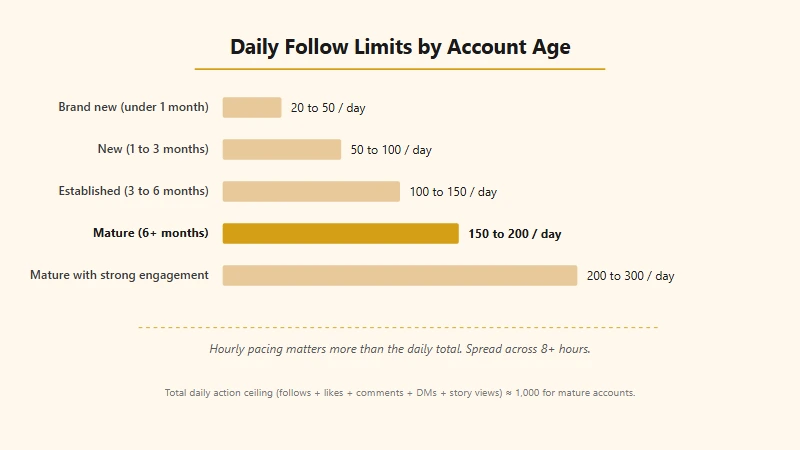
The safe daily follow limit ranges from 20 to 200 depending on account age. Mature accounts (6+ months) can do 150 to 200 follows daily, while accounts under a month should stay between 20 and 50.
The 7,500 cap is the visible ceiling. Underneath it, Instagram runs a much richer set of soft limits keyed to your account age, your historical engagement pattern, and what the trust-and-safety algorithm thinks of your behavior in the last 24 hours.
These are the limits that get most creators in trouble. None of the numbers below come from Meta, for the reason set out in the section above, so read them as a safe operating envelope that creators and tool operators converge on rather than as a published rule:
| Account age | Safe follows per hour | Safe follows per day | Total daily actions ceiling |
|---|---|---|---|
| Brand new (under 1 month) | 5 to 10 | 20 to 50 | ~150 combined actions |
| New (1 to 3 months) | 5 to 25 | 50 to 100 | ~300 to 500 combined |
| Established (3 to 6 months) | 10 to 15 | 100 to 150 | ~500 to 800 combined |
| Mature (6+ months, good standing) | 15 to 20 | 150 to 200 | ~1,000 combined |
| Mature with strong engagement history | 20 to 30 | 200 to 300 | ~1,000 combined |
A few details worth pulling out of that table.
First, the “total daily actions” column is not separate budgets. It is one shared bucket. Follows, likes, comments, story views, and DMs all draw from the same trust pool.
If you are aggressively liking content while doing a follow campaign, you can hit a block at 100 follows even though the supposed safe limit is 200, because the combined actions crossed the threshold. Most ranking guides treat each metric as independent. They are not.
Second, the 6+ months threshold is not a hard switch. The algorithm grades you on a sliding scale.
An account that has been active for nine months but only ever posts once a month and gets 12 likes per post will be treated more like an established account than a mature one. Activity history compounds with age.
Third, Meta Verified does not appreciably bump these numbers. The blue checkmark gives you priority support and slightly better visibility in search. It does not act as “action armor” against blocks.
Meta’s own description of the subscription covers verification, impersonation protection and account support. Raised action limits are not on that list, and the 7,500 ceiling applies regardless of Meta Verified status.
Hourly Pacing Beats Daily Totals (The Mistake Most Guides Get Wrong)
Hourly pacing matters more than daily totals. Following 100 people in a 10-minute burst triggers a block even if you stop afterward, while spreading 150 follows across 10 hours is significantly safer.
If there is one piece of conventional advice I want you to throw out, it is the framing that you can follow “100 people per day” safely. The algorithm watches your hourly pacing far more closely than your 24-hour total.
Following 100 people in a 10-minute burst will trigger a block even if you do nothing else for the rest of the day, because that pattern looks like a script.
Conversely, spreading 150 follows across 10 to 15 hours, with random gaps and other actions mixed in, is significantly safer for an established account. The system is looking for human-rhythm behavior.
Humans browse, scroll, watch a Story, follow someone, get distracted by a Reel, follow another person 20 minutes later, like a few posts, and so on. Bots tend to follow exactly every 30 seconds for an hour straight. That regularity is the tell.
The single fastest way to get blocked on a clean account is to fire 50 follows in five minutes after a multi-day period of total inactivity. That sequence, dormant followed by burst, is one of the most heavily-flagged patterns in Instagram’s spam-detection model.
It looks exactly like an account that just bought a follow-script and started hammering the API.
If you take only one thing from this section, take this. Pace your follows like you would pace your text messages on a normal weekday. Some clusters, then long gaps, then more clusters, with completely different actions in between.
What Triggers an Action Block
Action blocks fire when your behavior pattern looks automated. Rapid-fire follows, exact-interval pacing, mass follow-unfollow loops, identical comments, and bursts after dormancy are the most-flagged patterns.
Beyond raw rate, the algorithm watches for specific patterns that strongly correlate with automation. These are the ones that get creators blocked even when they think they are being careful:
- Rapid-fire identical actions. Following 50 accounts in 5 minutes, or any action repeated at near-exact 30-second intervals.
- Mass-follow after dormancy. A long inactive period followed by a sudden burst of follows.
- Aggressive follow-unfollow loops. Following 100 people, unfollowing them 24 hours later, repeating. This is the textbook “growth hack” pattern that gets shadowbanned the fastest.
- Identical comments across multiple posts. The same emoji string or the same canned reply on more than a handful of unrelated posts.
- Mass DMs to non-followers. Sending the same message to people who do not follow you back, in close succession.
- Tagging more than 20 people in a single post. Flagged as spam regardless of context.
- Frequent IP or device switches. Logging in from a phone, then a laptop, then a different phone, all within a short window. Especially harsh if combined with rapid follow activity.
- Hashtag indexing freeze followed by aggressive outbound activity. If your content has been quietly removed from hashtag results because you reused the same hashtag stack on too many posts, your follow actions look suspicious because they are not backed by organic discovery.
Item 8 is the one I see creators miss most. Hashtag freezes are common, often invisible, and act as a multiplier on every other risk factor.
If you suspect your hashtags have stopped working, fix that first before doing any meaningful follow campaign.
How Long an Action Block Lasts
A first action block typically lasts 24 to 48 hours. Repeat offenses stretch to 7 days, persistent automation patterns can hit 14 days, and continued violations risk permanent disable.
Conventional answer is 24 to 48 hours. Real answer is it depends on whether this is a first offense, what triggered it, and whether you behave during the cooldown.
| Block scenario | Typical duration |
|---|---|
| First offense, light trigger (hourly pacing slip) | 24 hours |
| First offense, moderate trigger (clear bot pattern) | 24 to 48 hours |
| Second offense within 30 days | 3 to 7 days |
| Persistent or severe pattern (third-party tools, mass DMs) | 7 to 14 days |
| Repeated extended blocks | Permanent disable risk |
The 14-day blocks are not fully documented by Meta but creator forums report them consistently. Once you are at that level, you are typically one more flag away from a full disable, so the only path is a complete activity reset.
A note on how Meta presents the block. The pop-up usually reads “We restrict certain activity to protect our community” or “You can’t follow accounts at the moment.”
The wording shifts a few times a year. The behavior is identical across variations. The key is to read the block as a signal, not a target to test against.
The Recovery Plan That Works (Numbered, In Order)
Recovery uses the Quarter-Capacity Method. After the cooldown clears, run 25 percent of normal activity for 3 days, 50 percent for the rest of week one, 75 percent for week two, and full activity in week three.
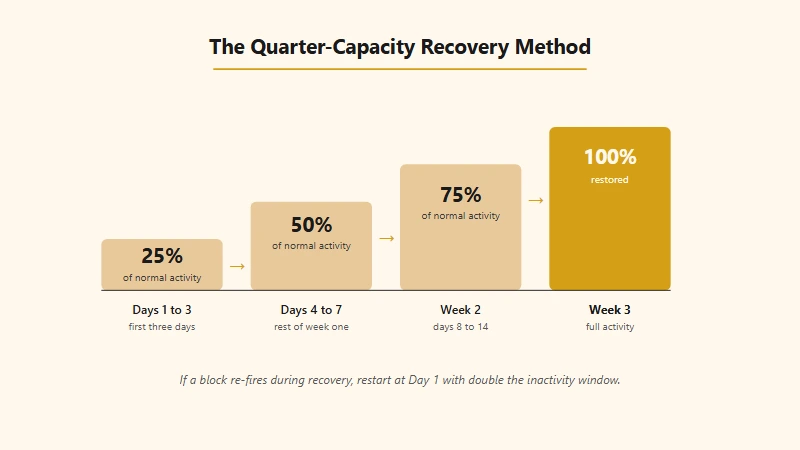
Once a block hits, the sequence below is what clears it without extending it. It is the one creator forums and recovery guides converge on, and it matches how the cooldowns behave in practice.
Treat it as a non-negotiable script:
- Stop everything for 2 to 3 hours immediately. No follows, no likes, no comments, no DMs. Even passively scrolling counts as light activity, but actions are what matter. Close the app.
- Do nothing in the app for the next 24 hours after that. Resist the urge to check whether the block has lifted. The “test” is itself a flag. The algorithm logs every attempted action and counts it against you, even if the action fails.
- At the 24-hour mark, perform one single innocuous action. Like one post from someone you already follow. If it succeeds, the block is lifted. If you get the popup again, wait another 24 hours and try again.
- Once cleared, stay at 25 percent of your normal activity for three days. If you normally do 100 follows a day, do 25. If you normally leave 30 comments, leave 7 or 8.
- Move to 50 percent of normal for the next four days (the rest of week one).
- Move to 75 percent for week two.
- Return to 100 percent in week three. This is the “Quarter-Capacity Method” and it works because it gives the algorithm a slow re-establishing trust window. Going straight back to 100 percent the moment a block lifts is the most common cause of the next, longer block.
Here is what that recovery looks like in practice, side by side with the impatient version:
Before: A creator gets blocked at 7pm Tuesday. They wait two hours, try one follow at 9pm to “test” it, get the popup again. They try again at 11pm, get it again. They try once more at 1am Wednesday. The block extends from a 24-hour first-offense to a 72-hour repeat-offense lockout because every failed attempt was logged as a fresh flag.
After: Same creator, same Tuesday 7pm block. They close the app immediately and do nothing in-app for 24 hours. Wednesday 7pm they like one post from a friend, the like succeeds, block is cleared. They run 25 percent of normal activity Wednesday through Friday, 50 percent Saturday and Sunday, 75 percent the following week. By day 14 they are back to full activity with no further blocks.
If at any point during recovery you get blocked again, restart at step 1 with a doubled inactivity window. So 48 hours of total quiet, then 50 percent recovery for the first week instead of 25.
One technical addition I want to flag. If your block came on while you were on Wi-Fi and you switch to cellular data after the cooldown, the block sometimes appears to clear faster. This is anecdotal but consistent enough across reports to be worth knowing.
The mechanism is likely that some soft restrictions are tied to IP fingerprints, and changing networks resets one of the inputs.
The 5-3-1 Rule and Why I Recommend Mixed Engagement Instead
The 5-3-1 rule has no documented Meta source. Mixed-engagement sessions, scrolling, liking a few posts, watching Stories, following one or two new accounts, and waiting 30+ minutes between sessions, are what keeps your account inside the safe zone.
You will see the “5-3-1 rule” cited everywhere in creator forums. The rough version is for every five posts you scroll past, leave three likes, and one comment. There are variations with different ratios.
I went looking for the actual source of this rule when researching this article and could not find a Meta-published or sourced origin. It is folklore that has been repeated enough times to feel official.
So I want to be honest with you. I cannot tell you the 5-3-1 rule is the protective shield people claim it is.
What I can tell you, because the platform behavior strongly supports it, is that mixed engagement works. The shape of safe activity looks like this:
- Open the app, scroll for two or three minutes without taking any action.
- Like 4 to 6 posts from accounts you follow.
- Watch 2 or 3 Stories.
- Leave one or two genuine comments on posts where you have something real to say.
- Tap follow on one or two new accounts you discovered through Explore or hashtags.
- Wait at least 30 minutes before the next session.
A creator who runs this rhythm for 8 to 10 sessions a day is doing somewhere between 8 and 16 follows per day, mixed in with 30 to 60 likes and a handful of comments. That is well inside safe zones for any account older than a month, and it looks indistinguishable from a real human using Instagram for entertainment.
Why Bypass Tools Get You Banned, Even the Ones That Promise Otherwise
Bypass tools cause permanent account disable. Every third-party automation tool authenticates with patterns Meta’s spam-detection model has been trained against for years, and there is no warning before disable.
There is a thriving market for tools that claim to help you “extend” or “bypass” Instagram’s follow limits. They go by names like growth-hackers, follow-bots, automated engagement panels, and increasingly, AI-powered “smart” growth tools.
Avoid all of them.
The reason is simpler than the marketing copy makes it sound. These tools have to authenticate to Instagram somehow. The sophisticated ones use your real session token; the lazy ones use scraped credentials.
Either way, the actions they perform are tagged with patterns that Meta has been training spam-detection models against for over a decade. Speed of follows beyond human capability, exact-interval pacing, identical user-agent strings, account fingerprints that match thousands of other tool users, all of these are flags.
The cost of getting caught is permanent. Meta does not give you a warning before disabling an account caught using third-party automation. They just disable it.
Recovering a disabled account is a multi-week support process that often ends in rejection.
If your goal is to grow on Instagram faster, the leverage is on the content side, not the engagement side. Reels that get pushed to non-followers via the algorithm bring in 10 to 100 times more new followers per hour than any manual or automated follow campaign ever will.
If you are spending your engagement budget on follows, you are likely under-investing in content. Tools like Opus Clip and Submagic can multiply your weekly Reels output without compromising your account in any way. That is the safer leverage.
The Edge Cases Most Guides Skip
Inbound and outbound engagement count differently. Replying to comments on your own viral post does not count toward outbound caps, Meta Verified does not act as block insurance, and Live stream interactions are treated more leniently than cold outbound activity.
The standard guides cover the basics decently. What they miss is the long tail of scenarios solo creators run into. Here is the field guide for those.
Inbound vs outbound during a viral moment. When a Reel goes viral and you have 800 new comments to reply to in 24 hours, replying does not count toward the spam-detection patterns the same way outbound comments do. Comments on your own posts, replying to people who are commenting on your content, are categorized as inbound engagement.
You can answer all 800 without hitting blocks. The key is not to copy-paste identical responses, which still flags. Vary the wording even by a few characters per reply.
Multi-account management on one device. The conventional advice “one account per device” is impractical for solo creators who run a personal brand and a niche faceless account. The protocol that works in 2026 is to log out fully when switching, never use the multi-account toggle for accounts that need real engagement separation, and avoid running heavy actions on two accounts within the same hour from the same IP.
If you are going to push limits, do it on one account per session. Reuse phone numbers across accounts only if you accept that flagging one will scrutinize the others.
ManyChat and approved DM automation. Instagram does support keyword-triggered DMs through approved partners, and ManyChat is the most popular one. The approved automation runs through Instagram’s official Messenger Platform API, which has its own rate limits separate from manual DM caps.
You can send hundreds of automated keyword-triggered replies per day without getting flagged for “mass messaging” the way an unapproved tool would. The catch is only the trigger-DM pattern is approved. Sending unsolicited DMs through ManyChat or any other tool is still spam.
Live stream interactions. Likes and comments that happen inside a Live broadcast count toward your standard hourly action caps, but Instagram is far more lenient about Live activity because the engagement pattern is naturally bursty.
A 60-minute Live where you reply to 200 comments live will not trigger the same flags as 200 cold outbound comments would. Treat Live as a relatively safe outbound channel.
Repurposed content from TikTok or YouTube Shorts. Reels that show TikTok watermarks have been reach-suppressed since 2022. The reach suppression compounds with action limits because your follows look more suspicious to the algorithm when they are not backed by organic discovery on your own posts.
If you are repurposing video, run it through a clean re-export tool that strips watermarks. Repurpose YouTube videos into Shorts covers the workflow that keeps the reach signal intact.
The platform’s idea of a “warm-up” is longer than people think. Most warm-up advice says go slow for the first week. The safe window is 2 to 3 weeks.
For the first 12 to 20 days of a new account, the rule is to post 2 to 3 pieces of content, like a handful of posts a day, and barely follow anyone at all. Aggressive following inside the warm-up window is one of the fastest paths to a permanent disable, even if you are technically inside the “safe limit” for new accounts.
What If My Account Already Has a Block I Cannot Shake?
Persistent blocks usually require manual review or app-permission cleanup. Disconnect old third-party app integrations from Apps and Websites in Settings, then submit a support review through Help, Report a Problem, Something Isn’t Working.
Some blocks persist past the standard recovery window. If you have been at zero activity for 7 days and the block is still showing, here is the escalation path.
First, check whether you have any third-party app integrations connected to your account through the official “Apps and Websites” page in Settings. Disconnect anything you do not actively use.
Some old analytics or scheduling tools that have not updated their permissions in a while can keep an account flagged for “suspicious app activity” indefinitely.
Second, request a manual review through the Help Center. The Meta support flow is buried but it does exist. The path is Settings, then Help, then Report a Problem, then Something Isn’t Working, and you can describe the block.
Reviews can take 3 to 14 days. Be specific and brief. Meta employees triaging these tickets do not have time to read essays.
Third, if you have a Creator account and have been active for at least 90 days, you can sometimes get faster traction by using the in-app “Account Status” feature, which shows recent restrictions and provides a “request review” option per item.
This is the cleanest formal path back.
Fourth, in the meantime, do not delete the account, do not factory-reset your phone, and do not log in from a new device. All of these add fingerprint variance that can make the block worse.
What Changed in 2026 That You Need to Know
The 2026 algorithm enforces hourly limits more aggressively and softens block messaging. Carousel posts now allow 20 slides, captions are now capped at five hashtags, and stale accounts coming back to 2026 are treated as new again.
A few platform shifts hit in early 2026 that affect everything in this guide.
The spam-detection model got noticeably stricter on rate. The grace zone for hourly bursts shrank, particularly for accounts under 6 months old.
If you set up a new account in 2024 and let it lapse, then came back to use it in 2026, you are being treated as a new account again, with all the corresponding limits.
Carousel posts now allow up to 20 photos or videos, up from 10. This is unrelated to follow limits but worth knowing because it changes how creators are using single-post bandwidth.
A 20-slide carousel of mini-tutorials, with strong CTAs in the captions, is now one of the highest-converting post formats for follow growth, more efficient than outbound following at any scale.
Instagram now enforces a hashtag cap. On December 18, 2025 Instagram announced it would gradually reduce the number of hashtags allowed in a post or Reel caption to five, saying that “using fewer (up to 5) more targeted hashtags, rather than many generic ones, can improve both your content’s performance and people’s experience on Instagram” (Social Media Today).
Because the change rolled out gradually, some accounts reached the cap later than others, but the 30-hashtag era is over. Any guide still telling you to fill 30 slots is describing a version of Instagram that no longer exists.
This matters for action limits because hashtag stuffing used to be one of the easiest ways to look spammy while doing nothing else wrong. The cap takes that particular risk off the table for you.
Action block messaging has gotten softer in tone but harsher in enforcement. The first message now often reads “We’re temporarily limiting your activity” rather than the older “Action Blocked.” The cooldowns behind those softer-sounding messages are the same or longer.
Frequently Asked Questions
How many people can I follow per day on Instagram?
Established accounts older than 6 months can safely follow 150 to 200 people per day. Newer accounts should stay between 20 and 100. Hourly pacing matters more than the daily total, so spread the activity across at least 8 hours rather than batching it into one sitting.
Is there a way to follow more than 7,500 people on Instagram?
Not by any supported route. Instagram enforces a 7,500 cap that applies regardless of account type, follower count, or Meta Verified status, so the only reliable way forward is to unfollow first. Accounts were reported above the ceiling in April 2026, and Instagram’s Help Center covers that case directly: anyone currently following more than 7,500 got there before the rule was in place.
Why am I getting “action blocked” even when I am under the limit?
Action blocks trigger on patterns, not just totals. Rapid-fire follows in a short window, exact-interval pacing, follow-unfollow loops, or sudden bursts after a long inactive period all flag the algorithm even if your daily count is technically inside the safe zone.
How long does an Instagram action block last?
A first offense usually lasts 24 to 48 hours. Repeat offenses within 30 days stretch to 3 to 7 days. Persistent abuse with third-party tools can extend the block to 14 days, with permanent account disable as the next step.
How do I get rid of a follow limit on my account?
You cannot remove the limits because they are a platform-wide spam protection feature. The most you can do is widen your safe range by maintaining steady activity, avoiding bot-like patterns, and keeping the account in good standing for 6+ months.
Do business or creator accounts have higher follow limits?
No, the limits are the same across personal, creator, and business accounts. Creator accounts may get slightly faster recovery from blocks and better support routing, but they cap at the same 7,500 follows and the same 150 to 200 daily safe range.
Quick Reference Cheat Sheet for Instagram Follow Limits
Here is everything worth remembering in 60 seconds.
If you are scanning this article rather than reading it linearly, here is the compressed version:
- The hard cap is 7,500. Meta publishes this one number and no other. The only supported way past it is to unfollow first.
- Daily safe limit by account age: 20-50 (under 1 month), 50-100 (1-3 months), 100-150 (3-6 months), 150-200 (6+ months).
- Hourly safe limit: 5-10 (new), 10-15 (established), 15-20 (mature). Pacing matters more than daily totals.
- Combined actions matter. Follows + likes + comments + DMs + story views all draw from the same daily bucket of roughly 1,000 actions for mature accounts.
- First action block is 24 to 48 hours. Repeat blocks stretch to 7 days. Persistent abuse risks permanent disable.
- Recovery method: 25 percent of normal for 3 days, 50 percent for 4 days, 75 percent for week two, 100 percent in week three.
- Skip bypass tools. Permanent ban risk. Invest your effort in better content instead.
- Mixed engagement is the safe rhythm. Scroll, like, watch, follow, comment, follow. Pace it like a real human across 8 to 10 short sessions.
The whole system is built to reward creators who treat Instagram as a place to spend time, not a place to grind volume. Once you internalize that, the limits stop being obstacles and start being a sanity check that keeps your account healthy through the inevitable hot streaks.
For more on staying out of platform trouble across short-form, recover from a TikTok shadowban walks through the parallel recovery plan for TikTok specifically. The two playbooks share the same underlying logic. Slow recovery beats fast retest, and content quality beats engagement volume in every scenario that matters.
You can also check Instagram’s own community guidelines for the platform’s official framing of what counts as automated behavior, which complements the practical playbook above.
If your follow button has stopped responding right now and you are still 6,800 follows in, this is the part where you take a deep breath, accept the cap, and start planning the unfollow audit you have been putting off. The accounts you stopped engaging with two years ago are using up real estate that could go to creators you care about. The 7,500 limit is annoying. It is also a forcing function for cleaning house. Use it.
In the worst case, aggressive following leads to a disabled account. The Instagram account disabled guide covers the recovery path.
Hitting the follow limit repeatedly can trigger a shadowban, and the shadowban test and recovery guide explains the warning signs.