Captions App Review for iPhone Wins and Android Losses
Captions App Review for iPhone Wins and Android Losses
Captions, formerly Mirage, is the mobile-first editor that wins on iOS but lags badly on Android. Honest review for the workflows solo creators actually run.
- 1What Captions Is
- 2How the Pricing Works
- 3The iOS Experience Is Genuinely Best in Class
- 4The Android Version Is a Different App
- The Workflow That Works on iPhone
- Where Captions Falls Short
- 5Who Should Choose Captions
- Alternatives Worth Considering
- 6Frequently Asked Questions
- Is Captions worth it for solo creators?
- Why did Captions rebrand to Mirage?
- How does Captions compare to Submagic on captions?
- Is the Android version worth using?
- What does an AI Twin actually look like?
- How fast do credits deplete on the Max tier?
- 7The Verdict
Bottom Line: Captions (rebranded to Mirage in September 2025) is the right pick if you film and finish on iPhone and want AI Twin avatars, eye contact correction, and 30+ language dubbing in one app, with the Pro tier at $9.99 a month being the entry point. The Android version is a noticeably degraded port and the credit system makes the Max tier’s monthly cost unpredictable.
I tested Captions on an iPhone 15 Pro and a Samsung Galaxy S24 across two weeks of short-form production.
The pitch is the most ambitious mobile-first AI video editor in the category. Film, edit, dub, and publish from one app without ever opening a desktop.
What is less obvious from the marketing is the gap between the iOS experience (genuinely best in class) and the Android version (a bug-prone port).
Short version: if you live on iPhone, Captions is the cleanest mobile workflow you will find. The Pro tier at $9.99 a month is the entry point. AI Twin and dubbing are real. The credit system makes Max-tier monthly costs unpredictable.
What Captions Is
Captions is a mobile-first AI video editor for solo creators that handles filming, transcription, captioning, AI Twin avatars, lip-synced dubbing into 30+ languages, and eye contact correction in one app, with iOS as the primary platform and Android as a secondary port.
The platform crossed 10 million users this year and reports a 500 million dollar valuation backed by Index Ventures, Kleiner Perkins, a16z, Sequoia, and Adobe Ventures.
The company rebranded as Mirage in September 2025, but most creators still know the product as Captions. We use Captions throughout this review for clarity.
So this is not an experiment. It is the most-funded company in mobile-first AI video editing, which is exactly why I needed to look at it carefully across both major mobile platforms.
This review focuses on the solo creator decision: which tier to pay for, what works on Android vs iPhone, and whether the AI features are worth the credit math.
How the Pricing Works
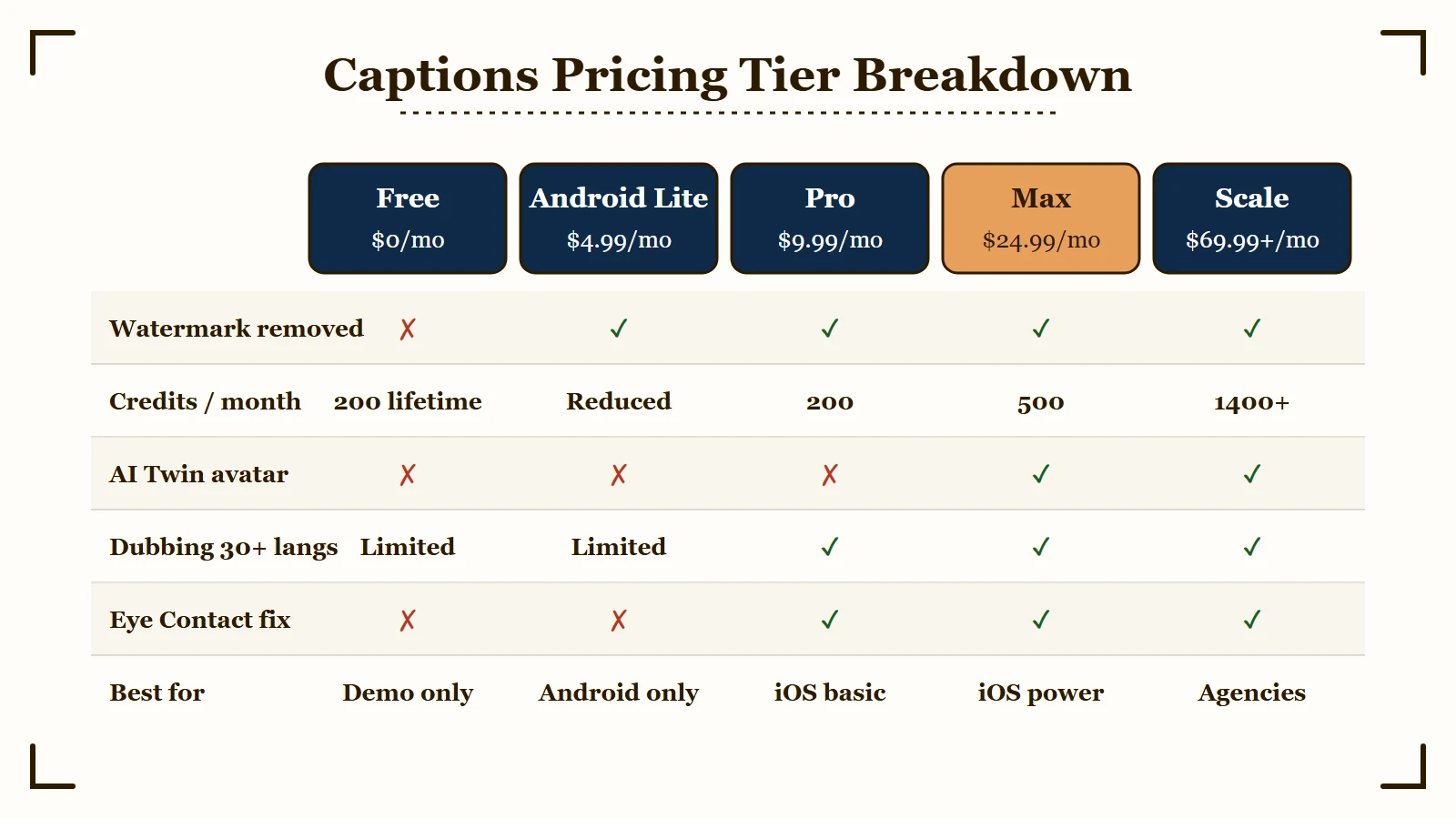
Captions has four paid tiers plus an Android Lite option, with Pro at $9.99 a month being the right entry point for individual creators and Max at $24.99 a month being where the AI Twin and high-volume credit allocation live.
Four tiers plus an Android-specific budget option. The credit system is the part that catches creators by surprise.
| Plan | Monthly | Credits / mo | AI Twin | Dubbing | Watermark |
|---|---|---|---|---|---|
| Free | $0 | 200 lifetime | No | Limited | Yes |
| Android Lite | $4.99 | Reduced | No | Limited | No |
| Pro | $9.99 | 200 | No | Yes | No |
| Max | $24.99 | 500 | Yes | Yes | No |
| Scale | 69.99+ | 1400+ | Yes | Yes | No |
The credit system is the catch. Generative features (AI Twin video, AI Dubbing into other languages, AI Lipdub) consume credits per use, with no fixed price published per operation.
A Max tier creator who runs 5 dubbings per week into 3 languages each can burn through 500 credits in 2 weeks. The Scale tier solves this with 2x to 8x credit allocation, but the price jumps to $69.99 a month minimum.
The Pro tier at $9.99 a month is the right starting point for an iPhone creator who wants caption styling and basic AI editing without the avatar and dubbing toys.
The Max tier at $24.99 a month is the value sweet spot for creators who genuinely use AI Twin and dubbing weekly. Skip Max if you only want captions.
The Android Lite tier at $4.99 a month exists because Android users have a noticeably degraded experience. Captions priced this honestly: Android Lite costs less because it does less.
The iOS Experience Is Genuinely Best in Class
On iPhone, Captions delivers the cleanest mobile-first AI video workflow available, with caption accuracy at 93 to 99 percent across 100+ languages, AI Twin avatars from a single selfie, and Eye Contact correction that works without leaving the app.
Three features stand out on the iOS app.
AI Twin avatars. Take one selfie. The app generates a digital twin that can star in new videos speaking any script you write, with natural lip movement and multi-language support. The first creation takes 5 to 10 minutes of processing. Subsequent generations from the same Twin are faster.
The quality is good enough to publish for casual content. It is not yet good enough to fool a sophisticated viewer at full attention. Use it for talking-head fillers, tutorials in other languages, or scripted scenarios where you would otherwise need to film yourself again.
Eye Contact correction. The tool digitally adjusts your gaze to look directly at the lens even if you were reading from a script or teleprompter while filming. The effect is subtle and convincing on most facial angles. It fails on extreme side profiles or when the original eye position is too far from center.
Dubbing into 30+ languages with AI Lipdub. Translate your video into another language with audio that sounds natural and mouth movements that sync to the new audio. The translation quality is on par with the best dedicated dubbing tools. The lip sync is what makes this feel finished rather than obviously dubbed.
Caption accuracy lands between 93 and 99 percent across 100+ languages depending on audio cleanliness, using OpenAI Whisper transcription. This is on par with Submagic and slightly above Opus Clip.
The Android Version Is a Different App
The Android port lags iOS in feature parity, performance, and stability, with reports of slow processing, sync drift, and missing AI features that ship months after the iOS release.
Multiple users report the Android version as “a noticeably degraded experience” compared to iOS.
Specific gaps:
Feature lag. New AI features ship to iOS first and arrive on Android months later, sometimes never. AI Twin shipped to iOS in early 2025 and only became stable on Android by late 2025.
Performance issues. Slower video processing, more frequent crashes during export, and laggy timeline scrubbing on devices older than the Galaxy S22 or Pixel 7.
Audio sync drift. After applying heavy AI effects or dubbing, Android users report the audio drifting out of sync with video. iOS users see this less often.
If you are on Android and the AI features are the reason you are considering Captions, plan to test the free tier extensively before committing to a paid plan. The Android Lite tier at $4.99 a month exists for a reason.
The Workflow That Works on iPhone
The clean Captions workflow for an iPhone solo creator looks like this:
- Film inside the app. Use the built-in camera with the teleprompter overlay if you are reading a script.
- Auto-transcribe and pick a caption template. Captions runs Whisper-based transcription in 5 to 15 seconds depending on clip length.
- Apply Eye Contact correction if you used a teleprompter. Optional but high-leverage for talking-head clips.
- Tweak the caption text and styling. Fix the 1 to 7 percent error rate, especially on brand names and technical terms.
- Add AI effects only if budget allows. Dubbing, AI Twin, AI Lipdub all consume credits. Decide deliberately.
- Export at source quality and publish.
This is a 5 to 8 minute workflow per clip on iOS once you find your template. Faster than Submagic on desktop because there is no upload wait.
Where Captions Falls Short
Three real limitations matter for the buying decision.
The credit math is opaque. The platform does not publish a fixed per-operation cost for AI Twin video or dubbing. Credits deplete unpredictably depending on output length and feature used. Plan for the Max tier if you genuinely use AI features weekly.
The interface is dense. Captions packs a lot of features into mobile real estate. The learning curve is steeper than Opus Clip or Submagic. Expect 2 to 3 sessions before the workflow feels natural.
Customer support is slow. Multiple Trustpilot and App Store reports cite slow response times for billing or bug issues. If something goes wrong with a payment or a bugged export, expect to wait days for a response.
Who Should Choose Captions
Captions is the right call for iPhone-first creators who want AI avatars, dubbing, and caption styling in one app, the wrong call for Android-primary users or anyone who wants a stable workflow without AI feature reliance, and a maybe for desktop creators who want a secondary mobile capture tool.
The clean answer:
- Yes if you film and finish on iPhone, want AI Twin avatars or dubbing as part of your weekly workflow, and can budget the Max tier at $24.99 a month.
- Yes if you create content in multiple languages and want AI Lipdub to make dubbed versions look finished.
- No if you primarily edit on desktop. The web version lags significantly behind the mobile app.
- No if your phone is older than iPhone 13 or Galaxy S22. The processing demands favor recent hardware.
- Maybe if you are an Android user. The Android Lite tier at $4.99 a month is honest pricing for the reduced experience, but you will not get the iOS features that drive the recommendation.
Alternatives Worth Considering
Two real alternatives in this category for desktop-first creators.
Opus Clip is the answer for long-form-to-short repurposing on desktop. We have an Opus Clip review covering the tradeoffs.
Submagic is the answer for desktop-based caption styling and short-form polishing. See our Submagic review.
For the head-to-head decision desktop creators face, our Opus Clip vs Submagic breakdown covers the choice.
Frequently Asked Questions
Is Captions worth it for solo creators?
Yes if you film and finish on iPhone and want AI Twin avatars, dubbing, or eye contact correction. The Pro tier at $9.99 a month is the right entry point for caption styling. The Max tier at $24.99 a month is the value sweet spot if you use AI features weekly. Skip Captions entirely if you primarily edit on desktop.
Why did Captions rebrand to Mirage?
The company rebranded in September 2025 to position itself beyond just captioning into a full mobile-first AI video editor. The product itself is still called Captions in the App Store and Play Store; Mirage is the company name. Most creators still refer to the product as Captions.
How does Captions compare to Submagic on captions?
Both use Whisper-based transcription with similar accuracy (93 to 99 percent). Submagic has a more polished caption template library and is the choice for desktop creators who want best-in-class styling. Captions wins on mobile workflow integration and adds AI Twin and dubbing that Submagic does not offer.
Is the Android version worth using?
Only at the Android Lite tier of $4.99 a month if you want basic captioning. The full-featured Android version lags iOS in performance, stability, and feature parity. Avoid the Pro or Max tiers on Android, the value math does not work.
What does an AI Twin actually look like?
A digital avatar of yourself generated from a single selfie. It can speak any script you write with natural lip movement in multiple languages. The quality is good enough for casual content but not yet good enough to fool a sophisticated viewer at full attention.
How fast do credits deplete on the Max tier?
Faster than most creators expect. AI Twin video generation, AI Dubbing, and AI Lipdub all consume credits per use without a published per-operation rate. A heavy AI user can burn through 500 monthly credits in 2 weeks. Plan to upgrade to the Scale tier if your weekly AI feature use is consistent.
The Verdict
Captions earns its place as the best mobile-first AI video editor on iOS, with one specific platform bias (Android is a noticeably degraded port) and one specific pricing trap (credits deplete unpredictably on AI features) that change the value math for the wrong user.
If you are an iPhone creator who genuinely uses AI Twin or dubbing weekly, Captions is the tool that does the most in one app.
If you are on Android, plan to use the Android Lite tier and accept the reduced feature set, or use Submagic on a desktop instead.
The 500 million dollar valuation is real. So is the iOS feature polish. So is the credit-system unpredictability and the Android performance gap.
Test the free tier extensively before committing to Pro or Max. Watch the credit counter on AI features. Decide on your platform first, then decide on Captions.
According to Captions on the App Store, the iOS app maintains strong ratings driven primarily by AI feature quality. The complaints concentrate on credit transparency and Android stability. Read both before committing.
After exporting from Captions, the cross-posting without watermarks guide ensures your video looks native on every platform.
If your Reels reach is dropping despite good captions, the Instagram reach dropped guide covers the algorithmic causes.