Metricool Review and the Add-On Math Nobody Shows
Metricool Review and the Add-On Math Nobody Shows
Metricool review for TikTok and Instagram creators. The real cost with add-ons, the analytics that justify it, and who should skip it.
- 1What Does Metricool Cost in 2026
- 2What Do You Get for the Money
- 3How Good Is Metricool for TikTok and Reels
- 4Metricool Review Pros and Cons
- 5Is Metricool Worth It for Creators
- 6Frequently Asked Questions
- Is Metricool free to use?
- Why do my scheduled Reels fail to post from Metricool?
- Does Metricool include X and LinkedIn?
- Does posting through Metricool hurt your reach?
- Is Metricool better than Buffer or Later?
- 7Quick Takeaways
Bottom Line: Metricool is the best analytics value under $100 a month for creators juggling TikTok, Instagram, and YouTube, and a mediocre buy if all you want is a scheduler. The $18 monthly sticker price quietly grows once LinkedIn and X add-ons land, and the silent Reel-failure causes are a setup tax nobody documents. This review covers the real math.
Most Metricool reviews lead with the same screenshot of the planner and the same word: affordable. The sticker price backs that up, with a free plan that costs nothing and a Starter tier around $18 a month on annual billing.
The number that changes the conversation is $1,080. That is the realistic three-year cost for a solo creator on Starter who adds LinkedIn and X, the two platforms Metricool charges $5 a month extra for, each. Affordable tools stop being impulse buys at four figures, and that math deserves to be in the open.
I still think Metricool earns a spot in a lot of creator stacks, and this review explains exactly which ones. We will walk through the real pricing, the analytics that justify the bill, the TikTok and Reels scheduling quirks that cause silent failures, and the creators who should skip it entirely.
What Does Metricool Cost in 2026
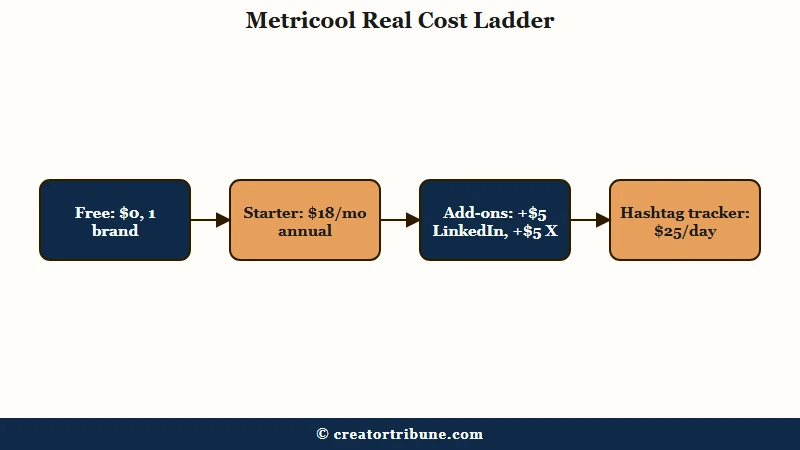
Metricool costs $0 on the free plan, about $18 a month for Starter on annual billing, and about $45 a month for Advanced. LinkedIn and X are paid add-ons at $5 a month each, and X also requires your own X Premium subscription.
The tier structure looks standard until you hit the add-ons. Here is how the plans break down for a solo creator or small team:
| Plan | Price | Limits | Watch out for |
|---|---|---|---|
| Free | $0 | 1 brand, up to 50 posts a month, 30 days of analytics, 5 competitors, 5 AI credits | No LinkedIn, no X, short analytics window |
| Starter | About $18/mo annual, $22 to $25 monthly | 5+ brands, 2,000 posts a month, 20 AI credits per brand, PDF and PPT reports | LinkedIn +$5/mo, X +$5/mo per account |
| Advanced | About $45/mo annual, $54+ monthly | 15+ brands, 5,000 posts a month, 35 AI credits per brand, team roles, white-label reports | Overkill for solo creators, X still costs extra |
The way I read this pricing, the Free plan is a genuinely usable trial for a single-brand creator, not a crippled demo. Fifty posts a month covers a daily TikTok cadence with room left over, and five competitor slots is enough to watch your niche.
The add-on math is where budgets slip. A Starter user who needs LinkedIn and one X account pays roughly $28 to $30 a month, not $18, and that gap compounds to around $1,080 over three years. There is also a real outlier fee hiding in the feature list: real-time hashtag tracking costs $9.99 to $25 per day, which means tracking one launch hashtag for a week can cost more than two months of the subscription.
Before: You sign up expecting the advertised $18 a month, or $216 a year, for everything in the dashboard.
After: Your first invoice with LinkedIn and X connected reads $28 a month, your X Premium subscription bills separately on top, and the one week you tracked a launch hashtag in real time added $70 to $175. The realistic first-year bill lands near $400, not $216.
One more billing note that shows up consistently in user complaints: Metricool does not prorate refunds, and cancellation friction comes up often in its 3.9 out of 5 Trustpilot score across roughly 600 reviews. Set a calendar reminder before any annual renewal.
What Do You Get for the Money
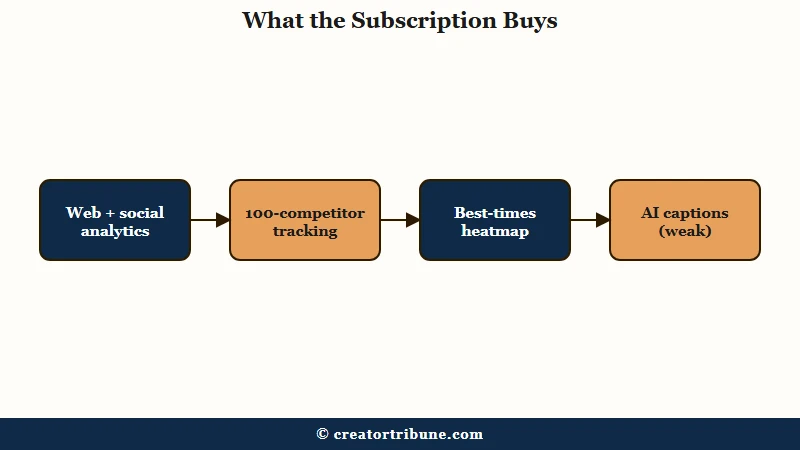
Metricool is an analytics-first platform. The scheduler is fine, but the data features carry the price: website traffic next to social stats in one view, up to 100 tracked competitors with two years of history, and auto-generated client-ready reports.
This is the part most reviews undersell. Metricool started in 2016 as an analytics company, and using it purely as a posting queue is paying for a data team and only using the calendar. If a queue is all you need, the scheduling tool comparison covers cheaper options that do that one job well.
What I’d pay for is the combination of three data features. First, the web analytics integration pulls your site or blog traffic into the same dashboard as your social metrics, which almost nothing else does under $100 a month, and it reports your 250 most popular pages in real time. Second, competitor tracking scales from 5 profiles on Free to 100 on paid plans, with up to two years of historical lookback on rivals.
Third, the best-times heatmap maps your audience’s activity by hour so the planner suggests slots instead of leaving you to guess, mapped out platform by platform in the posting time guide.
The AI assistant is the weakest feature of the bunch. It writes captions in 12 tones and that is the whole show, with no image or video generation, and the credit allowances are tight: 5 a month on Free, 20 per brand on Starter. Treat it as a tiebreaker, never a reason to buy.
Platform coverage is wide for the price: Facebook, Instagram, TikTok, YouTube, Pinterest, Google Business Profile, Twitch, Threads, plus the LinkedIn and X add-ons. Twitch support in particular is rare and makes Metricool a quiet favorite for streamers tracking clip performance.
How Good Is Metricool for TikTok and Reels
Metricool handles TikTok and Reels scheduling well once configured, and it was one of the first tools with direct TikTok publishing. The failures creators report are almost always setup issues: personal accounts, out-of-spec video files, or expired connection tokens.
Short-form is where scheduler complaints concentrate, so I’ll be specific about what breaks. Reels automation requires a Business or Creator account connected to a Facebook Page, and a personal account fails silently or throws a pre-publication error. The video file itself has to be MP4, 9 by 16, at least 1080 by 1920, and between 5 and 90 seconds, and a file outside that window can get rejected by Instagram with no useful error message.
In my judgment, most of the scary “Metricool didn’t post my Reel” stories trace back to Instagram’s API rules rather than Metricool’s code. The platform enforces the account-type requirement, the spec window, and the audio licensing, and every third-party scheduler inherits those limits. The trade-off that stings most is music: a professional account loses part of the trending audio library, so heavily sound-driven posts are better published natively.
Know the honest gaps on the video side before you pay. YouTube Shorts auto-posting cannot set a custom thumbnail or add related videos, so Shorts-heavy channels end up finishing uploads in YouTube Studio anyway. Account connections also drop more than I’d like, and an expired token means a missed slot until you re-authenticate.
Does third-party posting hurt reach? There is no credible evidence of an API penalty, and the reach drops creators blame on schedulers usually track back to content and consistency, the same forces covered in the Reels reach breakdown. What a scheduler does change is your posting discipline, and a steady cadence is the one lever with data behind it, as the TikTok posting cadence study lays out.
Metricool Review Pros and Cons
The short version of this Metricool review is strong analytics, wide platform support, and a usable free plan on the pro side, against add-on pricing, a weak AI assistant, and flaky account connections on the con side.
Here is how I’d tally it after weighing the feature set against the complaint patterns:
Pros:
- Web traffic and social analytics in one dashboard, a combination nearly unique at this price.
- Competitor tracking up to 100 profiles with two years of history for research.
- Genuinely usable free plan with 50 posts a month and TikTok included.
- Wide platform coverage including Twitch, Threads, and Google Business Profile.
- Auto-generated PDF and PPT reports that look client-ready out of the box.
Cons:
- LinkedIn and X cost $5 a month each on top of paid plans, and X needs its own Premium subscription.
- Real-time hashtag tracking costs up to $25 per day, a fee that dwarfs the subscription.
- The AI assistant is captions-only with tight credit limits.
- Account disconnections and occasional double-posting bugs show up consistently in user reviews.
- No prorated refunds and recurring cancellation complaints, reflected in a 3.9 Trustpilot average.
The dashboard also has a learning curve. Plan on one to two hours before the analytics views feel natural, which is fair for the depth but worth budgeting if you expect a five-minute setup.
Is Metricool Worth It for Creators
Metricool is worth it for data-driven creators managing two or more platforms who will use the analytics weekly. It is not worth it for single-platform casual posters, X-heavy accounts, or anyone who only wants a queue.
My verdict comes down to whether you open the analytics tab. A creator who checks competitor benchmarks, watches which posts drive site traffic, and plans against the activity heatmap gets more value here per dollar than from any tool I can name in this bracket. A creator who schedules seven TikToks on Sunday night and never looks at a chart is overpaying for unused features.
| You are | Best move |
|---|---|
| TikTok plus Instagram, data-curious, posting daily | Starter annual, skip the add-ons at first |
| Single platform, under 20 posts a month | Stay on the Free plan, it covers you |
| X or LinkedIn as a primary channel | Look elsewhere, the add-on math punishes you |
| Streamer tracking Twitch plus YouTube clips | Starter, the Twitch analytics are a rare find |
| Agency reporting to clients | Advanced for white-label reports and team roles |
Social platforms now reach over five billion users worldwide, per Statista’s social network data, and the practical consequence for creators is that multi-platform presence stopped being optional. Tools that consolidate the resulting data sprawl earn their fee, and Metricool consolidates more of it than anything else near $18 a month.
If you decide to try it, start on the Metricool free plan for two weeks before paying. Connect your real accounts, post your normal cadence, and check whether you opened the analytics more than twice. That answer is the whole purchase decision, and if you later switch tools, plan three to five days of running systems in parallel to migrate cleanly.
Frequently Asked Questions
Is Metricool free to use?
Yes. The free plan covers 1 brand, up to 50 posts a month, 30 days of analytics, and 5 competitor profiles. LinkedIn and X are excluded. For a single-platform creator posting daily, the free tier is genuinely enough.
Why do my scheduled Reels fail to post from Metricool?
The usual causes are a personal Instagram account (automation needs Business or Creator plus a linked Facebook Page), a video outside the MP4, 9:16, 1080×1920, 5-to-90-second spec window, or an expired connection token that needs re-linking.
Does Metricool include X and LinkedIn?
Not by default. LinkedIn costs an extra $5 a month on Starter, and X costs $5 a month per account on every plan while also requiring your own X Premium subscription. Budget for those before comparing prices.
Does posting through Metricool hurt your reach?
No credible evidence shows an API penalty for third-party posting. Reach drops usually trace to content or cadence changes. The real trade-off is creative: professional accounts lose part of the trending audio library, so sound-driven posts do better published natively.
Is Metricool better than Buffer or Later?
Metricool wins on analytics depth and platform breadth; Buffer wins on simplicity and per-channel pricing. If you want the full head-to-head including Hootsuite, the scheduling tool comparison breaks down all four with current prices.
Quick Takeaways
- Metricool’s real cost for a Starter user with LinkedIn and X is about $28 to $30 a month, roughly $1,080 over three years.
- The analytics justify the price, with web traffic beside social stats and 100-competitor tracking, while the scheduler alone does not.
- Most Reel posting failures are setup issues, so check account type, the 5-to-90-second window, and video specs before blaming the tool.
- Start on the free plan for two weeks and count how often you open the analytics tab. Pay only if the answer is weekly.
- Skip Metricool if X or LinkedIn is your main channel, because the add-on fees punish that mix.