Why TikTok Drafts Disappear and How to Get Them Back
Why TikTok Drafts Disappear and How to Get Them Back
TikTok drafts disappeared after an update or reinstall? Where drafts really live, what is recoverable, and the habit that stops the next loss.
- 1Why Did My TikTok Drafts Disappear?
- 2Will You Lose Your Drafts If You Update TikTok?
- 3Does TikTok Officially Say Where Drafts Are Stored?
- 4How Do You Recover TikTok Drafts That Disappeared?
- 5How Do You Stop TikTok Drafts From Vanishing Again?
- 6Frequently Asked Questions
- Does deleting the TikTok app delete my drafts?
- Do TikTok drafts transfer to a new phone?
- Is there a Recently Deleted folder for TikTok drafts?
- Why did my drafts disappear when I never deleted the app?
- Can TikTok support recover my drafts?
- Is there any way to get TikTok drafts back?
- My TikTok draft disappeared while editing. What happened?
- 7Quick Takeaways
TL;DR: TikTok drafts live only on your phone, never on your account, so reinstalls, logouts, clearing the app’s storage and some cleaner apps can erase them, while TikTok’s own cache clear leaves them alone. Recovery is possible only through your camera roll, a device backup, or scanning software, and each step up that ladder gets riskier. The 30-second fix going forward is posting important edits as Only Me with Save to Device turned on.
Your TikTok drafts are gone, and all you did was update the app or free up some storage. The edits were hours of work: trimmed clips, timed captions, effects layered just right, all sitting safely in the drafts folder. Then the folder is empty.
The painful part is that almost nobody registers how fragile that folder is until it empties. Drafts look like account data, sitting right there on your profile next to your posted videos, so everyone assumes they sync somewhere. They do not.
This guide covers why drafts vanish, an honest recovery ladder from free checks to last-resort software (with one safety warning you should not skip), and the one habit that makes the next loss impossible. The bad news comes first, but the prevention section is the part I’d bookmark.
Updated the app and the folder is empty? Do not panic-reinstall. A plain TikTok update rarely deletes drafts on its own, because they sit in local storage that survives updates. The empty folder is usually a display glitch, so restart your phone first, since the drafts often reappear once the app re-indexes local storage. Reinstalling is the one move that makes a fixable problem permanent.
Why Did My TikTok Drafts Disappear?
TikTok drafts disappear because they are stored only on your device, never on TikTok’s servers. Uninstalling, clearing TikTok’s storage in phone settings, or a cleaner that wipes app data deletes every draft, and logging out can hide or lose them. A routine update and TikTok’s own cache clear do not.
What is a TikTok draft: An unfinished video saved inside the app’s local storage on your phone. It is visible only to you, only on that device, and never uploaded to your account.
The design surprises almost everyone. Your posted videos live on TikTok’s servers and follow your account anywhere, while drafts are closer to files in a folder that the app owns on your phone. Whatever the reasoning behind that split, and TikTok has not explained it publicly, the effect is that unfinished content never touches their platform.
The practical consequence is that ordinary phone maintenance doubles as draft deletion. Here is what each common action does to them:
| What you did | What happened to your drafts |
|---|---|
| Uninstalled or reinstalled TikTok | Deleted with the app’s data |
| Logged out or switched accounts | Hidden while you are signed out, and sometimes lost |
| Cleared TikTok’s storage or data in phone settings | Deleted with the rest of the app’s data |
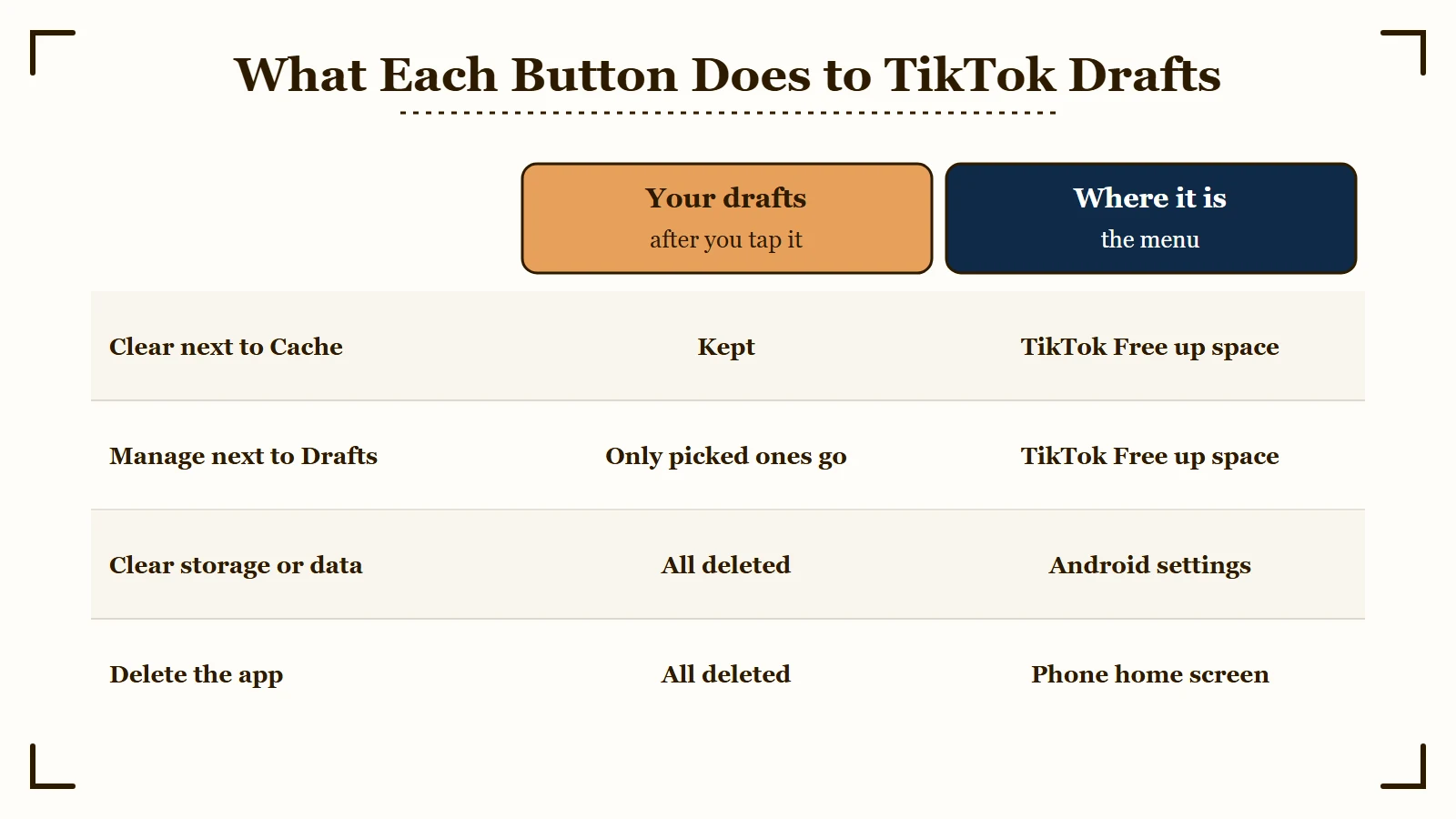
| Tapped Clear next to Cache in TikTok’s Free up space | Safe: TikTok lists Drafts as a separate item on that screen |
| Ran a phone cleaner app | At risk if it clears TikTok’s data rather than only its cache |
| Switched to a new phone | Drafts stay on the old device, they never transfer |
| App update or crash | Occasional losses from interrupted storage |
| Made the video with AI Alive | TikTok’s AI Alive help says these drafts expire after 7 days |
The cleaner-app row deserves special attention, because it catches people who never touched TikTok at all. A cleanup tool that only clears caches leaves drafts alone, but one that wipes an app’s stored data takes the drafts folder with it. Check which of the two your cleaner did before you blame TikTok.
One more quirk: drafts are device-specific and account-specific at the same time. Logging into your account on a new phone shows your posted videos and an empty drafts folder, and the drafts stay marooned on the old device.
This is also why drafts not showing on your profile does not always mean they were deleted. Check the profile grid before anything else.
If the drafts tile still shows a count, the files are there and you are looking at a display problem. If the tile is gone entirely, you have a real loss to work through, and the recovery ladder below is the next step.
Will You Lose Your Drafts If You Update TikTok?
Usually not. Updating the TikTok app does not by itself lose or delete your drafts, because an update replaces program files and leaves the app’s local data in place. That local data is where drafts live, so an empty folder straight after updating is far more often a display glitch than a real deletion.
Restart the phone before you do anything else. Reopen TikTok afterward and check the profile grid rather than the create screen. This is the single most common happy ending to a “my drafts are gone” scare.
What genuinely deletes them is anything that clears app data rather than replacing app code: uninstalling, clearing TikTok’s storage or data in system settings, or a cleaner app that wipes app data. Logging out is not one of the reasons TikTok’s help gives for drafts being removed, though some users report losing them that way. The dangerous move after an update is reinstalling the app to “fix” the empty folder, because that is the step that turns a recoverable glitch into a permanent loss.
Clearing the cache is not on that list, though the two settings are easy to confuse. Google’s Android help says Clear cache “deletes temporary data,” while Clear storage “permanently deletes all app data.” TikTok’s troubleshooting help lists Drafts as its own item under Free up space, apart from Cache.
On iPhone, Apple says Offload App “keeps its documents and data,” so offloading TikTok should leave drafts in place, while Delete App removes the app “and its related data.” The Clear button next to Cache is the one to use, and the steps for clearing TikTok’s cache safely cover both phones.
Does TikTok Officially Say Where Drafts Are Stored?
Not in so many words. TikTok’s Help Center covers drafts in a short section called Saving a draft, inside its Editing, posting, and deleting article. It says drafts may be removed after a reinstall or when the account moves to a different device, which is how files kept on the phone behave.
That Saving a draft section, read on October 7, 2026, lists two reasons drafts “may be removed.” The first is “TikTok has been uninstalled, then reinstalled on a device,” and the second is “The account has been moved or switched to a different device.”
The same section says drafts “can’t be shared or transferred between various accounts,” and the Making a post article adds that your drafts are visible only to you on your profile. None of the 26 articles in the Creating videos section has drafts in its title, which is why the answer is easy to miss.
Drafts also appear in TikTok’s Troubleshooting on TikTok article, read the same day. Under Free up space it lists three separate items: Clear next to Cache, Clear next to Downloads, and Manage next to Drafts, where you select drafts and tap Delete.
Read together, the two articles settle the cache question. Cache and Drafts are separate buttons, and a cache clear is not on TikTok’s list of removal reasons. Neither article offers a way to bring a removed draft back, so every recovery route below depends on your phone or its backups.
Most search results for official guidance are creator blogs, recovery-software vendors, and TikTok topic hubs that collect user videos. Weigh what they say against the Help Center lines above.
Treat the guides claiming TikTok quietly added a drafts sync setting with the same caution. I went looking and could not stand one up, and several of the pages making the claim sell recovery software.
How Do You Recover TikTok Drafts That Disappeared?
To get them back, work a ladder of four options in order. Confirm it is not a display glitch, check your camera roll and Recently Deleted, restore or extract from a device backup, and only then consider scanning software. TikTok support cannot help, because drafts never reach their servers.
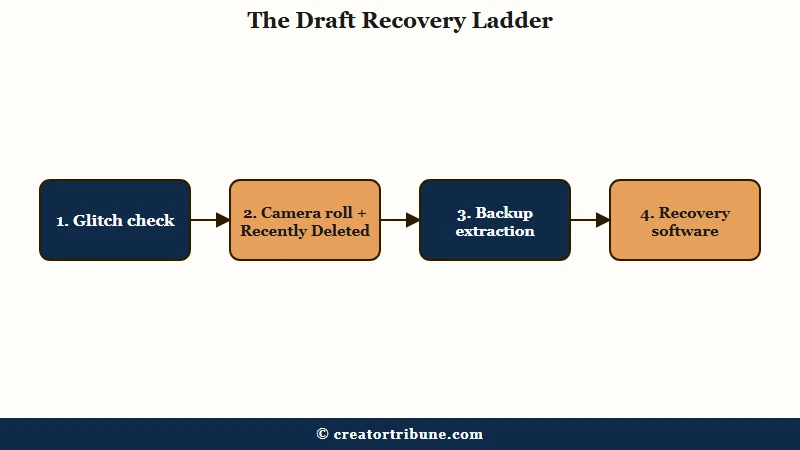
There is no recycle bin for drafts inside TikTok, so every way to get them back runs through your phone. Here is the order I’d work through, cheapest and safest first:
- Rule out a glitch. Check your profile grid for the drafts tile, which shows a count like “3 Drafts” in the first slot. If the count is there but the folder looks empty, update TikTok, force-close it, and restart your phone before assuming the worst.
- Check your camera roll. If Save to Device was ever on, finished versions of your edits are in your gallery. On iPhone, also open Photos and look in Recently Deleted, which holds removed files for about 30 days.
- Restore from a device backup, carefully. An iCloud, iTunes, or Google Drive backup from before the loss can bring drafts back, but a full restore reverts your ENTIRE phone to that date and erases everything created since. Treat it as the nuclear option, and prefer tools that can extract specific files from a backup without wiping the phone.
- Try recovery software as a last resort. Scanners like Tenorshare UltData, iMyFone D-Back, or Gbyte iOS Recovery search device memory for deleted file fragments. Success is not guaranteed, the useful features sit behind paid licenses, and you should be picky about which one you trust.
That fourth rung needs a real warning. This category of software asks for deep device access, and a scanner that can read deleted file fragments can read everything else on the phone too. Read recent independent reviews before connecting your phone to any of them, and never hand one your Apple ID password.
The honest odds depend on one question: did a copy ever exist outside TikTok’s data folder? If the answer is no, recovery software is a long shot, and I’d rather you spend that hour rebuilding the edit from raw clips in your gallery.
Here is how the four recovery options compare at a glance:
| Method | Works when | Risk | Cost |
|---|---|---|---|
| Glitch check | Drafts are hidden, not deleted | None | Free |
| Camera roll / Recently Deleted | Save to Device was on; within 30 days for deleted files | None | Free |
| Backup restore or extraction | A backup predates the loss | Full restore erases newer data; extraction is safer | Free to ~$50 |
| Recovery scanner software | No backup exists, loss is recent | Unvetted tools can harm the device or account | Paid license, success not guaranteed |
How Do You Stop TikTok Drafts From Vanishing Again?
Prevention means keeping a copy outside TikTok’s data folder. Turn on Save to Device, post important work-in-progress as Only Me, and keep raw clips in a cloud-synced gallery so any edit can be rebuilt.
The fail-safe habit takes about 30 seconds per video, and the trick is using TikTok’s private posting against its fragile drafts system. A video posted as Only Me uploads to your account like any other post, visible to nobody but you, and with Save to Device on it also drops a finished copy into your camera roll.
Before: You save the edit as a draft and move on. The draft lives in app data only, and the next logout, reinstall, or cleaner-app sweep can delete it silently.
After: You set the video’s privacy to Only Me, enable Save to Device, and post it. A copy now exists on TikTok’s servers under your account and another sits in your gallery syncing to iCloud or Google Photos. When you are ready, you change the visibility to public or re-edit from the saved file.
Two more habits round out the protection. First, keep your raw clips: a master copy in the gallery turns any lost edit into an hour of rebuilding instead of a funeral, the same logic behind keeping a clean master file for cross-posting. Second, do heavy edits in an external editor when the project matters, because a dedicated editing app keeps project files outside TikTok entirely and out of reach of an app update.
What I’d also flag for daily posters is that batching makes this painless. Filming and editing in blocks, then exporting everything to the gallery before scheduling, is already the rhythm that posting at the right times rewards. One export step at the end of each batch session protects the whole batch.
Every TikTok account gets the same fragile local drafts folder, and its rules stay invisible until the day something wipes it, which is why this loss keeps catching careful people. If your saved copies ever look soft after exporting, the upload quality guide covers the export settings worth locking in.
Frequently Asked Questions
Does deleting the TikTok app delete my drafts?
Yes. Drafts are stored in the app’s local data folder, so uninstalling TikTok wipes every draft with it. Reinstalling brings back your account and posted videos, but the drafts folder comes back empty.
Do TikTok drafts transfer to a new phone?
No. Drafts are tied to the device where they were created, even on the same account. Before switching phones, post important drafts as Only Me with Save to Device on, or export them to your gallery.
Is there a Recently Deleted folder for TikTok drafts?
Not inside TikTok. The app has no recycle bin for drafts. Your phone’s gallery has one, though, and on iPhone the Photos Recently Deleted folder keeps removed videos for about 30 days if copies were ever saved there.
Why did my drafts disappear when I never deleted the app?
The usual culprits are logging out, switching accounts or phones, an app update glitch, or a cleaner app that wiped TikTok’s data rather than only its cache. The Clear button next to Cache inside TikTok is not one of them, because TikTok’s help lists Drafts as a separate item under Free up space.
If your drafts keep disappearing rather than vanishing once, a cleaner app with automatic sweeps turned on is the first thing to rule out.
Can TikTok support recover my drafts?
No. Drafts never reach TikTok’s servers, so support has nothing to restore. TikTok’s Help Center lists a reinstall and a move to a different device as reasons drafts get removed and describes no way to restore them, so any real recovery happens on your device.
Is there any way to get TikTok drafts back?
Sometimes, and it depends entirely on whether a copy ever existed outside TikTok’s data folder. Work the ladder above in order: rule out a display glitch, check your camera roll and Recently Deleted, then look at a device backup, with recovery software as the last resort.
If no copy was ever saved outside the app, rebuilding from your raw clips is usually the faster route.
My TikTok draft disappeared while editing. What happened?
A draft can fail to save if the app crashes or gets force-closed before it finishes writing the file to local storage. That half-saved edit is usually unrecoverable, so the fix is preventive: post edits that matter as Only Me with Save to Device on rather than trusting the draft to hold.
Quick Takeaways
- TikTok drafts are device files, not account data, so reinstalls, logouts, clearing the app’s storage and data-wiping cleaner apps can erase them permanently, while the Clear button next to Cache in TikTok does not.
- Run the recovery ladder in order: glitch check, camera roll and Recently Deleted (30-day window on iPhone), backup extraction, and recovery software last.
- A full backup restore is the nuclear option that erases everything created after the backup date. Prefer extracting specific files.
- Vet recovery software hard before connecting your phone, and never give one your Apple ID password.
- Adopt the 30-second fail-safe today: post important edits as Only Me with Save to Device on, so a copy always exists outside the drafts folder.