
How to Restore a TikTok Streak After Using All Your Restores
How to Restore a TikTok Streak After Using All Your Restores
TikTok gives you a limited number of streak restores each month but never says how many. Here is the real timing, the missing button, and what works.
- 1Can You Restore a TikTok Streak After Using All Your Restores?
- 2How Many Streak Restores Do You Get Per Month?
- 3Why Is the Restore Button Missing From My Chat?
- 4How Long Do You Have Before a Streak Is Gone for Good?
- 5Should You Delete the Chat to Trigger a Restore?
- 6Does the Report a Problem Support Ticket Work?
- 7Why Can You Not Get Streaks on TikTok at All?
- 8What Happens to Your Streak Pet When a Streak Dies?
- 9Frequently Asked Questions
- How many streak restores do you get per month on TikTok?
- Can you restore a TikTok streak after 48 hours?
- Why is there no Restore button on my TikTok chat?
- Does deleting the chat restore a TikTok streak?
- Why can I not get streaks on TikTok?
- Can you buy more TikTok streak restores?
- 10Quick Takeaways
TL;DR: Once your monthly restores are gone, TikTok gives you no in-app way to restore a streak. The Restore button stops appearing altogether. TikTok confirms you get “a limited number of restores each month” without publishing the number, but the notice it posts in the chat after a restore shows how many you have left.
Trying to restore a TikTok streak after using all your restores is the point where the advice online falls apart. Every guide walks you to the same place, a support form buried under Report a Problem, and not one of them tells you whether it has ever worked.
The gap runs deeper than that. TikTok’s own help page says you get “a limited number of restores each month” and then stops, without ever saying how many. So the single question people search for most, how many restores do I get, has no published answer from the company that built the feature.
This piece covers what users report the number to be and why nobody can confirm it, the timing that decides whether your streak is recoverable at all, why the Restore button vanishes, and one widely repeated trick that destroys your last chance of getting the streak back.

Can You Restore a TikTok Streak After Using All Your Restores?
Restoring a TikTok streak after using all your restores is not possible inside the app.
The Restore button is the only official recovery path, and it stops appearing once your monthly allowance is spent. No setting, refresh, or reinstall brings it back early.
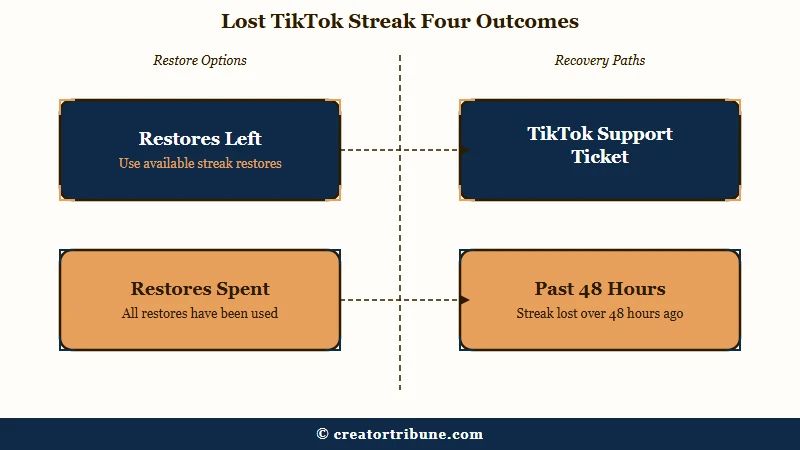
That is the honest answer, and it is the one most guides talk around. The support-ticket route those guides push you toward is real, but TikTok has never advertised it as a streak recovery tool or promised it will work.
My take is that the confusion here is manufactured. When a company documents a limit without publishing its size, people fill the silence with guesses, and those guesses get copied until they read like facts.
What you can control is the timing and the count. Both are covered below, and both matter more than any support form.
How Many Streak Restores Do You Get Per Month?
TikTok has never published the number. Its help page states only that “as you maintain your Streak, you get a limited number of restores each month.” The figures users pass around split between three and five, and nothing from TikTok backs either, so treat both as estimates.
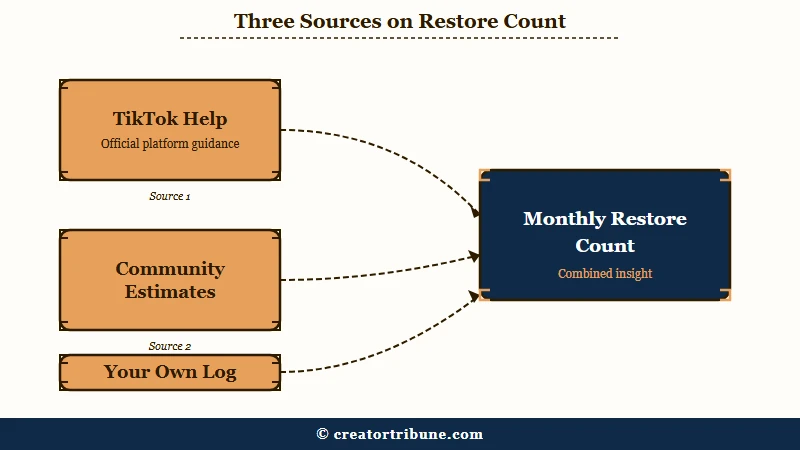
Here is where the sources land. TikTok’s official Streaks documentation still gives the “limited number” wording and no count as of November 6, 2026.
Summaries of user videos on TikTok show the split. One quotes a creator saying “you get three chances to restore your streak per month,” while another says “up to 5 restores for a specific chat every month.” Five is also the number that keeps turning up in the questions that bring readers to this guide, such as “do we have every month 5 restore streak on tiktok”.
Repetition is not confirmation, and none of those posts or searchers is quoting TikTok. The way I read it, the allowance may also scale with the streak, since TikTok’s page says you “may have the option to restore an expired Streak depending on how long you’ve been messaging for.” TikTok’s page also never says whether the allowance counts per chat or across your whole account.
So stop hunting for the universal number and find yours instead. It is the only figure that governs your account.
- Open the chat that lost the streak within the recovery window and check whether a Restore option appears.
- Read the line TikTok adds to the chat after a restore. Screenshots users have posted show it ending with your balance, such as “Streak restored. 0 restores left this month,” and a video posted in May 2025 shows 2 left.
- When the option stops appearing inside the window, you have hit your ceiling for that month.
- Compare across two months before assuming the ceiling is fixed, and note the day your count refills, since TikTok says “each month” without naming a reset date.
That check takes seconds and beats every number published on this topic, three and five included.
Why Is the Restore Button Missing From My Chat?
A missing Restore button usually means one of three things. Your recovery window has closed, your monthly restores are spent, or the streak has not run long enough to qualify, since TikTok offers restores “depending on how long you’ve been messaging for.” TikTok states plainly that “if you don’t see an option to restore your Streak, the time frame for restoring it has passed.”
That sentence is worth reading twice, because it makes the missing button diagnostic rather than a bug. People reinstall the app and clear caches chasing a button that was never going to render.
My read is that the button is behaving correctly and the documentation is just buried. I check the timing first and the restore count second, in that order, before touching any setting.
| Symptom | Likely cause | What to do |
|---|---|---|
| No Restore option, streak ended over 48 hours ago | Recovery window closed | Nothing recovers it. Start a new streak. |
| No Restore option, streak ended hours ago | Monthly restores already spent | Wait for the next monthly cycle. |
| Restore never appears on any chat, ever | The streak may be too new, since TikTok ties restores to how long you have been messaging | Update the app. A longer-running streak may qualify. |
| Restore missing and you are under 16 | Messaging restrictions apply to your account | See the age section below. |
| Streak badge gone but chat looks normal | Streak ended and the badge was removed | Check the timing math below. |
| No Restore option on a computer | TikTok’s help gives the Restore steps for the phone app only | Open the same chat in the TikTok app within the 48 hours. |
The under-16 row catches more people than you would expect, and it has nothing to do with restores at all.
On a laptop or PC, switch to your phone. TikTok’s help writes the Restore steps for the app (“Tap Restore within the chat”) and gives no desktop route, so open the same chat in the TikTok app before the 48 hours run out.
How Long Do You Have Before a Streak Is Gone for Good?
You have roughly 72 hours from your last message, not 48. The badge fades at the end of the day you miss. The streak then ends 24 hours after that fade, and only then does the documented 48-hour restore window begin.
This is the detail almost every guide gets wrong. Everyone quotes 48 hours without saying what the clock starts from, which is why so many people give up at the 48-hour mark believing they are already too late when they are not.
| Stage | When it happens | What you see | Can you still fix it |
|---|---|---|---|
| Streak active | Messages exchanged 3 days running | Badge with a day count | Nothing to fix |
| Badge fades | End of a day with no messages | Badge greys out | Yes, just send a message |
| Streak ends | 24 hours after the fade | Badge disappears | Yes, if you have a restore left |
| Window closes | 48 hours after the streak ends | No Restore option | No, it is gone |
The grey badge is your real warning light, and I treat it as the deadline rather than the day count. Once it greys out, one message ends the problem entirely and costs you no restore.
TikTok will also warn you, as long as the alert is switched on. Its help says you are notified “if your Streak is about to end,” and the toggle sits under Profile, then the Menu button, Settings and privacy and Notifications, where Streaks can be switched on for push and in-app alerts.
If the streak does end, a restore inside the window gives back every day you had built. TikTok says a restored streak will “return to the same number of days that you lost,” so one that died on day 11 comes back showing 11 days.
Should You Delete the Chat to Trigger a Restore?
No, and this is the most damaging advice in circulation. Deleting the thread erases your message history permanently and removes the exact screen where the Restore button appears. It destroys the recovery path it claims to trigger.
Follow the logic. TikTok’s instruction is to go to the chat that lost the streak and tap Restore inside that chat. Delete the chat and you have deleted the place the button would have rendered.
The trick has no support in any official documentation, and even the guides recommending it hedge that it may not work. Skip it. The same goes for changing your phone’s time zone, which does not move a clock that runs on TikTok’s servers rather than your handset.
If you want to spend effort somewhere, spend it on the support form, and write it properly.
Before: “my streak is gone please bring it back”
After: “My Streak with @username ended on August 8 at approximately 9pm. I had no restores remaining for this month. Requesting a manual review of this chat.”
The second version gives a reviewer a username, a date, a time, and a stated reason. The first gives them nothing to act on.
Does the Report a Problem Support Ticket Work?
TikTok has never promised that support will restore a streak. The route exists and costs you nothing to try, but it opens on an automated assistant, and no official page lists manual streak restoration as something agents do.
Every guide recites the same path, Report a Problem, then Account and Profile, then Streaks, then tapping No when asked if the problem is resolved. What none of them say is that this is a general feedback channel, not a streak recovery desk.
I don’t buy the framing that this is a dedicated streak recovery desk, because nothing TikTok publishes describes it that way. Treat it as a lottery ticket rather than a fix.
Send it inside the 48-hour window with the specific wording above, then move on with your day instead of refreshing your inbox. If you need the full route through TikTok’s help system, contacting TikTok support walks the whole path.
One thing to be certain about. TikTok does not sell restores, so any site offering to recover your streak for a fee is a phishing operation after your login or card details.
Why Can You Not Get Streaks on TikTok at All?
Streaks need direct messaging, and direct messaging starts at 16. Accounts registered to 13 to 15 year olds have no direct messaging at all, so a streak cannot begin. Group chats count too: TikTok’s Streaks page says three days of messages “in a direct message or a group chat” earns the badge, provided you are eligible for both.
For 16 and 17 year olds, group chats add a second gate. TikTok’s messaging help says under-18s cannot join a group chat at all if they have chosen not to receive messages from friends, and a join link works only when the group includes at least one mutual friend. Changing who can message you covers where that friends setting lives.
The age system behind this runs at a large scale. TikTok’s enforcement report for April to June 2026 lists 26,840,767 accounts removed as suspected to be under 13, about 8.9 million a month, and that count leaves out the US, which TikTok’s US joint venture reports separately. Pew Research’s October 2026 fact sheet puts TikTok use at 37 percent of US adults and 65 percent of those aged 18 to 29, and none of those adults should hit the under-16 messaging block.
If your birth date is recorded wrong, that is a fixable problem rather than a permanent one. Verifying your age on TikTok covers the process, and messages being flagged or blocked covers the neighbouring case where messaging is restricted for a different reason.
What Happens to Your Streak Pet When a Streak Dies?
When a streak ends, TikTok removes the Streak Pet for everyone in the chat. Restore the streak within the 48 hours and the pet returns to that chat, which also means a pet cannot come back once your restores are gone. Miss the window and a new pet unlocks only after a fresh streak earns its badge.
What surprised me is how much heavier a lost pet feels than a lost day count. It takes away a shared object both people watched grow, which is a different kind of loss from a number resetting.
Pets sit behind the streak badge at the top of the chat, where you can rename them up to 20 characters, hide them, or remove them. Removing one takes it away for everyone in the chat and returns its growth points to zero, even while the streak is still running, and in a group chat only the owner or an admin can remove it. TikTok also notes that Streak Pets are not available to everyone yet.
If a pet vanishes while the streak is still running, tap the streak badge, then More options, and look for Show Pet in chat before assuming a bug, because a hidden pet simply drops out of view. If the other person removed it instead, it is gone for both of you.
Frequently Asked Questions
How many streak restores do you get per month on TikTok?
TikTok does not publish the number and says only that you get a limited number each month. Users report three or five, and the notice TikTok posts after a restore shows how many you have left that month.
Can you restore a TikTok streak after 48 hours?
No. TikTok states that once the 48-hour window after the streak ends has passed, the restore option disappears permanently. The 48 hours runs from when the streak ends, not from your last message.
Why is there no Restore button on my TikTok chat?
Either the 48-hour window has passed, your monthly restores are used up, or the streak has not run long enough to qualify. TikTok confirms a missing option means the restore timeframe has closed, and its help gives the Restore steps for the phone app only.
Does deleting the chat restore a TikTok streak?
No. Deleting the chat erases your message history and removes the screen where the Restore button appears. It has no official support and destroys your remaining recovery option.
Why can I not get streaks on TikTok?
Direct messaging requires an account age of 16 or over, and accounts for 13 to 15 year olds cannot message at all. Group chats can hold streaks too, but under-18s cannot join one if they have turned off messages from friends.
Can you buy more TikTok streak restores?
No. TikTok sells no streak restores of any kind. Any website or account offering paid streak recovery is a scam targeting your login credentials or payment details.
Quick Takeaways
- TikTok publishes no restore count, but the notice it posts after a restore shows how many you have left this month.
- Your real deadline is around 72 hours from the last message, since the 48-hour window only starts once the streak formally ends.
- The grey badge is the warning light. One message at that stage saves the streak and costs no restore.
- Never delete the chat to chase a restore, because that deletes the screen the Restore button lives on.
- Streaks need direct messaging, which starts at 16, and group chats can hold a streak as long as you are eligible for them.
- A restore inside the window brings the streak back at the day count it lost, so one lost on day 11 returns at 11.