What Does Shared With You Mean on TikTok and Who Sees It
What Does Shared With You Mean on TikTok and Who Sees It
What does shared with you mean on TikTok? Here is what the label really tracks, why strangers appear, and the setting that switches it off.
- 1What Does Shared With You Mean on TikTok?
- 2Does Shared With You Mean Someone Viewed Your Profile?
- 3Why Does a Stranger Show Up With Shared With You?
- 4Why Does My iPhone Show a Shared With You Section?
- 5How Do I Turn Off Shared With You on TikTok?
- 6What Can Other People See About You on TikTok?
- 7Frequently Asked Questions
- Does shared with you mean someone stalked my TikTok?
- Does shared with you mean my ex is watching me?
- Can I stop my account being suggested to people who share links?
- Does the person who sent me a video know I watched it?
- Is the shared with you tag the same as Apple’s feature?
- Why do I see accounts I have never interacted with?
- 8Quick Takeaways
The Short Answer: “Shared with you” tells you how a piece of content reached you. On a video it means the clip arrived through a share rather than the algorithm. Under a suggested account it means TikTok linked you to that profile through link activity, and nobody viewed your profile to make it appear.
What does shared with you mean on TikTok is one of those questions people type with a knot in their stomach.
The label shows up under an account you half recognise. An ex, a coworker, or someone you are fairly sure you have never spoken to.
The obvious reading is that this person has been looking you up, and that TikTok is quietly telling you so.
Every guide that comes up repeats the same line, which is that TikTok has never explained the tag. Then each one guesses, and the guesses contradict each other.
Some say a friend sent you the video. Others say you watched their content first.
Both camps missed something. TikTok does document the mechanism, just not in a help article. It sits in the privacy screen of the app, under a toggle named after exactly what it does.

What Does Shared With You Mean on TikTok?
Shared with you is TikTok’s source label for content that reached you through a share rather than pure algorithmic recommendation.
It answers the question of how something arrived in front of you.
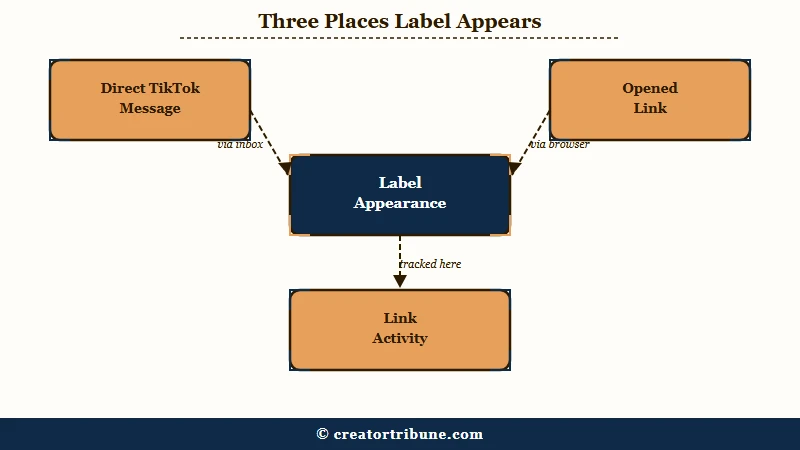
The confusion comes from one label doing two separate jobs, and I have yet to see a guide that keeps them apart.
On a video, the tag marks a clip that arrived through a share. That covers a direct message inside TikTok and a link you opened from somewhere else, including a text message or a group chat.
Under a suggested account, the tag is a recommendation reason. TikTok is telling you why that profile surfaced, and the reason is link activity between the two of you rather than anything that person did to your profile today.
| What you see | What it really means | What it does not mean |
|---|---|---|
| “Shared with you” on a video in your inbox | Someone sent you this clip in a TikTok message | That the sender knows whether you watched it |
| “Shared with you” on a video in your feed | You opened a TikTok link, possibly from another app | That the video was chosen for you personally |
| “Shared with you” under a suggested account | TikTok connected you to that profile through link activity | That the person viewed, searched, or screenshotted you |
That third row is the one people are asking about, and it is the one most guides blur into the first two.
Does Shared With You Mean Someone Viewed Your Profile?
No. Profile viewing is a completely separate TikTok feature with its own opt-in setting, and the shared with you label is not connected to it in any way.
I want to be blunt here because the folk theory is everywhere. A popular piece of advice says that once you pass 5,000 followers and lose the profile view list, you can study your suggested accounts to work out who has been checking your page.
That does not work, and it never did. TikTok’s profile view history is mutual by design. It shows you an account only if that person also turned the feature on, and it covers a rolling 30 day window.
The suggested accounts panel runs on different signals entirely. TikTok’s profile view rules work very differently from what most people assume, and they are the only place visits are recorded at all.
So a stranger appearing with this tag tells you nothing about whether they looked at you. It tells you a link moved between your two accounts at some point.
Why Does a Stranger Show Up With Shared With You?
Strangers appear because the setting behind the label counts links shared outside TikTok, so a group chat can make you link-adjacent to people you have never met.
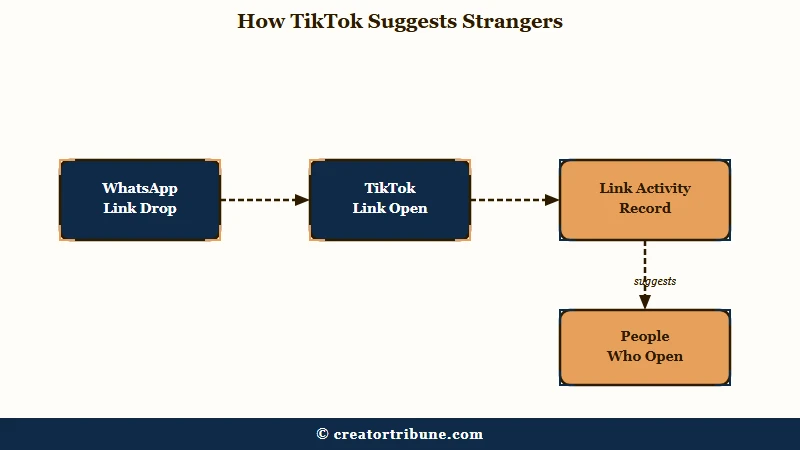
This is the part I think is genuinely worth knowing, and it is documented rather than guessed. Open Settings and Privacy, then Privacy, then “Suggest your account to others”. You will find four toggles.
- Contacts
- Facebook friends
- People with mutual connections
- People who open or send links to you
That fourth one is the answer. TikTok’s own description says people who have opened or sent TikTok links to you, or who received links from you, may see your account as a suggestion.
The critical detail is that this covers links shared off the platform. Someone drops a TikTok into a WhatsApp group of nine people, you tap it, and now you sit in a link graph with eight strangers.
That is why the accounts feel random. The profiles surfacing are people who touched the same link you did, sometimes months ago.
It also explains the ex. You do not need recent contact for the connection to persist, because the association was formed whenever a link passed between you.
Why Does My iPhone Show a Shared With You Section?
Apple runs its own feature with the identical name, and Apple’s documentation lists only six supported apps, none of which is TikTok.
This trips people up constantly, and I found at least one widely-shared guide getting it flatly wrong.
Apple’s Shared with You collects links sent to you in Messages and surfaces them inside the matching app. Apple’s official documentation states that it works with “the Music, Apple TV, News, Photos, Podcasts, and Safari apps”.
TikTok is not on that list. So if you are looking at a “Shared with you” row inside the TikTok app, that is TikTok’s own labelling, not Apple’s system feature reaching in.
The practical consequence matters. One guide currently tells readers to fix this through Settings, then Messaging, then Permission Settings, then Other under TikTok, then “Don’t Receive”. No such menu exists on iOS, and a reader following those steps will hunt for a screen that is not there.
Apple’s real path, from Apple’s own support pages, is Settings, then Apps, then Messages, then Shared with You, where you can turn off Automatic Sharing or switch off individual apps. That controls Safari and Photos, not TikTok’s label.
How Do I Turn Off Shared With You on TikTok?
There is no single off switch for the video label, but the suggested-account half of it has a dedicated toggle that most guides claim does not exist.
Several of the top results state that TikTok gives you no control here. That is only true for the video tag. Here is the sequence I would run, in order of how much it changes.
- Open your profile, then tap the three-line menu at the top right.
- Go to Settings and Privacy, then Privacy.
- Tap “Suggest your account to others”.
- Turn off “People who open or send links to you”.
- Turn off Contacts and Facebook friends in the same panel if you want full separation.
- Go back to Privacy and open “Sync contacts and Facebook friends”.
- Tap “Remove previously synced contacts”.
Step 7 is the one people skip, and skipping it undoes most of the work. Turning syncing off stops TikTok collecting anything new, but the address book it already holds stays on the servers and keeps feeding suggestions until you clear it.
Before: You switch off contact syncing, assume you are unlisted, and keep getting suggested to people from an old phone contacts list.
After: You switch off syncing and then tap “Remove previously synced contacts”, which purges the stored graph so past contacts stop surfacing you.
There is one more setting worth checking if you have teenagers in the house. “Suggest your account to others” is off by default for accounts registered as under 16, and it switches on automatically once the account reaches 16.
Nobody gets a prompt when that happens. If you want the account kept quiet, locking the account down properly is worth doing on the birthday rather than after.
What Can Other People See About You on TikTok?
The sender cannot tell whether you watched a video they sent, and your shared with you content is visible only to you.
This is the reassuring half, and the anxiety driving this search is mostly misplaced. TikTok reaches around 32% of U.S. adults according to Pew Research survey data, so a very large number of people are worrying about this same label.
If someone sends you a clip in a direct message, they get a read receipt showing you opened the conversation. They do not get any signal about whether you played the video, replayed it, or ignored it entirely.
Your shared with you collection is private. No other account can see what has been sent to you, and TikTok does not publish that list anywhere.
The reverse also holds for the thing people worry about most. Saving or capturing content does not ping the creator, which I covered in the guide to TikTok screenshots.
Where you should stay alert is unsolicited contact rather than labels. If accounts you do not know start messaging you out of nowhere, that pattern of random accounts messaging you is a different problem with a different fix.
Frequently Asked Questions
Does shared with you mean someone stalked my TikTok?
No. The label reflects link-sharing activity, not profile visits. TikTok tracks profile views through a separate opt-in feature that only works when both accounts have enabled it, and it never feeds the suggested accounts panel.
Does shared with you mean my ex is watching me?
No. The connection can date back to any point when a TikTok link passed between you, including a link opened in a group chat. It carries no information about recent activity on their side.
Can I stop my account being suggested to people who share links?
Yes. Go to Settings and Privacy, then Privacy, then “Suggest your account to others”, and switch off “People who open or send links to you”. This is a real setting despite several guides claiming no control exists.
Does the person who sent me a video know I watched it?
No. TikTok shows read receipts for the chat thread itself, so they can tell you opened the conversation. They receive nothing about whether you played or replayed the video.
Is the shared with you tag the same as Apple’s feature?
No. Apple’s Shared with You is a separate iOS feature covering Music, Apple TV, News, Photos, Podcasts and Safari. TikTok is not among the apps Apple lists as supported.
Why do I see accounts I have never interacted with?
Group chats are the usual cause. When several people open the same TikTok link, they become link-adjacent to each other, which is enough for the suggestion to fire without any direct contact.
Quick Takeaways
- “Shared with you” explains how content reached you, and it is never a report that someone viewed your profile.
- The suggested-account version is governed by a documented setting called “People who open or send links to you”, which counts links shared off TikTok as well as on it.
- Strangers appear because group chats put many people around a single link, not because any of them searched for you.
- Turning off contact syncing does nothing to old data until you also tap “Remove previously synced contacts”.
- Apple runs a separate feature with the same name, and TikTok is not on Apple’s list of supported apps, so iOS instructions floating around for this are wrong.