Fix Cross-Platform Audio for TikTok Reels and Shorts
Fix Cross-Platform Audio for TikTok Reels and Shorts
Reposting TikTok audio to Reels or Shorts can get it muted or struck. What the 2026 Music Terms actually say, plus a 4-step pre-upload fix.
- 1What TikTok’s 2026 Music Terms Actually Say About Cross-Posting
- 2What Each Platform Allows for Audio in 2026
- 3The 4-Step Pre-Upload Workflow
- 4How to Recover When the Strike Has Already Hit
- 5Frequently Asked Questions
- Can I use a TikTok library song on Instagram Reels in 2026?
- Will using 5 seconds of a copyrighted song avoid detection?
- Does giving credit to the artist in the caption make audio use legal?
- Can business accounts use the same trending sounds as personal accounts?
- Are sponsored posts treated as commercial use even on a personal account?
- Can I extract audio from a TikTok and use it on Reels or Shorts?
- Is my own original audio safe to use on all three platforms?
TL;DR: TikTok’s Music Terms, effective January 2026, license the trending library for personal use on TikTok and say a video you share elsewhere falls under that other platform’s rules. A sound cleared inside TikTok can still be muted or struck on Reels or Shorts, because Meta and YouTube run their own rights systems. The fix is a 4-step pre-upload workflow that edits the base video silent in CapCut and adds platform-licensed audio inside each app’s native uploader.
One question comes up constantly among creators posting the same vertical video to YouTube Shorts, Instagram Reels and TikTok. Does an audio track approved on one platform work on the other two?
The short answer is no, though the reason is more specific than most guides state. TikTok’s Music Terms carry an effective date of January 2026 and license the general library for personal, non-commercial use on TikTok. What actually mutes your cross-post is the destination platform, because Meta and YouTube scan every upload against their own rights databases and neither one recognizes a TikTok clearance.
Posting the same finished file three times is what breaks. The workflow below keeps the base video silent and adds platform-licensed audio inside each app, which is what survives all three rights systems.
What TikTok’s 2026 Music Terms Actually Say About Cross-Posting
TikTok’s Music Terms, effective January 2026, license the general library for personal, non-commercial use on TikTok, and by default limit Commercial Music Library sharing to within TikTok unless you clear the rights separately. Neither clause clears a trending sound for Reels or Shorts.
Most guides report this as a blanket cross-post ban. The terms are narrower than that, and the difference decides which of your posts is actually at risk.
Section 3 of TikTok’s Music Terms of Service covers the general library, which TikTok calls Sounds, and makes them available “so long as the videos are only for personal entertainment and non-commercial purposes.” Section 4 then adds the cross-posting sentence: “If you do share your TikTok video to a third-party platform, your TikTok video would be subject to the terms and conditions of that third-party platform.”
That sentence hands the question to the destination platform. Section 2 still closes the door from TikTok’s side, reserving everything it did not grant: “Except as expressly set out in these Music Terms, you acknowledge that no rights in the music … are licensed to you under the TikTok Terms of Service or these Music Terms.”
Once the video lands on Reels, Meta’s rules govern it, and Meta never licensed you that recording either.
The flat “shared only within the Platform” language does exist, but it sits in section 5, which is headed “How you can use music if you’re using Commercial Sounds.” For those tracks the terms say: “Any uses outside of the Platform require you to obtain separate permission and license the necessary rights directly from all necessary rights holders unless otherwise authorized by the Commercial Music Library – User Terms.”
So the hard contractual ban applies to the Commercial Music Library, the catalog that business and branded accounts are pushed toward. A personal account on a trending sound is governed by the non-commercial limit instead, and gets caught by the destination platform rather than by TikTok.
Section 4 also carries a duration limit under the heading “Short-form uses”: “uses of music up to one minute in length are generally permitted.” TikTok qualifies it in the same breath, noting that “specific limitations vary,” so treat one minute as the usual allowance and not a guaranteed ceiling.
Platform-specific licensing was on paper well before 2026. What changed for creators is the detection layer on the receiving end, since Meta and YouTube both fingerprint audio at upload and act on matches without a human in the loop.
The contractual structure changed too. The Music Terms name the operator, opening section 2 with “TikTok USDS Joint Venture offers its users a library of licensed music.”
That entity is the counterparty on the music license a U.S. creator is agreeing to.
Live audio has its own rule. TikTok’s Music Terms are blunt about it: “You cannot use Sounds or Commercial Sounds in a live stream,” and using recorded music you do not own requires your own rights and permissions.
On the cross-post itself, the check that matters happens at the destination. A track that played fine inside TikTok gets matched by Meta’s Rights Manager or YouTube’s Content ID on the copy you upload there, and both apply the action automatically.
| What the 2026 Music Terms say | What it means in practice |
|---|---|
| No cross-platform license granted | Sounds are licensed for personal, non-commercial use on TikTok; a shared copy falls under the destination platform’s terms |
| No Sounds in live streams | Section 7 bars Sounds and Commercial Sounds in Live; section 8 adds that TikTok’s audio recognition system may detect unauthorized use and mute the content |
| TikTok USDS Joint Venture | Named in the Music Terms as the entity offering the licensed music library to U.S. users |
| AI music disclosure | Section 6 says you should disclose AI music and should not upload AI vocals imitating a real person’s voice; TikTok may mute or remove the video |
What Each Platform Allows for Audio in 2026
Each platform has a separate audio library with different commercial-use rules, and the catalogs do not overlap.
Treating them as interchangeable is what triggers the muting on the cross-posted version.
What I would memorize first is the personal-vs-commercial line. On every platform, a personal account using a trending sound for a non-promotional post sits in a different legal bucket than a business account or a creator running sponsored content. Cross the commercial-use line and the trending library disappears under you.
Here is how the three compare.
| Platform | Personal account library | Business account library | Cross-post status of library tracks |
|---|---|---|---|
| TikTok | TikTok library, 1M+ tracks including trending pop | Commercial Music Library (CML) only | Not cleared for IG or YT |
| Instagram Reels | Full Licensed Music Library, non-commercial use | Meta Sound Collection, ~14,000 tracks | Not cleared for TikTok or YT |
| YouTube Shorts | YouTube Audio Library or Creator Music license | Must use licensed/royalty-free/original | Not cleared for TikTok or IG |
The asymmetric piece is that TikTok and Instagram both have huge “personal use” libraries that look interchangeable but sit on fully separate licensing contracts. YouTube’s library is smaller but stricter, and Content ID checks uploads against rights-holder reference files at ingest.
YouTube also treats length as a licensing line. Since late 2024, any Short longer than one minute with an active Content ID claim is blocked globally, and the in-app Shorts audio picker only clears copyrighted songs for clips under 60 seconds. A cross-posted TikTok video that runs 61 seconds with a flagged track does not just get muted on Shorts, it can disappear worldwide.
A second hidden trap is sponsored content. The moment a post is paid, gifted, or even mentions a brand in a way that reads as endorsement, the platform reclassifies it as commercial use.
Trending pop songs disappear and the only safe library is the platform’s Commercial Music Library. This catches creators with personal accounts because they assume the personal library is always available.
For broader context on how music removals interact with creator monetization, the TikTok music removed recovery guide on Creator Tribune covers the three triggers and the in-app workaround when a track gets pulled mid-publish.
The 4-Step Pre-Upload Workflow
The workflow that survives 2026 cross-platform enforcement is: edit silent in CapCut, export once, upload to each platform separately, add platform-native audio inside that platform’s uploader.
Doing the audio first then exporting once breaks on all three platforms.
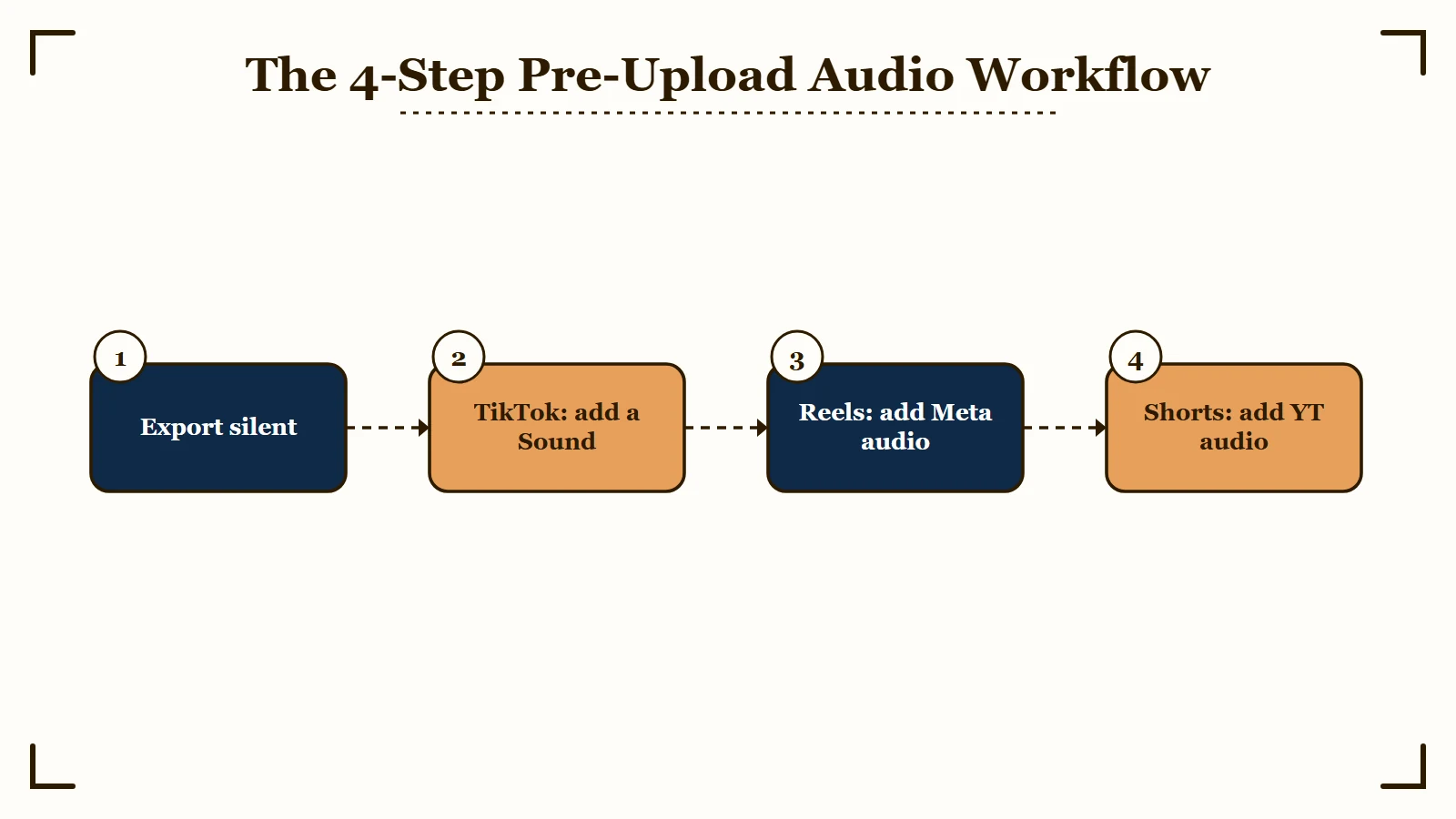
What I would do for a multi-platform short looks like this.
- Edit the entire video in CapCut (or any editor) with NO music track. Cut, transition, color, and finish. Export at 9:16, H.264, 1080p or higher.
- Upload to TikTok first. Inside the TikTok uploader, add a track from TikTok’s library. Trending or evergreen, just keep it inside the library. Post.
- Re-upload the same silent base video to Instagram Reels. Inside Reels’ uploader, add a different track from Meta’s Licensed Music Library (or use original audio if the video has voiceover). Post.
- Re-upload the same silent base to YouTube Shorts. Inside Shorts, add a track from YouTube Audio Library, use Creator Music with a license, or use royalty-free music from your own licensed stock account. Post.
The point of editing silent is that each platform’s audio addition is treated as native at ingest. That is what passes the fingerprinting layer. If you bake audio into the export, every platform fingerprints the same track and the cross-posts get caught at upload.
A second discipline that matters: never extract audio from another platform. Pulling a track off TikTok via a third-party downloader, then editing it into a Reels upload, hands Meta a recording you were never licensed to use there.
Fingerprinting identifies the recording itself, so the copy matches just as the original would.
Vague: Use the same trending pop song across TikTok, Reels, and Shorts because it “feels universal”.
Specific: Use the trending TikTok library track inside TikTok only. On Reels, swap to a Meta Licensed Music Library track that fits the same mood. On Shorts, use a royalty-free Epidemic Sound or Artlist track that you have a paid license for, OR YouTube Creator Music with the visible license.
The third discipline is game audio, meaning coin chimes, power-up stings and console UI sounds. Ripped game audio is not covered by the music license any of these platforms grants you, and the sound-effect libraries they do offer are cleared for the effects in those libraries only.
Use sound packs you hold a written license for, or skip the effect.
For the visual side of cross-platform shorts (watermark removal, aspect ratio safe zones, posting cadence between platforms), the cross-post without watermark workflow on Creator Tribune covers the export-first approach and the 15-to-30-minute stagger between platforms.
How to Recover When the Strike Has Already Hit
Recovery depends on which platform issued the strike and whether the audio was muted or the video was removed; the appeals are platform-specific and the timelines vary.
A 2-3 day window matters.
For TikTok, if a track gets removed under copyright the in-app workaround is to re-edit the post with a sound from the Sound Library before it hits the 3-month mute deadline. The video stays live with the new sound and the watch-time signal is partly preserved.
For Instagram Reels, the appeal path is via Help, “Why has my Reel been muted?”, which routes to Meta’s music dispute form. Counter-notifications take 10 to 14 business days. The video stays muted during the appeal but the impressions on the original post are preserved if the appeal succeeds.
For YouTube Shorts, the Content ID dispute is what to file. The dispute lives inside Studio under Content, then Copyright.
Counter-notifications carry penalty-of-perjury language, which means filing a frivolous one is a real legal risk. Disputes that succeed restore monetization; disputes that fail can convert into a strike on the channel.
Work the recovery decision tree in this order.
- Identify which platform issued the action and what the action was: muted audio, removed post, or copyright strike.
- If TikTok: re-edit with a Sound Library track inside the 3-month window. No formal appeal needed for muted videos.
- If Instagram Reels: file via “Why has my Reel been muted?”, attach proof of license if you have one. Expect a 10-14 day wait.
- If YouTube Shorts: file a Content ID dispute inside Studio under Content > Copyright. Read the penalty-of-perjury clause carefully before submitting.
- If a YouTube copyright strike was issued (not just Content ID), follow the YouTube copyright strike removal process which covers the three resolution paths.
The single highest-leverage move on every platform is the licensed-library audio swap. It avoids the appeal queue entirely and preserves the post’s watch-time signal.
One habit prevents most of these cases. Add the audio inside whichever app you are posting to, and never carry a track across from another one, because the license that covered it on TikTok does not travel with the file.
Frequently Asked Questions
Can I use a TikTok library song on Instagram Reels in 2026?
No. TikTok’s Music Terms license the general library for personal, non-commercial use on TikTok, and say that a video shared to another platform falls under that platform’s terms. Instagram never licensed that recording to you, so Meta’s Rights Manager can mute or remove the Reel regardless of what TikTok allowed.
Will using 5 seconds of a copyrighted song avoid detection?
No. YouTube Content ID and Meta’s Rights Manager both work by audio fingerprinting, and a short excerpt still produces a match. A 3-to-5-second clip is enough to register a match and trigger automatic muting or removal.
Does giving credit to the artist in the caption make audio use legal?
No. Copyright is based on licensing, not attribution. Tagging the artist or writing “I do not own the rights” provides zero legal protection and does not prevent the platform’s automated systems from issuing a claim.
Can business accounts use the same trending sounds as personal accounts?
No. TikTok business accounts are restricted to the Commercial Music Library, a pre-cleared catalog of about 1 million songs that TikTok makes available for business and promotional content.
Instagram business accounts are restricted to the Meta Sound Collection of about 14,000 tracks. Using a trending pop song on a business account triggers muting or rejection.
Are sponsored posts treated as commercial use even on a personal account?
Yes. The moment a post is paid, gifted, or includes a brand mention that reads as endorsement, all three platforms reclassify it as commercial use. The personal audio library disappears and only the Commercial Music Library is safe.
Can I extract audio from a TikTok and use it on Reels or Shorts?
No. Fingerprinting identifies the recording itself, so an extracted track matches on Reels and Shorts exactly as the original would. The recording is licensed to you only inside TikTok, so pulling it out of the app creates no license on Reels or Shorts.
Is my own original audio safe to use on all three platforms?
Yes. Audio you record and own, like a voiceover, sound design you made, or music you hold the rights to, sits outside every platform’s licensing system, so it gives the matching systems nothing to flag on TikTok, Reels, or Shorts. It is the only track that is genuinely safe to reuse across all three, which is why the pre-upload workflow treats original audio as the universal fallback.