Does TikTok Notify Screenshots and Why Your Phone Says Detected
Does TikTok Notify Screenshots and Why Your Phone Says Detected
TikTok does not tell creators when you screenshot. So why does your phone say Detected? Here is what that popup means and what creators really see.
- 1Does TikTok Notify Screenshots of Videos, Profiles, or Comments?
- 2Why Does My Phone Say TikTok Detected This Screenshot?
- 3Does TikTok Notify Screenshots of Direct Messages?
- 4Can iPhone Users Be Detected Without Seeing a Popup?
- 5What Can a TikTok Creator See About You?
- 6Frequently Asked Questions
- Does TikTok notify screenshots of a Story?
- Does TikTok tell someone if you screen record their video?
- Why does my phone say TikTok detected this screenshot?
- Can I stop the screenshot detected notice from appearing?
- Does TikTok notify screenshots on iPhone?
- Can a creator find out later that I screenshotted?
- 7Quick Takeaways
The Short Answer: TikTok does not send the creator any alert when you screenshot a video, profile, comment, Story, LIVE or DM. If your Android phone flashes a message naming TikTok after you press the buttons, that notice comes from Android itself, not from TikTok, and the creator never sees it.
Does TikTok notify screenshots? People search that exact question right before doing something faintly awkward.
Saving a shot of an ex’s profile. Capturing a comment before it gets deleted. Grabbing a frame of a video for a group chat.
Every guide ranking for this question gives the same flat answer, which is no. Most of them are published by companies that sell screen recording software. None of them explain the thing that sends people searching in the first place, which is the popup on Android that names the app out loud after you take a shot.
That popup is real. It is also badly misunderstood, including by the pages Google currently surfaces at the top of this exact query.
Below is what triggers it, what the app receives when it fires, why iPhone users should not read silence as safety, and the short list of things a creator genuinely can see about you.
Does TikTok Notify Screenshots of Videos, Profiles, or Comments?
TikTok sends no notification for screenshots of public content.
Feed videos, profile pages, profile photos, follower counts, bios and comment threads can all be captured without the account owner being told, on both iPhone and Android.
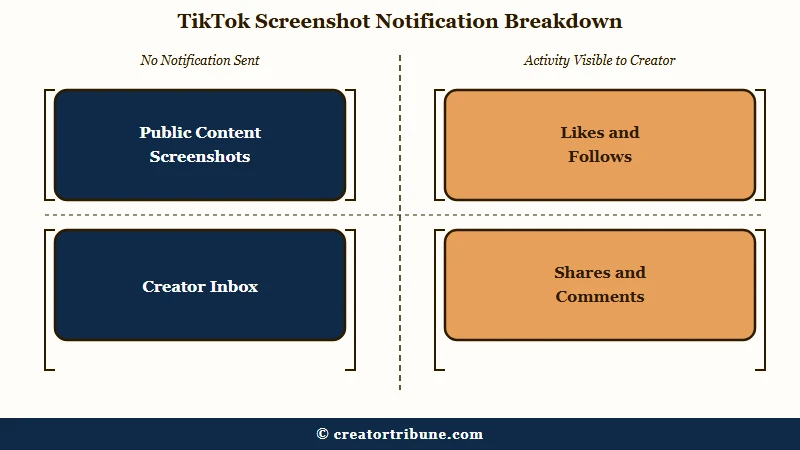
There is no hidden log either. A creator’s inbox shows likes, comments, follows, mentions, shares and favourites, and screenshots appear in none of those buckets. There is no delayed report and no analytics panel where capture activity turns up later.
The way I see it, the confusion traces back to Snapchat. Snapchat trained an entire generation to expect an alert on every capture, and people now assume every app behaves that way by default.
Here is where each surface sits.
| Surface | Does the creator get told? | What they can see instead |
|---|---|---|
| Feed video | No | Total view, like, share and save counts, never who screenshotted |
| Profile or profile photo | No | Profile views only if both people opted in, with strict eligibility |
| Comments | No | The comment itself, nothing about captures |
| TikTok Story | No | A named list of everyone who watched, while the Story is live |
| TikTok LIVE | No | A viewer list during the broadcast |
| Direct messages | No, on the weight of the evidence | Read receipts if enabled, not captures |
| Screen recording | No | Nothing, and TikTok does not block recording the way Netflix does |
TikTok also does not apply the screen-blocking flag that subscription streaming apps use, so a screen recording of a TikTok video captures picture and sound normally rather than going black.
Why Does My Phone Say TikTok Detected This Screenshot?
That notice comes from Android itself and means only that an app was passed a signal.
Android 14 added a screenshot detection system, the operating system shows you a notice each time it fires, and no part of that chain reaches the creator.
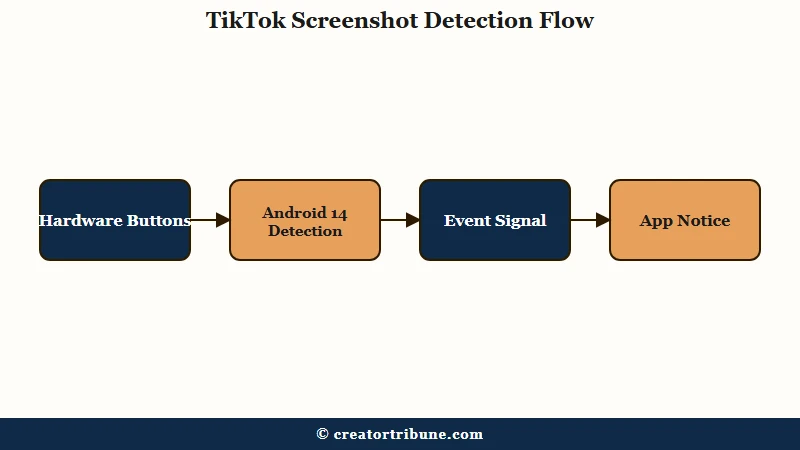
The mechanism is documented publicly. Android 14 introduced registerScreenCaptureCallback(), gated behind an install-time permission called android.permission.DETECTSCREENCAPTURE, and Google’s own developer documentation is explicit about the limits of what an app gets.
The app receives no image. In Google’s wording, “the callback doesn’t provide an image of the actual screenshot”, so the app learns that a capture event occurred and nothing about what was on the screen.
The visible notice is deliberate. The same documentation notes that “a notice is shown with every screenshot detection signal” and tells developers to warn users in advance so the system message does not come as a surprise.
This is why the popup names an app. Android users have reported the same pattern with other apps, worded as “YouTube detected this screenshot” or “Audible screenshot detected”, and Duolingo, Reddit, Amazon, ChatGPT and Character AI have all shown it. The permission is granted at install time, so there is no per-app toggle to switch it off.
What surprised me here is how confidently the top-ranking pages get this wrong. Several attribute the popup to one phone maker’s own software suggestions feature, which does not match how the Android notice is documented to work.
The page Google’s AI summary leans on hardest is published by a company selling a $39 screenshot tool, under a headline claiming testing that the page itself never describes. No devices, no operating system versions, no method.
One documented limit almost never gets mentioned. Google states the Android 14 system API “only detects a screenshot if the user performs a specific combination of hardware button presses”. It also does not fire for captures taken through developer tools such as ADB or instrumentation tests.
Before: You press power and volume down together, the notice fires, and you assume TikTok just told the creator.
After: You understand the notice is Android reporting that an app registered the event, that the app got no image, and that the creator was never in the loop at all.
Does TikTok Notify Screenshots of Direct Messages?
No, on the weight of the evidence, though this is the one point where the ranking guides openly contradict each other.
Four of the five most visible guides say DM screenshots are never notified, including for disappearing photos and videos.
One widely read privacy guide says the opposite in strong terms, claiming that screenshot alerts appear only in direct messages and that the sender is told when a private conversation is captured. No other source supports it, and none of the sources making either claim publishes a test methodology.
I would treat the majority position as correct and the outlier as unverified. What I would not do is trust any of them with something genuinely sensitive, because none of them show their work, and a claim repeated by four blogs is still four blogs.
If it matters to you, the safe move is to assume a private conversation can leave the app by some route regardless of alerts. Someone can always photograph a screen with a second phone, and no notification system in existence catches that.
Unsolicited messages are a separate problem worth understanding on its own, and random accounts sliding into DMs has its own set of controls.
Can iPhone Users Be Detected Without Seeing a Popup?
Yes, and this is the part that gets iPhone users into trouble, because iOS shows no equivalent notice.
Apple has offered developers a screenshot signal since iOS 7.0 through UIApplication.userDidTakeScreenshotNotification, and the system tells the user nothing when an app listens for it.
On Android 14 and later, a visible notice means the operating system is being transparent about a signal it just passed along. On iPhone that same class of signal has existed for over a decade with nothing shown to you at all.
None of this means TikTok is alerting creators on iPhone, and there is no evidence that it is. My read is narrower and more useful: the absence of a popup on iOS tells you nothing either way, so treating an iPhone as automatically more private than an Android here is a mistake.
TikTok’s own documentation does not settle it. The company’s account safety pages cover passwords, passkeys, two-step verification, trusted devices and account recovery, and say nothing whatsoever about screenshots or screen recording. That silence is a large part of why the rumours keep regenerating.
What Can a TikTok Creator See About You?
Creators cannot see screenshots, but they can see several things people wrongly assume are private, and those are worth more attention than the screenshot question. Watching is far more visible than capturing.
Three surfaces expose you by name. Here is the order I would check if you are worried about being noticed.
- TikTok Stories. While a Story is live, the poster can open a named list of every account that viewed it. Capturing the Story is invisible, but opening it is not. The mechanics of how Story views are counted are worth knowing before you tap.
- TikTok LIVE. Hosts can pull up a viewer list during a broadcast. Screenshotting the stream leaves no trace, while being in the room does.
- Profile views. This one has real eligibility limits that most guides skip. It is a mutual opt-in feature, available to accounts aged 16 and over with fewer than 5,000 followers, and it only ever shows the last 30 days. Who can see profile visits depends entirely on whether you both turned it on.
Saving a video is a middle case, and the exact button matters. Downloading a video with Share then Save video sends the creator nothing with your name on it. Tapping the bookmark icon is different: that one has shown the creator your username since late 2022, when TikTok began naming the accounts that favourite a video, as Tubefilter reported at the time.
One myth deserves killing outright. Turning off downloads on your own videos does nothing to stop screenshots or screen recording. Once a frame renders on someone else’s display it can be captured by the phone, by a desktop browser, or by a second camera pointed at the screen.
| Platform | Alerts on story capture | Alerts on DM capture | Current status |
|---|---|---|---|
| TikTok | No | No | No screenshot alerts of any kind, and no official policy page on the subject |
| Snapchat | Yes | Yes | The origin of the assumption that every app behaves this way |
| No | Only for view once and disappearing media | Tested Story alerts in 2018 and pulled them the same year |
The Instagram column trips people up constantly, since the rules there genuinely differ by message type. Instagram’s screenshot rules are worth reading separately if you use both apps.
Roughly 32 percent of American adults use TikTok, according to Pew Research survey data collected through mid 2025. That is a lot of people guessing at this rather than checking.
Frequently Asked Questions
Does TikTok notify screenshots of a Story?
No. TikTok Stories carry no screenshot marker and no alert, unlike Snapchat. The poster does see a named list of accounts that viewed the Story while it is live, so watching is visible even though capturing is not.
Does TikTok tell someone if you screen record their video?
No. Screen recording triggers no notification on any TikTok surface, and TikTok does not black out the screen during recording the way subscription streaming apps do. Audio and video both capture normally.
Why does my phone say TikTok detected this screenshot?
That message comes from Android 14’s screenshot detection system, not from TikTok. It means an app was passed a signal that a capture happened. The app receives no image, and the creator is not told anything.
Can I stop the screenshot detected notice from appearing?
Not through a normal setting. The underlying permission is granted at install time rather than prompted, so there is no per-app switch. Google’s documentation also notes the signal fires on hardware button screenshots specifically.
Does TikTok notify screenshots on iPhone?
No, and iPhone shows no detection notice at all. Apple has offered apps a screenshot signal since iOS 7.0 without any system message to the user, so the absence of a popup on iOS is not evidence either way.
Can a creator find out later that I screenshotted?
No. There is no log, no delayed report and no analytics view that surfaces capture activity. A creator’s notifications only ever cover likes, comments, follows, shares, mentions and favourites.
Quick Takeaways
- TikTok sends no screenshot or screen recording alert on any surface, and its own account safety documentation never mentions the subject at all.
- A popup naming TikTok after a screenshot is Android 14’s detection notice doing its job, and the app that receives that signal never receives the image.
- Google documents the Android trigger as a specific hardware button combination, which is the detail every ranking guide leaves out.
- iPhone gives you no notice whatsoever, so read silence on iOS as missing information rather than as proof of privacy.
- The real exposure is in watching rather than capturing, because Story viewer lists, LIVE viewer lists and mutual profile views all attach your actual username.