Random Accounts in Your TikTok DMs and How to Stop It
Random Accounts in Your TikTok DMs and How to Stop It
A random account showed up in your TikTok DMs and you think you got hacked. Here is what is really happening and how to lock the messages down.
- 1Why Random Accounts Show Up in Your TikTok DMs
- 2Has Your TikTok Account Been Hacked
- 3How to Stop Random Accounts From Messaging You
- 4What to Do if Your Account Is Sending Spam
- 5When It Is Worth a Full Security Checkup
- 6Frequently Asked Questions
- Does a random account in my TikTok DMs mean I was hacked?
- Why is an account in my inbox if it never messaged me?
- Should I change my password right away?
- How do I stop random people from messaging me on TikTok?
- Can someone under 16 get TikTok DMs?
- Can I get hacked just by opening a TikTok DM?
- 7Quick Takeaways
What’s Happening: Random accounts appearing in your TikTok inbox, often with no message and no follow, are almost always a platform-wide spam or bot wave, not proof that your account was hacked. The real warning sign of a hack points the other way, when your account starts sending messages you never wrote. This guide shows you how to tell the difference and shut the messages down.
Random accounts in your TikTok DMs have a way of showing up at the worst time. You open the app, check your inbox, and there is a profile you have never seen sitting there. It did not message you, it is not a follower, and one of them might even be named something like “youvebeenhacked,” which is a fun thing to read at midnight.
If your first thought was that someone broke into your account, take a breath. When random accounts show up in your TikTok DMs at the same time everyone else is posting about the exact same thing, that pattern points to a spam wave on TikTok’s side, not a targeted hack on yours.
These waves hit the app every so often, and the panic response is almost always bigger than the real problem. Here is what is going on, the quick test to confirm your account is fine, and the settings that stop strangers from landing in your inbox again.
Why Random Accounts Show Up in Your TikTok DMs
Random accounts in your TikTok DMs usually come from a spam-bot wave, a messaging glitch, or TikTok suggesting “people you may know,” none of which mean your password was stolen.
The way I read it, the tell is scale. If thousands of users report the same thing within hours, it is the platform, not you.
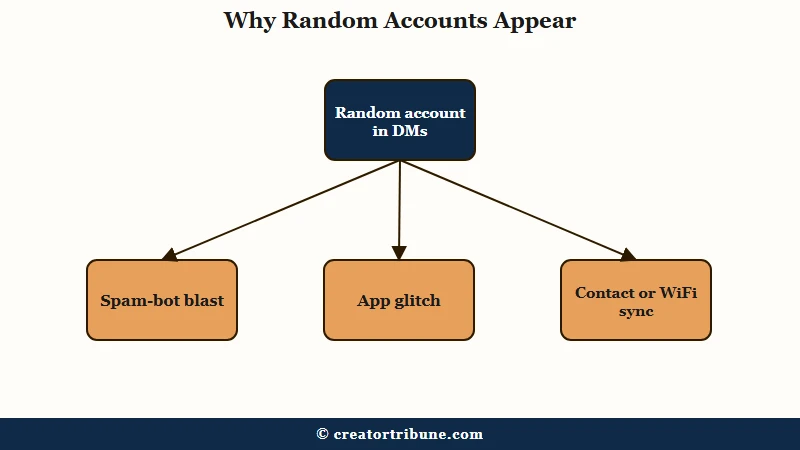
A few different things create this effect, and they get mixed together in the panic. Spam bots blast message requests to huge batches of accounts at once, so a profile can sit in your inbox before you ever open it. Glitches during a bad app update can surface profiles in the inbox with no message attached.
There is also a quieter cause that has nothing to do with hacking. TikTok can surface “potential connections” as message requests, and it sometimes links accounts that have shared a contact list or even connected to the same WiFi network. That last one is why a stranger, or your own second account, can appear next to people you know.
With more than a billion monthly users on the app, per TikTok’s audience data on Statista, a spam campaign that hits even a fraction of accounts looks like a flood on Reddit overnight. That scale is exactly why it feels personal when it is not.
Has Your TikTok Account Been Hacked
Your TikTok account is likely fine if a stranger only appears in your inbox; the real signs of a compromise are outgoing activity you did not create, such as sent messages, new follows, posted videos, or logins from devices you do not recognize. Direction is everything here.
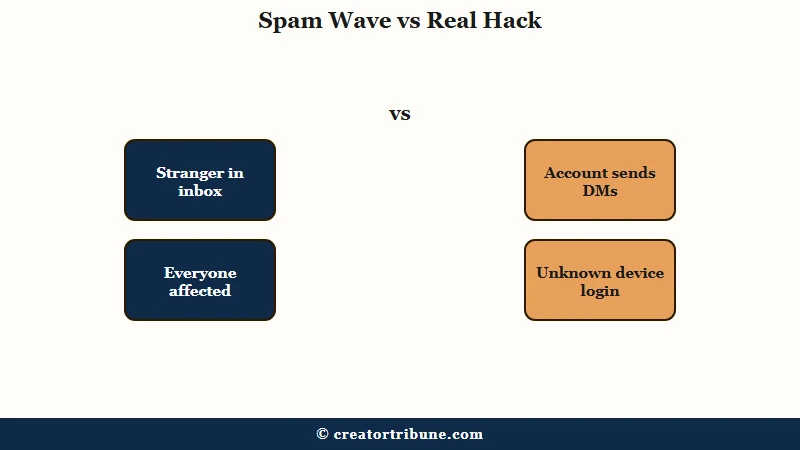
The simplest mental model I use is direction. Incoming weirdness, like a stranger showing up in your inbox, is usually a platform problem. Outgoing weirdness, like your account messaging your followers a crypto link, is the kind that needs action fast.
To confirm it, do not guess. Open Settings and privacy, then Security and permissions, then Manage devices, and look at the list of logged-in sessions. If you only see your own phone, no one is inside your account.
Speed matters if you do spot a device you do not recognize. Every minute an unknown session stays live is a minute someone can change the email, password, or phone number attached to your account, which is what turns a nuisance into a lockout.
Tap Delete on anything strange the moment you see it, then change your password from a device you trust.
| What you see | Just a spam or bot wave | Your account is compromised |
|---|---|---|
| Direction of activity | A stranger appears in your inbox, no message sent by you | Your account sends DMs, follows, or posts you did not create |
| Who is affected | Lots of users report it the same night | Mostly just you, friends ask why you messaged them |
| Manage devices list | Only your own devices shown | A device or location you do not recognize |
| Right first move | Report, block, tighten DM settings | Remove the device, change password, revoke connected apps |
This is also the moment to rule out a wider outage. If the app is glitching in other ways too, my breakdown of when TikTok is down walks through the difference between a platform outage and an account-specific problem.
How to Stop Random Accounts From Messaging You
To stop random TikTok DMs, report the account first, then block it, then change your direct message setting so only friends can reach you. Reporting before blocking matters more than people think.
Reports on TikTok are anonymous and are usually reviewed within 24 to 48 hours, so reporting a spam profile before you block it gives TikTok’s moderation team the data it needs to catch the wider wave. Blocking only protects you from that one account, and during a bot flood there are always more behind it.
Cleaning this up takes about two minutes once you know the order. Here is the sequence I would run:
- Open the conversation, tap the three-dot icon in the top corner, choose Report, and pick the Spam category.
- Block the same account so it cannot interact with you again.
- Go to Settings and privacy, then Privacy, then Direct messages, and set who can message you to Friends or to no one.
- While you are in there, run Security and permissions, then Security checkup, and clear the green checkmarks for 2-step verification and recovery contact.
- If the app itself feels buggy, clear the cache under Settings and privacy, then Free up space, which does not delete your videos, drafts, or messages.
Here is where each of those controls lives, so you can find them fast.
| Action | Where to find it | What it does |
|---|---|---|
| Direct messages | Settings and privacy, then Privacy | Limits who can message you to Friends or no one |
| Manage devices | Settings, then Security and permissions | Shows logged-in sessions and removes unknown ones |
| Security checkup | Settings, then Security and permissions | Confirms 2-step verification and recovery setup |
| Report | Three-dot menu inside the chat | Flags the spam account to TikTok anonymously |
| Block | The account profile or chat | Stops that one account from interacting with you |
One note for younger users and parents, because the rules here are tiered rather than flat. TikTok switched direct messaging off entirely for accounts registered to under-16s, and that restriction still stands.
Accounts registered to 16 and 17 year olds can use messaging, but it defaults to Friends only and cannot be opened up to everyone. A stranger landing in a teen’s inbox is therefore unusual on its own.
If the account should be under 16, the registered birth date is the thing to check first, not the DM setting. An under-16 account receiving direct messages usually means it was signed up with an older birth date.
If your messages have been getting oddly flagged or limited around the same time, that is a separate issue worth ruling out, and my guide to TikTok messages flagged as unsafe covers that specific case.
What to Do if Your Account Is Sending Spam
If your TikTok account keeps sending spam after you change your password and turn on 2-step verification, the leak is usually not your password; it is malware on your device or a third-party app holding access, and you have to cut both off. This is the part most guides skip.
Changing your password is the obvious move, and you should do it, but it is not where I would stop. The catch is that an “infostealer,” a piece of malware sitting on your phone or computer, will quietly grab the new password the moment you set it, which is why some people reset three times and the spam keeps going.
There is a second hidden door. A malicious third-party app you once authorized can keep access through an OAuth grant even after a password change, because that grant is a separate credential and resetting your password never touches it. Revoke anything you do not recognize under Settings and privacy, then Privacy, then connected or authorized apps.
To be thorough, run a malware scan on the device you use most, and clear your browser cookies if you ever log into TikTok on the web, since one fix people report is that the spam only stopped after the browser session was cleared. If your reach cratered while the account was compromised, you can also ask TikTok support about restoring account standing, which I touch on in the TikTok ban appeal guide.
Before: You spot “youvebeenhacked” in your DMs, panic, delete the app, and rush to change five passwords while convinced your phone is owned.
After: You open Manage devices, see only your own phone, report and block the account, set DMs to Friends, and move on with your night in under two minutes.
When It Is Worth a Full Security Checkup
A full TikTok security checkup is worth it any time you saw outgoing activity you did not create, reused the same password on other apps, or logged in on a shared device. A stranger in your inbox alone does not require it, but these three situations do.
TikTok launched the in-app Security Checkup dashboard on March 17, 2025, and it is the fastest way to confirm 2-step verification, trusted devices, passkeys, and backup login methods are all set. I would treat it like a smoke alarm test, quick, occasional, and worth doing before you need it.
Use an authenticator app rather than text-message codes if you can. SIM-swap attacks target SMS codes specifically, and an authenticator closes that gap. If suspicious activity has also been hitting your live sessions or visibility, the TikTok suspicious-activity and live-restriction guide gets into those signals in more detail.
Frequently Asked Questions
Does a random account in my TikTok DMs mean I was hacked?
Usually no. A profile appearing in your inbox with no message, especially when many users report it at once, points to a spam-bot wave or glitch. You are only likely hacked if your account is sending messages, follows, or posts you did not create.
Why is an account in my inbox if it never messaged me?
TikTok can surface message requests and “potential connections” before any message is sent, and spam bots queue requests in bulk. Shared contacts or the same WiFi network can also link a stranger to your account.
Should I change my password right away?
Only rush if you see outgoing activity or an unknown device under Manage devices. If a stranger simply appeared in your inbox, reporting, blocking, and tightening DM settings is enough.
How do I stop random people from messaging me on TikTok?
Go to Settings and privacy, then Privacy, then Direct messages, and set who can send you messages to Friends or no one. Report and block any spam accounts already in your inbox.
Can someone under 16 get TikTok DMs?
No. TikTok disables direct messaging entirely for accounts registered to anyone under 16, so an under-16 account should never receive a message request. If one does, the account was almost certainly registered with a birth date over 16.
Can I get hacked just by opening a TikTok DM?
It is rare, but advanced exploits have allowed account access from a user simply opening a message. The safer habit is to never tap links inside DMs from accounts you do not know.
Quick Takeaways
- A stranger appearing in your TikTok DMs is almost always a platform spam wave, not a hack of your account.
- The real hack signal is outgoing: messages, follows, or posts you did not create, plus an unknown device under Manage devices.
- Report spam accounts before blocking them, then set Direct messages to Friends to stop the flood.
- If your account keeps sending spam after a password reset, scan for malware and revoke connected apps, since the leak is usually not the password.
- Run TikTok’s Security Checkup and switch to an authenticator app if you saw any outgoing activity.