TikTok Comments Not Showing and the Real Fix Most Guides Miss
TikTok Comments Not Showing and the Real Fix Most Guides Miss
TikTok comments not showing is really four different problems, and clearing your cache only fixes one. Here is how to tell which is yours and fix it.
- 1Why Are Your TikTok Comments Not Showing
- 2How to Tell Which Comment Problem You Have
- 3Why Clearing Your Cache Will Not Fix a Comment Shadowban
- 4How to Find Comments TikTok Hid From You
- 5When the Problem Is TikTok and Not You
- 6Frequently Asked Questions
- Why are my TikTok comments not showing up for other people?
- Does clearing the cache fix TikTok comments not showing?
- Why does my video say it has comments but the section is blank?
- How long does a TikTok comment restriction last?
- How do I find comments TikTok hid on my own video?
- Can a 14-year-old turn on public comments on TikTok?
- 7Quick Takeaways
TL;DR: TikTok comments not showing is four separate problems wearing the same mask: a device or server glitch, a comment shadowban, comments filtered and waiting for creator approval, or a rate-limit lockout. Clearing your cache only fixes the first one. The fastest path is to figure out which of the four you have before you touch a single setting.
Every guide tells you the same three things when your TikTok comments stop showing: clear the cache, reinstall the app, check your connection. That advice fixes exactly one of the four reasons comments go missing, and it is useless for the two that hurt creators most.
TikTok comments not showing looks like one bug, but it hides a real diagnostic problem. Your comment can post perfectly on your screen and be invisible to everyone else.
A video can show a comment count of 40 and open to a blank section. You can be locked out of commenting entirely without a single notification telling you why.
Here is the detail that breaks the standard advice. A comment shadowban is tied to your device’s hardware fingerprint, things like your screen resolution, battery readings, and sensors, not just your account. Reinstall the app or spin up a brand new account on the same phone and your comments stay invisible.
I will walk through how to tell which of the four problems you have in about two minutes, then the real fix for each. Most of them have nothing to do with your cache.
What is a comment shadowban: A silent restriction where TikTok lets your comment post on your own screen but hides it from everyone else, with no warning or notification that it happened.

Why Are Your TikTok Comments Not Showing
TikTok comments are not showing for one of four reasons: a device or server-side loading glitch, a comment shadowban or filter that hides your comment from others, comments held for creator review, or a rate-limit lockout that blocks commenting entirely.
Each has a different fix, and only the first responds to cache-clearing.
The way I see it, the single biggest time-waster here is treating all four as the same bug. People reinstall the app five times when their comments are sitting in a creator’s filtered-comments folder, fully intact.
Two of these are on your device or TikTok’s servers. The blank comment section that loads nothing is usually a cache problem or, in early 2026, the platform-wide glitch I cover below. The other two are moderation: your comment got filtered, or your account got rate-limited.
Telling them apart is the whole game. A reader on a stable connection whose comments post fine but vanish for others has a moderation problem, and no amount of clearing storage will move the needle.
How to Tell Which Comment Problem You Have
You diagnose it by checking three things: whether the comment section is blank for everyone or just missing your comments, whether the comment count is zero or non-zero, and whether you can comment at all.
Those three answers point straight at the cause.
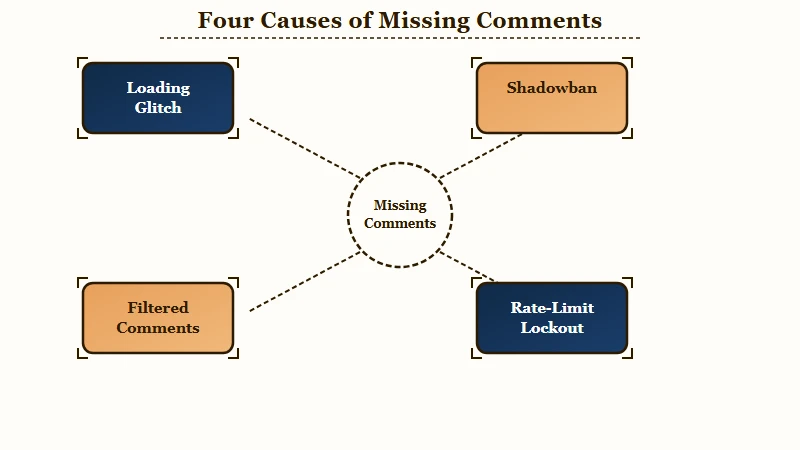
Run this check before you change any setting. I would rather spend two minutes diagnosing than an hour reinstalling the wrong fix.
| What you see | Most likely cause | The fix that works |
|---|---|---|
| Comment section blank on every video | App cache or the early-2026 server glitch | Force-close and reopen, clear cache, or wait out the outage |
| Your comment posts for you but others cannot see it | Comment shadowban or a creator keyword filter | Stop bulk-replying and wait out the restriction |
| “No comments yet” but the count is not zero | Comments filtered, waiting for creator approval | The creator approves them in Review filtered comments |
| You cannot comment at all | “Commenting too fast” rate limit or an age lock | Wait 24 hours, or check age and Family Pairing settings |
Here is the cleanest test for the sneakiest case. If you suspect your own comments are hidden, post one and check it from a friend’s phone or a logged-out account.
Before: You reinstall TikTok three times and clear the cache twice, and your comments are still invisible to everyone else.
After: You post a test comment, check it from a friend’s phone, see it never appears, and know the problem is a shadowban on your account, not a cache bug on your device.
If the test comment shows for you but not for them, you are shadowbanned or filtered, and my guide to recovering from a TikTok shadowban covers the full reset.
If your whole feed and views cratered at the same time, the broader shadowban self-test confirms it fast.
Why Clearing Your Cache Will Not Fix a Comment Shadowban
A comment shadowban is enforced at the device level, so clearing your cache, reinstalling TikTok, or making a new account on the same phone will not lift it.
TikTok fingerprints the hardware itself.
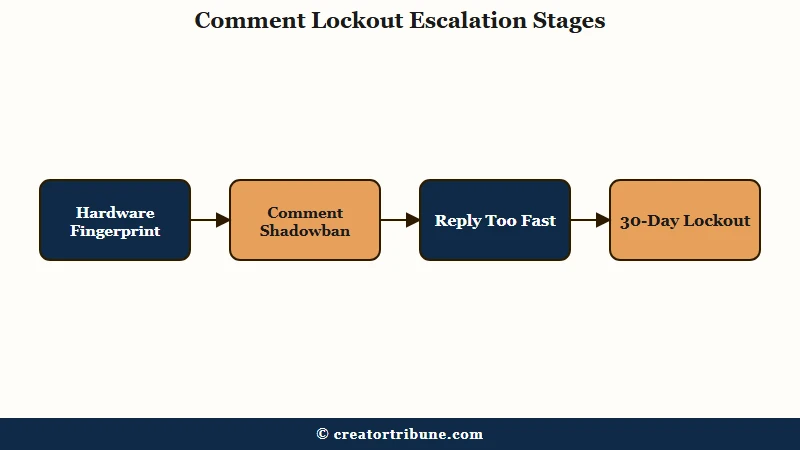
This is the part that sends people in circles. TikTok collects an extensive device fingerprint, including model, screen resolution, hardware sensors, battery level, and network details. A shadowban flags that physical signature, so a fresh install or an alt account on the same handset stays just as invisible.
There is a second trap, and it is one creators walk into trying to do the right thing. Replying fast to a wave of new comments to boost engagement is the exact behavior TikTok’s anti-spam system reads as a bot.
That triggers a “commenting too fast” restriction. The first one disables commenting for 24 hours, and people who keep hitting it report escalating lockouts of 4 days, 30 days, and in some cases a permanent comment ban with no warning. What I would recommend is slowing your replies to a human pace and stopping the moment you see that error, because each retry can extend the timer.
If your reach fell off a cliff alongside the comment problem, it is worth ruling out a wider view-suppression issue too. My breakdown of why TikTok FYP views drop walks through that diagnostic.
How to Find Comments TikTok Hid From You
As a creator, filtered comments are not deleted, they sit in a Review filtered comments folder waiting for you to approve or delete them.
Most people never open it.
This is the most useful menu most creators do not know exists. TikTok’s automated filters, plus Creator Care Mode and your own keyword list, quietly pull comments out of public view, and they pile up where nobody looks. Here is the path I would check weekly.
- Open the app and go to your Profile.
- Tap the Menu button, the three lines at the top, then Settings and privacy.
- Tap Privacy, then Comments.
- Open Review filtered comments, then Approve or Delete each one.
One change worth knowing about. TikTok raised the custom keyword filter limit from 50 to 300 words in app version 29.8, so if you expanded your blocked-word list, legitimate comments may now be getting swept up.
A non-zero comment count with a blank section almost always means comments are filtered, not broken. If your notifications are also acting up, my fix for TikTok notifications not working pairs with this one.
When the Problem Is TikTok and Not You
Sometimes missing comments are a platform glitch, a hard age lock, or an automated moderation sweep that no troubleshooting on your end can touch.
Knowing this saves hours of pointless fixing.
Three causes here are completely out of your hands. The first hit in early 2026: after TikTok’s U.S. operations changed ownership on January 23, the new infrastructure caused widespread glitches, including blank comment sections, disappearing like counts, slow loads, and videos stuck “in review.” One creator who sent video proof of the vanishing-comment bug was told support would monitor it but had no solution.
The second is age. For users aged 13 to 15, TikTok hard-locks comments to “Friends” only, and there is no way to switch that to “Everyone” no matter the account settings. If a chunk of your younger audience cannot comment, that is a compliance lock, not a bug.
The third is scale. Under EU Digital Services Act enforcement, TikTok now leans heavily on automated moderation, and in its own reporting it removed roughly 112 million pieces of content in the second half of 2025 with about 93.8% actioned by automated systems before any human looked.
A lot of missing comments are an AI sweep, not your phone. The bigger lesson from all three is that an audience you only reach through TikTok’s comment box can be muted by a setting you do not control.
That is the argument for building a channel you own, something my guide to turning views into subscribers and the free creator money page template both walk through.
Frequently Asked Questions
Why are my TikTok comments not showing up for other people?
Your comments most likely tripped a comment shadowban or a creator’s keyword filter. Test it by posting from a friend’s phone. If the comment never appears for them, slow your commenting and wait out the restriction.
Does clearing the cache fix TikTok comments not showing?
Only if the cause is a loading glitch. Cache-clearing does nothing for a shadowban, which is tied to your device fingerprint, or for filtered comments sitting in a creator’s review folder.
Why does my video say it has comments but the section is blank?
A non-zero count with a blank section means the comments were filtered, not deleted. They are held in the creator’s Review filtered comments folder until approved, or hidden by an automated safety filter.
How long does a TikTok comment restriction last?
A first “commenting too fast” lockout lasts 24 hours. Repeated triggers escalate to 4 days, 30 days, or a permanent comment ban, so stop commenting the moment you see the error.
How do I find comments TikTok hid on my own video?
Go to Profile, Menu, Settings and privacy, Privacy, then Comments, then Review filtered comments. You can approve or delete each hidden comment from there.
Can a 14-year-old turn on public comments on TikTok?
No. TikTok hard-locks comments to “Friends” for users aged 13 to 15, and the “Everyone” option is disabled. No setting change or reinstall will unlock it.
Quick Takeaways
- TikTok comments not showing is four problems in one: a loading glitch, a shadowban, filtered comments, or a rate-limit lockout. Diagnose before you fix.
- A comment shadowban is tied to your device fingerprint, so reinstalling or making a new account on the same phone does nothing.
- Replying to your own audience too fast triggers a 24-hour comment lockout that escalates to days or weeks. Slow down.
- Filtered comments are not gone. Approve them under Profile, Settings and privacy, Privacy, Comments, Review filtered comments.
- When it is a platform glitch, an age lock, or an automated sweep, no fix on your end works, which is the case for owning an audience off-platform.