How to Hide Followers on Instagram and What Cannot Be Hidden
How to Hide Followers on Instagram and What Cannot Be Hidden
Instagram has no button to hide your followers or your count. Going private locks your lists, yet Instagram's help says public accounts on them stay visible.
TL;DR: Instagram has no button to hide your followers or following list, and no setting hides the follower count. Going private locks both lists to approved followers, but Instagram’s own help says the public accounts you follow, and the public accounts that follow you, stay visible to anyone on Instagram and Threads. Blocking cuts one person off from your profile and both lists, while Restrict leaves your lists in full view.
Search how to hide followers on Instagram and you get the same five steps everywhere: go private, restrict, use Close Friends, block, remove. Half of that advice does not do what the guides claim, and the most-shared tip is flatly wrong.
Instagram gives you no button to hide your follower or following list, and no setting anywhere hides the follower count. That number sits on your profile header, public or private.
There is a second surprise that sends people in circles. When you tap a profile and see “We limit certain things you can see,” that hidden list is not a setting the person switched on, because Instagram’s help offers no such setting. Instagram applies that notice itself and has never published what triggers it.
I went through Instagram’s help center on November 3, 2026, and the most useful line was in Instagram’s own comparison of public and private accounts. Here is what really works, what does not, and the honest tradeoff creators have to make.
That comparison table answers “Who can see public accounts you follow and who follow you?” with “Anyone on Instagram and Threads” for public and private accounts alike. Going private only shields the private accounts on your lists, and anyone can still open a public account you follow and find you among its followers.
What “We limit certain things you can see” means: a notice Instagram shows when it hides someone’s followers or following list from you. Instagram has not published what triggers it, and no setting lets an account owner turn it on.
How to Hide Followers on Instagram in 2026
To hide followers on Instagram, go private so only approved followers can open your lists, block anyone you want cut off from your profile, or remove followers one by one on a private account.
There is no single switch, none of these hide your follower count, and going private still leaves your connections to public accounts visible.
The way I see it, the honest version of this answer is the one creators need most. Instagram was built to be social and discoverable, so it deliberately leaves your connections visible by default. Every method below is a workaround with a hard limit.
Going private is the closest thing to a global fix. Strangers can no longer open your followers or following list, your posts or your stories, but existing followers keep full access, and the public accounts on your lists stay visible to anyone on Instagram and Threads. It also guts your reach, which I will get to.
For a public account, your only real lever is blocking, because a public profile shows its lists to everyone on Instagram by design. If your goal is privacy from the wider world while you keep growing, my guide to growing on Instagram without reels pairs well with the tradeoff at the end of this piece.
Why You Cannot Hide Your Follower Count
Instagram has no setting to hide your follower or following count, so the number shows on your profile header whether the account is public or private.
You can hide the list of names, never the total.
This trips up creators who want to avoid being judged on vanity metrics. You can lock your account down completely and the count still sits there in plain view. No account type gets a hide-list button either: Instagram’s help center, read November 3, 2026, documents none, verified accounts included.
A widely shared how-to guide, still live after an April 2026 update, says a restricted person “won’t be able to see who’s in your followers or following lists.” Instagram’s own Restrict help page lists every effect of Restrict, and your lists are not on it.
Per that page, a restricted person cannot see when you are online or whether you read their messages, their new comments stay visible only to them unless you approve them, and their chat moves to Message Requests. Nothing there touches your follower or following lists.
If you want proof, restrict a second account of your own and open your lists from it.
What Really Hides Your Lists and What Does Not
Only three tools change who sees your lists: going private, blocking, and removing a follower. Restrict, Mute, and Close Friends do nothing to hide them.
Most “hide your followers” advice fails because it leans on the tools in that second group.
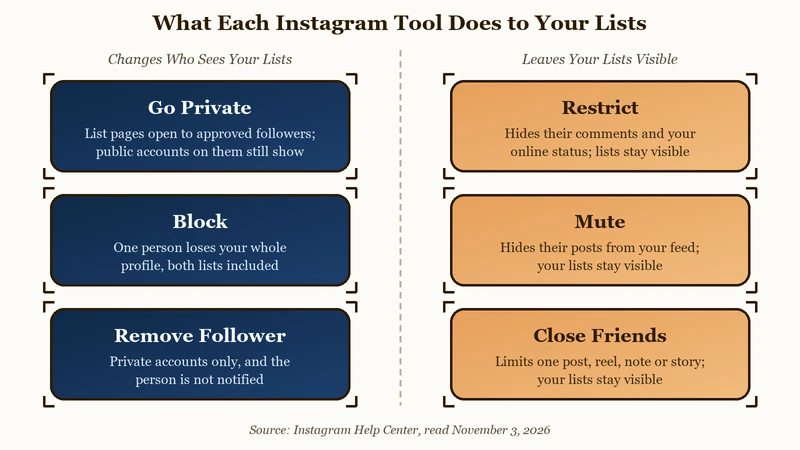
I would start by matching the tool to the exact result you want, because using the wrong one is why people think they are hidden when they are not. Here is the honest breakdown.
| Method | What it hides | What it does NOT hide | Best for |
|---|---|---|---|
| Go private | Lists, posts, and stories from anyone who does not follow you | Existing followers, the public accounts on your lists, and never the count | Personal accounts that do not need reach |
| Block | Your profile and lists from one person, plus any new accounts they make if you choose that option | Your profile from everyone else | Hiding from one person on a public account |
| Remove follower | That person’s access, but only if you are private | Anything on a public account, they just reopen your profile | Private accounts trimming who is inside |
| Restrict, Mute, Close Friends | Comments, DMs, or who sees a single post, reel, note or story | Your follower and following lists stay fully visible | Not list privacy at all |
To go private on a personal account, the path is quick once you know it. Here is the sequence I would use.
- Tap your profile picture, then the Menu icon, the three lines at the top right.
- Open Settings and privacy, then Account privacy under Who can see your content.
- Turn on Private account, then tap Switch to private.
- To cut off an existing follower, open Followers, tap Remove next to their name.
Before: You restrict the person you want gone from your lists, sure it hides your followers from them.
After: You find out Restrict only limits their comments and messages, so you block them instead, the one move that truly removes their access on a public account.
This quick reference keeps the tools straight when you are deciding.
| Tool | What it really does |
|---|---|
| Block | Hides your whole profile and lists from one person |
| Restrict | Limits their comments and DMs, lists stay visible |
| Mute | Hides their content from your feed, nothing about your lists |
| Close Friends | Limits a post, reel, note or story to your list, not your lists |
Close Friends now covers posts and reels as well as stories, per Instagram’s Close Friends help, which makes it the cleanest way to hide a post from someone without blocking them. It still leaves both of your lists exactly where they were.
No outside app can change who Instagram shows your lists to. An app that asks for your Instagram login to “hide” your followers is asking for access it cannot use for that, so keep your password to yourself.
Why Can’t You See Someone’s Followers List?
If a profile shows no lists at all, the account is usually private and has not approved you; if it shows “We limit certain things you can see, such as someone’s followers or following lists,” Instagram is hiding the list from you itself. In that second case the account owner did not switch anything on, because no menu creates that notice.
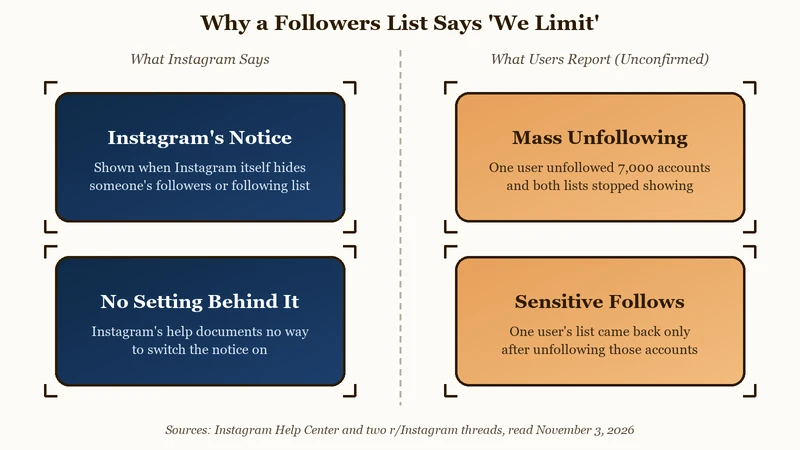
People see that grayed-out message on someone else’s profile, assume there is a secret setting, and waste an afternoon hunting for it. The setting does not exist.
Instagram has not published what triggers the notice, so everything about causes comes from users. In one r/Instagram thread, a user says both lists stopped showing to anyone after unfollowing more than 7,000 accounts over a month. In another, a user who checked their own following list from a backup account linked it to following sensitive-content accounts and said it came back only after unfollowing them.
You cannot turn this notice on for your own profile, so it is no substitute for going private. Instagram gives no timeline for when it lifts either.
If your reach dropped at the same time, that is a separate issue my shadowban test guide and the piece on Instagram unfollowing people both unpack.
The Creator Account Trap and the Real Fix
Creator and Business accounts cannot be private, so hiding your lists means switching back to a personal account first.
That trap is the reason this question has no clean answer for creators.
This is the wall every growing account hits. Instagram’s professional accounts help says it plainly: “Professional accounts can’t be set to private.” To use the private setting you have to switch back to a personal account, and that is not free.
Downgrading strips real tools. Instagram’s own list of professional features includes insights, the professional dashboard, ads and monetization tools, the Contact button, the Primary and General inbox folders and spam-follower review, all given up to hide lists your existing followers can still see anyway.
Privacy and growth pull in opposite directions for a creator. Instagram’s comparison table gives “No one” as the answer for who sees a private account’s posts in search results, Explore, and hashtag and location pages, and for who can download a private account’s reels or remix and embed its videos. With 3 billion monthly users on Instagram as of September 2025, staying public is how creators get found at all.
The durable answer is to stop depending on a platform that controls who sees what. An audience you own, an email list or a site, cannot be hidden, throttled, or quarantined by an algorithm, which is the whole point of my guide to turning views into subscribers and the free creator money page template.
Quick Takeaways
- Instagram has no button to hide your followers or following list, and no setting hides the follower count.
- Going private locks both lists to approved followers, but the public accounts on them stay visible to anyone on Instagram and Threads.
- Blocking cuts one person off from your profile, while Restrict, Mute and Close Friends leave your lists visible.
- The “We limit certain things you can see” notice comes from Instagram, and no setting turns it on.
- Professional accounts cannot be private, so creators give up insights and other tools to hide their lists.