Instagram Unfollowing People on Its Own Is Not Always a Glitch
Instagram Unfollowing People on Its Own Is Not Always a Glitch
Instagram unfollowing people on its own is not always a glitch. Learn whether it is the 2026 purge, an action block, or a hack, and how to fix each.
TL;DR: Instagram unfollowing people on its own usually has one of four causes. Deleted or deactivated accounts drop off your lists by themselves, which is also what a sudden follower drop like the May 2026 cleanup looks like. Follows you never made point to a hacked login or a rogue connected app, and unfollows that snap back hours later mean you hit an action limit.
You open Instagram, glance at your profile, and the numbers are wrong. Your following count slid overnight, or accounts you know you followed are gone, or worse, you are suddenly following strangers you have never heard of. The instinct is to call it a glitch and reinstall the app.
That instinct is what I want to interrupt. When Instagram is unfollowing people on its own, you are usually looking at one of several separate problems that look identical on your profile screen. Treating the wrong one wastes time or, in one case, leaves a stranger inside your account.
A dropping follower count, or followed accounts that vanish because they were deleted, is housekeeping that needs no fix. Follows you never made are a security problem that needs action the same day.
Unfollows that quietly reverse themselves mean you hit an action limit by moving too fast. You will finish this guide knowing which one you have and what to do about it.
Why Is Instagram Unfollowing People on Its Own
Instagram unfollowing people on its own usually comes down to four causes: accounts that were deleted, deactivated or that removed you; a cleanup of inactive and bot accounts; a hacked login or rogue app; or an action limit reversing fast unfollows.
Each one has a different fix, so diagnosis comes first.
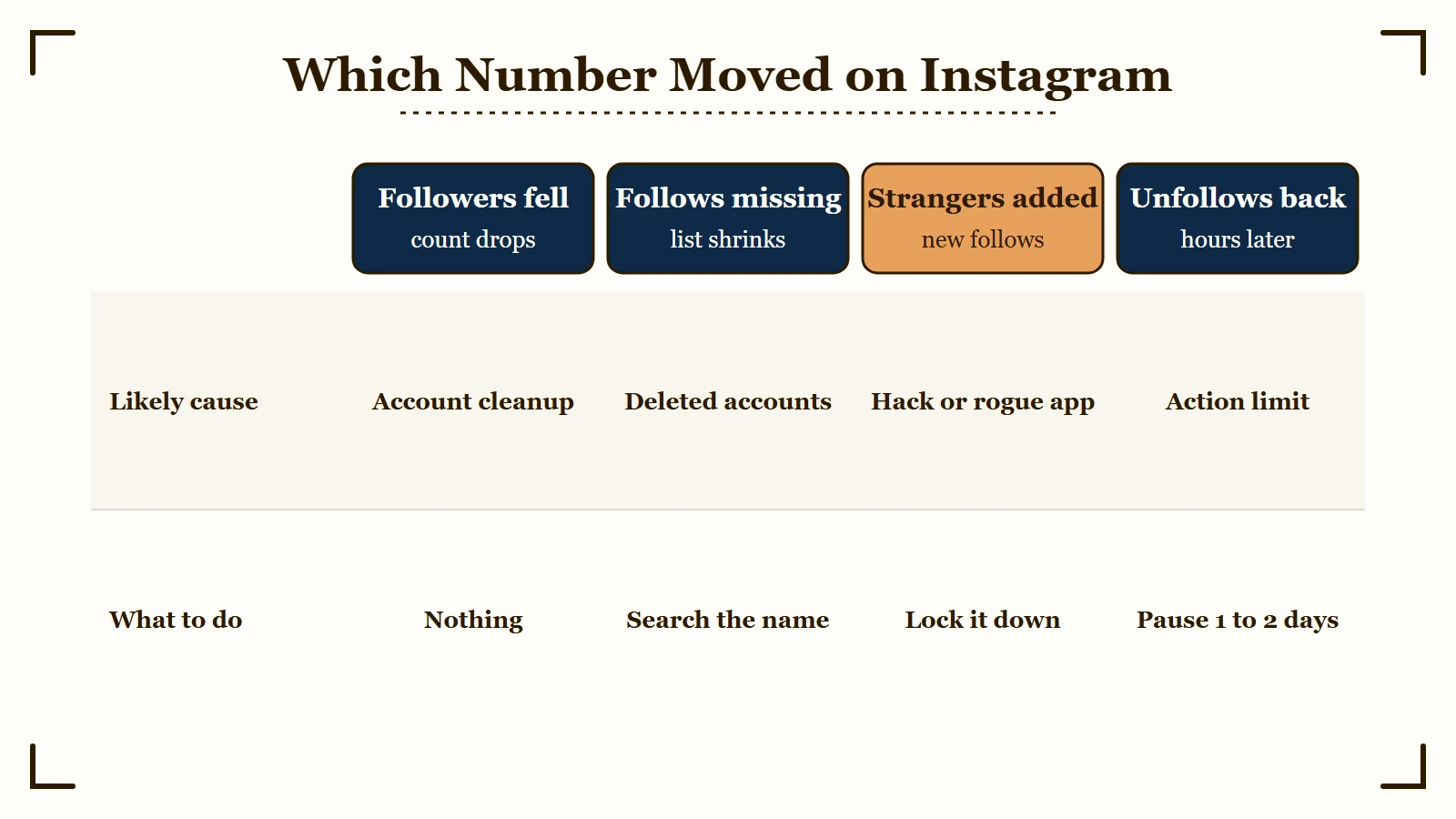
The reason this trips so many creators up is that all four show the same surface symptom: a number on your profile changed without your input. Reading which number moved is how you tell them apart.
If your follower count fell, other accounts stopped following you, usually because they were deleted or removed. If your following count fell, first check whether the missing accounts still exist, since a deleted or deactivated account drops off your list by itself.
A live account can also vanish from your list because it removed you as a follower or blocked you. Instagram’s help page on removing followers is written for the person doing the removing, and it says the follower is not notified either way. My blocked or deactivated check shows how to tell a block from a deleted account.
Follows you never made mean something is acting on your behalf, and so do live accounts vanishing alongside them. Here is the quick diagnostic I would run before touching a single setting.
| What changed | Most likely cause | What to do |
|---|---|---|
| Follower count dropped | Instagram removed inactive or bot accounts, as in the May 2026 cleanup | Nothing, Meta says active followers are unaffected |
| Accounts you followed are missing | They were deleted or deactivated, or they removed or blocked you | Search the name, and if it is live, check your logged-in devices and active apps before assuming a hack |
| You follow strangers you never added | Hacked account or a rogue connected app | Lock the account down now |
| Your unfollows come back hours later | An action limit from unfollowing too fast | Slow down and wait it out |
Is It the 2026 Purge or Something Else
A sudden follower drop is usually Instagram removing inactive and bot accounts, which Meta calls a routine process. The sweep creators nicknamed the Great Purge of 2026 hit on May 6 and 7, and Meta said active followers were unaffected.
Bots and long-inactive accounts were not seeing your posts anyway, so losing them costs no reach.
What is the Great Purge: Instagram’s overnight removal of millions of inactive and bot accounts on May 6 and 7, 2026, which Meta described as part of its “routine process to remove inactive accounts.”
The numbers were brutal at the top. Reports put Kylie Jenner’s loss at about 15 million followers and Cristiano Ronaldo’s at 7 to 8 million.
Small and mid-sized creators saw average drops of about 2 to 5 percent, per Cybernews. If your drop landed on May 6 or 7 and sits in that range, you have your answer.
Instagram’s head, Adam Mosseri, addressed it in an Instagram Stories Q&A on May 8, saying the removed accounts were long inactive or bots and that “it’s not going to affect your reach,” Geo News reported. He also apologized for the confusion.
Meta’s statement on the purge said “Active followers remain unaffected.” Some creators still reported active followers caught in the sweep, so the reach promise holds best for bot and long-dead accounts.
There is a clean test to separate a purge from a real problem. Tap a few of the accounts that vanished from your followers; if their profiles are deleted or look bot-like, that is the purge doing its job. If they are real, active humans, that is an audience issue worth reading the why your reach dropped breakdown for, not a glitch.
When Auto-Following Means You Have Been Hacked
If Instagram is following accounts you never touched, or unfollowing live accounts alongside other actions you never took, treat it as a compromised account or a rogue third-party app, not a bug.
This is the one cause where waiting it out makes things worse.
What is a rogue app: A third-party tool you once authorized, like a follower tracker or auto-poster, that runs follow and unfollow actions through your account using a saved access token.
Auto-following strangers, liking posts you never saw, or DMs you did not send are the classic fingerprints of someone or something operating your account. Deleted accounts can only shrink your following list, and a compromise usually adds accounts you do not recognize.
The usual culprit is not even a stolen password. Creators connect growth tools, auto-commenters, or link-in-bio apps over the years, and any one of them can change hands or go rogue and start running actions in the background.
Instagram’s own help page on unauthorized activity warns that an app given your login, “whether with an access token or by giving them your username and password,” can gain complete access to your account. The same page says detected inauthentic activity can trigger a “Try again later” error.
Unfollower trackers keep showing up in these stories. A creator who installed one in September 2026 was told to change their email and password, then hit a restriction two days later.
If you have ever pasted your Instagram login into a “get more followers” site, assume that is your leak. My shadowban self-check helps confirm whether the rogue activity has already dented your reach.
How to Lock Down a Compromised Account
Lock down a hacked Instagram account in four steps: log out unknown devices, revoke every third-party app, change your password, and turn on two-factor authentication.
Do them in that order, fast.
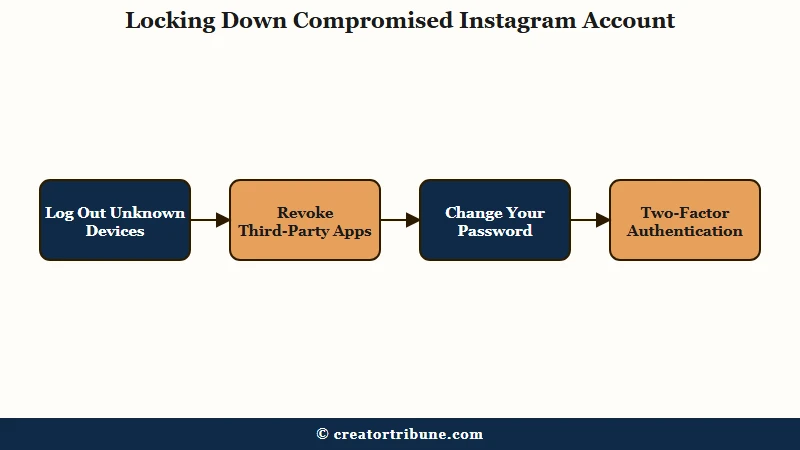
The order matters because logging out the intruder first stops the bleeding before you change anything else. I would not pause between these steps; a connected app keeps acting until you cut its access. Here is the exact sequence.
- Open your profile, tap the menu, go to Accounts Center, then Password and security, then Where you’re logged in, and log out any device you do not recognize. While you are in Accounts Center, remove any linked account you do not recognize.
- Open your profile, tap the menu, then under Your app and media tap Website permissions, then Apps and websites, then Active, and tap Remove next to every third-party app, even ones you think are safe.
- Change your password to something you have never used elsewhere. Instagram’s help says a password change logs out every device signed in to your account.
- Turn on two-factor authentication so a stranger cannot log back in even with your password.
Removing an app stops it reading your non-public information, though Instagram’s help warns it may keep what it already stored. Old tools do not reliably time out on their own: access lapses after 90 days unused only on private personal accounts, and apps that manage business or creator accounts are never expired that way.
Here is what that looks like in practice versus the trap most people fall into.
Before: You watch your account follow strangers, assume it is a glitch, reinstall the app, and wait, while a connected growth tool keeps running actions every hour.
After: You open Where you’re logged in, spot an unfamiliar device, log it out, revoke all apps, reset your password, and the rogue follows stop that same day.
If your account was outright disabled rather than hijacked, that is a different path, and the account disabled recovery guide covers it. If someone has already locked you out, my hacked account recovery steps cover getting back in.
Why Unfollows Snap Back and How Many You Can Unfollow a Day
Unfollows that reverse themselves a few hours later usually mean you hit Instagram’s action limit by unfollowing too fast. Instagram publishes no daily unfollow number, only a 7,500 cap on how many accounts you can follow. In practice, the working range is about 150 to 200 unfollows a day, 15 to 20 an hour, for accounts older than six months, and lower for newer ones.
Instagram shows the action as done, then quietly rejects it once you cross a hidden limit.
Reports from 2026 show how uneven the line is. In April one r/Instagram user working down a following list said they “deleted about 500 yesterday with no repercussions.” In June another was locked and asked for a video selfie after unfollowing about 200 accounts in a short time through an unofficial Instagram app.
These limits are invisible and seem to scale with account age, which is why people trip them without warning. The ranges below sit inside the follow ranges in my follow limit guide, a working envelope creators and tool operators converge on. Keep a cleanup inside them and wait a day if anything snaps back.
| Account age | Unfollows per hour, in practice | Unfollows per day, in practice |
|---|---|---|
| New, under 3 months | 5 to 10 | 20 to 100 |
| Established, 3 to 6 months | 10 to 15 | 100 to 150 |
| Mature, 6 months plus | 15 to 20 | 150 to 200 |
If you are trimming a long list, start with the Least Interacted With list, which gathers the accounts you have engaged with least over roughly the last 90 days. Instagram caps everyone at 7,500 follows, per its help page on the following limit, so at the cap, unfollowing is the only way to follow anyone new.
If you have already tripped a block, often shown as a “Try again later” message, stop all following and unfollowing for 24 to 48 hours so the timer can reset. Pushing through it just extends the block, and chasing growth with rapid follow then unfollow cycles can flag your account and tank your reach, as the reach dropped overnight guide explains.
Protecting the Audience No One Can Delete
The safest follower is one you can reach without Instagram, because a purge, a hack, or an algorithm change can wipe the rest overnight.
The 2026 purge proved how fast the numbers move.
Every cause in this guide is a reminder that your follower count is borrowed, and the accounts inside it can vanish overnight in a sweep you did not control. Chasing the number is the wrong game.
So move the audience you care about somewhere you own, like an email list or a single link hub off the platform. The walkthrough on turning views into subscribers covers the habit, and the free Creator Money Page template is the fastest way to start. A purge cannot delete a list that lives in your own inbox.
Quick Takeaways
- Instagram unfollowing people on its own usually has one of four causes, so read which number moved before you act.
- A falling follower count is usually Instagram clearing inactive and bot accounts, as in the May 2026 cleanup, and Meta says active followers are unaffected.
- Followed accounts that vanish were often deleted or deactivated, or they removed or blocked you, so search the name before you suspect a hack.
- Follows you never made, or unfollows of live accounts alongside other actions you never took, point to a hacked account or rogue app, so log out unknown devices and remove every connected app.
- Unfollows that snap back mean you hit an action limit, so stop for 24 to 48 hours and keep cleanups inside the practice ranges.
- Move your real audience to an owned channel like the free Creator Money Page template so a purge cannot erase it.