Why Am I Losing Followers on Instagram and Is It Your Fault
Why Am I Losing Followers on Instagram and Is It Your Fault
Most Instagram follower drops are Instagram removing inactive, disabled or fake accounts. See how to tell a purge from real unfollows and what to do.
- 1Why Am I Losing Followers on Instagram Overnight?
- Was There an Instagram Follower Purge in 2026?
- 2Why Do I Keep Losing Followers on Instagram?
- Why Does My Instagram Follower Count Go Up and Down?
- Can You See Which Instagram Followers You Lost?
- Why Am I Losing Followers on a Private Instagram Account?
- 3Why Do I Lose Instagram Followers Every Time I Post?
- 4Why Do People Follow You on Instagram and Then Unfollow?
- 5Is Instagram Punishing Me by Removing My Followers?
- Can a Hacked Instagram Account Lose Followers?
- 6How Do You Stop Losing Followers on Instagram?
- 7Quick Takeaways
TL;DR: You’re usually losing followers on Instagram because Instagram removed disabled, inactive or fake accounts that followed you, which it does routinely and did on a large scale in the first week of May 2026. If your following count fell on the same day, removed accounts are the likely cause. A drop that lands within hours of each post means real people unfollowed, and any actual restriction shows up in Account Status.
Why am I losing followers on Instagram? Most of the time it isn’t your fault, and the answer is a cleanup job you never see.
Instagram routinely removes disabled accounts, and its help page on follower changes says that can change both your follower total and the number of accounts you follow, “even within a short time.”
That second number is the first one I check. When your following count falls on the same day as your follower count, accounts were deleted from both lists, which points to removals and away from people deciding to leave.
Drops like this kept turning up long after the big sweep in May. In October 2026, a creator posting normally lost more than 400 followers in a week, and another account lost 1,400 of almost 15K in a month.
Below is how to tell a removal sweep from real unfollows, a block, a hacked account or an app you connected, and what to do about each one. Most of the checks need nothing more than your profile screen and a few minutes.
Why Am I Losing Followers on Instagram Overnight?
An overnight drop on Instagram usually means Instagram removed accounts that followed you.
It deletes disabled, inactive and fake accounts on a routine basis, and each removed account comes off your follower count when it goes.
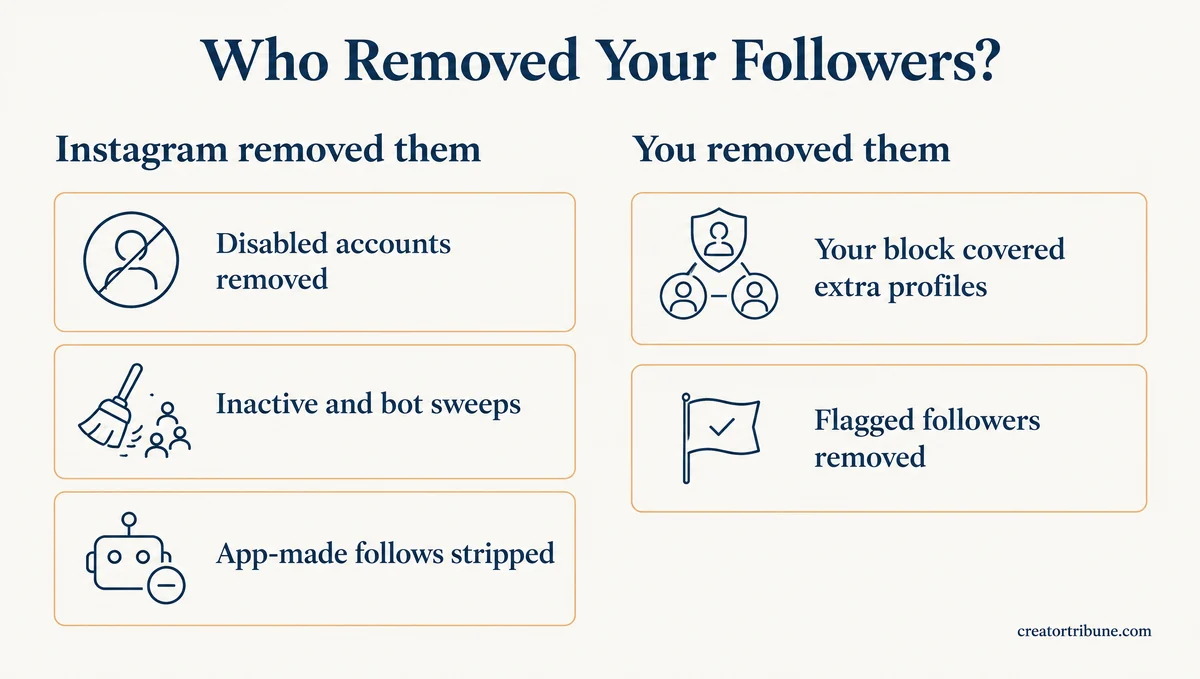
Beyond disabled accounts, Instagram’s help center says it strips out activity from “non-Instagram apps” that “create automated likes, comments and follows to make an account appear more popular than it is.”
Five things can take a chunk of followers in one night:
- Disabled accounts removed. Instagram’s routine cleanup takes accounts it has disabled off every follower list they were on.
- Inactive and bot accounts swept. This usually runs quietly, but in May 2026 it ran at a scale that made headlines.
- App-made follows stripped. Follows generated by growth apps are removed when Instagram finds them, so an audience partly built by an app shrinks.
- You blocked someone. Instagram’s blocking help page offers to block a person’s profile “and other existing profiles they may have,” so one block can remove several followers.
- You cleared Flagged for review. Tapping Remove all on Instagram’s suspected-spam list takes those accounts off your follower count.
One blocked friend cost the owner of a public account two followers at once in October, because the friend had two other accounts following it.
Here is who removed the follower for each cause, including two covered further down, and whether it was anything you did:
| Cause | Who removed the follower | Did you cause it? | Fix needed? |
|---|---|---|---|
| Disabled, inactive or bot accounts removed | No | No | |
| App-made follows stripped | Only if you used a growth app or bought followers | Stop using the app | |
| A block that covered extra profiles | You | Yes, on purpose | No |
| Flagged followers removed | You | Yes | No |
| Real unfollows after posts | Your followers | Partly | Review those posts |
| A hacked account | Whoever has your login | No | Yes, secure the account first |
So is the drop your fault? Usually not. The causes you control are a block you chose, flagged followers you removed, a growth app you used, or posts that turned people off.
I give an overnight drop two or three days before changing anything. Meta says suspended accounts that get restored go back into the count, so part of a fresh drop can reverse on its own.
Was There an Instagram Follower Purge in 2026?
Yes, Instagram removed a large batch of inactive and bot accounts in the first week of May 2026, and Meta called it a routine process.
Big accounts lost the most, and even the Men’s Journal reporter who covered it lost about 200 followers.
A Meta spokesperson’s statement, as Men’s Journal printed it on May 8, read: “As part of our routine process to remove inactive accounts, some Instagram accounts may have noticed updates to their follower counts. Active followers remain unaffected, and any restored suspended account will be included in the count again after verification.”
Instagram head Adam Mosseri addressed it on his Stories the same day, as Geo News reported. “We regularly remove accounts that are either very very long inactive or bots and usually doesn’t happen so many accounts at once,” he said, and “it’s not going to affect your reach.”
Men’s Journal, citing LAD Bible, put Taylor Swift’s loss at about one million followers. Mosseri apologized for the confusion and said Instagram would “try to manage it more responsibly in the future.” The checks below work on any drop.
Why Do I Keep Losing Followers on Instagram?
Your following count, the timing of each drop and your Account Status will tell you why you keep losing Instagram followers.
Those three checks separate removals, real unfollows and account problems, and none of them needs an outside app.
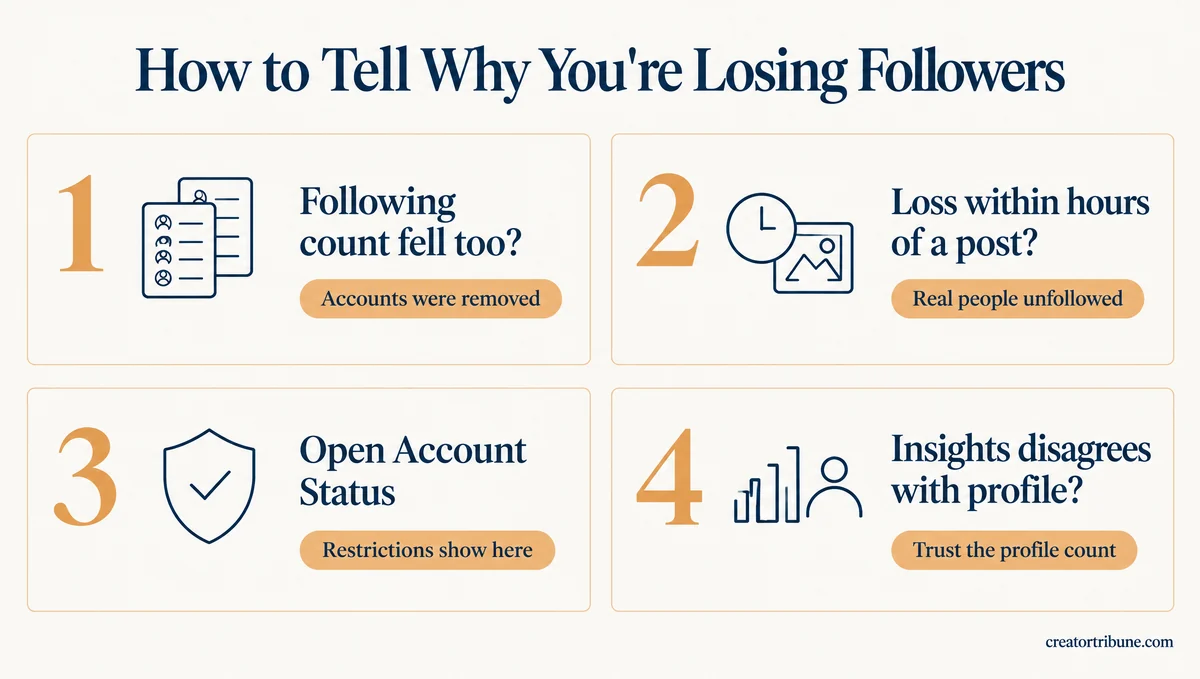
I run them in this order, adding two quick looks at the lists Instagram already gives you:
- Look at your following count. If it fell on the same day as your followers, Instagram removed accounts that were on both lists.
- Check when the drop happened. One overnight fall points to a sweep, while losses that land within hours of each post are people unfollowing.
- Open Account Status. Go to your profile, tap the menu, and find Account Status below More info and support, where removed content and features you can’t use are listed.
- Open Insights. On a public account with at least 100 followers, Instagram’s insights page says Total followers shows “Growth (number of followers you’ve gained or lost)” for timeframes within the past 90 days.
- Open Followers and look for Flagged for review. Public accounts get this list of suspected spam if the feature has reached them, and removing it lowers your count.
Insights can be wrong, so I trust the number on my profile when the two disagree.
In April 2024, Instagram told Social Media Today that “a technical issue resulted in Instagram accounts seeing an inaccurate loss of followers in their Account Insights, but total follower counts on profiles were not impacted.”
| What you see | Likely cause | What to do |
|---|---|---|
| Followers and following both fell overnight | Instagram removed disabled or inactive accounts | Nothing, and give it a few days |
| A big overnight fall with following unchanged | A sweep of accounts you never followed back | Nothing |
| A loss within hours of each post | Real unfollows | Compare those posts with your usual ones |
| A count that swings up and down by tens or hundreds | Suspended accounts dropping out and coming back | Judge the weekly trend |
| Posts, follows or messages you didn’t make | A hacked account or a connected app | Change your password now |
| Insights shows a loss your profile doesn’t | An Insights reporting error | Trust the profile count |
Here is the same drop read two ways:
Before: “I lost 400 followers this week, so Instagram must be punishing my account.”
After: “I lost 400 followers in one night, my following count fell by 12 that same night, and Account Status shows nothing removed, so this was a removal sweep and I can leave it alone.”
Why Does My Instagram Follower Count Go Up and Down?
An Instagram follower count that swings up and down usually reflects suspended accounts dropping out and coming back, on top of ordinary follows and unfollows.
Meta’s May 2026 statement said “any restored suspended account will be included in the count again after verification,” so a follower Instagram suspends can drop off your count and later return.
A beauty brand at 107K followers lost 200 in a day, climbed back to about 107,450, then slid to 105,994 two weeks later. A brand that bought bots in the past, around 50k of them, now moves up and down by 100 to 200 a day at about 4,000 followers. I judge a swinging count by its weekly direction and ignore the daily number.
Flagged follow requests aren’t behind the swing. Follows from accounts Instagram flags arrive as requests even on a public account, and Instagram’s flagged-followers page says requests you don’t approve “within 30 days” are declined automatically.
A request that expires was never counted as a follower, so it can’t lower your count.
Can You See Which Instagram Followers You Lost?
Instagram doesn’t tell you who unfollowed you, and Insights shows only how many followers you gained or lost.
Our guide on who unfollowed you on Instagram covers the manual checks that work.
Skip any tracker that asks for your password. Instagram’s help page on follower apps says handing one of those apps your login lets it “gain complete access to your account,” and unfollower trackers ask for the same login.
Why Am I Losing Followers on a Private Instagram Account?
A private Instagram account loses followers for the same reasons, but it gets no Insights, so the following count is your best clue.
A private account near 200 followers saw followers and following both drop by around 20 in one October week, which is the removal pattern.
The Flagged for review filter is built for public accounts, so it isn’t what’s shrinking a private one.
Why Do I Lose Instagram Followers Every Time I Post?
You lose Instagram followers when you post because each post puts you back in front of followers who stopped caring, and some of them leave.
A follower who forgot you exists costs nothing until your next post reminds them.
My first suspect is any post that reads like an ad, and the second is a recent viral hit. A creator running paid partnerships lost 50 to 100 followers within two to three hours of every post, and more than 1,000 in a few days. A carousel of theirs had recently gone viral, and Meta Verified support didn’t help.
A viral post brings its own correction. People who follow after one hit video often find the next ten posts aren’t what they came for, and they go.
Other triggers I watch for:
- A change of topic. Followers who came for one subject leave when the feed moves to another.
- A burst after a long break. A run of posts after weeks of silence lands in every feed at once.
- Too much selling. A feed that pitches more often than it helps loses people one post at a time.
Instagram publishes no “normal” unfollow rate, so the 1 to 3 percent a month figure that circulates online is a guess.
Your own Insights are the better baseline, since Instagram’s page on professional accounts says they help by “mapping new and existing posts to net follower changes.”
Why Do People Follow You on Instagram and Then Unfollow?
People follow and then unfollow on Instagram when the follow was a trade, made in the hope of a follow back or made by an app.
Once the trade ends, the follow goes too.
Growth apps built this habit. TechCrunch described these apps in 2018 as tools people use to “follow then unfollow others in hopes of growing their audience,” with services charging $10 to $45 a month.
Instagram has fought them ever since. On November 19, 2018, it started removing “inauthentic likes, follows and comments from accounts that use third-party apps to boost their popularity,” and said the measures “will be ongoing.” Any follower who reached you through one of those apps can disappear when Instagram catches it.
Your own cleanups count too. I expect a few followers to leave whenever I trim the accounts I follow, because some only stayed for the follow back, and an account cleaning its list started losing followers along the way.
If your following list is changing without you, see our guide to Instagram unfollowing people.
Is Instagram Punishing Me by Removing My Followers?
Instagram’s help pages describe no penalty that takes real followers away; its penalties remove content, limit features or cut recommendations, and Account Status lists them.
A restricted account keeps its followers. It just reaches fewer new people.
Instagram’s Account Status page lists three things:
- Removed content that went against the Community Standards.
- Features you can’t use for now.
- Recommendations Guidelines problems on professional accounts, which decide whether content is shown “to people who don’t already follow you.”
None of the three is a follower count. I don’t buy the idea that Instagram quietly deletes real followers to punish an account, and nothing in that page suggests it.
The one documented exception involves apps. Instagram’s follower apps help page says that if you’ve shared your login with one, “we may remove any likes or other engagement that they generated.”
Use one to gain likes or followers, and the same page warns that “your account may be disabled or terminated.”
So a drop after using a growth app is most likely Instagram taking back what the app produced. Bought followers fade for a related reason, since they come from the fake accounts Instagram keeps removing, and our bot follower cleanup guide covers a flood of them you never asked for.
Can a Hacked Instagram Account Lose Followers?
A hacked Instagram account can lose followers quickly, because whoever holds your login can post spam that drives people away.
Instagram’s help page on follower apps says a follower app with your login can “potentially post spam or other harmful content on your profile.” A person who steals your password can do the same.
I treat any post, follow or message I didn’t make as a hack until I’ve ruled it out. Change your password first, then work through our hacked account recovery steps.
How Do You Stop Losing Followers on Instagram?
You stop losing Instagram followers by fixing the cause you found, and for a removal sweep the fix is to do nothing.
Removed accounts weren’t watching your posts, so losing them costs no reach and raises your engagement rate.
An account with 10,000 followers and 400 likes a post has a 4 percent rate. If a sweep removes 500 inactive followers, the same 400 likes on 9,500 followers works out to about 4.2 percent.
Here’s what I’d do for each of the other causes:
- Flagged followers. Review the Flagged for review list before tapping Remove all, and tap Options, then Not spam or irrelevant, next to anyone real. Our guide to removing followers explains why going slowly beats going fast.
- Unfollows after posts. Open the posts that came before each drop and look for what they share, such as a sponsored post, a new topic or a burst of uploads. Judge future posts by reach, shares and follows instead of the running total.
- A growth app. Change your password, which Instagram says revokes the app’s access, and stop using it.
- A hacked account. Secure the login before anything else, then check which posts and follows aren’t yours.
- A block. Nothing to do, unless you meant to block only one of a person’s profiles.
If your account is established and you still want help regrowing it, $39 to $129 a month buys Kicksta, which puts one Instagram account in front of people in your niche.
It logs in with your password and follows people who follow the accounts and hashtags you choose. It likes posts from the ones who follow back, then runs its unfollow step 2 to 4 days later.
That is the follow-then-unfollow method described above, so some followers it wins can leave once it unfollows them. Instagram’s warning about follower apps applies to it too, which makes it a poor fit for a new or recently restricted account.
The review linked above covers the tradeoffs, including Kicksta’s own July 2026 video calling follow/unfollow dead, and our guide to getting more followers covers the free route.
The followers no sweep can touch are the ones on a list you own. Our free Creator Money Page template gives your profile link a place to collect emails, so a purge can’t take that audience away.
Quick Takeaways
- An overnight drop is usually Instagram removing disabled, inactive or fake accounts, and Meta says active followers are unaffected.
- Check your following count first, because removals usually take both numbers down together.
- Losses within hours of each post are real unfollows, so compare those posts with your usual ones.
- Account Status shows any real restriction, and none of the penalties Instagram documents takes real followers away.
- A follower app with your password can cost you twice, through removed follows and the risk of a disabled account.
Most drops aren’t your fault, so check your following count and Account Status before you change a single post.