How to See Deleted Instagram Messages Without Getting Scammed
How to See Deleted Instagram Messages Without Getting Scammed
Instagram says deleted messages cannot be restored and its data export leaves them out. Here is what still works and why to skip paid recovery apps.
- 1Can You See Deleted Instagram Messages at All?
- Does Instagram Notify Someone When You Unsend a Message?
- 2Does Instagram’s Data Export Show Deleted Messages?
- 3How to Read a Message Someone Unsent on Android
- 4Do Instagram Message Recovery Apps Work?
- 5What Deleted Really Means After Instagram Dropped Encryption
- 6Quick Takeaways
The Short Answer: Instagram’s own help says deleted messages cannot be restored, and its data export leaves out both chats you deleted and messages you unsent. The methods that work are narrow: Android Notification History and the recipient’s own copy, while business accounts can also try the Meta Business Suite inbox. Paid recovery apps are a trap.
Learning how to see deleted Instagram messages usually starts the same way. Someone unsends a message right as you glance at your phone, or you delete a whole thread by accident, and then you go hunting for an undo button that does not exist.
I have watched people burn an afternoon on this, and the frustrating part is that most of the advice online sends them straight to the two methods least likely to work. One of those methods is even sold as the official fix. It quietly leaves out the messages you care about most.
There are a small number of ways to get a deleted or unsent message back, and each works only in a specific window. There is also a whole category of apps that charge for recoveries Instagram’s own help rules out.
This guide separates what genuinely works from what wastes your money, and it explains why “deleted” on Instagram in 2026 does not mean what you think it means.
Can You See Deleted Instagram Messages at All?
Seeing a deleted Instagram message is possible only in narrow cases. Instagram’s help page on restoring content says plainly that “deleted messages on Instagram cannot be restored,” and the message is gone from your app the moment it is removed.
Whether you can get it back depends entirely on which kind of deletion happened and which device received it.
Instagram’s Recently Deleted folder is no help here. It holds deleted posts, reels, videos and archived stories for 30 days and other stories for up to 24 hours, but messages are not on that list.
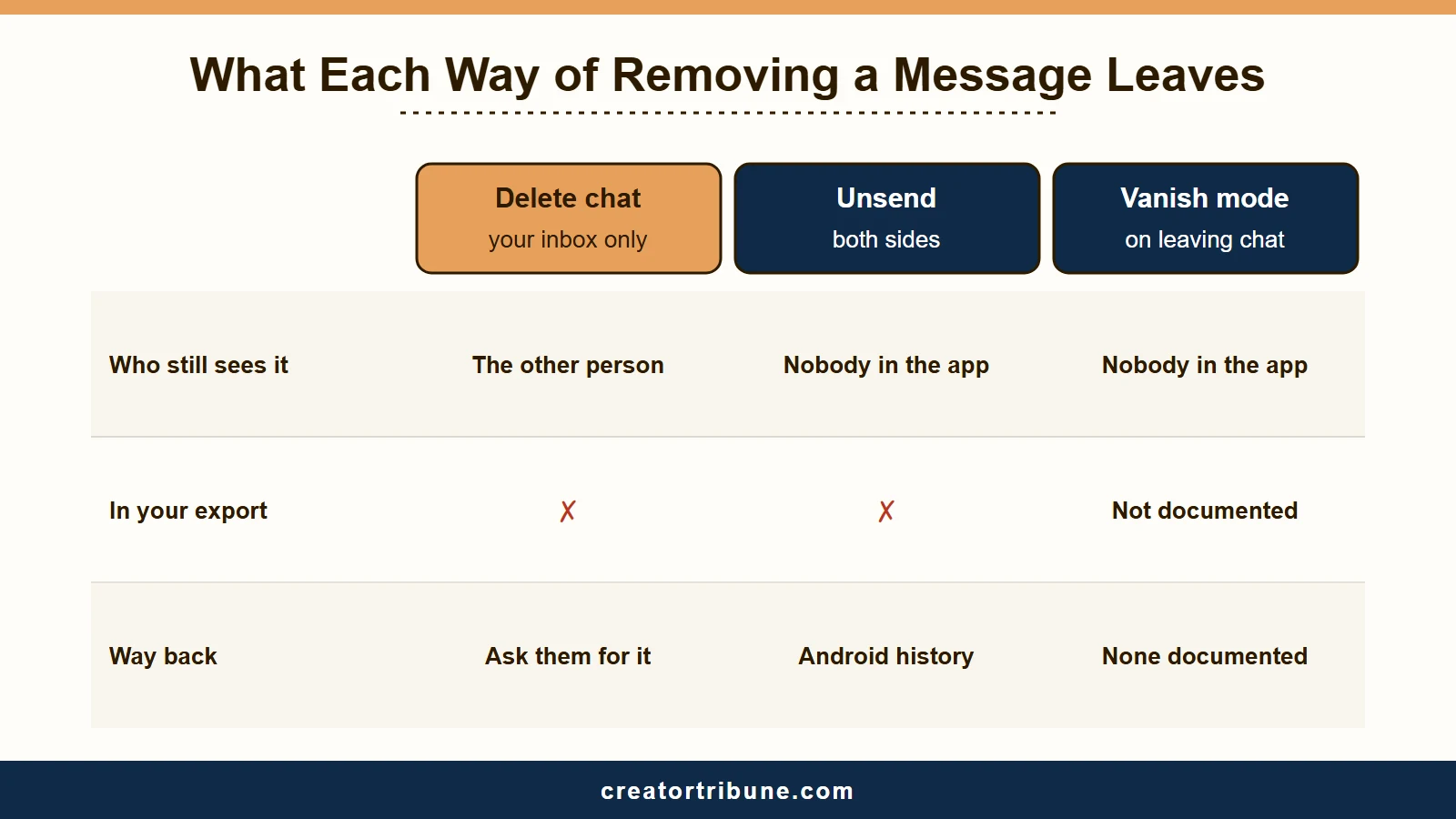
The first thing to untangle is delete versus unsend, because people use the words interchangeably and they are not the same. Deleting a conversation only clears it from your own inbox, and Instagram’s delete-a-chat page confirms the thread “will still appear in the inbox of other people” in the chat.
Unsending is the real removal. It pulls the message from both sides of the chat at once, although the other person may still get an alert that a message was unsent. That is the version people usually mean when they ask how to read something that vanished.
If a message was unsent before you ever saw it, your options shrink to one device-level trick. If it was sent in vanish mode, Instagram documents no way to see it again.
Instagram’s vanish mode page says that content disappears when someone leaves the chat or turns vanish mode off, and that you cannot copy, save or forward it. Its reporting page still lets you report those messages for up to 14 days after they disappear, and a report sends them from your device to Instagram’s review team. Nothing there lets you read them again.
If you are also trying to work out whether someone quietly cut you off, our guide on telling if someone blocked you covers that separate signal.
Here is how the three ways a message can disappear compare, because the fix depends entirely on which one you are dealing with:
| Action | What it does | Who still has it | Recoverable? |
|---|---|---|---|
| Delete chat | Clears the thread from your inbox only | The other person keeps the full thread | Yes, via the other person’s copy |
| Unsend message | Removes it from both chat screens at once | Neither side sees it in the app | Rarely, only via Android history or a screenshot |
| Vanish mode | Disappears when someone leaves the chat or turns vanish mode off | No one can open it; a report within 14 days still includes it | No documented way to view it again |
Does Instagram Notify Someone When You Unsend a Message?
Sometimes it does. In September 2026 an iPhone user posted a screenshot of an Instagram notification reading “This message is no longer available because it was unsent by the sender,” an alert Instagram’s Help Center never mentions. The alert does not say who unsent the message.
The screenshot was posted to r/Instagram on September 23, 2026. Nothing in the screenshot shows which message was unsent or what it said. Two commenters said they get the same alert every day, and one of them had never seen it before the previous week.
The wording itself is old. Users posted the same alert text on X in October 2021 and on Threads in September 2023, and Instagram’s Help Center page on unsending still does not mention it. Whether Android phones show the alert too is unconfirmed.
If you are the one unsending, assume the other person may still find out. Instagram’s Help Center warns that the people you sent it to may have already seen your message. On Android, their Notification History may also still hold the preview.
They may also have screenshotted it before you unsent it, which Instagram does not flag for regular messages, as our guide to whether Instagram notifies screenshots explains.
If the alerts keep arriving with no chat you recognize, look at your broadcast channels and group chats first. One commenter traced most of their alerts to a creator’s channel where posts get unsent and resent, and another suggested that someone unsending in an old chat or a group chat could explain the rest.
Does Instagram’s Data Export Show Deleted Messages?
No. Instagram’s own help says the export, the tool older guides call Download Your Information, leaves out both chats you deleted and messages you unsent.
Most recovery guides still present it as the way back, often with a “within 90 days” promise, so this is where people lose the most time.
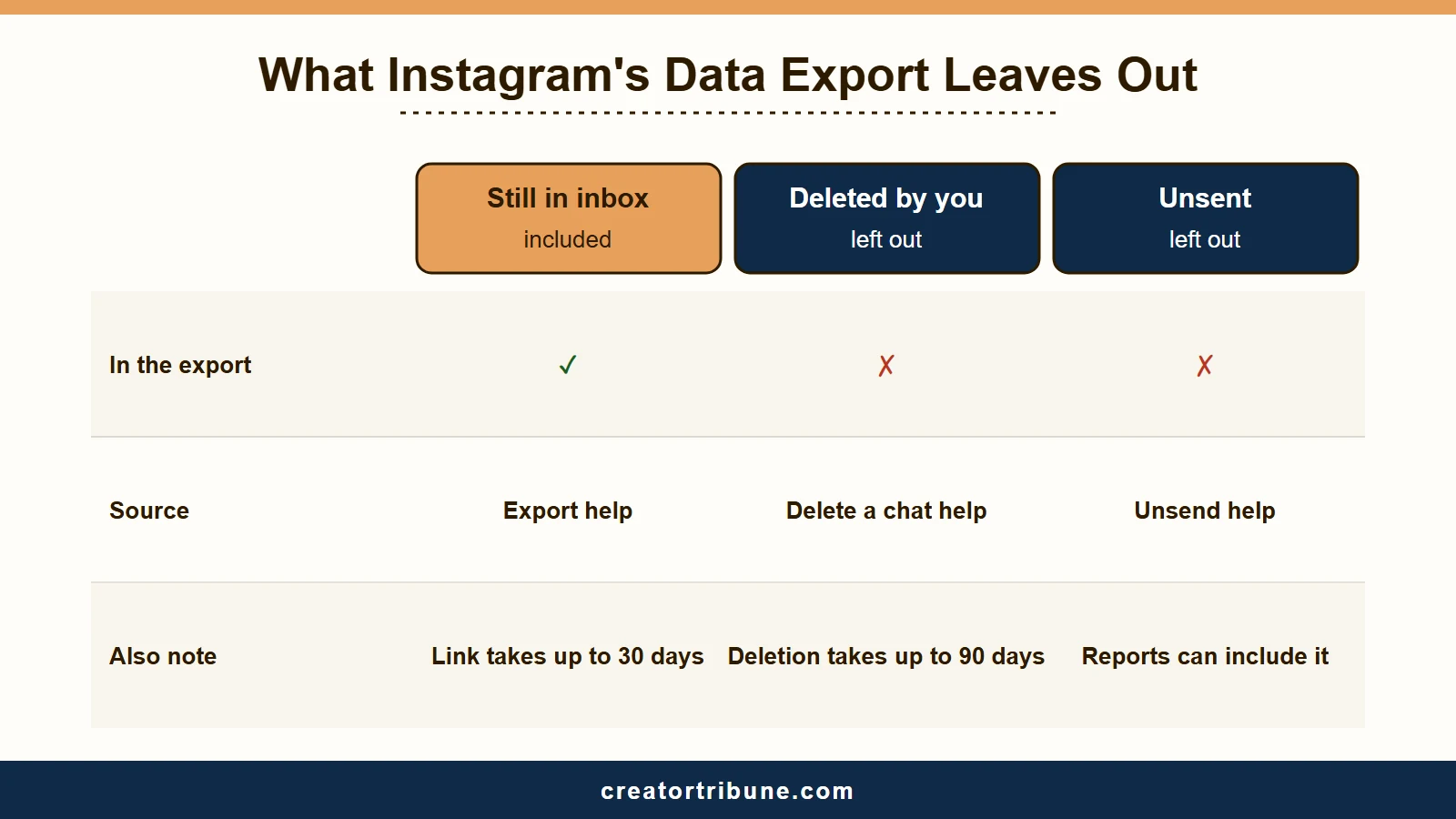
The pitch sounds airtight. Instagram’s deleted-content page gives deletion up to 90 days to finish and says copies may remain in backup storage after that, so surely requesting your archive pulls them back.
Instagram’s own Help Center says otherwise, on four pages. Its page on unsending says the Data Download file “doesn’t include messages that you’ve unsent,” the deleted-content page agrees, and the delete-a-chat page says the same of deleted ones. The export page itself adds that deleted information “may be stored temporarily for safety and security purposes, but will not appear when you access or download your information.”
So the tool is real and it does have a use. It saves a copy of chats that are still in your inbox, which is worth doing before you delete a thread you may need later. It will not resurrect a message that was deleted or unsent before you asked.
That gap matters because Meta does keep data you thought was gone. Security researcher Saugat Pokharel used this exact tool and received photos and private messages he had deleted more than a year earlier, plus a few photos he had deleted back in 2013. PCMag reported the bug in August 2020 once Instagram had fixed it, and Instagram paid him a $6,000 bounty.
The data is there. The export just is not built to hand it to you, which is why I would not lean on it for anything you truly need back.
If you still want a copy of what remains, here is Instagram’s current path and the timing that trips people up:
- Open your profile, tap the menu, then Meta Account or Accounts Center (Instagram says it is “gradually updating people to Meta Accounts”), then Your information and permissions.
- Tap Export your information, then Create export, choose your Instagram profile, and tap Next.
- Pick Export to device, narrow the information to your messages, set the date range, format and notification email, then tap Start export.
- Wait for the link, which Instagram says may take up to 30 days to arrive by email, then download it within 4 days of the export being ready.
The same steps work on instagram.com in a computer browser, starting from More in the bottom left, then Settings.
Before: you assume the data download is a recover button and expect your unsent messages inside it.
After: you treat it as a mirror of what is still in your inbox, useful as a backup before you delete a thread, useless for a message that was already deleted or unsent.
How to Read a Message Someone Unsent on Android
Android users can read an incoming message that was later unsent in the phone’s built-in Notification History. It keeps a history of the day’s notifications, so the preview can still be there after the chat stops showing it.
It is the most dependable free method for a message someone unsent, because it has nothing to do with Instagram itself.
When a message arrives, your Android system captures the notification at the moment of delivery, and that preview stays in a system log even if the sender unsends it seconds later. Google’s Android Help describes the log as a history of the day’s notifications and warns that some devices do not have it. The catch is that the feature has to be switched on before the message arrives, so I would turn it on now rather than after you need it.
This is the method most people are hunting for when they ask how to see an unsent message, without knowing their phone already does it. Here is the sequence I would follow:
- Open your phone Settings, then Notifications.
- Find Notification History, usually under Advanced settings, and turn the toggle on.
- Leave it on so future notifications get logged automatically.
- After a message is unsent, open Notification History and scroll to the time it arrived to read the preview.
Two limits apply. It only captures incoming messages, so it will not show something you unsent yourself, and iPhone has no history of cleared notifications like this.
On an iPhone, you may get Instagram’s unsend alert instead, which says a message was unsent but not what it said or who sent it.
If you rely on your inbox for brand deals or client work, that gap is a good reason to think about where your important conversations really live. Our piece on spotting fake Instagram security emails is worth a read too, since scammers love to exploit that same anxiety.
What is Unsend: Instagram’s feature that removes a sent message from both people’s chat screens at once. The recipient may still get an Instagram alert that a message was unsent, without the sender’s name.
Do Instagram Message Recovery Apps Work?
No. Paid Instagram message recovery apps promise what Instagram’s own help says is impossible, since deleted messages “cannot be restored,” so the safest move is to avoid the entire category.
The marketing is slick, with deep-scan animations and confident success rates. What those apps actually ask for is your Instagram login or full access to your phone.
The way I see it, handing your login to an unknown app is how a lost message turns into a lost account. Here is how the real options stack up against the fantasy ones:
| Method | What it recovers | Time window | Worth it? |
|---|---|---|---|
| Android Notification History | Incoming messages later unsent | About a day | Yes, free and safe |
| Ask the recipient | Anything they still have | Until they unsend or delete | Yes, simplest fix |
| Export your information | Chats still in your inbox | Link may take up to 30 days | As a backup only, never for deleted or unsent |
| Meta Business Suite inbox | Chats a business account deleted in the Instagram app | No documented window | Unconfirmed, business accounts only |
| Paid recovery apps | Nothing, by Instagram’s own account | Never reliable | No, high scam risk |
The most reliable method is also the least technical, and I would try it first. If you still have the other person in the chat, just ask them to screenshot what they sent. They almost certainly still have their copy unless they were the one who unsent it.
What Deleted Really Means After Instagram Dropped Encryption
Deleted has never meant permanently gone on Instagram, and since Meta removed its end-to-end encrypted chat option on May 8, 2026, every Instagram DM sits where Meta can read it.
Understanding this changes how you should treat anything sensitive in your inbox.
Encryption was always an opt-in extra on Instagram, and Meta’s stated reason for dropping it was that the feature was rarely used, as Help Net Security reported in March 2026. The practical result is that Meta can read, process, and store the contents of every Instagram chat, and it now points anyone who wants encryption to WhatsApp. If old encrypted chats vanished from your inbox around then, our guide to Instagram messages that disappeared covers that cutoff.
The change landed 11 days before the federal Take It Down Act’s May 19 compliance deadline, which requires platforms to pull reported non-consensual images within 48 hours. A privacy analyst quoted by Fox 32 Chicago said regulatory pressure was likely driving it. That link is the analyst’s reading, since Meta itself pointed to low adoption.
Instagram says deletion can take up to 90 days, backup copies may outlast that, and it may keep information longer for legal issues, terms violations or harm prevention. Its Help Center says an unsent message can still be included in a report if the chat or a surrounding message is reported.
Instagram passed 3 billion monthly active users in September 2025, according to CNBC, and none of their old DMs are as erased as the interface suggests.
If you run a creator business, the brand rates, contract terms and customer details in an unencrypted DM thread are one subpoena or one breach away from being read by someone else. Renting your most important conversations from a platform that keeps a copy and can now read it is a fragile way to run a business.
This is why I keep pointing creators toward owning their audience through a simple creator money page and an email list they control. That way, a single deleted thread or policy change never takes your livelihood with it. If you also want more privacy in the chats you keep, our guide on turning off read receipts pairs well with this one.
What is Vanish Mode: A chat setting where messages disappear for both people once someone leaves the chat or turns vanish mode off. Instagram still lets you report them for up to 14 days afterward.
Quick Takeaways
- Instagram’s own help says deleted messages cannot be restored, so the real options are Android Notification History and the recipient’s copy, plus a check of the Business Suite inbox for business accounts.
- Unsending can still reach the other person, since some recipients get an Instagram alert that a message was unsent, though it does not name the sender.
- The data export most guides push leaves out chats you deleted and messages you unsent, by Instagram’s own account, and its link can take up to 30 days to arrive.
- Avoid paid recovery apps entirely, since they promise what Instagram says is impossible and usually want your login or full phone access.
- After Meta dropped DM encryption on May 8, 2026, treat anything sensitive in your inbox as readable and move brand and client talk to channels you own.