How to Add Music to an Instagram Post Without Getting Muted
How to Add Music to an Instagram Post Without Getting Muted
Add music in the Instagram app from the caption screen; instagram.com has no music step. Why songs go unavailable and how to keep a post from getting muted.
- 1How Do You Add Music to an Instagram Photo Post?
- Can You Add Music to an Instagram Post on a Computer?
- 2Why Your Instagram Music Library Looks Empty or Limited
- 3The Business to Creator Toggle and Why It Backfires
- 4Why Is My Instagram Music Not Working on a Photo Post?
- Why Does Instagram Say This Song Is Currently Unavailable?
- 5Does Adding Music to a Post Help Your Reach?
- 6Quick Takeaways
The Short Answer: Adding music to an Instagram photo or photo carousel takes seconds from the caption screen in the app, but instagram.com on a computer has no music step. Your account type and region decide which songs you get, and on a commercial post an unlicensed track can get muted or draw a copyright claim. The reach payoff is also smaller than most guides admit.
Figuring out how to add music to an Instagram post feels like it should take one tap, and for a personal account it mostly does. The confusion starts when the song you want is missing, the audio goes silent after you post, or your business account only shows tracks nobody has heard of.
Plenty of social media managers add a trending song to a still photo and then turn the volume all the way down to zero. They use the track purely as a reach signal.
That one trick tells you what music on a static post is really for in 2026, and it also explains why the whole feature is wrapped in so many account rules and copyright traps. This guide covers the steps for a single photo and a carousel, why your library looks limited, why music stops working or shows as unavailable, and whether any of it moves your reach.
How Do You Add Music to an Instagram Photo Post?
To add music to an Instagram post, tap the plus icon, pick your photo or photos, tap Next, then tap Add Music on the caption screen, choose a track and the snippet, and share.
The option sits right below the location and tag fields, and it works only in the mobile app, never on the desktop site.
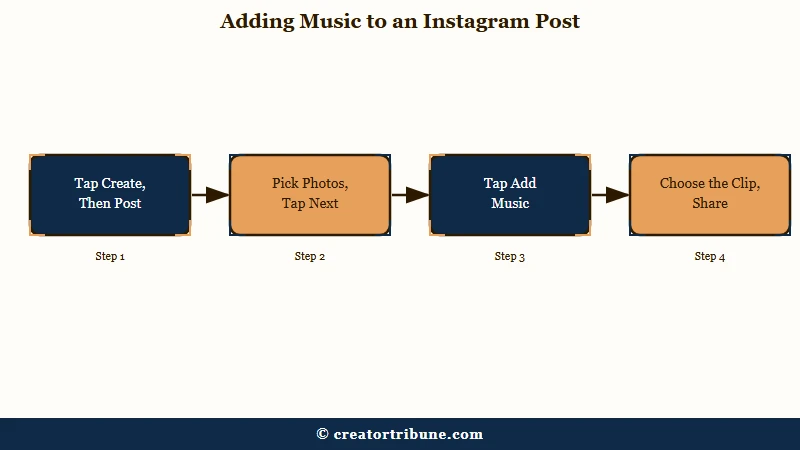
For a single photo, the flow is quick and I would keep the snippet tight so the song loops cleanly. Here is the sequence:
- Tap the plus icon and choose Post, then select one photo and tap Next.
- On the caption screen, tap Add Music below the caption box.
- Search the library or browse the For you suggestions, pick a track, and drag the slider to the part of the song you want.
- Tap Done, then Share.
Carousels work the same way, and one background track has been able to run across a whole photo carousel since August 2023. The catch is video: Instagram’s carousel music page says “Music cannot be added to carousels with videos,” so keep every slide a photo if you want a song on it. A carousel holds up to 20 photos, and the music becomes the glue that holds a multi-slide story together.
- Tap the plus icon and use Select Multiple to choose at least two images.
- Tap Next to reach the final editing screen.
- Tap Add Music, choose your track and snippet, and tap Share.
One formatting catch that trips people up on carousels: the first slide sets the aspect ratio for every slide after it, so a portrait photo dropped behind a square first slide gets cropped.
If you want your feed to stay sharp through all of this, our guide on Instagram photo quality after upload covers the compression side.
Can You Add Music to an Instagram Post on a Computer?
Not on instagram.com: the website has no music step for a feed post, and Instagram documents Add music only inside its Android and iPhone apps. Its computer posting steps, checked on 6 October 2026, run from Select from computer through filters, caption, location and tags straight to Share.
People keep asking anyway. A 1 October 2026 r/Instagram thread got the same answer from another user, whose fix is to move the post to the phone, add the song there and share it from the app.
That is the reliable route: send the photos to your phone, build the post in the app and add the song on the caption screen. If the post has to go out from a computer, put the sound into a video file before you upload it, which makes it a video post rather than a photo post. Use only audio you own or have licensed there, because a rights holder can block content that contains their track.
Why Your Instagram Music Library Looks Empty or Limited
Your Instagram music library looks limited because Instagram keeps certain Business accounts and some post types out of its licensed library, usually leaving them the Meta Sound Collection of over 14,000 royalty-free songs and sounds. Personal and Creator accounts get the popular catalog, and the split comes from music licensing.
Instagram’s Music Guidelines say the licensed library “is intended for personal, non-commercial use” and that licensed music “may also not be available in certain countries or regions.” A Business account reads as commercial, so Instagram keeps many of them away from the hits. That is why your competitor’s personal account can drop the song of the summer and your bakery’s Business account cannot.
The restriction protects you, even though it feels like a punishment. The same guidelines say Sound Collection tracks can be used for commercial purposes like ads, which is more than you can say for a trending song you do not have a license for.
| Account type | Music library | Trending hits? | Safe when commercial? |
|---|---|---|---|
| Personal | Full popular catalog | Yes | Only for non-commercial posts |
| Creator | Full popular catalog | Yes | No, a brand deal voids the license |
| Business | Often Sound Collection only | No | Yes, tracks are pre-cleared |
The Business to Creator Toggle and Why It Backfires
Switching a Business account to Creator can unlock the trending music library, but it does not make a commercial post eligible for that music or give you any legal protection. It looks like a fix, and the costs stay hidden until later.
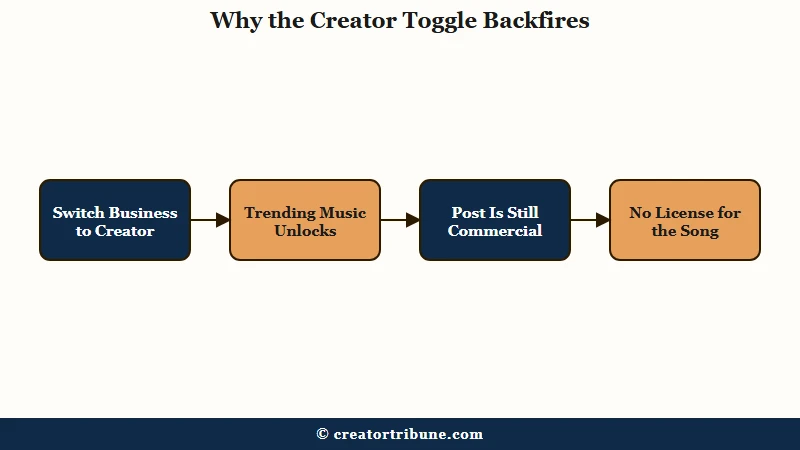
I understand the temptation. Plenty of guides frame it as a clean workaround, noting you can switch to Creator, publish, then switch back and the post keeps its audio.
The Music Guidelines limit the licensed library to personal, non-commercial use, whatever the account label says. Changing the label does not change the underlying fact that a paid or promotional post has no license for that song.
The moment you take any brand deal, a flat fee, an affiliate link, a performance bonus, or even free product, your content becomes promotional and Instagram’s built-in personal music license stops applying.
In May 2024 Sony Music sued Marriott over 931 alleged infringements of its recordings in social media posts, 913 by Marriott hotels and 18 by influencers Marriott paid, as Music Business Worldwide reported. US law allows statutory damages of up to 150,000 dollars per work for willful infringement, which put nearly 140 million dollars in play, and the case was dismissed that October after a settlement.
An Arnold and Porter advisory had warned brands about this risk two years earlier. That is the same enforcement behind an ordinary muted post, so our guide on handling an Instagram copyright claim is worth a read. If you monetize your following, our creator money page walks through funnels that never depend on a borrowed song.
Why Is My Instagram Music Not Working on a Photo Post?
Instagram music stops working on a photo post because your region or account type lacks the licensed library, a licensing deal changed, a rights holder blocked the track, or you are posting from a computer.
Start with region. Instagram’s audio help page says a song may be out of reach because the licensed library “isn’t available for your account type or in your country or region.” Here is how the common failures break down:
| Symptom | Likely cause | Fix |
|---|---|---|
| Song says it is currently unavailable | Region, account type, licensing change or rights-holder block | Pick another track, or replace the audio on a published post |
| No Add Music option at all | Region not licensed | No in-app fix; Reels and Stories may still offer the Sound Collection |
| Add Music missing on computer | Desktop does not support it | Post from the mobile app |
| Only unknown songs show | Business account library | Use the Sound Collection; Creator does not license commercial posts |
Most “Instagram music not working” reports trace to one of these four, so rule them out before assuming the app is broken.
A VPN plus a reinstall is the workaround that circulates for region locks. Instagram’s Terms of Use bar attempts to “circumvent, by-pass, or override any technological measures that control or limit access to the Service,” so that route puts the account at risk.
Why Does Instagram Say This Song Is Currently Unavailable?
“This song is currently unavailable” means the track is not usable on your account right now. Instagram’s audio help page lists three causes: no licensed library for your account type or region, a changed licensing agreement, or a block by the rights holder.
Rule them out in the order Instagram lists them. Region and account type come first, since an unlicensed country or a restricted Business account loses the licensed library outright. A pulled track comes last, and the only fix there is a different song.
A 2 October 2026 r/Instagram post describes highlights built from old stories showing their song as unavailable for licensing, while the same song still appears when adding a new story. Instagram’s Stories archive page documents one way an old story loses its song: to save storage, archived photo stories that use the music sticker can be permanently changed, which “can mean muting music.” Our guide to music on old highlights covers what that does to a highlight.
Since July 2026, any song on a feed post or photo carousel you already shared can be swapped for another licensed track through Edit. The Replace Audio walkthrough covers it, and the post keeps every like and comment. Updating the app is also a free check, though Instagram’s audio help page does not list an outdated app as a cause.
Does Adding Music to a Post Help Your Reach?
Adding music to a static post gives a modest reach nudge at best, because the 2026 algorithm rewards hook timing, shares, and low skip rates far more than the song itself.
The music is a small signal at most.
Guides disagree on this. Some argue trending audio lifts you into the audio tab and Explore; others counter that a still photo with random audio does not hold attention, and that silence can outperform a mismatched track. In a feed now serving 3 billion monthly users, the song helps only when it fits the image and the format does the real work.
Creators who attach a trending track to a still photo and mute it are betting that the audio metadata alone earns a nudge in a video-first feed. It is a low-effort experiment, and it does nothing if the post itself is not worth stopping for.
Before: you slap the loudest trending song on a static photo at full volume, and it clashes with a calm image so people scroll faster.
After: you pick a track that matches the mood, keep the snippet tight, and let the caption and first slide do the hooking, so the song adds feel instead of friction.
If reach is the real goal, our breakdown of why Instagram reach drops matters far more than any soundtrack. Pairing music with a strong link in your Instagram bio turns the attention you do earn into something you own.
Quick Takeaways
- Add music from the caption screen after tapping Next, in the app only, for single photos and photo carousels; Instagram says music cannot go on carousels with videos.
- Certain Business accounts are limited to the Meta Sound Collection of over 14,000 tracks, while Personal and Creator accounts get trending hits.
- The switch-to-Creator hack unlocks hits but gives no legal cover, and any brand deal takes a post outside the personal-use music license.
- “This song is currently unavailable” traces to region, account type, a licensing change or a rights-holder block.
- Music is a minor reach signal, so let the image and hook do the work and use a track only when it genuinely fits.