How to Collab on Instagram Without Ever Splitting Your Reach
How to Collab on Instagram Without Ever Splitting Your Reach
A collab post shares one engagement pool across both audiences, not a split. Here is how to collab on Instagram, the real limit, and the reach payoff.
- 1How Do You Collab on Instagram?
- How to Accept a Collab Invite on Instagram
- How to Add a Collaborator After Posting
- 2Does a Collab Post Split Your Engagement?
- 3How Many People Can You Add to a Collab Post?
- 4How Do You Remove Yourself as a Collaborator on Instagram?
- How the Creator Removes a Collaborator
- What If Stop Sharing Is Not in the Menu?
- 5Why Is the Invite Collaborator Button Not Showing?
- 6How to Use Collab Posts to Grow Your Audience
- 7Quick Takeaways
The Short Answer: An Instagram collab post is a single co-authored post or Reel that appears on both accounts’ profiles and shares one pooled engagement count, so every like shows in full on both. You invite up to 5 collaborators from the Tag people screen, before or after posting, and a collaborator can leave later with Stop sharing. The reach payoff is real, but only when your audiences barely overlap.
A lot of creators put off learning how to collab on Instagram because they assume sharing a post cuts its engagement in half.
When two accounts co-author a post, the likes, comments, saves, and views land in one shared pool. If that post earns 3,000 likes, every profile it sits on shows 3,000 likes, not 1,500 each. Emplifi’s September 2026 report on January to June 2026 client data found that brands under 10,000 followers earned about five times more interactions on accepted collab posts than on their standard posts.
So the collab feature is one of the few free reach levers left on Instagram, and plenty of older guides still get the basics wrong, including whether you can add a partner after posting. This walks through the exact steps, the real collaborator limit, how to leave a collab or remove a partner, why the invite button goes missing, and the one partner-matching rule that decides whether any of it works.

How Do You Collab on Instagram?
To collab on Instagram, create your post or Reel, tap Tag people on the caption screen, choose Invite Collaborator instead of a normal tag, pick the account, and share.
The post goes live on your profile right away and appears on theirs once they accept the invite in their messages.
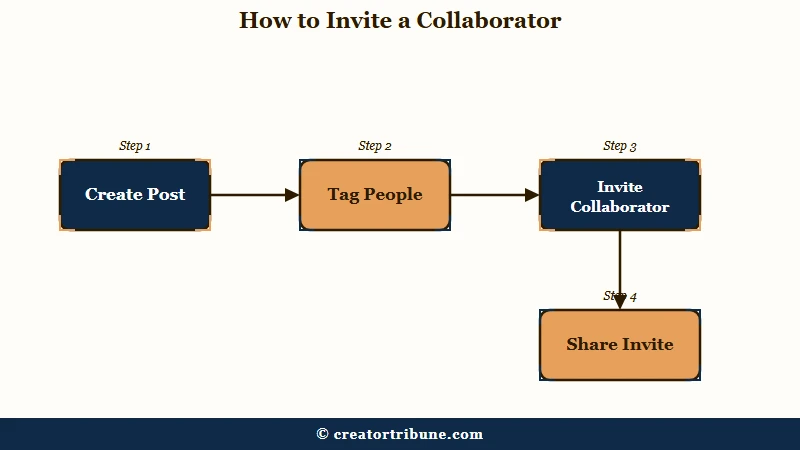
Tagging someone does not make them a collaborator. A tag lands in their Tagged tab and is not shared with their followers, while a collab lists them as a co-author and puts the post in front of their audience. Here is the sequence I would use before posting:
- Build your post, Reel, or carousel and move to the final caption screen.
- Tap Tag people, then tap Invite Collaborator rather than the standard tag.
- Search the username, select the account, and tap Done.
- Tap Share, and the invite lands in their messages to accept.
How to Accept a Collab Invite on Instagram
To accept a collab invite, open Messages, tap the chat where the invite arrived, tap the collaboration invite, then tap Review and Accept, or tap Decline to turn it down. Until the invite is accepted, the post shows only on the creator’s profile.
How to Add a Collaborator After Posting
You can also add a collaborator after a post is already live, which is where a lot of older advice is flat wrong. Several guides still insist you have to delete and repost, but the feature changed:
- Open the published post and tap Options (the three dots) in the top right.
- Tap Edit, then Tag people, then Invite Collaborator.
- Search the account, select it, and save.
The post keeps every like and comment it already earned while the new invite goes out. If your goal is turning that shared reach into something you keep, our guide on how to grow on Instagram pairs well with the collab habit.
If you run collabs across several accounts of your own, SMTasker is one tool that can handle the routine posting and engagement around them, running Instagram, TikTok and Threads actions from Android phones you connect yourself. It automates the kind of activity Instagram restricts, and accounts that break Instagram’s guidelines may lose access to Collabs, so weigh that before connecting an account you depend on.
Does a Collab Post Split Your Engagement?
No. Every like, comment, save, and view on a collab post goes into one shared count that shows in full on all co-authors’ profiles.
Instagram adds that every account that accepts can see all the likes and comments on the post.
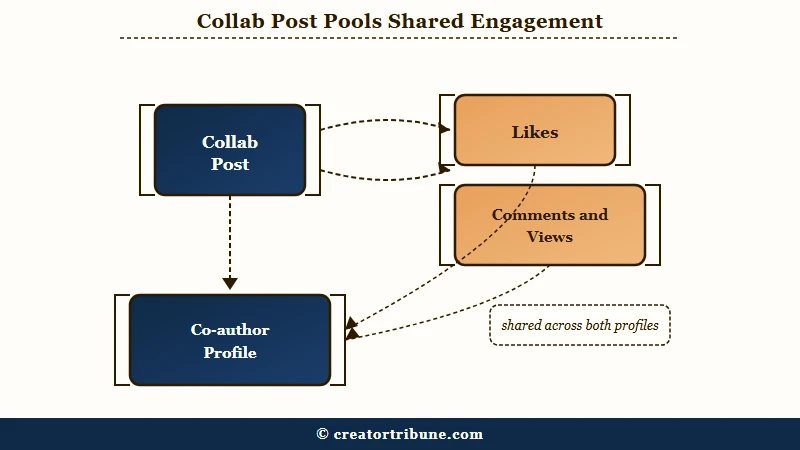
Because nothing gets divided, a collab works as a multiplier whenever the other audience is new to you.
On a platform that passed 3 billion monthly users in September 2025, that reach adds up. In ecommerce and retail, Emplifi found accepted collabs drew more than five times the shares and reposts of non-collab posts, and Reels showed the strongest collab gains of any format. Its amplification analysis covered 520,198 posts and accepted collaborations across 3,791 Instagram profiles.
The multiplier only works if the two audiences are genuinely different. A collab with an account whose followers already follow you mostly recycles the same viewers, so the reach barely moves even though the mechanic is working perfectly.
If your numbers have been sliding lately, our breakdown of why Instagram reach drops covers the other levers.
| Feature | Where it appears | Engagement | Best for |
|---|---|---|---|
| Collab post | Both profiles’ main grid | One shared pooled count | Reaching a new audience |
| Tag | Their Tagged tab, or their grid if they use Add to Grid | Stays on your post alone | Crediting without co-authoring |
| Repost | Your Reposts tab and followers’ feeds | Credited to the original creator; comments on your repost reach you as DMs | Sharing someone else’s post |
Add to Grid, which Instagram launched on September 10, 2026, blurs the tag row a little. TechCrunch reported that you can now put a post you are tagged in onto your main grid, from the DM notification, the post itself or your Tagged tab, without duplicating the original.
It still only works for posts you are tagged in, and it does not list you as an author. A collab remains the route when you want co-authorship and the post in both audiences’ feeds from the start.
How Many People Can You Add to a Collab Post?
You can add up to 5 collaborators to a single feed post or Reel, so the content lives on 6 profiles counting you, and there is no follower minimum to use the feature.
Guides disagree on the number because the limit crept up over time.
You will still find articles claiming the cap is one or three, because each was written at a different point in the feature’s life. The current ceiling is 5 invited collaborators, and a brand new public account can use it exactly like a large one.
A few rules decide whether an invite even sends, per Instagram’s help center. A private account can only invite people who follow it, and if a public account accepts a private account’s invite, the post is shared publicly through that public collaborator, so I would flag that before anyone with a locked account sends one. You also cannot add collaborators to Stories, only to feed posts and Reels.
The collab tag does not cover legal disclosure. If money or free product changed hands, the collab label alone does not satisfy advertising rules, and you still need the separate Paid Partnership label on top of it.
How Do You Remove Yourself as a Collaborator on Instagram?
To remove yourself as a collaborator on Instagram, open the post, tap Options (the three dots) in the top right, tap Stop sharing, then confirm with Stop sharing. The post leaves your profile but stays on the original creator’s, likes and comments included.
Instagram’s help center says the invited account can leave at any time. Only the original creator can delete the post itself, and if they do, it disappears from every collaborator’s profile too.
How the Creator Removes a Collaborator
If you made the post, open it, tap Options, then Edit, then Tag people, tap Remove next to the collaborator’s name, and tap Done. Before you publish, the same Remove button sits on the Tag people screen, and Instagram says the creator can remove a collaborator at any time.
What If Stop Sharing Is Not in the Menu?
One trap turned up in a September 23, 2026 r/Instagram post: the user had hidden a collab reel from their main grid first, and the menu they could reach from their Reels tab no longer offered a way to leave. Instagram’s collab help page does not cover hidden posts, and two routes skip that menu entirely.
Ask the creator to remove you from their Edit screen, or block their account, which Instagram’s help center says ends the collaboration while the post stays on their profile. Blocking is the blunt option, so I would message the creator first.
Why Is the Invite Collaborator Button Not Showing?
If the Invite Collaborator button is missing, the likely causes are an outdated app, a Story (collabs work only on feed posts and Reels), or an account Instagram has limited for breaking its guidelines. If the button works but you cannot add a particular person, the usual cause is that your account is private and they do not follow you. Each one has a specific fix.
Instagram says accounts that have gone against its guidelines “may not have access to Instagram Collabs”, so a recent strike or restriction can take the option away, and our guide on fixing an Instagram action block covers clearing one. Here is how the common failures sort out:
| Symptom | Likely cause | Fix |
|---|---|---|
| No Invite Collaborator option | Old app, or you are posting a Story | Update the app; collabs work on feed posts and Reels only |
| You cannot add a particular person | Your account is private and they do not follow you | Ask them to follow you, or have them invite you |
| Button vanished suddenly | A guideline strike or restriction on your account | Check Account Status, pause any automation or mass-following, and wait for the restriction to clear |
| Collab vanished from their profile | They left with Stop sharing, or one of you blocked the other | Ask them; a block ends the collaboration |
I would check Account Status and your privacy setting before reinstalling anything.
How to Use Collab Posts to Grow Your Audience
A collab pays off most when you partner with an account whose followers barely overlap with yours.
Same-niche twins feel safe and quietly waste the feature.
Chasing a partner who does the exact same thing you do means both of you are showing the post to the same people twice, so the pooled reach hardly grows. A complementary account, a food creator and a local ceramicist, pushes each of you in front of a genuinely new audience.
Watch out for the pay-to-collab economy too. In a March 2026 r/InstagramMarketing thread, a software vendor said one large page gets 50 to 100 collab invites a day and now auto-replies with a $1 payment button, and another page owner said they pay about 40 euros for 10 collabs on bigger accounts. For a small account I would skip that and offer real value to a slightly larger creator instead, like editing a clip for them.
Before: you collab with three accounts in your exact niche, and the post lands with the same followers who already see everything you make.
After: you collab with a creator in an adjacent niche, and half the likes come from people who had never heard of you, some of whom follow.
A viral collab is only worth it if you catch the new audience before it scrolls away. Point the spike at something you own with a strong link in your Instagram bio and a simple creator money page, so a borrowed audience turns into subscribers you keep even after the post cools off.
Quick Takeaways
- A collab post keeps one shared engagement count, so its full like count shows on every profile it lives on.
- You can invite up to 5 collaborators for 6 total profiles, with no follower minimum, and you can add them before or after posting.
- To leave a collab, open the post, tap Options, then Stop sharing; the creator removes a collaborator through Edit, then Tag people.
- If the Invite Collaborator button is missing, update the app, make sure you are not posting a Story, and check Account Status; if you cannot add a particular person, check whether you are private and they do not follow you.
- The payoff depends on low audience overlap, so partner with a complementary creator and route the new reach to something you own.