What a Real Instagram Email Looks Like and How to Check It
What a Real Instagram Email Looks Like and How to Check It
Scammers now spoof Instagram's real sender address and shortcode. Here is the 60 second in app check that proves whether a security email is real.
- 1How to Know if an Instagram Email Is Real in 60 Seconds
- 2Why a Real Sender Address Does Not Prove Anything
- 3Which Email Domains Does Instagram Actually Use?
- How to Read a Sender Domain Without Getting Fooled
- 4The Instagram Scams Creators See Most in 2026
- 5What to Do the Moment You Think You Clicked
- 6How Creators Can Stop One Scam From Wiping Out Everything
- 7Frequently Asked Questions
- Is [email protected] a safe email address?
- Is mail.instagram.com a legitimate domain?
- Will Instagram ever DM me about a security problem?
- What does a real Instagram security text look like?
- Is an Instagram email offering account verification real?
- How do I report a fake Instagram email?
- 8Quick Takeaways
TL;DR: The only reliable way to tell if an Instagram email or text is real is the in app Recent emails log under Accounts Center. A genuine looking sender address proves nothing, because scammers spoof it, and any security email older than 14 days that does not appear in that log is fake.
The fastest way to know if this Instagram email is real is to open the app, not the email. Instagram keeps a private log of every security message it has ever sent you, and if the alarming message in your inbox is missing from that log, it did not come from Instagram.
That one check beats every tip about inspecting sender addresses, because the sender address is the easiest thing for a scammer to fake.
This matters more than it used to. The FTC reported that people lost $2.1 billion to scams that started on social media in 2025, with reported losses now eight times higher than in 2020. For a creator, a hijacked account means losing your distribution, your brand deals, and sometimes your income in a single afternoon.
The cruel part is that the scariest messages look the most official. A 2026 wave of these emails arrives from addresses that read [email protected], threaten to delete your account within 24 hours, and link to a login page that is pixel for pixel identical to the real one.
This guide hands you a 60 second routine that tells you, with certainty, whether any Instagram text, email, or login alert is genuine before you touch a single link.
How to Know if an Instagram Email Is Real in 60 Seconds
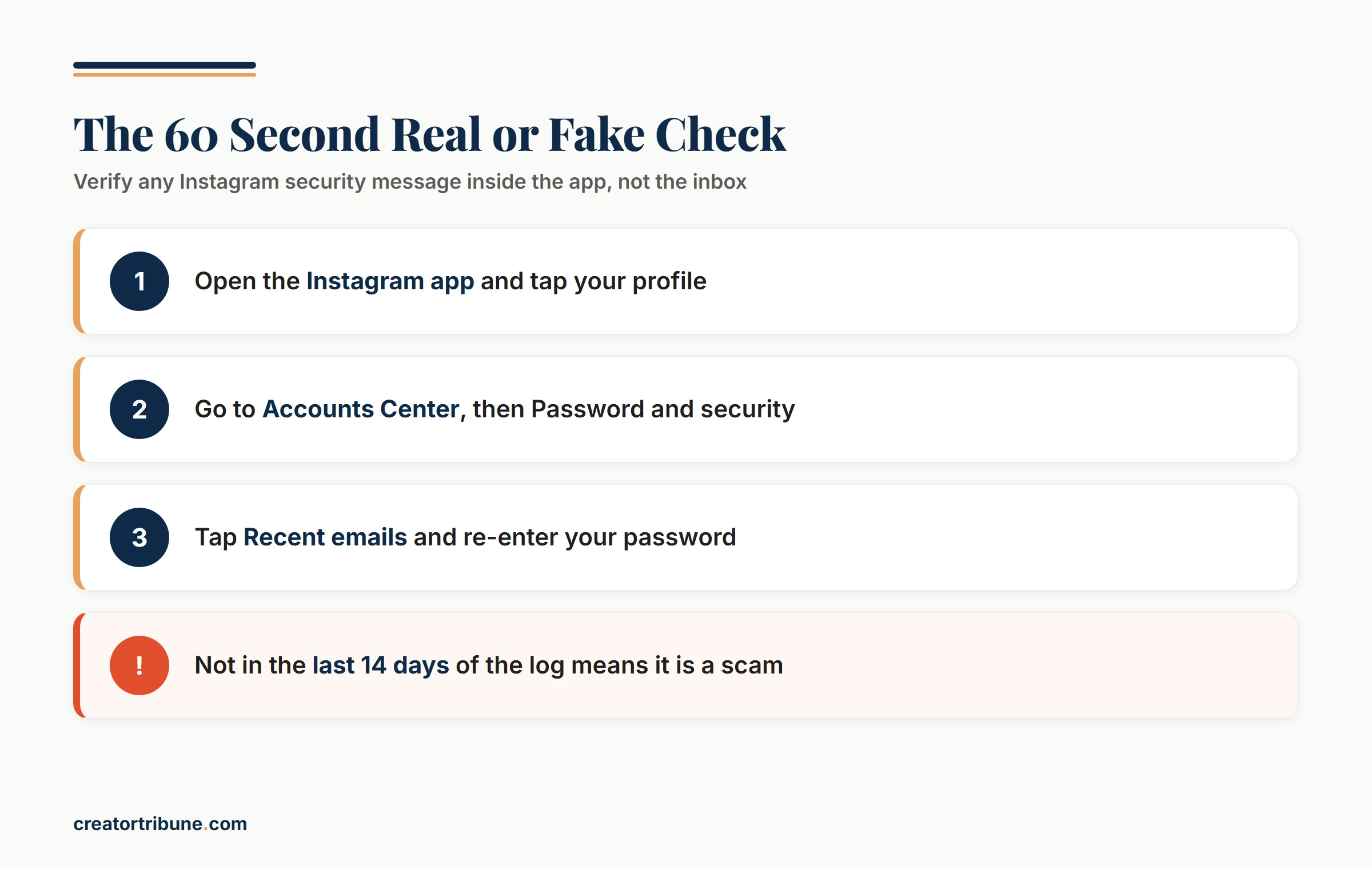
An Instagram email is real only if it appears in your in app Recent emails log. Open Instagram, go to your profile, and check the log under Accounts Center. If the message is not listed there, treat it as a scam, no matter how official the sender looks.
What is the Recent emails log: A private list inside Instagram that shows every security and login email Meta sent you in the last 14 days, used to confirm a message is genuine.
This is the only check that holds up, because it does not ask you to spot a fake. It leans on Instagram’s own records instead of your judgment under pressure. The sequence below takes under a minute.
- Open the Instagram app and tap your profile picture in the bottom corner.
- Tap the menu, then open Settings and activity.
- Go to Accounts Center, then Password and security.
- Tap Recent emails. You may have to re-enter your password, which is itself a good sign you are inside the real settings and not a fake page.
- Compare the suspicious message against the list. Genuine security and login emails from the last 14 days appear here. No match means it did not come from Instagram.
There is a quiet trap hiding in that 14 day window, and it is the single most useful thing to remember. The log only stores the last two weeks of messages, so a security email sitting in your inbox dated three weeks ago can never be confirmed in the app. An unverifiable old alert is a scam by default, full stop.
If you want a faster gut check before you even open the log, these four signals separate a genuine message from a fake one almost every time.
| Signal | Real Instagram | Phishing |
|---|---|---|
| Appears in Recent emails log | Yes, within 14 days | No |
| Asks for your password or code | Never | Often |
| Link destination | instagram.com | Look alike domain or mailto |
| Tone | Informational | Countdowns and threats |
Why a Real Sender Address Does Not Prove Anything
A correct sender address does not prove an email is real, because sender addresses are trivial to forge. Scammers spoof [email protected] outright or register look alike domains your eye skims straight past.
The classic swap replaces the letter m with the pair r and n, which at small sizes on a phone reads as an m. It only works on the part of an address somebody had to buy, so the convincing fake is instagrarn.com, not a subdomain of the real instagram.com.
The harder case is the one where the sender field is genuinely correct. Spoofing writes a real address into the From line without ever touching Meta’s servers, so a message can pass every visual check and still be a trap.
There is a sneakier version that dodges spam filters entirely. Some of these emails hide a mailto link instead of a normal web link, so tapping it opens a blank email addressed to the attacker rather than a website. Security tools that scan for malicious URLs never flag it, because there is no URL to scan.
What is SMS sender ID spoofing: A technique that replaces the real phone number behind a text with a name or shortcode, letting a scam message slot into the same thread as your genuine Instagram alerts.
Before you trust it: the address reads [email protected] and the email warns of account deletion in 24 hours.
After a closer look: the reply link is a mailto that opens a blank message to the attacker, and the same alert is nowhere in your Recent emails log.
That second line is the whole game. A creator phishing wave works the same way a YouTube phishing scam does, by borrowing every visual cue of the real platform and counting on you not to verify.
Which Email Domains Does Instagram Actually Use?
Meta publishes a closed list of the only domains its email can come from, and mail.instagram.com sits inside it. Anything arriving from a domain outside that list is fake, no matter what the display name says.
Meta’s guidance on scams and phishing names six: fb.com, facebook.com, facebookmail.com, instagram.com, meta.com, and metamail.com. Subdomains of those count too, which is why [email protected] clears the check.
The list only settles half the question. It rules out the lazy fakes instantly, and it says nothing about a spoofed message that already carries a real domain, which is why the in app log stays the deciding test.
How to Read a Sender Domain Without Getting Fooled
Read the address after the @ from right to left, and stop after two pieces. Those last two are the only part somebody had to register, and everything to their left can be invented freely by whoever owns them.
In mail.instagram.com the two that matter are instagram.com, so Meta owns it and the mail piece is theirs to create. Only Meta can put a label in front of instagram.com, because that requires control of the domain itself.
The attack runs the other way. A link to instagram.com.account-verify.net belongs to account-verify.net, and the familiar instagram.com at the front is decoration a scammer added in ten seconds.
The two piece rule: Find the first slash in a web address, or the end of an email address, then count two labels back. Whoever owns those two owns everything to their left.
The Instagram Scams Creators See Most in 2026
The most common 2026 Instagram scams are fake copyright notices, verification badge offers, and unusual login alerts. Each one manufactures urgency to rush you past the 60-second check.
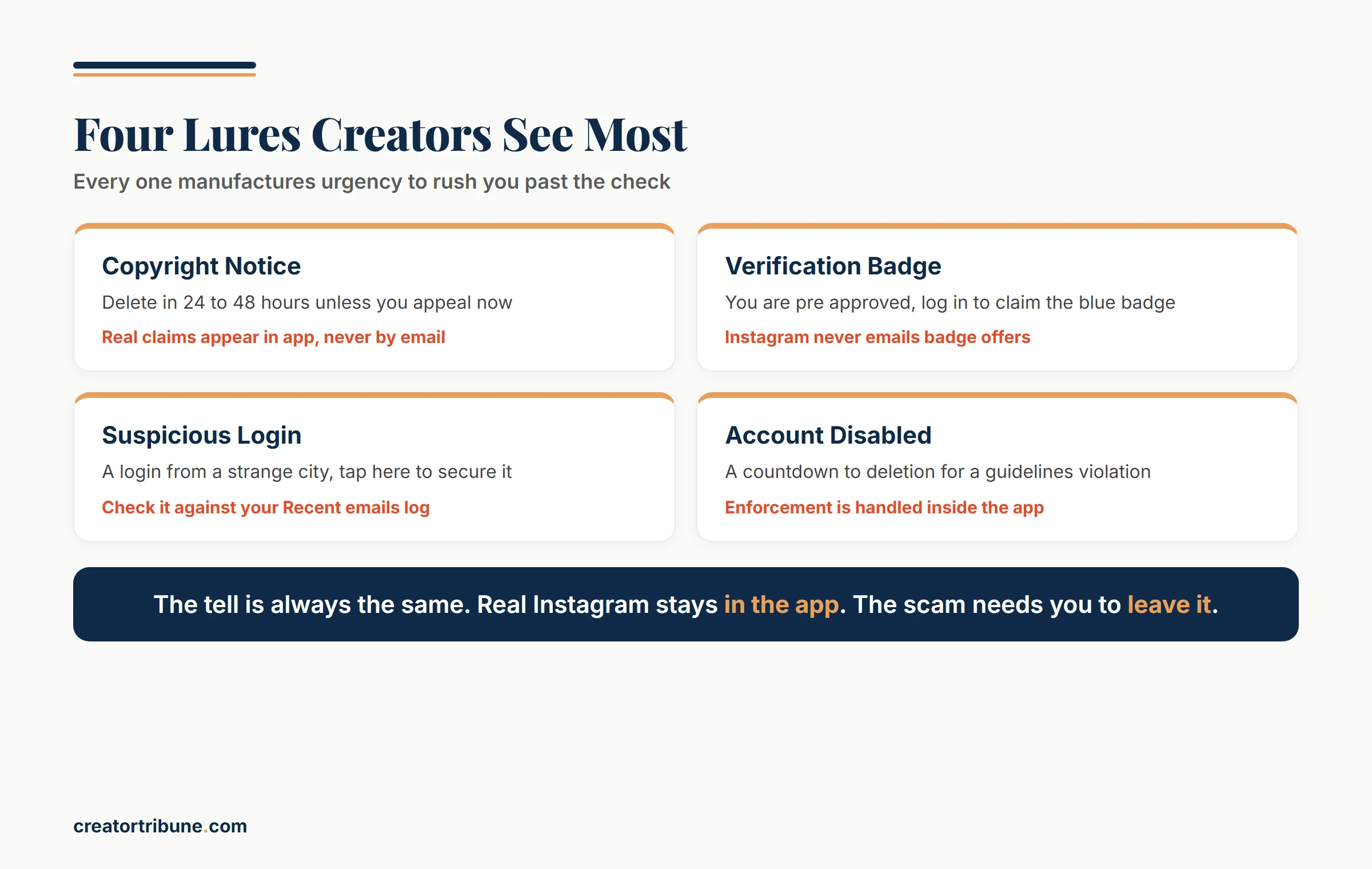
I would tell any creator to memorize these five, because they cover the overwhelming majority of what lands in a working account’s inbox. The tell is almost always the same: a real Instagram process happens inside the app, while the scam needs you to leave it.
| Lure | What it claims | The tell |
|---|---|---|
| Copyright violation | Your account will be deleted in 24 to 48 hours unless you appeal now | Real copyright claims show up in app, never as an email ultimatum |
| Verification badge | You are pre approved for a blue badge, log in to claim it | Instagram never emails badge offers, verification starts in the app |
| Suspicious login | A login from a strange city or IP, tap here to secure your account | Compare it against Recent emails, genuine alerts are listed there |
| Account disabled | A countdown to permanent deletion for a guidelines violation | Enforcement is handled in app, not through a ticking email clock |
| Brand collaboration | A paid partnership that needs you to log in to a campaign dashboard | Legit brands never need your Instagram password to pay you |
The collaboration scam is the one I would warn creators about hardest, because it is built specifically for you. A fake brand deal flatters your work, attaches a slick PDF or a Notion link, and asks you to sign in to a partner portal that quietly harvests your password.
The same panic playbook turns up when an account gets wrongly flagged, which is why a genuine Instagram integrity ban is worth understanding before a fake one fools you.
What to Do the Moment You Think You Clicked
If you clicked a phishing link, change your password immediately and confirm your email and phone are still yours. Speed decides the outcome, because the first thing an attacker does with a working password is change the email address and phone number attached to the account, which is what turns a scare into a lockout.
I keep this list short on purpose, because in the moment you do not want to read an essay. Move through it in order and do not stop to investigate how it happened until the account is secured.
- Change your Instagram password right now, from inside the app, never from a link in the suspicious message.
- Turn on two factor authentication if it is not already on, using an authenticator app rather than text where possible.
- Open Accounts Center and check whether the email address or phone number on the account is still yours.
- Review active login sessions and log out anything you do not recognize.
- If the attacker already swapped your email or phone, look for a genuine [email protected] message with an official reversal link, or go straight to instagram.com/hacked.
The full recovery path gets more involved once a hacker has changed your contact details, and our Instagram account hacked recovery walkthrough covers the harder cases step by step. The goal in the first few minutes is containment, not a full forensic review.
How Creators Can Stop One Scam From Wiping Out Everything
The strongest protection against a hijacked account is owning your audience somewhere a hacker cannot reach. An email list survives a lockout that a follower count does not.
Creators who get locked out tend to say a version of the same thing afterward: the followers never really belonged to them. When your entire audience lives inside one app, a single stolen password can erase years of work in an afternoon. A link in bio that funnels people toward an email list turns that disaster into a temporary setback.
Setting up a simple creator money page is the cheapest insurance I would put in place this week, well before any scam shows up. It is the one move that makes your reach genuinely yours. The account can be recovered or rebuilt, but the relationship with your audience stays intact either way.
Frequently Asked Questions
Is [email protected] a safe email address?
It is a genuine Instagram security address, and mail.instagram.com is a subdomain of instagram.com, which is on Meta’s published list of sending domains. Seeing it still does not make a message safe, because spoofing writes a real address into the From line without Meta being involved. Verify against the in app Recent emails log instead of trusting the sender field.
Is mail.instagram.com a legitimate domain?
Yes. It is a subdomain of instagram.com, one of the six domains Meta says its email comes from, alongside fb.com, facebook.com, facebookmail.com, meta.com, and metamail.com. Only Meta can create an address ending in .instagram.com, with that leading dot, so look alikes have to change the registered part instead, as in instagrarn.com or instagram.com.account-verify.net.
Will Instagram ever DM me about a security problem?
No. Instagram communicates security and policy issues through email and the app’s own notifications, never through a direct message. Any DM claiming to be from Instagram Support or a Copyright Center is a phishing attempt you can ignore and report.
What does a real Instagram security text look like?
A genuine Instagram text usually delivers a short login or two factor code and never threatens your account or asks you to log in through a link. If a text demands urgent action or links to a sign in page, check the in app log before doing anything.
Is an Instagram email offering account verification real?
No. Instagram never emails users to offer a verification badge, and Meta Verified is purchased and managed only inside the app. Any email claiming you are pre approved for a blue badge is a credential trap.
How do I report a fake Instagram email?
Forward the suspicious email to [email protected], then delete it without clicking anything. You can also report the message from inside the app under Settings if it impersonates Instagram.
Quick Takeaways
- Open the app, not the email. The Recent emails log under Accounts Center is the only proof that a message is genuinely from Instagram.
- A correct sender address means nothing on its own, because spoofing puts a real address in the From line. Meta sends only from fb.com, facebook.com, facebookmail.com, instagram.com, meta.com, and metamail.com, so anything else is fake outright.
- Any security email older than 14 days that is missing from your Recent emails log is a scam by default.
- If you clicked, change your password from inside the app within minutes and confirm your email and phone are unchanged.
- Build an email list now so a stolen account becomes a recoverable setback instead of the loss of your whole audience.