How to Verify Your Age on TikTok and Fix a Wrong Flag
How to Verify Your Age on TikTok and Fix a Wrong Flag
How to verify your age on TikTok in 2026 and appeal a wrong under-18 flag, with the exact methods, menu paths, and the deadline that bites.
- 1How Do You Verify Your Age on TikTok
- 2Why TikTok Flagged You as a Minor
- 3Which Appeal You Are Actually Filing, and Which Clock Runs
- 4How to Appeal a Wrong Underage Flag
- 5When the Verification Option Is Missing or You Are on a Computer
- 6What Happens to Under 18 and Under 16 Accounts
- 7The 60 Day Deadline for TikTok Shop Creators
- 8Is the TikTok Age Scan Safe
- 9Frequently Asked Questions
- How do I verify my age on TikTok?
- What should I do if TikTok wrongly thinks I am a minor?
- How long does TikTok age verification take?
- Is the TikTok facial age scan safe?
- What happens if I miss the appeal deadline?
- Why is the age verification option not showing on TikTok?
- Can I verify my age on TikTok on a computer?
- Why is my account still restricted after I verified my age?
- What is the minimum age for TikTok?
- Can I change my age on TikTok?
- 10Quick Takeaways
TL;DR: To verify your age on TikTok you use one of three methods, a government ID with a selfie, a facial age scan, or a credit card check. If the system wrongly tagged you as a minor, the fix is an appeal, not a birthday edit. Check which one you got first: a banned account deletes on day 30 in the US, while a removed feature gives you a flat 180 days and deletes nothing.
Yoti, whose facial age estimation TikTok rolled out across Europe in January 2026, puts its own margin of error at 2.1 years for 18 to 24 year olds. It also reports that 99.3 percent of 13 to 17 year olds are correctly read as under 21, which tells you where the threshold really sits.
Here is the part that catches creators off guard. In 2026, the birthday you typed when you signed up no longer settles the question. TikTok now reads your behavior, the videos you post and watch, and treats its own estimate as the truth.
So if you want to verify your age on TikTok, or you just lost access to DMs, LIVE, or your gift earnings overnight, this guide walks the exact methods, the menu paths, and the appeal that really reverses a wrong call. I will also flag the deadline that quietly deletes US accounts first.
If the flag came with a full account restriction, the TikTok ban appeal process covers the wider recovery path alongside the age-specific steps here.

How Do You Verify Your Age on TikTok
You verify your age on TikTok with one of three methods, a government ID plus a selfie, an AI facial age scan, or a credit card authorization. TikTok picks which one to offer based on why the check fired.
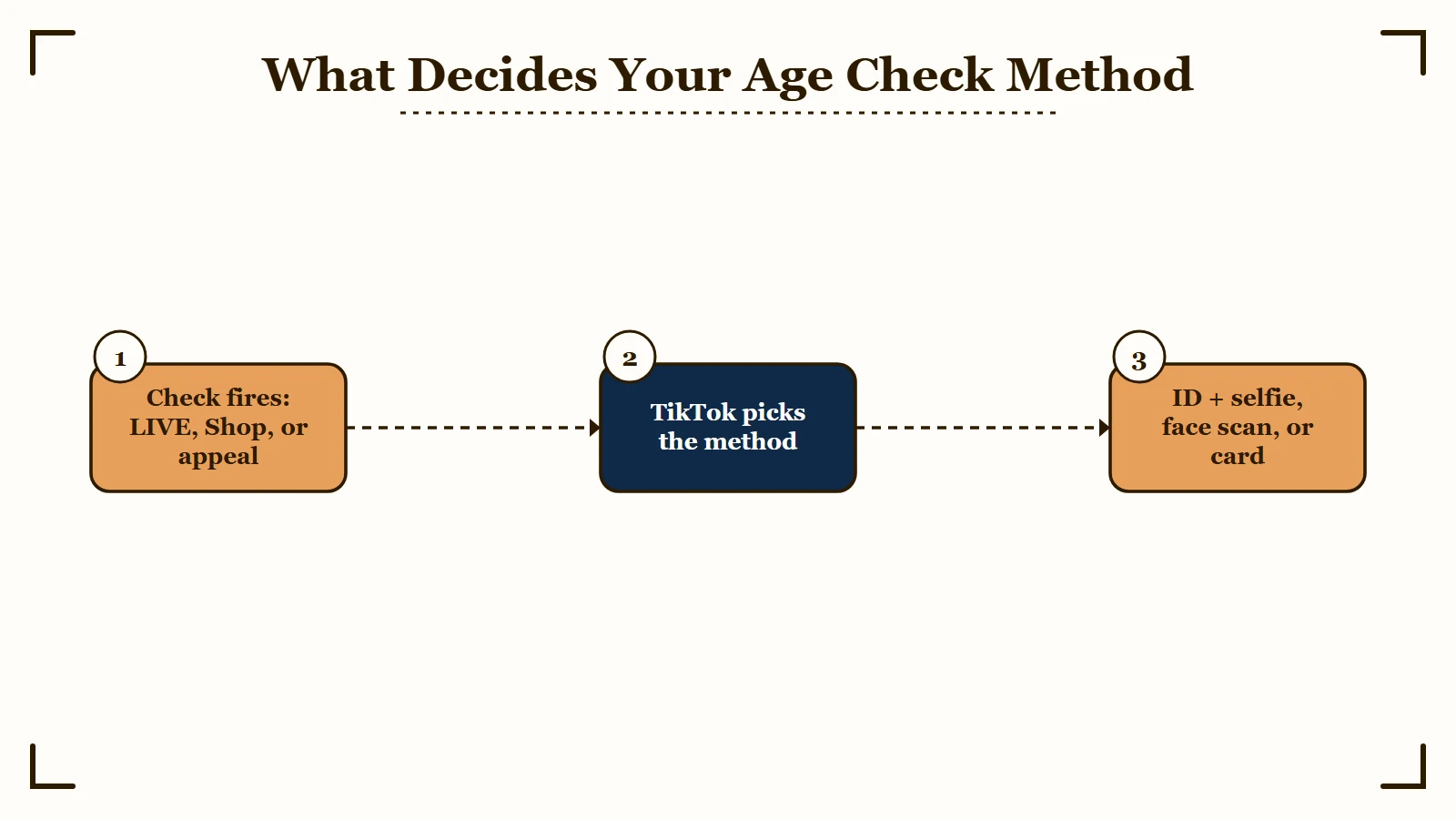
The trigger matters. A verification prompt usually appears when you try to go LIVE, join TikTok Shop as a seller, appeal an underage ban, or correct a birthdate the system thinks is wrong. The way I see it, knowing which trigger you hit tells you which method you will face.
One thing that surprises people: you cannot just edit your birthday in settings. To request a date-of-birth change you have to file a support request at Profile, then the three lines, then Settings and Privacy, then Report a Problem, then Account and Profile, then Editing Profile, then Other, then Need More Help.
Here is how the three verification methods compare, so you can have the right document ready before you start.
| Method | What you provide | Roughly how long |
|---|---|---|
| Government ID and selfie | Photo of your ID plus a live selfie | About 15 minutes |
| Facial age estimation | A real-time selfie inside the on-screen frame | A few minutes |
| Credit card check | Card details for a small refundable authorization | About 15 minutes |
For the facial scan, the selfie has to be live, captured inside the frame on screen, not a photo from your gallery. Glasses are fine, but take off hats and anything casting a shadow, since that is what trips a rejection.
Why TikTok Flagged You as a Minor
TikTok flagged you as a minor because its age-estimation system reads behavioral signals, not just your birthday, and the facial model errs young by design. A correct date of birth does not protect you if the AI disagrees.
The accuracy numbers are the tell, and the right ones to read are the provider’s own. TikTok rolled out Yoti facial age estimation across Europe in January 2026. Yoti’s July 2025 white paper reports a mean absolute error of 1.1 years for 13 to 17 year olds and 2.1 years for 18 to 24 year olds.
That second figure is the one that catches adults. A margin of over two years around the 18 threshold sweeps in a lot of genuine 18, 19 and 20 year olds. Yoti also reports that 99.3 percent of 13 to 17 year olds are correctly estimated as under 21, because the check is set against a threshold well above 18 rather than at 18 itself.
Then there is the behavioral layer. TikTok’s system studies your profile, the content you make, and your viewing patterns to predict whether you are under 13 or under 18. The way I see it, this is why a correct birthday alone never clears the flag, the engagement pattern is doing the talking.
The scale explains why the net is cast so wide. TikTok says it removes around 6 million underage accounts globally every month, and that when its technology flags an account as possibly under 13, a specialist moderator reviews it before any ban. TikTok confirmed both points when it extended this detection across Europe in January 2026, so a person should be reading your case rather than an algorithm closing it.
What I would watch as a creator is the symptom set, because the restrictions are the first clue. If your uploads suddenly default to private, your gift income on vertical lives stops, or your reach craters, you may have been quietly estimated as under 18 rather than shadowbanned. The account not recommended fix helps separate a reach problem from an age flag.
Which Appeal You Are Actually Filing, and Which Clock Runs
TikTok runs two different age appeals. An underage ban gives you 23 to 180 days depending on your region and ends in deletion. A removed feature gives you a flat 180 days and deletes nothing.
Almost every guide collapses these into one, which is how a creator who simply lost LIVE ends up believing their account is 23 days from deletion. Check which notification you received before you panic.
If TikTok thinks you are under 13, it bans the whole account. That is the underage appeal, and it carries the regional deadlines in the table below, ending in permanent deletion of the account and its data.
If TikTok thinks you are under 18 or under 16, it strips the age-gated feature and leaves the rest of your account working. TikTok’s minimum age appeal page states plainly, “You have 180 days from the date your access was removed to submit an appeal”, with no regional split and no deletion clock.
So losing LIVE, gifts, or direct messages is the less urgent of the two, and losing the whole account is the one that runs out in three weeks in the United States. Both use the same verification methods, which is part of why they get confused.
How to Appeal a Wrong Underage Flag
You appeal a wrong underage flag by proving your real age through ID, a card, or a face scan, and which deadline applies depends on whether TikTok banned your account or only removed a feature. Those are two separate systems with two different clocks.
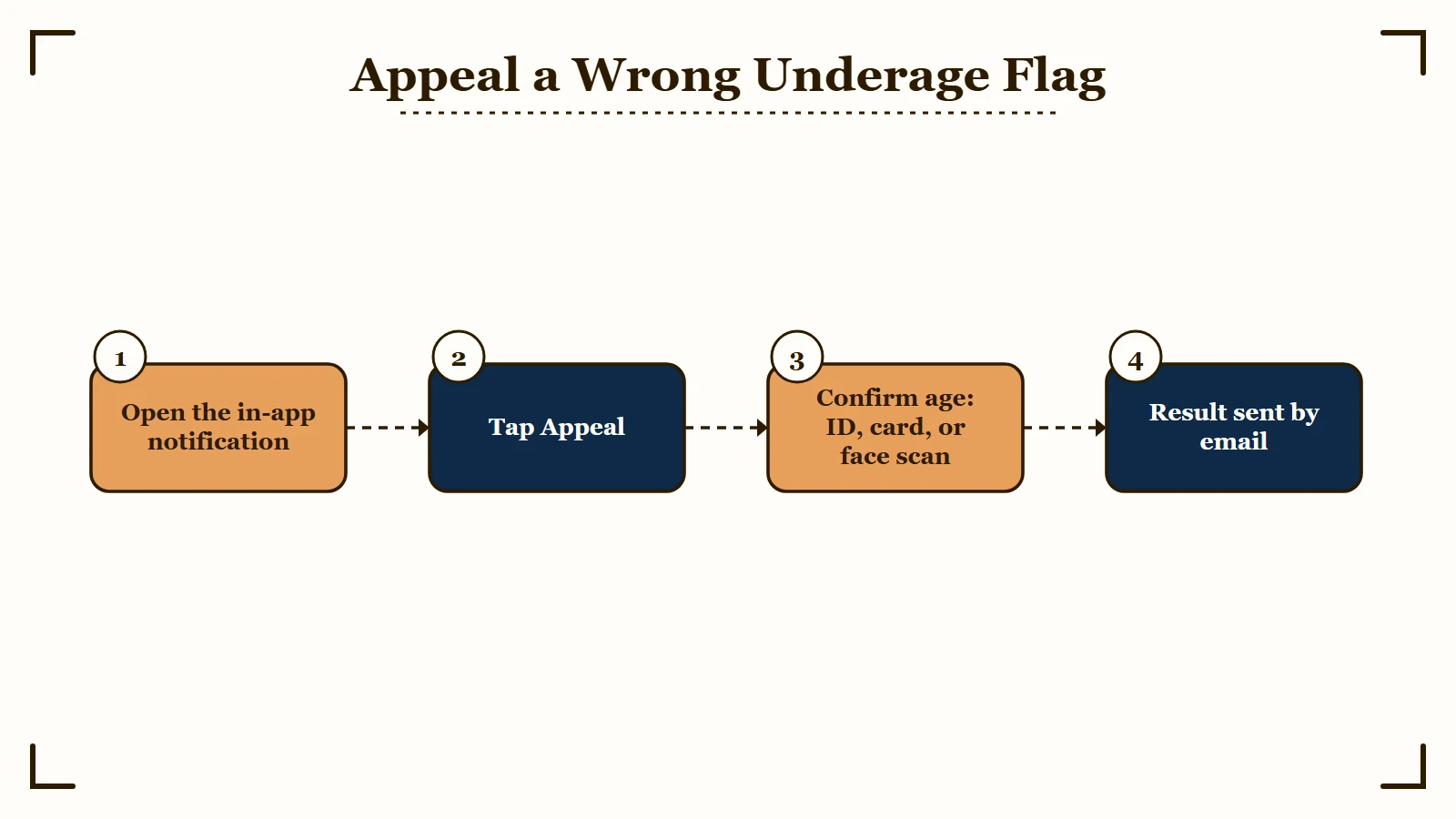
When the notification appears, tap Appeal to start. If your account is still usable, you can also request an age correction through Report a Problem under Account and Profile. The step I would not skip is having your ID ready before you begin, because one method locks you out fast.
Here is the sequence I would run for the ID route, in order.
- Open the appeal notification in the TikTok app and tap Appeal.
- Upload a clear photo of a valid government ID with no glare, one that carries both your photo and your date of birth, since the check has to match your face to the document. TikTok does let you cover any part of the ID you have a legal right or obligation to hide.
- If you are offered ID and selfies, take three selfies from different angles when prompted, so the system can confirm you are a real person.
- If you are offered selfie with ID instead, that route runs through Incode and captures one real-time selfie. Have your ID ready, because you get 15 minutes and exiting early means waiting another 15.
- On the Incode route, say yes when it asks to share your date of birth with TikTok. Decline and TikTok never receives it, so the appeal cannot succeed.
- Submit and wait for the result, which arrives by email if your account is banned.
There is a second route, and TikTok scopes it narrowly: the photo-with-a-trusted-adult option is for 16 and 17 year olds appealing a removed feature, not for the full underage ban. It asks for a photo with a parent, guardian, or other trusted adult over 25, holding a handwritten sign carrying three specific things.
Before: a sign that just says “I am over 18, please unlock my account.”
After: a sign that reads “TikTok proof of age,” your date of birth, and the unique code TikTok gave you during the appeal.
Get that wording wrong and the appeal bounces, so copy the three required elements exactly. The deadlines below apply to a full underage ban, the case where the account itself is at risk.
| Region | Time to appeal | Account deleted on |
|---|---|---|
| United States | 23 days | Day 30 |
| UK, EEA, Switzerland | 180 days | Day 187 |
| Rest of world | 113 days | Day 120 |
A US creator has only 23 days to appeal and pull their data before deletion kicks in at day 30, while someone in the UK or EEA gets 180. The Download your data tool switches off on the same day the appeal window closes, and once your file is ready it stays available for only 4 days.
When the Verification Option Is Missing or You Are on a Computer
If the face scan option is not showing, TikTok’s own documentation says it may simply not be offered to you, and the appeal flows run in the mobile app rather than the desktop site.
Plenty of people go looking for a setting that was never there for them. On facial age estimation TikTok states, “Depending on your location and age, facial age estimation may not be available to you”, so a missing option is a regional or account-level decision rather than a bug you can clear by reinstalling.
The same goes for hunting on a laptop. Both appeal flows begin with “Open the notification in the TikTok app”, and for the parent-confirmation route TikTok is explicit that “Confirmation can only be completed on mobile.”
There is one documented workaround, and it is aimed at the adult doing the confirming rather than at you. If they are on a computer, TikTok tells them to scan the QR code in the confirmation link or copy that link into a mobile browser. A parent or guardian does not need a TikTok account to use it.
If the option is absent and you are already in the app, the remaining paths are the ones TikTok offers for your age band: ID with selfies, the Incode selfie-with-ID route, or credit card authorization at 18 and over.
What Happens to Under 18 and Under 16 Accounts
Under-18 accounts lose LIVE, gifts, and TikTok Shop, while under-16 accounts also lose direct messaging and go private by default. These limits are why a wrong flag hits a creator’s income, not just their feed.
For users estimated to be 13 to 15, the account is private out of the gate, direct messages are off, and others cannot Duet, Stitch, or download the videos. That is a hard wall for anyone trying to grow or collaborate.
For users read as under 18, LIVE streaming is gone, gifts on vertical live streams are blocked, and TikTok Shop selling is off the table. If your livestream gifting dried up overnight, that restriction is the likely cause, and the creator rewards rejection guide covers the monetization side of getting reinstated.
What I find most frustrating for creators is the messaging hit, because outreach dies with it. If brands and collaborators suddenly cannot reach your inbox, read the messages flagged unsafe fix to rule out a separate DM restriction before you assume it is the age flag.
The 60 Day Deadline for TikTok Shop Creators
TikTok Shop creators have 60 days to confirm they are at least 18, counted from onboarding or from the first in-app age confirmation notice, and missing it strips your Shop access. This clock runs separately from any wrong-flag appeal.
Per TikTok’s own creator age confirmation guidance, letting the window close costs you the TikTok Shop Creator Center, hides your product links from viewers, pulls products off your profile page, and ends your eligibility for Shop monetization. The rest of your account keeps working normally, which is why this one tends to go unnoticed until the commissions stop.
The retry allowance is tighter than most creators expect. Facial age estimation gives you three attempts, the credit card and ID routes give you six each, and anyone confirmed to be under 18 is permanently ineligible with no further retries.
Is the TikTok Age Scan Safe
The face-scan route deletes your selfie, but the Incode ID route does not, and that difference is worth knowing before you pick one. TikTok documents both, and only one of them cleans up on its own.
For facial age estimation, TikTok says the provider will “send us your age estimate and delete your selfie”, and TikTok itself starts deleting what you submitted as soon as the appeal completes.
The Incode route works the other way. TikTok’s own wording is that “Incode, will retain the information you submit to confirm your age”, and that deleting it is on you: log in to your Incode account and submit a request.
So if minimizing the paper trail matters to you, the face scan is the cleaner option where it is offered, and the Incode route is the one that leaves a copy of your ID with a third party until you go and remove it.
The reason all of this exists is regulation, and it is tightening fast. The UK Online Safety Act demands what it calls highly effective age checks, with fines reaching 18 million pounds or 10 percent of qualifying worldwide revenue, whichever is greater.
The scale of the machinery behind those checks is easy to underestimate. Yoti alone reports over 850 million age checks completed and more than a million every day, and its check returns only a yes or no against a threshold rather than your actual age.
The laws keep multiplying. Australia banned under-16s from social media at the end of 2025 with no parental opt-out, several US states set 2026 deadlines, and more are coming, so age checks on TikTok are here to stay rather than a passing glitch.
Frequently Asked Questions
How do I verify my age on TikTok?
When a verification prompt appears, tap to begin and choose a method, a government ID with a selfie, a facial age scan, or a credit card check. Follow the on-screen steps to restore LIVE, messaging, and shopping access.
What should I do if TikTok wrongly thinks I am a minor?
Submit the underage appeal right away rather than trying to edit your birthday. Open the appeal notification, pick the ID option, upload a valid government ID, and take the selfies it asks for to prove your real age.
How long does TikTok age verification take?
The facial age scan usually returns a result within a few minutes. The government ID and credit card methods take about 15 minutes to complete, though a manual appeal review can take up to a day or more.
Is the TikTok facial age scan safe?
It depends which route you take. The facial age estimation route deletes your selfie once the provider sends TikTok the age estimate, but TikTok states that Incode retains what you submit on the selfie-with-ID route until you log in to your Incode account and request deletion.
What happens if I miss the appeal deadline?
That depends which appeal you are filing. If an underage ban goes unappealed TikTok deletes the account and its data, on day 30 in the United States and day 187 in the UK, EEA, and Switzerland, so download your data early. Missing the 180 day window on a removed feature does not delete anything, it just leaves the feature off.
Why is the age verification option not showing on TikTok?
Often because it was never offered to you. TikTok states that depending on your location and age, facial age estimation may not be available, so a missing face-scan option is a regional or account-level decision rather than a bug. The remaining routes are ID with selfies, the Incode selfie-with-ID flow, or credit card authorization at 18 and over.
Can I verify my age on TikTok on a computer?
Not through the desktop site. Both appeal flows start by opening the notification in the TikTok app, and TikTok states that parent or guardian confirmation can only be completed on mobile. If the adult confirming your age is on a computer, they can scan the QR code in the confirmation link or copy that link into a mobile browser, and they do not need a TikTok account to do it.
Why is my account still restricted after I verified my age?
Check which appeal you completed. Clearing an underage ban restores the account, but an age-gated feature such as LIVE, direct messages, or buying Coins is governed by a separate minimum age appeal with its own 180 day window. TikTok updates your date of birth when an appeal is approved, so if a feature is still missing, the appeal that covers it has probably not been filed.
What is the minimum age for TikTok?
You must be 13 to open a TikTok account in most countries. Direct messaging unlocks at 16, while going LIVE, buying Coins, sending or receiving gifts, and earning through TikTok Shop all require you to be 18, or 19 for buying Coins in South Korea.
Can I change my age on TikTok?
Not directly in settings. You have to file a date-of-birth change request through Report a Problem under Account and Profile, then Editing Profile, and TikTok may ask you to verify the new date with ID before it applies the change.
Quick Takeaways
- Yoti, whose face scan TikTok rolled out across Europe, publishes a 2.1 year margin of error for 18 to 24 year olds, and TikTok reads your behavior over your stated birthday, which is why genuine adults get flagged.
- To fix a wrong flag, file the underage appeal with a government ID and selfie, not a birthday edit in settings.
- A banned US account is deleted on day 30 while UK and EEA accounts are deleted on day 187, but losing only a feature such as LIVE or DMs carries a flat 180 day appeal window and no deletion.
- On the trusted-adult appeal, open to 16 and 17 year olds appealing a removed feature, the sign must say “TikTok proof of age,” your date of birth, and the unique code, or it bounces.
- A sudden loss of LIVE, gifts, DMs, or reach is often the first symptom of a wrong under-18 estimate, not a shadowban.
- TikTok Shop creators get 60 days from onboarding to confirm they are 18, or the Shop Creator Center closes and their product links go hidden.