How to Turn Off Read Receipts on Instagram Without Anyone Knowing
How to Turn Off Read Receipts on Instagram Without Anyone Knowing
Instagram finally added a read receipts toggle, and there is a bigger 2026 privacy change behind it. Here is how to turn the Seen label off cleanly.
- 1How to Turn Off Read Receipts on Instagram
- 2Can Someone Tell You Turned Off Read Receipts
- 3Read Receipts Versus Typing Indicator Versus Active Status
- 4Why Read Receipts Still Show in Vanish Mode and Groups
- 5How to Read an Instagram DM Without Being Seen
- 6What Read Receipts Cannot Hide After the 2026 Encryption Change
- 7Frequently Asked Questions
- Does Instagram have a setting to turn off read receipts?
- Will the other person know I turned off read receipts?
- Does turning off active status also turn off read receipts?
- Do read receipts still show in vanish mode?
- Is the airplane mode trick reliable for reading DMs unseen?
- 8Quick Takeaways
The Short Answer: To turn off read receipts on Instagram, open Settings and privacy, tap Messages and story replies, then Show read receipts, and switch it off. It is reciprocal, so you also stop seeing when others read your messages. The other person is never told you turned it off.
Turning off read receipts on Instagram hides the small “Seen” label from one person, and that is worth doing. The change almost nobody is talking about is bigger.
As of May 8, 2026, Instagram pulled end-to-end encryption out of direct messages, so the platform can now read what is inside them.
For a creator, that combination matters. You want the Seen label off so you can triage messages on your own schedule, and you want to know which conversations are safe to keep on the platform now that they are no longer private.
This guide covers the native toggle Instagram finally shipped, how to read a message without leaving a trace, the settings people confuse with read receipts, and the one privacy shift no toggle can fix. I wrote it for people who practically live in their inbox.

How to Turn Off Read Receipts on Instagram
To turn off read receipts on Instagram, use the native toggle at Settings and privacy, then Messages and story replies, then Show read receipts.
For a long time this did not exist, which is why half the internet still tells you to rely on tricks. It is real now, and it works for every chat at once or one chat at a time.
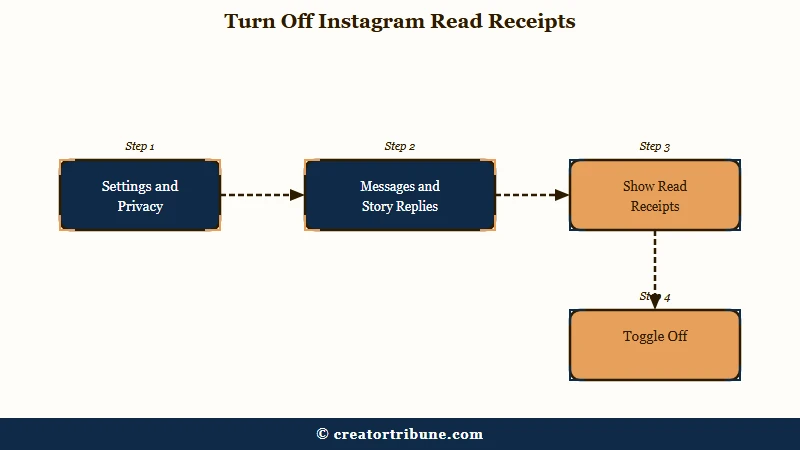
Here is the global path that switches Seen off everywhere:
- Open your Profile and tap the three-line Menu in the corner.
- Go to Settings and privacy.
- Tap Messages and story replies.
- Open Show read receipts and switch the toggle off.
What is a read receipt: The “Seen” label that appears under a message once you open the chat, telling the sender you have read it.
If you only want to go quiet with one person, you can do it per chat instead. Open their DM, tap their name at the top, choose Privacy and safety, and turn off Read receipts for that thread.
The same per-chat menu works inside a group, so you can drop out of the group’s Seen list without touching your other conversations.
One honest caveat before you flip it. I still see the old workarounds pushed everywhere because Instagram was so slow to add this toggle, and some of them do more harm than good, so the native switch is the one to trust.
Can Someone Tell You Turned Off Read Receipts
No, Instagram never notifies anyone that you disabled read receipts, so there is no alert and no badge.
The only way a person could guess is by noticing that their messages to you stopped showing “Seen.” Most people never track that closely.
There is a trade you are making, though, and it catches people off guard. Read receipts are reciprocal, so the moment you stop sending them, you also stop seeing them. You will no longer know when anyone reads what you send, which is the price of going dark yourself.
For a creator, I treat that as a feature to manage, not just a cost. The way I handle it is to keep receipts off as my default for the flood of fan DMs, then switch them back on inside an active brand negotiation so a partner sees I am responsive and engaged. That selective approach signals professionalism where it counts without exposing you everywhere else.
Read Receipts Versus Typing Indicator Versus Active Status
Read receipts, the typing indicator, and your active status are three separate settings, and turning one off does nothing to the other two.
This is the single most common mix-up I see, and it wastes people a lot of time. Switching off your green “Active now” dot will not stop a single read receipt.
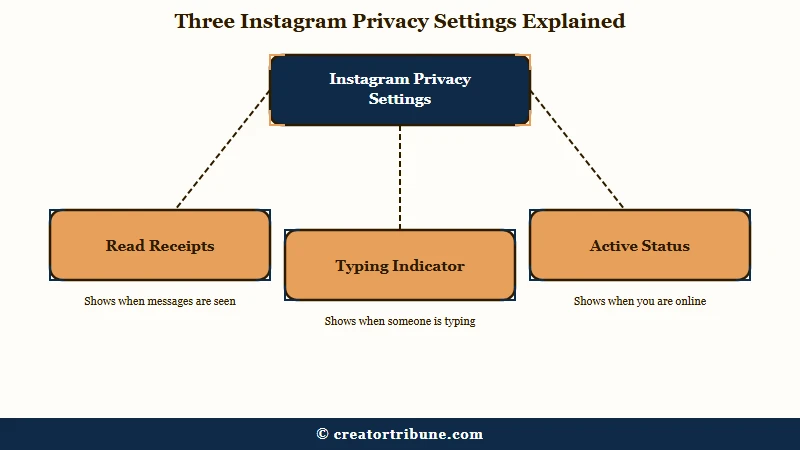
Each one lives in a different place, so here is the map:
| Setting | What it reveals | Where to turn it off |
|---|---|---|
| Read receipts | That you opened and read a message | Messages and story replies, then Show read receipts |
| Typing indicator | That you are typing right now | A chat’s Privacy and safety menu |
| Active status | That you are online or when you last were | Settings and privacy, then Show activity status |
If your goal is to disappear completely from a chat, you have to turn off all three. I learned that the slow way, wondering why someone could still see my green dot after I had killed read receipts weeks earlier.
Why Read Receipts Still Show in Vanish Mode and Groups
Read receipts are forced on inside vanish mode even when your global toggle is off, because both people need to know a disappearing message was seen before it vanishes.
This surprises almost everyone who assumes vanish mode is the more private option. It is more temporary, not more hidden.
Vanish mode has two other limits I always flag to creators. It is geoblocked entirely in the European Union and the United Kingdom, so if your brand partners or collaborators are based there, they cannot use it with you. It also cannot be turned on in group chats at all, only one-on-one threads.
Group chats handle Seen differently from a normal DM. The group shows the names of everyone who has opened a message by default, which is more exposure than most people realize.
You can shut that off for yourself through the group’s Privacy and safety menu, the same place the per-chat toggle lives.
How to Read an Instagram DM Without Being Seen
The most reliable way to read a message without sending a receipt is to Restrict the sender, which silently routes their DMs to your Requests folder.
Restrict is the tool I reach for first, because it is quiet and it does more than block a Seen label.
When you restrict someone, their messages land in Message Requests where you can read them freely with no receipt, and they are never told. It also hides your typing indicator and your active status from that person, so it is a full privacy shield rather than a single switch. For a creator dealing with a fixated fan, that silent boundary beats a hard block that invites drama.
The other methods are more fragile, so here is how they stack up:
| Method | How it works | How reliable |
|---|---|---|
| Restrict the sender | Moves their DMs to Requests, no receipt sent | High, and it is silent |
| Airplane mode read | Go offline, open the DM, mark it unread, reconnect | Shaky, can queue the Seen event and fire it when you reconnect |
| Desktop with scripts off | Read in a browser with JavaScript disabled | Works for the tech-savvy, clunky for daily use |
| Notification preview | Read the text from the lock screen without opening the app | Fine for short messages, useless for long ones |
Before: You open a brand’s pitch on your phone the second it arrives, it shows “Seen,” and now the clock is ticking on a reply you are not ready to send.
After: You read the pitch from your lock-screen preview or through a restricted thread, take a day to think, and answer when you have a real response ready.
One warning worth taking seriously. Third-party “read receipt blocker” apps are a trap, since Instagram does not expose that control to outside tools, and handing an app your login is a fast route to a stolen or banned account. Stick to the native settings and Restrict.
What Read Receipts Cannot Hide After the 2026 Encryption Change
Turning off read receipts hides that you read a message, but it does nothing to protect what is inside your DMs now that Instagram removed encryption.
This is the part that matters most for anyone running a business through their inbox. A hidden Seen label is cosmetic next to an unencrypted conversation, and it is the shift I would not ignore.
Meta removed end-to-end encryption from Instagram DMs on May 8, 2026, blaming low opt-in rates, and the timing lined up with a new United States law that forces platforms to pull reported image-based abuse within 48 hours.
The practical result is that the platform can now scan and read the text, images, and voice notes inside your messages. Instagram sits above 2 billion monthly users per Statista, and every one of those inboxes lost that layer of privacy at once, as several outlets reported at the time.
Here is where it lands for creators. You routinely trade PR shipping addresses, rates, contracts, and phone numbers over DMs, and none of that should live in an unencrypted inbox anymore.
The safest habit is to treat Instagram as a first-touch channel and move anything sensitive to a place you control before you share it.
That is the same logic behind owning your audience instead of renting it. Our Creator Money Page walks through building channels you control, and pairing it with the habit of turning followers into subscribers means a platform privacy change never costs you a client.
For the account-level privacy side, take a minute to review how to hide your followers and Instagram’s sensitive content controls while you are tightening things up.
Frequently Asked Questions
Does Instagram have a setting to turn off read receipts?
Yes. Instagram added a native toggle at Settings and privacy, then Messages and story replies, then Show read receipts. You can also turn it off per chat through a conversation’s Privacy and safety menu.
Will the other person know I turned off read receipts?
No, Instagram sends no notification. The only clue is that your Seen label stops appearing on their messages. Remember it is reciprocal, so you also stop seeing when they read yours.
Does turning off active status also turn off read receipts?
No. Active status, read receipts, and the typing indicator are three separate settings. Turning off your green dot hides only your online status and has zero effect on read receipts.
Do read receipts still show in vanish mode?
Yes. Read receipts are forced on in vanish mode even if your global toggle is off, so both people know a disappearing message was seen. Vanish mode is also blocked in the EU and UK.
Is the airplane mode trick reliable for reading DMs unseen?
Not fully. It can work if you fully close the app before reconnecting, but Instagram often queues the Seen event and fires it when you go back online. Restricting the sender is more dependable.
Quick Takeaways
- Instagram now has a real toggle at Settings and privacy, then Messages and story replies, then Show read receipts, plus a per-chat version.
- Turning off read receipts is reciprocal and silent, so you lose others’ Seen labels too but nobody is told you did it.
- Read receipts, typing indicator, and active status are three separate settings, so hiding your green dot does nothing to Seen.
- Restrict is the quietest way to read a DM unseen, and it hides your typing and active status from that person too.
- No receipt setting protects message contents after Instagram dropped DM encryption on May 8, 2026, so move sensitive brand talk off-platform.