TikTok Age Verification Not Working and How to Fix the Loop
TikTok Age Verification Not Working and How to Fix the Loop
TikTok age verification not working? Here is why the face scan rejects real adults, the credit card fix for the loop, and how to recover a locked account.
- 1Why TikTok Age Verification Keeps Saying You Are Underage
- 2How to Fix the TikTok Age Verification Loop
- 3The @0 Profile Reset Bug After You Verify
- 4Which ID Works for TikTok Age Verification?
- 5What to Do If You Are Locked Out or Banned
- 6Is Your Face and ID Data Safe With TikTok?
- 7Frequently Asked Questions
- Why does TikTok keep asking me to verify my age?
- Can I use a credit card instead of a face scan on TikTok?
- Which ID does TikTok accept for age verification?
- Why did TikTok say I am underage when I am an adult?
- How long do I have to appeal a TikTok age ban?
- Is my face data safe with TikTok age verification?
- 8Quick Takeaways
TL;DR: TikTok age verification fails for a lot of adults because the AI is tuned to challenge anyone who looks under 25, not because you did anything wrong. If the face scan keeps rejecting you or the screen freezes on a spinning dot, switch to the credit card option to clear the loop in minutes. A profile that resets to @0 right after you verify is a known bug, not a ban.
If TikTok age verification is not working for you, the first thing worth knowing is that the problem is usually not your face or your ID. The system is built to reject borderline cases on purpose, and on top of that it has been shipping real bugs throughout 2026.
A wave of new laws pushed TikTok to bolt a strict age-check layer onto features like LIVE, Shop, and creator payouts. That layer leans on a third-party AI that guesses your age from a selfie, and it guesses conservatively. Add in the glitches people keep hitting and you get rejected adults, endless loops, and the occasional profile that wipes itself to zero.
This guide walks through why the scan flags you, the quickest way out of the verification loop, which ID genuinely works, and what to do if your account is already locked. These are the fixes creators report working, not the generic retry advice TikTok hands you.

Why TikTok Age Verification Keeps Saying You Are Underage
TikTok age verification rejects many real adults because its AI applies a Challenge 25 buffer, flagging anyone it estimates to be under roughly 25 years old.
If you are in your early twenties, the scan is doing exactly what it was tuned to do.
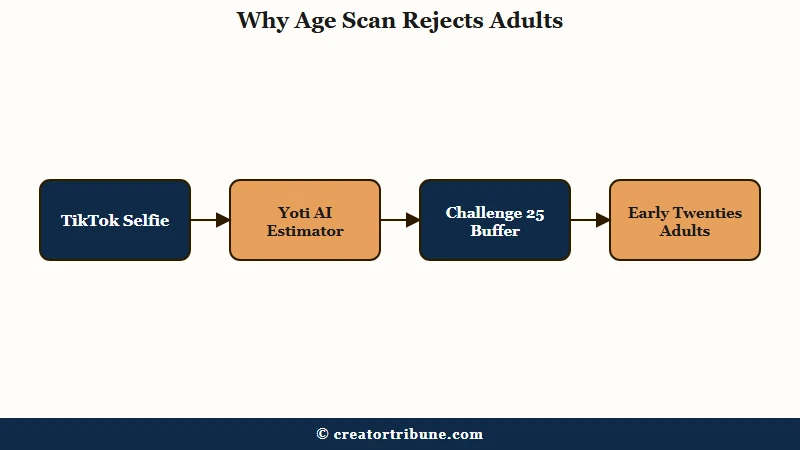
TikTok uses a company called Yoti for facial age estimation. Instead of recognizing who you are, the model reads the pixel patterns of your face and guesses an age range. To keep underage users out, it sets the pass line several years above 18, the same logic as the retail “Challenge 25” rule where cashiers card anyone who looks under 25.
What is facial age estimation: A scan that uses AI to guess your age range from a selfie, without identifying you personally or matching your face to any database.
That buffer drives the underage error rate down to around 0.1%, which is great for compliance and frustrating for a 22-year-old who keeps getting bounced. The way I read it, a young-looking adult getting bounced is the system doing its job, however annoying that feels.
Lighting, glare on glasses, hats, heavy makeup, beauty filters, and low camera quality all push the estimate younger and trigger more rejections. There is also a measured accuracy gap across skin tones, with Yoti’s own data showing a small dip for darker tones, so creators of color sometimes hit more false rejections.
If the selfie keeps failing, stop feeding it selfies and switch to a document or card check instead.
How to Fix the TikTok Age Verification Loop
The fastest fix for a stuck TikTok age verification loop is to choose the credit card option instead of the face scan or ID upload.
Creators who got trapped in the broken selfie flow report this as the one method that reliably clears it.
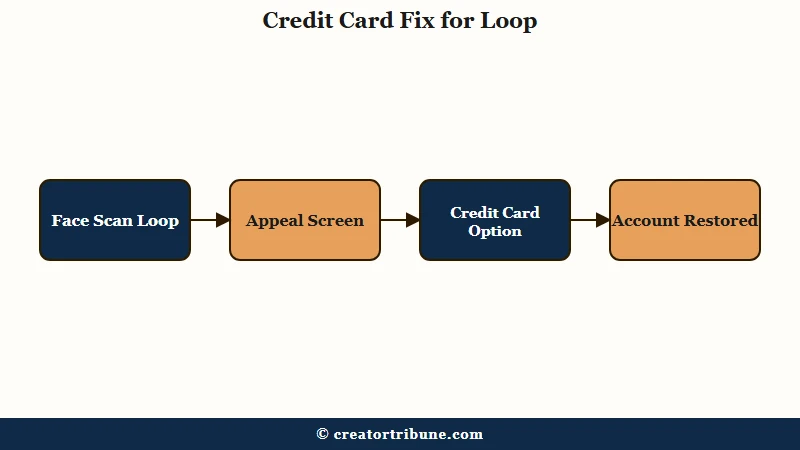
When the selfie screen freezes on a spinning red and blue dot, that is a systemic app bug, not your connection. Here is the sequence I would run before wasting another hour on rejected selfies:
- Open the age prompt or the appeal screen and tap to verify or appeal.
- Enter your real date of birth when asked.
- Choose the Credit Card authorization option rather than Selfie or ID.
- Let TikTok place a temporary charge of about $1.50, which it refunds within minutes.
- Wait for the account to restore, usually inside 5 to 10 minutes.
The card check confirms you are an adult through card ownership and skips the biometric scan entirely, which is handy if you also would rather not hand your face to a third party. If the card option is greyed out, close the app fully, clear the TikTok cache, confirm camera and network permissions, and reopen it before trying again.
Before: You re-submit the same selfie 20 times, get rejected each time, and burn through your retry attempts.
After: You tap Appeal, pick Credit Card, pay the temporary $1.50, and your account is back in minutes.
One caution from the research: the credit card route works for most people but not everyone, and a few report it failing after their appeal was already denied.
The trick is to reach for it early, before you have spammed the system and tripped a harder block. TikTok caps you at roughly 3 facial attempts and 6 ID or card attempts for Shop verification, so do not waste them.
The @0 Profile Reset Bug After You Verify
A TikTok profile that resets to @0 with zero followers right after you verify your age is a known data-sync bug, not a ban or a hack.
I have seen this one send people into a panic, so it is worth saying plainly.
The pattern is specific. You pass the ID and face check, you even get a confirmation email, and then your username flips to “@0”, your follower, following, and like counts all drop to zero, and your account stops showing up in search. Nothing was deleted. The account is sitting in a broken probationary state while TikTok fails to sync your data back.
The fixes that move the needle are opening an in-app support ticket describing the @0 symptom exactly, force-closing and reinstalling the app to trigger a fresh sync, and then giving it time rather than re-verifying over and over. Re-running the whole verification while you are already in this glitch tends to make it worse, not better.
If your livelihood runs through the account, this is also the moment to think about owning your audience off-platform so a sync bug never holds your whole business hostage again.
Which ID Works for TikTok Age Verification?
TikTok accepts a driver’s license, a state-issued ID card, or the photo page of a passport for age verification.
A non-driver state ID card counts, which answers the question a lot of people ask when they do not drive.
Document scans fail for boring reasons most of the time. Glare, blur, a cropped edge, or a cover over part of the card all get the upload kicked back. You usually get up to 10 retries on the same document for quality issues before TikTok forces you onto a different method, and a manual ID review can take up to 24 hours to clear.
Here is how the common failure points map to a fix.
| Symptom | Likely cause | Fix |
|---|---|---|
| Face scan says you are underage | Challenge 25 buffer flags under-25 looks | Switch to ID or credit card check |
| Spinning red and blue dot, no submit | Systemic selfie-flow bug | Use the credit card option instead |
| ID upload rejected repeatedly | Glare, blur, or cropped edges | Retake flat, in good light, full card in frame |
| Profile reset to @0 after verifying | Data-sync glitch, not a ban | Support ticket, reinstall, wait for sync |
| Verification prompt keeps returning | Failed or unsynced attempt | Complete the credit card check once, then stop |
When I have to pass an ID scan, the thing that works is laying the card flat on a dark surface, killing any overhead glare, and filling the frame edge to edge before the camera grabs it.
What to Do If You Are Locked Out or Banned
If TikTok banned your account as underage, you have a strict appeal window, 23 days in the US and up to 180 days in Europe, before the account is deleted for good.
Knowing the clock matters because the US window is far shorter than the “you have months” advice floating around.
Download your data first. TikTok lets you export your videos and messages during the grace period, and that is your insurance if the appeal fails. The global appeal window runs to 113 days with deletion on day 120, the EEA, UK, and Switzerland get 180 days with deletion on day 187, and the US gets just 23 days with deletion on day 30.
Appeal once, cleanly, with a clear government ID. What you should not do is fire off ten appeals with the same documents, because creators who hammered the system that way reported triggering automated policy violations that turned a fixable flag into a permanent, un-appealable ban.
If you keep getting the message that says the account was reviewed and the violation “confirmed” despite a valid license, you have hit the end of the AI loop, and the only path left is to keep replying to the same support ticket to push it toward a human. For a step-by-step on the formal process, our TikTok ban appeal guide breaks down what to write.
There is real disagreement here, and I will be honest about it. Some creators swear by overwhelming support until a person finally looks; others say fighting the AI is hopeless and you should save your energy.
The middle path I would take is one clean appeal, your data downloaded, and a backup account building quietly in case the first one does not come back.
Is Your Face and ID Data Safe With TikTok?
Your TikTok face scan is deleted within seconds by Yoti, but ID documents handled by a separate partner can be retained until you request deletion.
The privacy story is not as simple as “everything is wiped instantly.”
The selfie used for facial age estimation is genuinely short-lived. Yoti returns an age estimate and deletes the image right away, and it is never used to identify you or matched against any database. That part checks out across the sources.
The document path is murkier. When TikTok routes your ID and selfie through its verification partner Incode, that data can sit retained until you actively delete it by logging into the provider’s portal, and manual-review IDs can be held for around 28 days. If you care about minimizing your footprint, I would treat the face scan as the lighter-touch option, with the credit card check lighter still.
TikTok’s own age requirements for going live and its step-by-step age verification walkthrough are worth a look before you pick a method. The broader regulatory backdrop, from the UK’s age-assurance rules to Australia’s under-16 ban, is why none of this is going away.
Frequently Asked Questions
Why does TikTok keep asking me to verify my age?
TikTok re-prompts when a verification attempt fails, does not sync, or is required for a gated feature like LIVE, Shop, or payouts. New age-assurance laws expanded these checks in 2026. If the prompt loops endlessly, it is usually a known app bug, and the credit card method is the reliable way out.
Can I use a credit card instead of a face scan on TikTok?
Yes, if you are 18 or older you can verify with credit card authorization. TikTok places a temporary charge of about $1.50 and refunds it within minutes. Creators stuck in the broken selfie flow report the card option as the one method that clears the loop.
Which ID does TikTok accept for age verification?
TikTok accepts a driver’s license, a state-issued ID card, or the photo page of a passport. A non-driver state ID works fine. Lay the card flat in good light with the full edge in frame, since glare and blur cause most rejected uploads.
Why did TikTok say I am underage when I am an adult?
The AI applies a Challenge 25 buffer, so it challenges anyone it estimates to be under about 25. Early-twenties adults, plus poor lighting, glasses glare, hats, or filters, all trigger false rejections. Skip the selfie and verify with an ID or credit card instead.
How long do I have to appeal a TikTok age ban?
US users get just 23 days before deletion on day 30. The global window is 113 days with deletion on day 120, and the EEA, UK, and Switzerland get 180 days with deletion on day 187. Download your data immediately as a backup.
Is my face data safe with TikTok age verification?
The face scan selfie is deleted within seconds by Yoti and never used to identify you. ID documents handled by TikTok’s verification partner can be retained until you request deletion through the provider’s portal. The credit card check avoids biometric data entirely.
Quick Takeaways
- The face scan rejects real adults on purpose because it challenges anyone who looks under 25.
- Switch to the credit card option to escape a stuck verification loop, it costs a refunded $1.50.
- A profile that resets to @0 after verifying is a known sync bug, open a support ticket and wait, do not re-verify.
- US users have only 23 days to appeal an underage ban, so download your data the moment you are locked out.
- Appeal once with a clean ID, never spam ten attempts, that can turn a fixable flag into a permanent ban.