Crossclip Review and Why It Is Not the AI Clipper You Expect
Crossclip Review and Why It Is Not the AI Clipper You Expect
Crossclip turns Twitch and Kick clips into vertical TikTok and Reels videos, but it is not the AI auto clipper many reviews claim. Here is the real verdict.
- 1What Crossclip Does and Where Its AI Stops
- 2Crossclip Pricing Breakdown
- 3What the Free Tier Costs You in Practice
- 4The Streamlabs Billing History You Should Know About
- 5The YouTube Import Problem Nobody Mentions
- 6How Crossclip Compares to Opus Clip, StreamLadder, and Eklipse
- 7Pros and Cons of Crossclip
- 8Who Should Use Crossclip and Who Should Skip It
- 9The Verdict on Crossclip
- 10Frequently Asked Questions
- Is Crossclip free to use?
- Does Crossclip add a watermark?
- Is Crossclip good for gaming clips?
- Does Crossclip work with YouTube?
- Is Crossclip better than StreamLadder?
- Can you get a refund from Streamlabs?
- 11Quick Takeaways
Bottom Line: Crossclip (Streamlabs Cross Clip) is a cheap, simple way to turn a Twitch or Kick clip into a vertical TikTok, Reels, or Shorts video. It does not scan your stream and surface highlights for you. It is a manual reformatter, and that one distinction decides whether it fits your workflow. Pro runs $4.99 a month and strips the watermark.
Crossclip gets sold as an AI clipping tool, and that framing trips up a lot of streamers before they ever sign up. The reality is narrower. Crossclip takes a clip you already have and helps you crop it into a vertical video for TikTok, Reels, and Shorts.
It does not comb through a four-hour Twitch broadcast looking for your best moments. You bring the moment, it handles the reframing. Once you know that, the tool either fits your workflow neatly or misses it completely.
Below, I break down how Crossclip prices itself, what the free tier quietly costs you, and where the Streamlabs billing reputation should make you cautious. You will come away knowing exactly who should pay the $4.99 a month and who should reach for a real AI clipper instead.
What Crossclip Does and Where Its AI Stops
Crossclip is a manual clip reformatter, not an AI highlight finder.
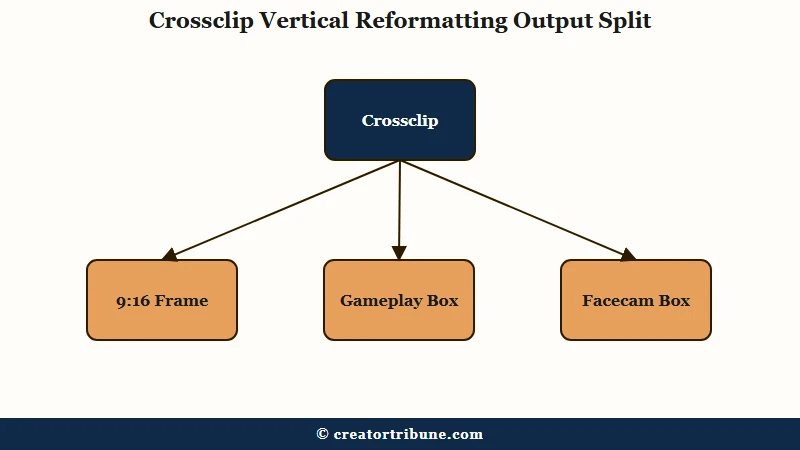
You paste a Twitch or Kick clip link, or upload a short file, and the editor helps you crop it to a 9:16 frame with separate boxes for gameplay and facecam. It will not watch a full stream and pull the good parts on its own.
This is the part that gets muddied online. CapCut’s own blog describes Crossclip as a tool where “the AI technology behind automates the clip editing process.” The clippers that compete with it tell the opposite story.
StreamLadder puts it bluntly, noting that Crossclip “only does step one” and cannot scan a VOD to find moments. Eklipse calls its highlight detection “limited” and not built for gameplay. I will side with the competitors here, because the marketing leans generous.
What is a VOD: A VOD (video on demand) is the full saved recording of a past livestream, often several hours long, that creators mine for short clips.
That does not make Crossclip useless. It makes it a layout tool rather than a discovery tool, and those are two different jobs with two different price tags.
Crossclip Pricing Breakdown
Crossclip is free at the base tier, $4.99 a month for Cross Clip Pro, or $27 a month bundled inside Streamlabs Ultra.
The standalone Pro plan is the one most solo streamers want, since it removes the watermark without forcing you into a six-app suite.
Here is how the tiers shake out in 2026. I would not pay for Ultra unless you genuinely use the other Streamlabs apps that come with it.
| Plan | Price | Export quality | Key limits |
|---|---|---|---|
| Free | $0 | 720p, watermark plus branded outro | 100MB uploads, 2 layers, 3-clip montage, 1GB storage |
| Cross Clip Pro | $4.99/mo or $49.99/yr | 1080p at 60fps, no watermark or outro | 1GB uploads, 6 layers, 6-clip montage, priority queue |
| Streamlabs Ultra | $27/mo or $189/yr | Everything in Pro | Adds 5 other apps, 10GB storage |
One real discount worth flagging: students with a valid .edu email can use the code STUDENT for 50% off Ultra for two years, which drops it to roughly $13.50 a month. Apple’s in-app pricing differs too, listing Ultra at $18.99 a month rather than $27, so where you subscribe changes the bill.
What the Free Tier Costs You in Practice
The free plan exports at 720p with a Crossclip watermark and a branded outro stitched onto your clip, and Pro is what removes both.
On a platform where the first second decides whether someone keeps watching, a tacked-on outro is not a small thing.
The free ceiling is low in ways that matter. Uploads cap at 100MB, which is tiny for raw video, so free users get pushed toward URL imports rather than uploading high-quality local recordings. You also get two editor layers and a montage limit of three clips.
Pro lifts those caps to 1GB uploads, six layers, and a six-clip montage, plus 1080p at 60fps and a priority render queue. The jump from free to Pro is less about features and more about whether your clips look amateur or clean.
Before: You export on the free plan and your TikTok opens with gameplay but ends on a Crossclip outro card that has nothing to do with your channel.
After: You upgrade to Pro, the outro and watermark disappear, and the clip ends on your own moment so the loop and the rewatch stay intact.
That retention difference is the real argument for paying. I would treat the $4.99 as the actual entry price and ignore the free tier for anything you plan to post seriously.
The Streamlabs Billing History You Should Know About
Streamlabs carries a documented history of auto-renewal billing complaints, including a $4.4 million class-action settlement that received final approval in early 2025.
That case alleged the company enrolled people into a recurring Streamlabs Pro charge without making the subscription clear, and it is a fair warning before you hand over a card.
The refund experience is where the gap between policy and reality shows. Officially, Streamlabs points to a 30-day money-back guarantee and an automatic refund inside 72 hours, with a 7-day window for Ultra handled through a support ticket. Streamers on Reddit tell a rougher story, reporting refund denials within an hour of an accidental annual renewal.
The legal record backs up the frustration. The $4.4 million Streamlabs auto-renewal settlement is public, and it covers exactly the kind of quiet recurring charge users kept complaining about.
What I would take from it is simple: if you subscribe, set a calendar reminder a few days before any annual renewal and cancel through the dashboard rather than trusting the refund window.
The YouTube Import Problem Nobody Mentions
Crossclip removed the ability to import clips directly from YouTube links, so creators who work primarily from YouTube lose a step the marketing still implies exists.
The change landed with app version 2.6.0 and was tied to shifts in YouTube’s API policies.
Plenty of comparison posts still list YouTube as a supported source, which sets a false expectation. The current import paths are Twitch and Kick links or a local file upload. If your source lives on YouTube, you have to download the clip yourself first and then upload it, staying under the 100MB free cap or the 1GB Pro cap.
That workaround is fine for the occasional clip, but I would not build a daily routine around it. For a cleaner long-form-to-Shorts routine, repurposing YouTube videos into Shorts lays out a workflow that does not lean on a tool that dropped YouTube support.
How Crossclip Compares to Opus Clip, StreamLadder, and Eklipse
Crossclip is the cheapest manual reformatter in the group, while StreamLadder, Eklipse, and Opus Clip charge more but add genuine AI highlight detection.
The right pick depends entirely on whether you want to find clips or just format them.
| Tool | What it does best | AI highlight detection | Free watermark-free export | Best for |
|---|---|---|---|---|
| Crossclip | Manual vertical layout | No | No | Streamers who pick their own clips |
| StreamLadder | Scans streams for moments | Yes | Yes, basic | Twitch streamers who want speed |
| Eklipse | Auto gaming highlights | Yes, gaming-tuned | Limited | Gamers chasing kills and wins |
| Opus Clip | Long-form to clips | Yes, talk-focused | No | Podcasters and talking-head creators |
A few honest notes from comparing them. StreamLadder’s free plan allows basic watermark-free exports, which is a real edge over Crossclip’s watermarked free tier. Eklipse is the one I would point gamers toward, since its detection is built around in-game events.
Opus Clip is stronger for podcasts and interviews, though its face-tracking auto-frame can crop out gameplay action in a way streamers hate. If you would rather skip subscriptions entirely, free local options like CapCut on desktop or the Aitum Vertical OBS plugin handle vertical formatting without a monthly fee.
Pros and Cons of Crossclip
Crossclip’s strengths are its low price and precise manual layout control, and its weaknesses are the missing AI, the capped montages, and the Streamlabs billing reputation.
Here is how I weigh it after looking at the whole picture.
What works in its favor:
- Cross Clip Pro is genuinely cheap at $4.99 a month, undercutting most AI clippers.
- The manual layout gives you locked, repeatable facecam and gameplay boxes, which is great for a game like Apex Legends.
- Direct Twitch and Kick import keeps the workflow tight for stream-native creators.
- Exports push straight to TikTok, Reels, Shorts, and Facebook from one place.
Where it falls short:
- There is no real AI to find your highlights, so you still do the hunting.
- The montage feature caps at six clips even on Pro, which is thin for a weekly recap reel.
- YouTube import is gone, and the marketing has not caught up.
- The Streamlabs billing track record means you have to actively manage renewals.
- Captions are English only, which limits multilingual channels.
Who Should Use Crossclip and Who Should Skip It
Crossclip fits streamers who already know which clips they want and need cheap, repeatable vertical layouts, and it is the wrong call for anyone expecting AI to do the finding.
I would not stretch it beyond that lane.
Use it if you stream on Twitch or Kick, clip your own moments as you go, and want a $4.99 tool that reframes them cleanly with a saved layout. It is also a reasonable pick if you value manual control over an algorithm guessing at your best moment.
Skip it if you want a tool that scans your VODs and surfaces highlights, since StreamLadder and Eklipse own that job. Skip it too if you publish mostly from YouTube, or if you build long montage reels that blow past the six-clip cap.
The Verdict on Crossclip
Crossclip Pro at $4.99 a month is worth it as a no-frills manual reformatter, but it disappoints anyone who showed up expecting AI highlight detection.
Judge it as a layout tool and it is a fair deal. Judge it as the AI clipper its marketing implies, and it falls short.
The bigger lesson, the way I see it, sits underneath the tool. Leaning your whole growth plan on one platform’s clips and one vendor’s billing terms is fragile, and the smarter move is to turn those clips into an audience you control. Building an email list or a simple creator money page gives you somewhere to send viewers that no algorithm can throttle.
If you want to go further and sell to that audience down the line, a platform like Systeme.io handles the off-platform side without much overhead. The clip tool is a means to an end, and the end is owning the relationship.
Frequently Asked Questions
Is Crossclip free to use?
Crossclip has a free tier that exports vertical clips at 720p with a watermark and a branded outro, capped at 100MB uploads. It works for testing, but the free output looks unpolished for serious posting. Pro at $4.99 a month removes the watermark and outro.
Does Crossclip add a watermark?
Yes, the free plan adds both a Crossclip watermark and a branded outro video to every export. The only way to remove them is Cross Clip Pro at $4.99 a month, which also unlocks 1080p at 60fps and larger uploads.
Is Crossclip good for gaming clips?
Crossclip handles gaming clips well for manual formatting, with separate boxes to lock your facecam and gameplay into a vertical frame. What it will not do is automatically detect kills or wins, so a gaming-tuned tool like Eklipse is better if you want auto-detection.
Does Crossclip work with YouTube?
No, Crossclip removed direct YouTube clip imports in app version 2.6.0 due to YouTube API changes. You can still upload a YouTube clip as a local file if you download it first, but the one-click YouTube link import is gone.
Is Crossclip better than StreamLadder?
For pure price and manual control, Crossclip wins, but StreamLadder adds AI that scans full streams for moments and a free tier without watermarks. Most streamers who want speed will prefer StreamLadder, while Crossclip suits those who clip their own moments.
Can you get a refund from Streamlabs?
Streamlabs lists a 30-day money-back guarantee and a 72-hour automatic refund window, but many users report difficulty getting refunds after auto-renewals. A 2025 class-action settlement over its billing practices makes a cancel reminder the safer bet.
Quick Takeaways
- Crossclip is a manual vertical reformatter, not an AI tool that finds your highlights for you.
- Cross Clip Pro at $4.99 a month removes the watermark and outro, and that is the price you should plan around.
- Streamlabs settled a $4.4 million auto-renewal class action in 2025, so manage your renewals deliberately.
- If you want AI highlight detection, pick StreamLadder or Eklipse instead of Crossclip.
- Turn the clips into an audience you own rather than betting everything on one platform’s reach.