Repurpose Long YouTube Videos Into Shorts in Seven Steps
Repurpose Long YouTube Videos Into Shorts in Seven Steps
Seven-step workflow that turns one long YouTube upload into a week of Shorts and Reels, with the AI tools that handle the heavy lifting.
- 1Why Repurposing Long Videos Works
- 2The Seven-Step Repurposing Workflow
- 3The Tools That Actually Work
- 4Where Most Creators Get The Workflow Wrong
- Platform-Specific Adjustments
- 5Frequently Asked Questions
- How long does it take to repurpose one YouTube video?
- Which tool is cheapest for this workflow?
- Can I do this workflow on my phone?
- How many clips can I get from one long video?
- Do I need different captions for TikTok vs Reels vs Shorts?
- Will the YouTube watermark hurt my Reels and TikTok views?
- 6The Workflow Recap
TL;DR: Repurposing one 30 to 60 minute YouTube video into 5 to 10 publish-ready Shorts and Reels takes about 90 minutes once you have the workflow dialed in, with the bulk of the time spent on selection and caption polish rather than the actual cutting. The cheapest viable stack is Opus Clip Pro at $14.50 a month annual.
I started repurposing my own long-form YouTube content into short-form clips in late 2024 because the algorithms had stopped surfacing my long videos to anyone who had not already subscribed.
The pitch from the AI clipping tools is “upload long video, get publish-ready Shorts in three clicks.” That works for the first ten clips. After that, the cracks show.
The actual workflow is closer to seven steps and 90 minutes per source video, but it produces clips that earn views from people who have never heard of you.
This guide is the workflow that survived two years of running it weekly across my own channel.
Why Repurposing Long Videos Works
YouTube long-form, TikTok, Reels, and Shorts pull from the same set of viewers but reward different content shapes, so a single recording can produce a week of content for each platform without the creator filming anything new.
Three structural reasons make this workflow worth running.
The cost-per-minute of producing long-form video is high. The cost-per-minute of repurposing it is low. The math favors the repurposing path for any creator who already produces 30+ minutes of long-form weekly.
The discovery algorithms on TikTok, Reels, and Shorts heavily favor consistent posting cadence. A repurposing workflow lets you publish 5 to 10 short clips a week from one long-form recording, satisfying the cadence requirement without burning yourself out filming new content.
Each platform’s audience overlaps but is not identical. Your YouTube long-form viewers are not necessarily your TikTok audience. Repurposing exposes your best moments to viewers who would never sit through a 45-minute upload.
The catch: the AI tools that promise to do this in three clicks produce mediocre output if you skip the human pass. The workflow below is what makes the AI output actually publishable.
The Seven-Step Repurposing Workflow
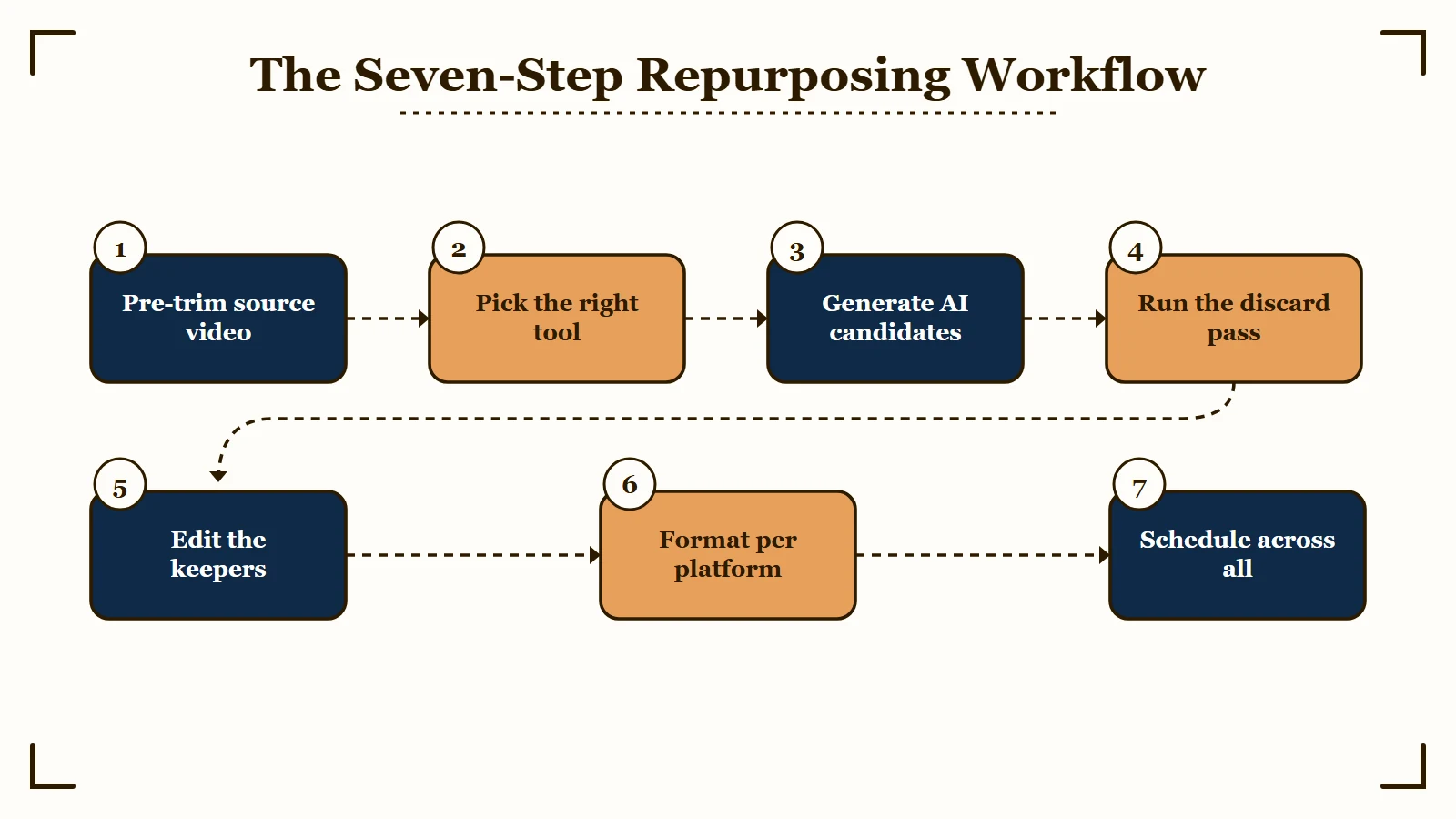
The reliable workflow for turning one long YouTube video into 5 to 10 publish-ready short clips is seven steps, with the most time spent on the human selection pass and the caption polish, not on the AI cutting.
This is the sequence that produces clips you would actually want your viewers to see.
- Pre-trim your source video. Cut the dead first 30 seconds (intro music, settling in) and the dead final 2 minutes (outro, sign-off). These eat AI processing credits and produce nothing publishable.
- Pick the right tool for your platform mix. Use Opus Clip if budget is tight or you publish across TikTok, Reels, and Shorts equally. Use Submagic if you cut clips elsewhere and need the styling layer. Use Captions if your filming and finishing happens on iPhone.
- Generate AI clip candidates. Upload your pre-trimmed video. Wait 4 to 8 minutes per 30 minutes of source for processing.
- Run the discard pass. Sort clips by virality score and watch the top 10 end to end. Discard any clip with mid-sentence cuts, missing context, references to off-screen visuals, or moments where you reference something the viewer cannot see.
- Edit the keepers. Trim endpoints. Fix the 1 in 20 (Opus) or 1 in 50 (Submagic) caption errors. Tweak the hook frame if it lands on a closed mouth or unflattering expression.
- Format per platform. Each platform has different aspect ratio preferences, caption placement zones, and hook-window length expectations. The cuts can be the same; the caption framing and hook timing should be platform-specific.
- Schedule across platforms. Use the in-app scheduler if your tool offers one (Opus Pro, Submagic Growth) or queue manually in TikTok Studio, Instagram Pro, and YouTube Studio.
That sequence takes about 90 minutes per source video once the workflow is dialed in.
The first time you run it, expect 2 to 3 hours. The discard pass and the caption polish are the steps that take the longest until you build muscle memory for what publishes well in your specific niche.
The Tools That Actually Work
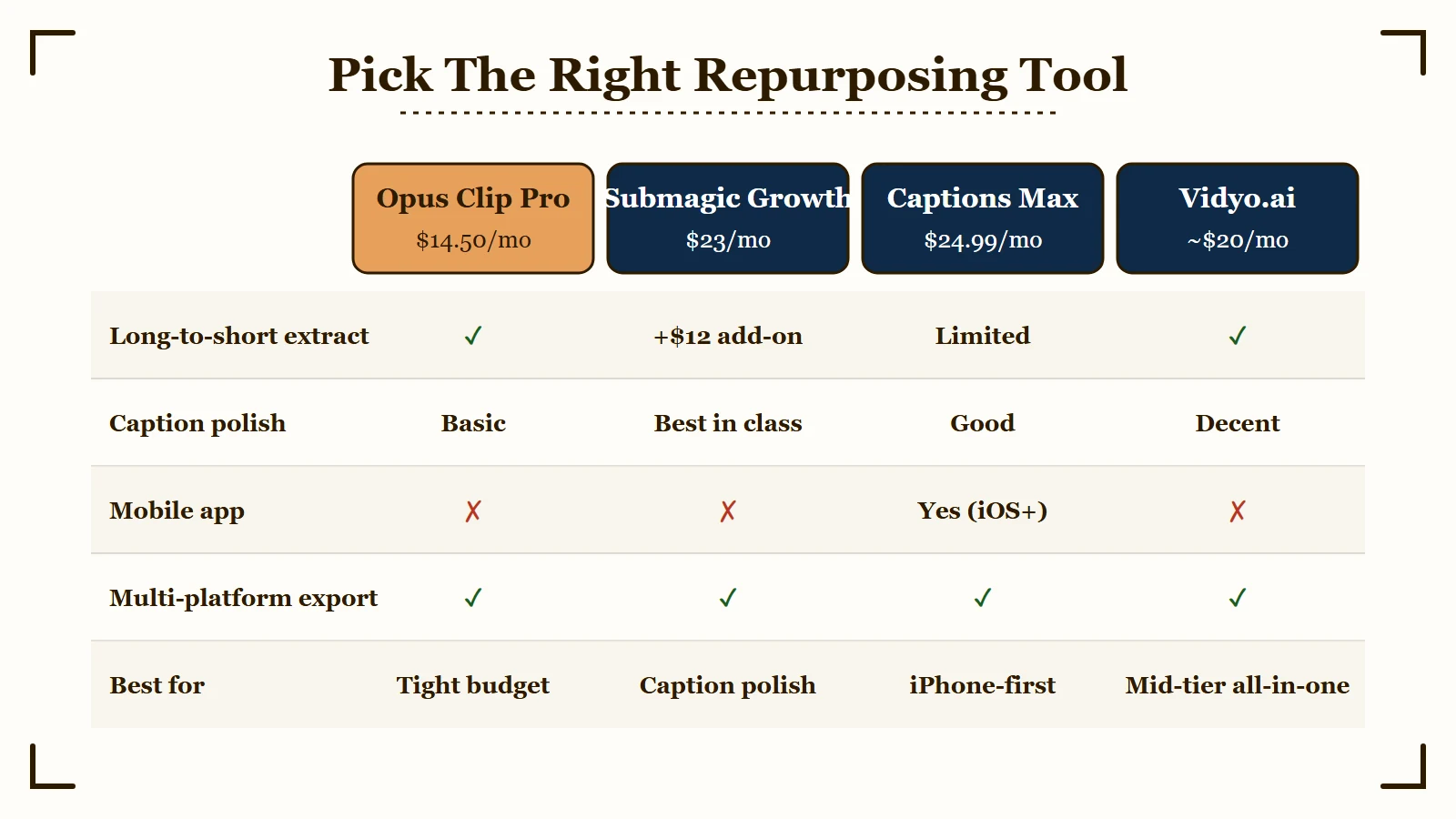
The three tools worth considering for this workflow are Opus Clip for the long-to-short extraction, Submagic for caption polish, and Captions for the iPhone-first creators, with the right pick depending on your bottleneck and budget.
Three tools cover the realistic options for solo creators.
| Tool | Best for | Price (annual) | Platform |
|---|---|---|---|
| Opus Clip Pro | Long-to-short extraction | $14.50/mo | Web only |
| Submagic Growth | Caption polish | $23/mo | Web only |
| Captions Max | iPhone-first workflow | $24.99/mo | iOS / Android |
| Vidyo.ai | Mid-tier all-in-one | ~$20/mo | Web only |
The pick depends on which step is your bottleneck.
If you have long-form content piling up and no time to clip it, the bottleneck is extraction. Opus Clip Pro at $14.50 a month annual is the right answer.
If you already cut clips and they look templated and generic, the bottleneck is styling. Submagic Growth at $23 a month annual gives you the design library that makes clips look intentional.
If you film on iPhone and finishing on desktop is the friction, the bottleneck is platform. Captions at 9.99 to $24.99 a month removes that friction entirely.
For a deeper take on the two desktop tools, see our Opus Clip vs Submagic head-to-head.
Where Most Creators Get The Workflow Wrong
The three biggest workflow mistakes are skipping the discard pass, letting the AI pick the hook frame, and using identical caption styling across every clip, each of which makes your channel look algorithmically generated rather than human-curated.
Three patterns I see in the channels that try this workflow and bounce off it.
Skipping the discard pass. The AI finds 10 candidate clips. Most creators publish the first 5 in order without watching them. Result: 2 of the 5 have mid-sentence cuts, weird hook frames, or context errors. The bounce rate is brutal. Always watch every candidate end to end before publishing.
Trusting the AI hook frame. The AI picks the first frame of the clip as the thumbnail. It picks based on facial alignment heuristics, not on what would make a viewer stop scrolling. Manually tweak the hook frame on every clip. A 15-second adjustment per clip pays off in the first 100 plays.
Identical caption styling on every clip. Most AI tools default to the same template across all your clips. Result: viewers scrolling TikTok or Reels see the same look on hundreds of channels using the same tool. Vary your caption template across clips or use a custom font that signals your brand visually.
Platform-Specific Adjustments
Each short-form platform has quirks worth knowing about.
TikTok rewards clips that hook in the first 1.5 seconds and run 21 to 34 seconds. Captions should sit in the lower-middle third because the upper-third gets covered by the username overlay.
Instagram Reels rewards clips that match its algorithmic preference for “originality”, repurposed YouTube content with visible YouTube watermarks gets penalized. Strip any YouTube branding from your hero shot.
YouTube Shorts rewards clips that link back to your long-form video. Use the description to direct viewers to the full episode. The first 3 seconds matter most for retention.
Frequently Asked Questions
How long does it take to repurpose one YouTube video?
About 90 minutes once your workflow is dialed in, broken down as: 5 minutes of pre-trim, 4 to 8 minutes of AI processing wait, 30 to 45 minutes of selection and caption polish, 15 to 20 minutes of platform-specific formatting, and 10 minutes of scheduling. The first time you run it, plan for 2 to 3 hours.
Which tool is cheapest for this workflow?
Opus Clip Pro at $14.50 a month annual is the cheapest viable option for the long-to-short extraction. The Free tier is too limited (watermark, 60 credits, no editor) to be a real workflow. Skip the Starter tier at $15 a month, the editor is locked.
Can I do this workflow on my phone?
Yes, with Captions on iPhone. Opus and Submagic are web only and require a desktop. If your filming and finishing happens on a phone, Captions Max at $24.99 a month is the right tool. See our Captions app review for the iOS-vs-Android tradeoffs.
How many clips can I get from one long video?
A 30 to 45 minute video typically produces 5 to 8 publishable clips after the discard pass. A 60+ minute podcast can produce 10 to 15. The AI generates more candidates (usually 15 to 25 from a 45-minute source), but most need to be discarded for context or selection errors.
Do I need different captions for TikTok vs Reels vs Shorts?
The text can be identical, the placement and styling should vary slightly. TikTok captions should sit lower-middle to avoid the username overlay. Reels captions can use the upper-middle third. Shorts captions can sit anywhere because the YouTube interface does not overlap as much.
Will the YouTube watermark hurt my Reels and TikTok views?
Yes. Both platforms penalize content with visible competitor branding. If your YouTube long-form has a channel watermark in the corner, crop or mask it before publishing the clips elsewhere. The 5 second crop pass is worth the algorithmic protection.
The Workflow Recap
The reliable repurposing workflow is seven steps, takes about 90 minutes per source video, costs $14.50 a month at minimum (Opus Clip Pro), and produces 5 to 10 publish-ready clips when run with the human discard pass that the AI tools alone cannot replace.
Most creators who fail at this workflow fail because they trust the AI to do the discard pass for them. It cannot. The AI finds candidate clips. You decide what publishes.
The 90 minutes per source video is real. The cost at $14.50 a month is real. The volume (5 to 10 clips per long video) is real.
If you produce one long video a week and run this workflow, you publish 25 to 40 short-form clips a month for 14.50 in tooling cost plus 6 hours of your time. That math justifies the workflow for almost any creator who is publishing long-form already.
For the tool-by-tool breakdown, see Opus Clip review, Submagic review, and Captions app review.
According to Hootsuite’s YouTube Shorts research, channels that publish 4+ Shorts per week see the highest discovery lift. The 4-per-week threshold is the cadence target the repurposing workflow is built to hit.
Timing your uploads matters more than most creators realize, and the best time to post breakdown has the data by platform.
If your Shorts views flatline after uploading, the YouTube Shorts views stopped guide walks through the diagnostic steps.
Once your Shorts are ready, the cross-posting without watermarks guide shows how to distribute them cleanly across TikTok and Reels.