Opus Clip vs Submagic After a Real Three-Week Test
Opus Clip vs Submagic After a Real Three-Week Test
Opus Clip beats Submagic on long-to-short auto-extraction at $14.50 a month. Submagic wins on caption quality at $23 a month. Match the tool to the workflow you actually run.
- 1The Two Tools Solve Two Different Problems
- 2Side By Side On Price
- 3The Caption Quality Gap
- 4The Long-to-Short Capability
- Where They Both Lose
- 5The Decision Tree
- 6Frequently Asked Questions
- Is Opus Clip or Submagic better for podcasts?
- Which tool has better captions, Opus Clip or Submagic?
- Can I use Opus Clip and Submagic together?
- Do either of these tools have a mobile app?
- Which tool is cheaper for a solo creator on a budget?
- Are the AI virality scores reliable on either tool?
- 7The Final Pick
The Verdict: Opus Clip Pro at $14.50 a month annual wins on price and on the included long-to-short auto-extraction. Submagic Growth at $23 a month annual wins on caption quality and template design. Most solo creators should start with Opus, then add Submagic as a separate styling pass only if caption quality is the load-bearing element of the channel.
I tested both tools head to head against my own podcast back catalog over three weeks.
The pitch from each is similar enough to make creators flip a coin. Both promise to turn long video into publish-ready short clips with AI doing most of the heavy lifting.
What is less obvious is that Opus and Submagic optimize for two different parts of the workflow, and the right pick depends on which part is actually your bottleneck.
Short version: Opus owns the long-to-short extraction. Submagic owns the caption styling. The choice is which problem you would rather pay to solve.
The Two Tools Solve Two Different Problems
Opus Clip is built around long-to-short auto-extraction with the Virality Score as the headline feature, while Submagic is built around the captioning and styling layer with auto-extraction sold as a paid add-on.
The category looks unified from the outside. From the inside, the two tools have different center-of-gravity.
Opus Clip starts with the assumption that you have a 30 to 90 minute source video and want short clips back. The Virality Score, the AI hook detection, the credit-per-source-minute pricing, and the editor flow are all built around that workflow. Caption styling is a secondary feature.
Submagic starts with the assumption that you have a short clip already cut and want it to look like a designer made it. The animated caption library, the template-by-template typography, the in-app editor responsiveness, and the per-video pricing are all built around that workflow. Long-to-short extraction is sold as the Magic Clips add-on at $12 a month extra.
This matters because most solo creators have one bottleneck, not both. You either need help finding the publishable moments in a long video, or you need help making your already-cut clips look polished. Pick the tool that fixes your actual bottleneck.
Side By Side On Price
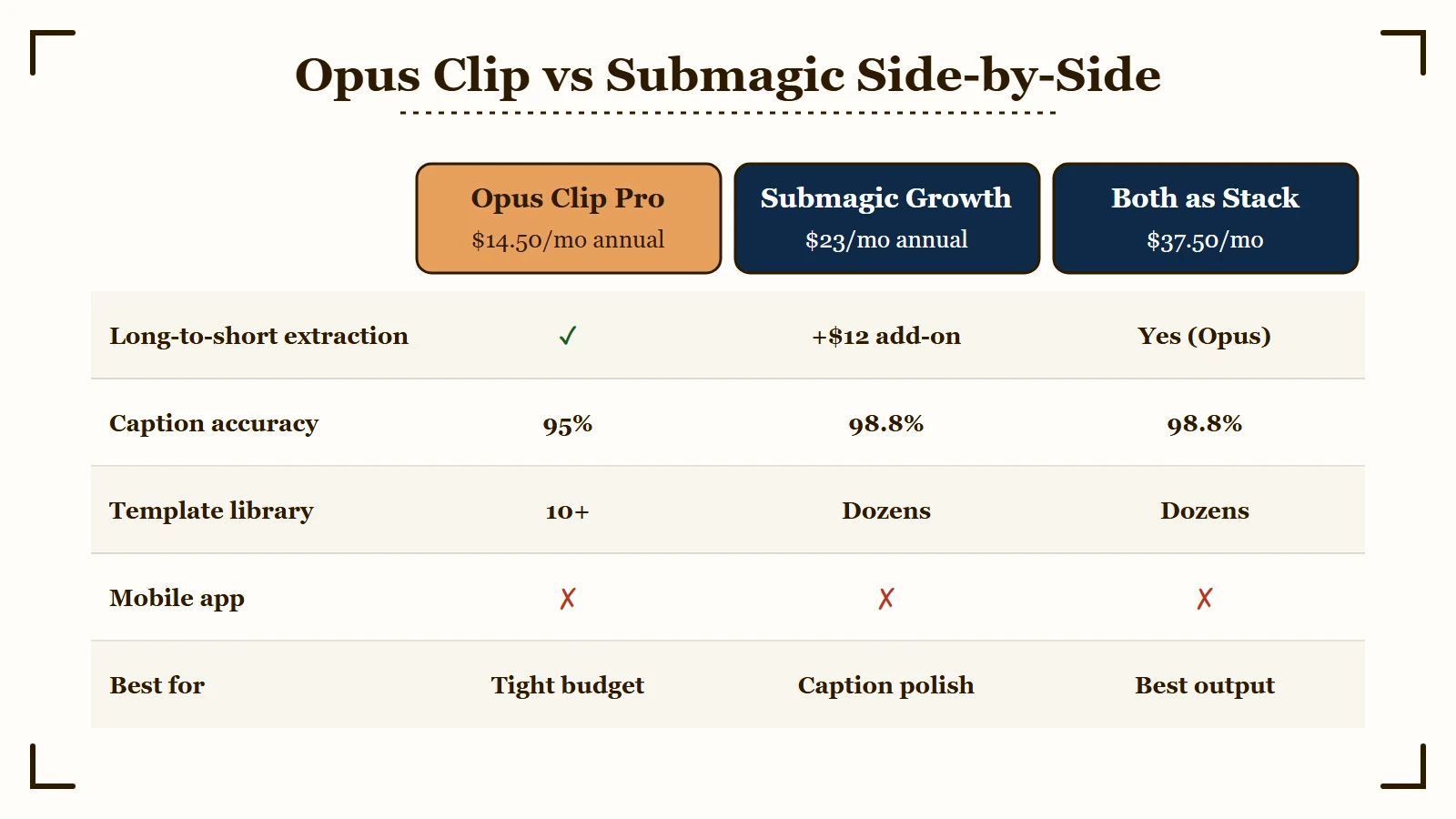
Opus Clip Pro at $14.50 a month annual is the cheapest entry point that includes both auto-extraction and editing, while Submagic Growth at $23 a month annual is the cheapest entry that includes the full caption library, with Magic Clips adding $12 a month if you want both styling and extraction.
The pricing math depends on which features you actually need.
| Feature | Opus Clip Pro | Submagic Growth |
|---|---|---|
| Annual price (per month) | $14.50 | $23 |
| Long-to-short extraction | Included | +12 add-on |
| Caption accuracy | 95% | 98.8% |
| Caption template count | 10+ | Dozens |
| Mobile app | No | No |
| Effective price for both | $14.50 | $35 |
The bottom-row math is the headline. If you want both extraction and styling, Opus Pro at $14.50 a month is half the price of Submagic Growth + Magic Clips at $35 a month effective.
If you only want styling and you bring already-cut clips, Submagic Growth at $23 a month is the right pick because the caption quality and template library are visibly better.
If you only want extraction and you do not care about caption polish, Opus Pro at $14.50 a month is overwhelming value.
The Caption Quality Gap
Submagic captions land at 98.8 percent accuracy with dozens of designer-quality animated templates, while Opus Clip lands at about 95 percent with a smaller library that produces visibly more templated-looking output.
The 3-point caption accuracy gap looks small until you see what it means in practice.
Opus needs caption fixes on roughly 1 in 20 sentences. Submagic needs fixes on roughly 1 in 50. For a creator publishing 10 clips per session, that is the difference between fixing 5+ caption errors per session vs fixing 1 every other session.
The bigger gap is the template library. Submagic ships dozens of distinct animated styles with smooth word-by-word reveals, color highlights for keywords, kinetic emphasis on stressed words, and template-by-template typography choices that look intentional.
Opus defaults look algorithmically picked. Most creators using Opus end up with one of the same three caption styles that are visible on every short feed, contributing to the “Opus look” recognizable to anyone scrolling TikTok for ten minutes.
For a brand that wants to be visually distinctive, Submagic gives you a meaningful head start. For a brand where captions are not the load-bearing visual element, the Opus default is fine.
The Long-to-Short Capability
Both tools can auto-extract publishable moments from long source video with similar 60 to 75 percent accuracy on clean solo audio, but only Opus includes this in the base plan while Submagic charges $12 a month extra for Magic Clips.
The auto-extraction feature is the headline use case for this category.
Both tools work similarly when you give them clean solo-speaker audio. Selection accuracy lands around 60 to 75 percent. You will discard 25 to 40 percent of suggestions for context errors, no matter which tool you use.
On multi-speaker audio with crosstalk, both tools drop to roughly 40 to 45 percent accuracy. The discard rate climbs proportionally.
The functional difference is the price. Opus includes extraction in the Pro plan at $14.50 a month annual. Submagic charges $12 a month extra on top of any base plan. So Submagic + Magic Clips at $35 a month effective is doing the same job Opus Pro does for 14.50.
If extraction is your bottleneck and budget is the constraint, Opus wins this comparison decisively.
Where They Both Lose
Three real limitations apply to both tools.
Web only, no mobile app. Both Opus and Submagic require a desktop browser. Neither has an iOS or Android app for filming or finishing on a phone. If your workflow is mobile-first, look at Captions instead.
Shallow editing. Neither tool replaces a real video editor. Both expect you to do precise frame-level cuts, layered audio, and color grading elsewhere. Use the AI clipper for the first pass, finish in Premiere or DaVinci.
Aesthetic homogenization. Both tools default to template-styled output that creates a recognizable look on the platform feeds. Plan to override defaults from day one if visual identity matters to your channel.
The Decision Tree
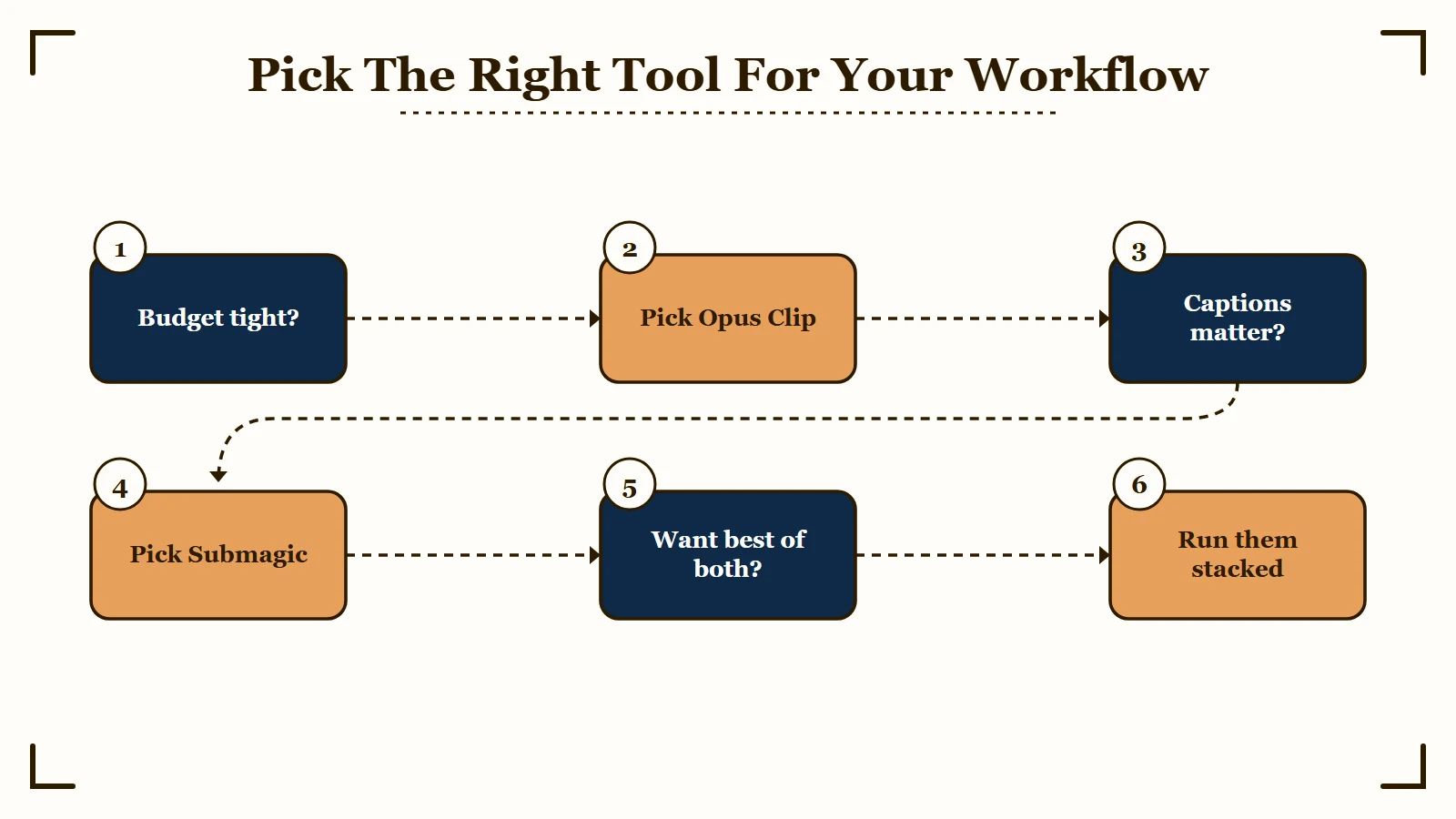
Pick Opus Clip if budget is the constraint or extraction is your bottleneck. Pick Submagic if caption quality is the load-bearing visual element. Pick both as separate tools if you have the budget and want best in class for each layer.
The clean answer:
- Opus Clip Pro if you have a podcast or long-form back catalog and need to harvest short clips. The $14.50 a month annual price plus included extraction is overwhelming value.
- Submagic Growth if you already produce cut short clips and the caption look is the load-bearing visual signal of your channel. The $23 a month annual cost is justified by the design quality.
- Both, separately if budget allows. Use Opus for extraction. Export the keepers. Run them through Submagic for the styling pass. Cost is 14.50 + 23 = $37.50 a month annual, vs Submagic + Magic Clips at $35 a month effective. Roughly a wash on price; visibly better output.
- Neither if your workflow is mobile-first. Look at Captions.
For most solo creators starting out, the right move is Opus first. Add Submagic later only if you can articulate why the caption quality matters for your specific channel.
Frequently Asked Questions
Is Opus Clip or Submagic better for podcasts?
Opus Clip Pro at $14.50 a month annual is the better value for podcast clipping because the long-to-short auto-extraction is included in the base plan. Submagic charges $12 a month extra (Magic Clips add-on) for the equivalent feature. Use Opus to extract the clips, then optionally pass them through Submagic for caption styling if budget allows.
Which tool has better captions, Opus Clip or Submagic?
Submagic. Caption accuracy lands at 98.8 percent vs Opus at about 95 percent. The bigger gap is the template library: Submagic ships dozens of designer-quality animated styles, Opus ships about 10 with less variation. If caption quality is the load-bearing visual element of your channel, Submagic is the right answer.
Can I use Opus Clip and Submagic together?
Yes. The two-tool workflow is: Opus for extraction (find the publishable moments), export the keepers as raw clips, upload to Submagic for the styling pass (apply the caption template, polish, publish). Combined cost is about $37.50 a month annual, which is roughly equivalent to Submagic + Magic Clips at $35 a month effective but produces visibly better output.
Do either of these tools have a mobile app?
No. Both Opus and Submagic are web only. Neither has an iOS or Android app for filming or finishing on a phone. If your workflow is mobile-first, the answer is Captions, which is the only first-class mobile-first AI video editor in the category.
Which tool is cheaper for a solo creator on a budget?
Opus Clip Pro at $14.50 a month annual is the cheapest entry point that includes both extraction and editor access. Submagic Growth at $23 a month annual is more expensive and does not include extraction. If budget is tight, Opus is the right starting point. Add Submagic later only if you can justify the caption quality upgrade.
Are the AI virality scores reliable on either tool?
Both Opus’s Virality Score and Submagic’s equivalent should be treated as sorting hints, not publish gates. Both systematically under-rate niche content and over-index on the first 1.5 seconds of a clip. Use the score to triage which clips to review first, not to decide what publishes.
The Final Pick
For the average solo creator with one bottleneck and a real budget, Opus Clip Pro is the right starting point because of the included extraction at $14.50 a month annual. Submagic Growth is the upgrade you make later when caption quality becomes the load-bearing visual signal of your channel.
If you only have budget for one tool today, that tool is Opus Clip. The included extraction is too valuable at $14.50 a month annual to skip.
If captions are the visual element your audience already recognizes you for, that tool is Submagic. The 3-point accuracy edge plus the template library is visible on every clip you publish.
If you have the budget and the workflow volume to justify both, run them as separate tools in a two-step pipeline. Opus for extraction. Submagic for styling. Best output the category produces today.
According to G2’s verified Opus Clip reviews and G2’s verified Submagic reviews, both tools maintain strong ratings driven by feature quality. The complaints concentrate on different things: Opus complaints cluster on cancellation friction and credit math, Submagic complaints cluster on pricing and upload speed. Read both before committing.
Whichever tool you pick, the cross-posting without watermarks guide covers the export workflow that keeps every platform happy.
The optimal posting frequency guide helps you decide how many clips per week actually moves the needle.