Submagic Review and the 5-Minute Cap Trap
Submagic Review and the 5-Minute Cap Trap
Submagic ships the best AI captions in the category, but a 5-minute video cap throttles the entry plan. Read this before you upgrade.
- 1What Submagic Is
- 2How the Pricing Works
- 3The Captions Are Best in Class
- Magic Clips Is the Real Decision
- 4The Submagic Workflow That Works
- Where Submagic Falls Short
- 5Who Should Choose Submagic
- Alternatives Worth Considering
- 6Frequently Asked Questions
- Is Submagic worth it for solo creators?
- How does Submagic compare to Opus Clip on captions?
- Does Submagic have a free version?
- Can Submagic remove silences and filler words?
- What is the longest video Submagic can process?
- Is Magic Clips included in any plan?
- 7The Verdict
Bottom Line: Submagic is the right pick if your priority is the best looking animated captions in the category, with the Growth tier at $23 a month annual being the only sensible entry point. The captions truly are best in class. The trap is that Magic Clips, which most creators expect to be included, costs an extra $12 a month.
I tested Submagic against my own short-form workflow for two weeks before writing this.
The pitch is the most polished captioning experience in the category. Drop in a clip, pick a template, get something that looks like a designer made it.
What is less obvious from the marketing is the gap between the base plan and the long-to-short auto-extraction feature most creators expect to be included.
Short version: the captions live up to the marketing. The Growth tier at $23 a month annual is the right entry point. The Starter tier is too capped to use. And Magic Clips changes the value math if you need long-to-short repurposing.
What Submagic Is
Submagic is an AI styling and captioning tool built to take a short clip you already cut and make it look like it belongs on TikTok, Instagram Reels, or YouTube Shorts, with industry-leading caption accuracy and a designer-quality template library.
The platform claims more than 4 million users and pitches “edit shorts 10 times faster with AI.”
That number is real for the specific workflow Submagic targets: creators who already produce raw short-form content and need a fast styling layer.
It is misleading for creators who want a tool that handles the whole long-to-short repurposing process. Submagic does that too, but only as a paid add-on.
This review focuses on the solo creator decision: which tier to pay for, what the realistic workflow looks like, and where Submagic loses to alternatives.
How the Pricing Works
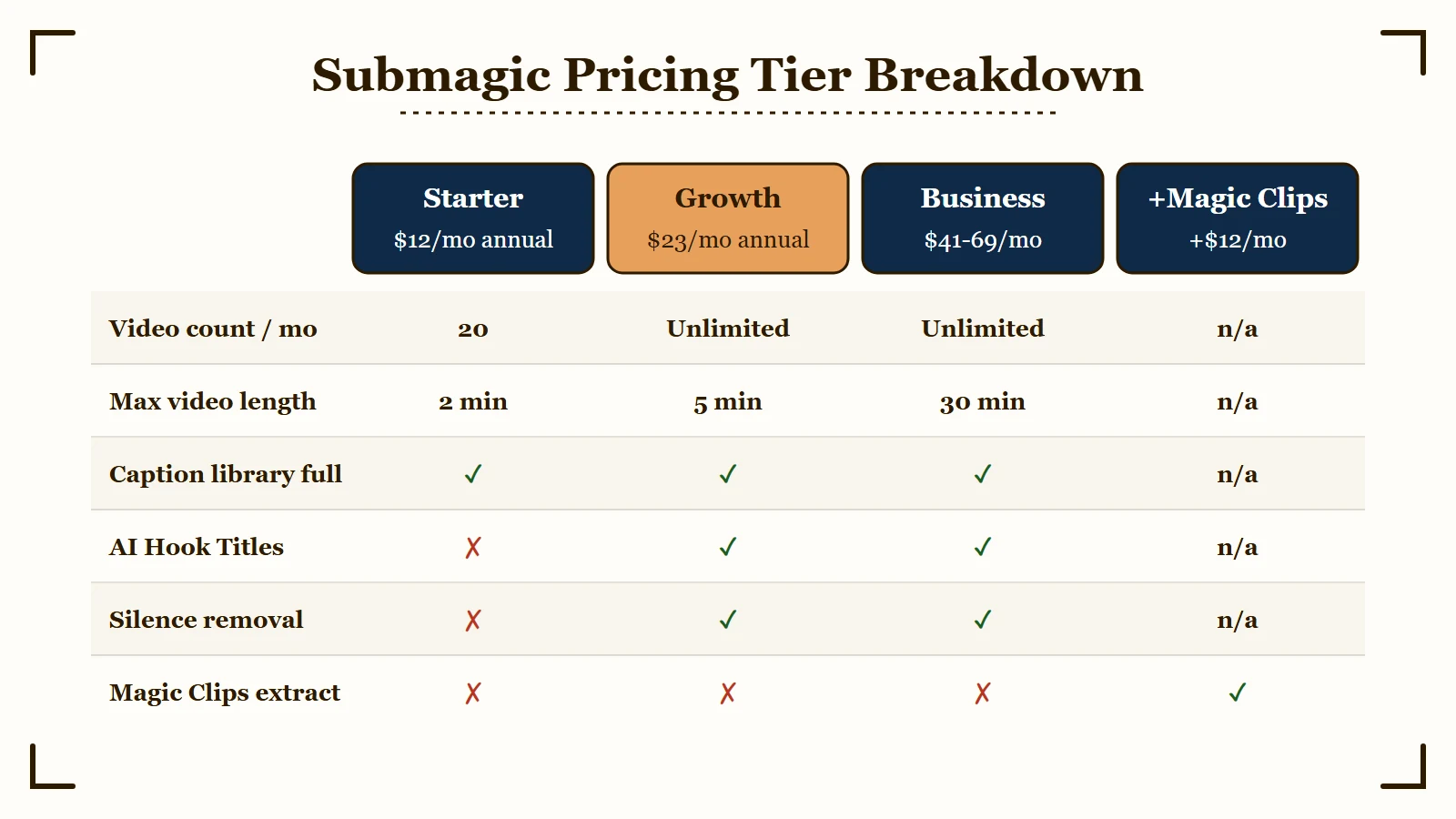
Submagic has three tiers plus a Magic Clips add-on at $12 a month, with the Growth tier at $23 a month annual being the value sweet spot for solo creators publishing real short-form volume.
Three tiers plus an add-on. The add-on is the part most creators get wrong.
| Plan | Monthly | Annual (per month) | Video count | Max length | Magic Clips |
|---|---|---|---|---|---|
| Starter | $20 | $12 | 20 / mo | 2 min | No |
| Growth | $50 | About $23 | Unlimited | 5 min | No |
| Business | $150 | About 41-69 | Unlimited | 30 min | No |
| Magic Clips add-on | +12 | +12 | n/a | n/a | Yes |
Read that last row carefully.
Magic Clips is the feature that takes a long podcast or webinar and auto-extracts viral moments. It is the headline use case people associate with this category.
Submagic does not include it on any tier. You add $12 a month on top of whatever plan you are on.
That changes the math. Growth at $23 a month annual sounds great until you add Magic Clips and land at $35 a month effective.
Opus Clip Pro at $14.50 a month annual includes the equivalent feature in the base plan.
The Starter tier at $20 a month is the wrong tier for almost anyone. The 2-minute video cap rules out most podcast clips, most tutorial segments, and any long-form repurposing. You hit the wall on video three.
The Growth tier at $23 a month annual is where the platform earns its price for creators who already produce real short-form content. Unlimited video count, 5-minute cap, the full animated caption library, and AI hook titles. Add Magic Clips only if you need long-to-short workflows.
The Business tier at 41-$69 a month annual is for agencies and creators who routinely produce 10+ minute content. The 30-minute cap matters for podcast operators publishing full episodes as vertical video.
The Captions Are Best in Class
Submagic captions hit 98.8 percent accuracy across 48 languages with dozens of designer-quality animated templates, putting them roughly 3 points above Opus Clip and visibly better than every other tool in the category.
Caption accuracy lands at 98.8 percent on clean audio across 48 languages.
Independent user testing puts it consistently above 97 percent. For comparison, Opus Clip lands around 95 percent.
The 3-point gap sounds small until you realize what it means in practice. Opus needs caption fixes on roughly 1 in 20 sentences, Submagic needs fixes on roughly 1 in 50.
The caption templates are the second differentiator. Submagic ships dozens of animated styles with smooth word-by-word reveals, color highlights for keywords, kinetic emphasis on stressed words, and template-by-template typography choices that look intentional rather than templated.
The defaults look like a designer made them. Opus defaults look like an algorithm picked them.
Custom font upload is supported on Growth and Business. If you have a brand font, it works without friction.
The 1.2 percent failure cases concentrate where you would expect: brand names, technical jargon, and whisper-volume speech. Plan to fix captions on every clip that mentions a product name, a specific software version, or a technical acronym.
Submagic does this faster than Opus because the in-app editor is more responsive, but the volume of fixes is real.
Magic Clips Is the Real Decision
The base Submagic experience assumes you bring already-cut clips. Magic Clips changes that.
With the add-on enabled, you upload a 60-minute podcast and Submagic auto-extracts the most engaging segments, scores them for virality, and prepares them for the styling layer.
In testing this works well on clean solo-speaker audio. Selection accuracy lands around 65 to 75 percent, similar to Opus Clip.
On multi-speaker recordings with crosstalk, accuracy drops to roughly 45 percent. The discard rate matters in your workflow planning. Expect to throw out 25 to 35 percent of AI suggestions for context errors.
The Magic Clips question becomes: is the styling-layer-plus-extraction combo at $35 a month effective worth the savings vs Opus Clip Pro at $14.50 a month plus a separate captioning tool?
For most solo creators the math favors Opus when budget is tight. When caption quality is the load-bearing factor for your channel and you can spend $35 a month on tooling, Submagic with Magic Clips is the cleaner workflow.
The Submagic Workflow That Works
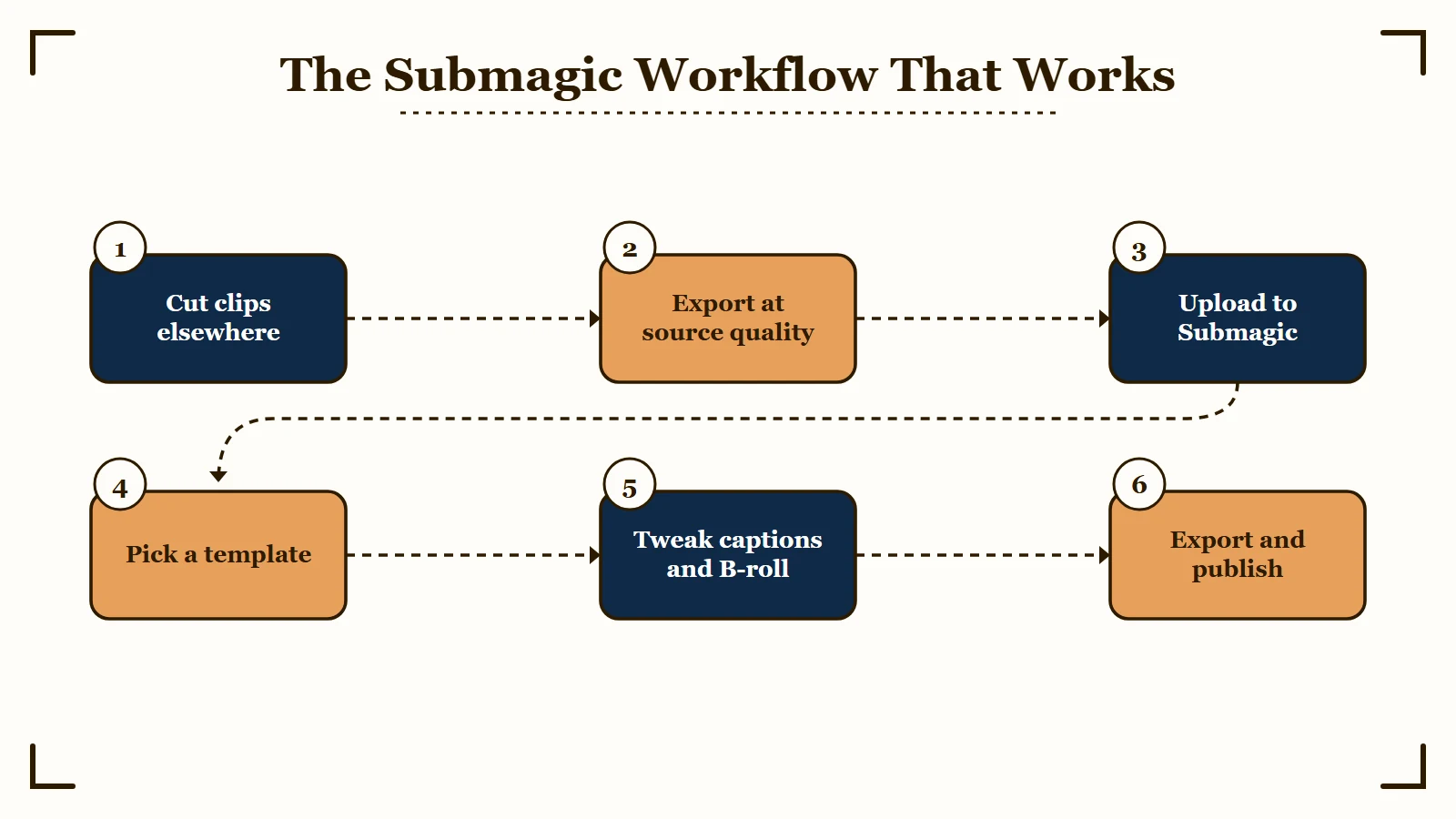
The realistic Submagic workflow is six steps not three, with most of the value coming from the styling pass and the editor responsiveness, not from the AI features the marketing leads with.
The clean Submagic workflow for a solo creator looks like this:
- Cut clips elsewhere. Use a real editor (Premiere Pro, DaVinci Resolve, Final Cut, or even CapCut) to make the actual edits. Trim, restructure, fix audio.
- Export each clip at source quality. 1080p minimum, vertical 9:16 ideal.
- Upload to Submagic, one clip at a time. Wait through the 30 to 60 second upload.
- Pick a caption template. Spend 30 seconds finding one that fits your brand voice. Save it as a custom template if it works for your channel.
- Tweak captions and add B-roll. Fix the 1 in 50 errors. Override the auto B-roll where it does not match the moment.
- Export and publish.
This is a 3 to 5 minute workflow per clip once you find your template.
For creators producing 5 clips a day, that is 25 minutes saved vs styling each clip in a traditional editor.
The workflow Submagic markets (“3 clicks to viral content”) works for the first clip. Real production cycles run the steps above.
Where Submagic Falls Short
Three real limitations matter for the buying decision.
Not a full editor. There is no timeline view, no multi-track audio, no advanced color grading, no transition customization beyond template selection. If your workflow requires precise frame-level cuts, layered audio, or anything resembling traditional video editing, Submagic is the wrong tool.
Upload speed. Multiple users report 30 to 60 second upload waits even on small files. The processing itself is fast once the upload completes, but the front-loaded delay annoys creators producing 5+ clips per session.
Billing friction. The free trial auto-converts to paid unless cancelled within the trial window. Multiple Trustpilot and Reddit reports document confusion around when the trial ends and complaints about charges that arrived 24 hours earlier than expected. Set a calendar reminder before the trial date.
Who Should Choose Submagic
Submagic is the right call when caption quality is the load-bearing visual element of your channel, the wrong call when budget is tight and you need long-to-short repurposing, and a maybe for agencies producing 10+ minute content per piece.
The clean answer:
- Yes if caption quality is the load-bearing visual element of your channel and you publish enough short-form content to justify $23 a month or higher.
- Yes if you already produce cut clips and need a styling layer that looks designed rather than generated.
- No if you need a long-to-short repurposing tool and budget is tight. Opus Clip Pro at $14.50 a month annual is the better value with the equivalent feature included.
- No if you need a real editor. Submagic does not replace Premiere, DaVinci, or Final Cut.
- Maybe if you are an agency producing client work. The Business tier at 41-$69 a month annual is competitive against the alternatives at the 30-minute video cap level.
Alternatives Worth Considering
Two real alternatives in this category.
Opus Clip wins on price and on the included long-to-short feature. Captions are weaker. We have an Opus Clip review covering the tradeoffs. If you only have budget for one tool and you do podcast or webinar repurposing, start with Opus.
Captions is the mobile-first answer. iOS and Android apps that handle filming, transcription, and styling in one workflow. If your creator setup is phone-only, Captions is the right tool. See our Captions app review.
For the head-to-head decision most readers face, our Opus Clip vs Submagic breakdown puts the two side by side.
Frequently Asked Questions
Is Submagic worth it for solo creators?
Yes if caption quality matters more to you than long-to-short auto-extraction, and your channel publishes enough short-form to justify $23 a month annual. The Growth tier at that price is the value sweet spot. Skip the Starter tier and decide whether Magic Clips is worth the extra $12 a month based on how much podcast or long-form content you repurpose.
How does Submagic compare to Opus Clip on captions?
Submagic captions land at 98.8 percent accuracy across 48 languages and offer dozens of designer-quality animated templates. Opus Clip lands at about 95 percent with a smaller template library. The 3-point accuracy gap and the design quality of the templates are the two reasons most creators who try both end up keeping Submagic as the styling layer.
Does Submagic have a free version?
There is a free trial that allows up to 3 videos with a watermark. The trial auto-converts to paid unless you cancel within the trial window, so set a calendar reminder. Treat the free trial as a styling demo, not as a workflow.
Can Submagic remove silences and filler words?
Yes, automatic silence removal and filler word detection are included on the Growth and Business tiers. The Starter tier does not include these. The detection works well on cleanly recorded audio and produces a noticeable improvement in pacing for most podcast or talking-head clips.
What is the longest video Submagic can process?
2 minutes on Starter, 5 minutes on Growth, 30 minutes on Business. If your typical content runs longer than 5 minutes per piece, the Growth tier will not work for you and the Business tier becomes the realistic choice.
Is Magic Clips included in any plan?
No. Magic Clips is a $12 a month add-on on top of any base plan. The base plans assume you bring already-cut short-form content. If you want auto-extraction from long-form sources, you pay for the add-on or use a different tool like Opus Clip that includes the equivalent feature in the base price.
The Verdict
Submagic earns its place as the highest-quality captioning and styling layer in the short-form creator category, with one specific pricing trap (Magic Clips as a paid add-on) that changes the value calculation for anyone planning long-to-short repurposing.
If your channel rises or falls on whether your captions look intentional, Submagic is the cleanest answer in the market today.
If you also need long-to-short auto-extraction and budget is the constraint, Opus Clip Pro at $14.50 a month annual is the better value because that feature is included.
The 4 million user count is real. So is the design quality of the caption templates. So is the upload speed friction.
Set a calendar reminder before the trial ends, decide on Magic Clips deliberately rather than by default, and treat Submagic as the finishing tool rather than the editor.
According to G2’s verified reviews, Submagic maintains strong ratings driven primarily by caption quality and template design. The pricing complaints are the largest category of negative reviews. Read both before committing.
For a clean multi-platform workflow after captioning, the cross-posting without watermarks guide shows how to avoid platform penalties.
Pairing captions with optimal upload timing makes the biggest difference, and the best time to post guide has the platform-by-platform breakdown.