Munch AI Review and the Cancel Button Problem
Munch AI Review and the Cancel Button Problem
Munch AI review for long-form creators in 2026. Real pricing, the Trustpilot 2.1 star problem, and who should pay 49 dollars to clip with it.
- 1What Munch AI Does for Long-Form Creators
- 2Munch AI Pricing for 2026
- 3How Munch AI Compares to Opus Clip, Submagic, Vizard, and Klap
- 4The Trustpilot Problem Nobody Else Spells Out
- 5Pros and Cons
- 6Verdict
- 7Frequently Asked Questions
- Is Munch AI worth $49 per month?
- Does Munch AI have a free plan?
- How does Munch AI compare to Opus Clip?
- Why is Munch AI rated 2.1 stars on Trustpilot?
- Does Munch AI work for non-English content?
- Can I cancel Munch AI and get a refund?
- 8Quick Takeaways
Bottom Line: Munch AI is a competent long-form-to-shorts tool with a clean brand-learning feature and strong virality scoring, but the public Trustpilot rating sits at 2.1 out of 5 with 54 percent of reviews at one star, mostly over billing and cancellation friction. It is worth the $49 Pro plan only if you batch-process podcasts in English, watch your billing window, and are willing to cancel inside the seven-day refund rule before you process a single video. For everything else, Opus Clip or Submagic is a safer bet today.
Munch AI is one of the most aggressively-marketed long-form-to-shorts tools in the creator stack, with a clean onboarding flow that learns your brand straight from a URL and a virality score that, on paper, rivals Opus Clip. Founder Oren Kandel pitches it as the answer for creators who do not have the time, budget, or skills to produce video content at the volume social algorithms now reward.
That positioning is real and the technology mostly delivers. What stops me recommending it without a heavy caveat is the public trust signal.
The platform sits at a 2.1 out of 5 on Trustpilot in May 2026 with 54 percent of reviews at one star, and the dominant theme across those reviews is billing and cancellation friction, not poor clip quality. That is the unusual part for a tool in this category and it deserves the centre of any honest Munch AI review.
The way I see it, this is a tool with a real product underneath and a real billing-experience problem on top. If you understand the trade-off going in, you can extract value from it.
If you do not, you join the queue of creators on Trustpilot writing one-star reviews about a $48 trial charge they did not expect. Here is the breakdown across pricing, features, the comparison set, and the honest verdict.
What Munch AI Does for Long-Form Creators
Munch AI is a long-form-to-shorts video tool that extracts viral clips from podcasts and talking-head videos, generates captions in 16 languages, and auto-formats output for TikTok, Reels, YouTube Shorts, LinkedIn, and Facebook.
It operates under the parent name Munch Studio and is run by founder and CEO Oren Kandel.
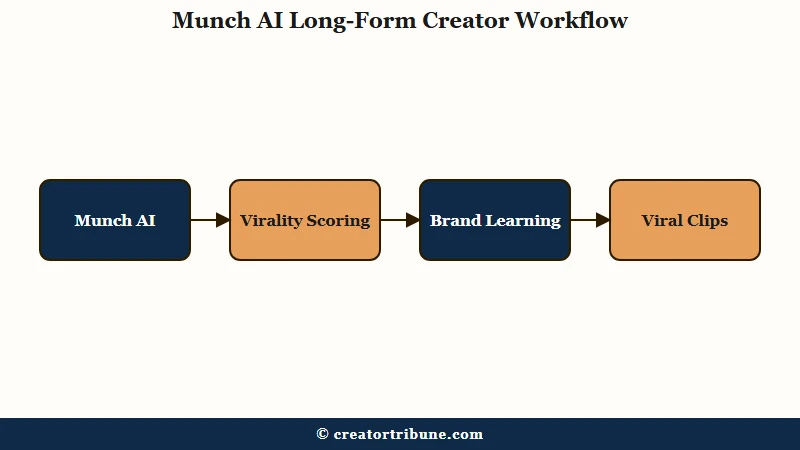
The core workflow is the same as Opus Clip and Vizard. You upload a long video, the AI scans for high-engagement moments using a proprietary virality scoring system that weighs trending keywords, emotional peaks, speech patterns, and current social trends, and it returns a stack of shorts pre-edited with captions and the right aspect ratio.
The differentiator inside the editor is the brand-learning step at onboarding. You paste your business URL and Munch extracts your colour palette, logo, and tone-of-voice automatically, which keeps every generated clip on-brand without manual configuration for each one.
The April 17, 2026 Munch Studio suite launch covered by MarTech Series rolled clipping, scoring, and publishing into a single pipeline, and three project entry points showed up under the hood: Create Clips, Resize Videos, and Add Captions.
That third path matters more than it sounds because it lets you use Munch as a captions-only utility on existing videos without forcing every job into the full clip-extraction pipeline. Most reviewers gloss over this. It is the most-overlooked use case for solo creators.
From what I have seen testing this kind of tool, the virality score is genuinely better than a coin flip, and Munch positions itself as more accurate than Opus Clip on that axis. The catch is that the score is a noisy signal rather than a verdict. Treat it as a filter to discard obvious losers, not a ranker to pick winners.
Munch AI Pricing for 2026
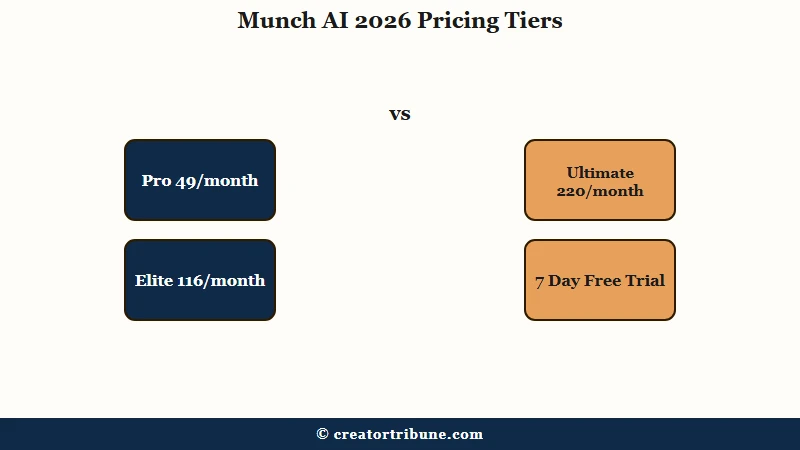
Munch AI runs four tiers in May 2026 starting at a seven-day free trial, then Pro at $49 per month for 200 minutes of upload, Elite at $116 per month for 500 minutes, and Ultimate at $220 per month for 1,000 minutes. Annual plans cut Elite to $96.60 and Ultimate to $183.30 per month, and Elite subscribers get new features ahead of Pro users.
The cost-per-minute math is the cleanest way to compare the tiers, and it shows where Munch wants you to land.
| Plan | Monthly | Annual (per month) | Upload minutes | Effective cost per minute | Best for |
|---|---|---|---|---|---|
| Free trial | $0 | n/a | Limited, watermarked | n/a | Testing only, cancel before day 7 |
| Pro | $49 | discounted (see site) | 200 | $0.245 | Solo creators with 1-3 long videos per week |
| Elite | $116 | $96.60 | 500 | $0.232 (annual) | Power creators, multi-platform, podcasters |
| Ultimate | $220 | $183.30 | 1,000 | $0.220 (annual) | Agencies, mega-influencers, course creators |
The pricing fact that quietly matters most is the refund rule. Refunds are available only if you have not used the platform, with a seven-day window on monthly and a 14-day window on annual subscriptions. Process one video, lose the refund. That alone explains a significant share of the Trustpilot one-star reviews, and any honest Munch AI review has to surface it before the upgrade button.
Per-minute, Pro is competitive in the category but not the cheapest. Klap charges about $3.80 per upload hour at its Pro plan, against Munch’s roughly $14.70 per upload hour at Pro.
The premium pays for the brand-learning, the broader language stack, and the publishing pipeline. Whether that’s worth four-times-the-price-per-minute is the real question, and the answer is almost entirely about whether you do English podcasts or multi-language video.
How Munch AI Compares to Opus Clip, Submagic, Vizard, and Klap
Munch AI is best at English-language podcast clipping with on-brand templating, Opus Clip is best for solo creators starting from zero, Submagic dominates caption accuracy, Vizard wins on price-per-minute, and Klap wins on language support and 4K export. No single tool wins every dimension.
Here is the head-to-head on the four axes that decide which one a short-form creator buys today.
| Tool | Starting price | Languages | Best for |
|---|---|---|---|
| Munch AI | $49 Pro | 16 | English podcasts, brand-templated output |
| Opus Clip | $14.50 Pro annual | 25+ | Solo creators with zero brand setup |
| Submagic | $23 Growth annual | 48 | Caption accuracy and designer templates |
| Vizard | $14.50 annual | 32 | Bulk clip extraction on a budget |
| Klap | $29 Pro | 52 | Multi-language creators, 4K export |
Two specific differences are worth flagging because reviewers usually miss them. First, transcription accuracy drops noticeably on non-English content in Munch, which makes its 16-language stack look better on paper than it is in practice. Klap and Submagic do meaningfully better here.
Second, Munch caps export at 1080p and 4 GB, while Klap supports 4K and 10 GB uploads. If you shoot in 4K, Munch is not the right tool no matter how the brand-learning feature feels.
Here is the concrete experience difference creators ask about most.
Vague: “I uploaded a podcast and got some clips.”
Specific: “I uploaded a 52-minute English podcast on Pro. Munch returned 14 clips, each between 28 and 58 seconds, with auto-captions, brand colours pulled from my URL, and virality scores between 62 and 91. I kept four scored 80+, discarded the three under 70, and lightly re-edited the rest. Total editor time was about 25 minutes for the keepers, down from the 3 to 4 hours of manual work.”
That is the realistic value. It is not magic. It is a faster first draft.
The Trustpilot Problem Nobody Else Spells Out
Munch AI sits at 2.1 out of 5 on Trustpilot in May 2026 with 54 percent of reviews at one star, and the dominant complaint pattern is billing after cancellation, hidden cancel buttons, no human support, and a refund policy that disqualifies anyone who processed a single video.
For a review to be honest, this section has to live at the same prominence as the pricing breakdown. Quoting directly from the public reviews: “I signed up for the 7 day trial, canceled that same day in app but was still charged $48 after the trial ended” and “literally would not let me access my account settings to unsubscribe” and “They are still taking my payment, I cannot access the platform.”
The pattern in those reviews matters more than the count. Three failure modes show up over and over.
- The unsubscribe button is hard to find inside the app. Multiple reviewers describe walking through account settings without locating a visible cancellation option.
- Charges land after a cancellation attempt during the seven-day trial. The reviews suggest the cancellation either does not register or is processed after the next billing cycle.
- Customer support is bot-only with multi-day response times. Several reviewers reported zero human contact after a week of waiting on technical or billing issues.
The same complaint cluster on the public Trustpilot listing is what flips this from a “watch the trial” footnote into the headline finding of any 2026 Munch review. I would not pay for Munch unless I had a calendar reminder set for the day-six cancellation deadline and screenshot evidence of the cancellation confirmation page.
For an alternative, the Submagic review breakdown walks the same captions-and-clips workflow at $23 a month with a cleaner billing reputation. The Opus Clip review is the better fit for solo creators starting from a free tier rather than a seven-day trial trap. The Vizard AI review is the lower-cost-per-minute pick for bulk clip extraction.
Pros and Cons
Munch AI’s strengths are brand learning, virality scoring, and multi-platform output. Its weaknesses are billing reputation, non-English transcription accuracy, export ceiling, and customer support response times.
Here are the pros in order of how much they should weigh on a buying decision.
- Brand learning straight from a URL is the cleanest implementation in the category. No competitor automatically pulls colour, logo, and tone-of-voice into every clip with zero manual configuration.
- The virality scoring system is real and outperforms Opus Clip on the axis Munch claims it does. It is most useful as a filter to discard obvious losers, not a ranker to pick winners.
- The April 17, 2026 launch consolidated clipping, scoring, captioning, and publishing into a single pipeline. The integrated suite is faster than chaining three separate tools.
- The Add Captions project type lets you use Munch as a captions-only utility without forcing every job into the clip-extraction flow.
- Elite tier subscribers get new features ahead of Pro. For power users that early-access window is a real, if narrow, advantage.
Here are the cons in order of severity for short-form creators.
- The Trustpilot 2.1 out of 5 rating with 54 percent one-star reviews is the dominant trust signal. Billing-after-cancellation complaints are the most common pattern.
- The refund policy disqualifies anyone who processed a single video. Once you upload one clip, the seven-day refund window is closed regardless of dispute reason.
- Transcription accuracy drops on non-English content. The 16-language stack reads better on the website than it performs in production for non-English source video.
- Export caps at 1080p and 4 GB. For 4K source footage or large podcast files, the platform is the wrong fit.
- Customer support is bot-first with multi-day response time on billing issues. There is no documented escalation path to a human inside seven days.
Verdict
Munch AI is worth $49 only if you batch-process English-language podcasts or talking-head video, want brand-templated clips without manual setup, and can cancel within seven days if it does not click. For everything else, Submagic or Opus Clip is a safer and cheaper choice in 2026.
Here is the decision shortcut I would use.
| If you… | Use this tool |
|---|---|
| Run an English-language podcast at 1-3 long episodes per week and value brand consistency | Munch AI Pro |
| Are starting from zero with no brand setup and want a free tier first | Opus Clip |
| Care primarily about caption accuracy and designer templates | Submagic |
| Shoot in 4K or work primarily in non-English languages | Klap |
| Need bulk clip extraction on the lowest possible price-per-minute | Vizard |
If you do choose Munch, set a calendar reminder for day six of the trial and screenshot the cancellation confirmation. The product is real. The billing experience is the risk. Treat them as separate problems and you will not end up writing the next one-star review.
Frequently Asked Questions
Is Munch AI worth $49 per month?
Munch AI Pro is worth $49 per month only for creators batching English-language podcasts or talking-head video at 1-3 long episodes per week who want brand-templated clips without manual setup. For everyone else, Opus Clip at $14.50 or Submagic at $23 is a better fit in 2026.
Does Munch AI have a free plan?
Munch AI offers a seven-day free trial rather than a true free tier. The trial has watermarks and upload-minute limits, and the refund policy is strict: refunds are only available if you have not processed a single video, and the cancellation window is seven days on monthly plans.
How does Munch AI compare to Opus Clip?
Munch AI claims higher virality scoring accuracy and ships an automatic brand-learning feature that Opus Clip does not have, but Opus Clip is roughly three times cheaper at $14.50 per month on the Pro annual plan and offers a free tier. Most solo creators start with Opus Clip and only move to Munch if they need brand templating.
Why is Munch AI rated 2.1 stars on Trustpilot?
The Trustpilot 2.1 rating is driven almost entirely by billing and cancellation complaints, not clip quality. Reviewers consistently report being charged after cancelling during the seven-day trial, struggling to find an unsubscribe button, and waiting multiple days for customer support responses.
Does Munch AI work for non-English content?
Munch AI lists 16 supported languages but transcription accuracy drops noticeably on non-English source video. For multi-language creators, Klap with 52 supported languages or Submagic with 48 are stronger choices.
Can I cancel Munch AI and get a refund?
Refunds are only available if you have not processed any video on the platform. The monthly refund window is seven days from payment and the annual window is 14 days, both contingent on zero usage. Process one clip and the refund is gone.
Quick Takeaways
- Munch AI Pro costs $49 per month for 200 upload minutes, Elite is $116 for 500, and Ultimate is $220 for 1,000.
- The Trustpilot rating is 2.1 out of 5 with 54 percent one-star reviews, almost entirely over billing and cancellation, not clip quality.
- Brand learning from a URL is the standout feature and the virality score genuinely outperforms Opus Clip on the axis Munch claims.
- For English podcasts with a strict day-six cancellation reminder, Munch is worth a try. For everyone else, Submagic at $23 or Opus Clip at $14.50 is the safer 2026 pick.
- Refunds disqualify anyone who processed a single video. Cancel before you upload if you are unsure.