Fix YouTube Videos Going Private on Their Own
Fix YouTube Videos Going Private on Their Own
YouTube keeps changing your videos to private without warning? Diagnose which of the seven causes you hit, then apply the right fix and recovery path.
- 1How to Tell Which Trigger You Hit
- 2The Seven Triggers and Their Fix Paths
- 3The RSS Feed Trap Podcasters Keep Missing
- 4The Made-for-Kids Override Quietly Eating Reach
- 5How to Prevent Future Auto-Private Switches
- 6Frequently Asked Questions
- Why does YouTube keep changing my videos to private?
- What is the difference between Locked as Private and Set to Private?
- Why does YouTube auto-private my RSS-fed podcast episodes?
- How do I appeal a YouTube video that was locked as private?
- Does YouTube notify creators when their video is auto-set to private?
- Does YouTube’s age-estimation AI change my Audience setting?
- How do I report a hijacked YouTube channel?
- 7Quick Takeaways
TL;DR: YouTube can flip a video from public to private under seven different triggers, and the fix depends on the trigger. The two patterns creators confuse most are “Locked as Private” (platform-enforced, you cannot manually toggle back) and “Set to Private” (protective hold, you can flip back yourself after a security check). Podcasters have an eighth cause that sits outside those triggers: RSS-delivered episodes arrive private by default and stay that way until you publish or change the setting, so they were never public rather than switched. Diagnose the cause first, then apply the matching fix below.
If your YouTube videos are switching from public to private on their own and you never touched the visibility toggle, you are looking at one of eight distinct causes, seven of them YouTube enforcement actions and one a documented podcast feed behaviour. The fix path is different for each one, and applying the wrong fix wastes a recovery cycle and sometimes makes the situation worse.
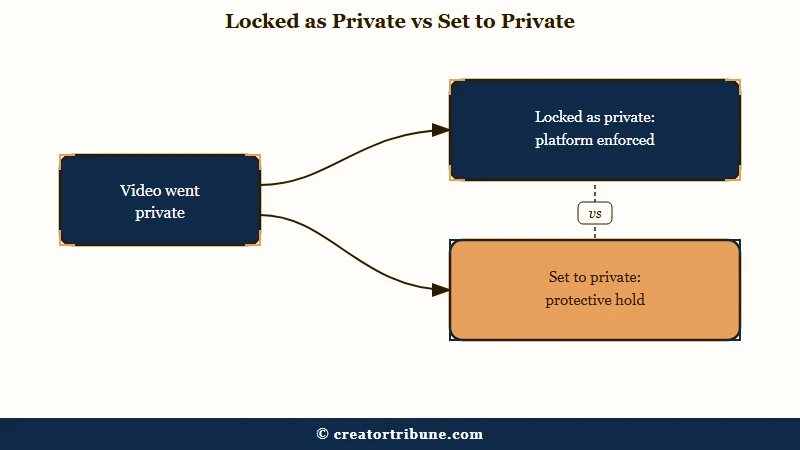
The way I see it, the biggest source of creator confusion is two near-identical states that mean very different things. “Locked as private” is platform-enforced and creators cannot manually toggle the video back to public until a re-review clears it. “Set to private” is a protective hold for suspected hacked-account activity and the creator can flip it back themselves after a security check.
Both surface the same way in YouTube Studio. They almost never produce the same email, and the recovery path is opposite for each.
Podcasters have an extra cause to rule out before any of that. YouTube’s own RSS podcast delivery creates episodes as private videos and keeps applying whichever default you set, so a feed can look like it is being enforced against while it is only following instructions. Here is the diagnostic flow plus the fix path for every cause.
How to Tell Which Trigger You Hit
Open YouTube Studio, go to Content, and check three fields per affected video: Visibility, Restrictions, and Audience. The exact combination of values across those three columns tells you which of the eight causes applies. Diagnose before you appeal.
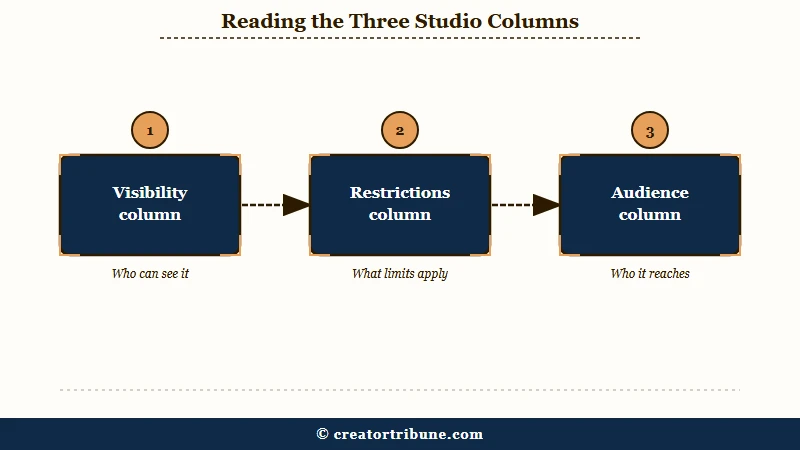
The fastest way to get the right diagnosis is to compare the three column values against the trigger table below. Most creators jump straight to “appeal everything” and end up burning their single age-restriction appeal on the wrong cause.
| Visibility column | Restrictions column | Audience column | Most likely cause |
|---|---|---|---|
| Locked as private | none or “Copyright” | unchanged | Metadata violation or unverified API service |
| Set to private | none | unchanged | Suspicious account activity (possible hack) |
| Private | none | unchanged | Podcast RSS default visibility setting |
| Private | none | “Yes, it’s made for kids” | COPPA Made for Kids reclassification |
| any | Copyright | unchanged | Content ID block or strike |
| any | Age-restricted | unchanged | Age restriction applied |
| Locked as private | none | unchanged | Priority Flagger (Trusted Flagger) review removal |
| any | any | any | Hacked-account hold (separate path) |
Two specifics matter here. First, if you see “Locked as private” you cannot toggle the video back manually, no matter how many times you click. The toggle is server-side disabled until a human reviewer clears the appeal.
Second, if Audience flipped to “Yes, it’s made for kids” with a YouTube-set notice, YouTube has overridden your own audience choice. Studio files those videos under a Content filter labelled “Set to made for kids (by YouTube)”, and YouTube says it will only override your audience setting choice “in cases of error or abuse”.
If you are unsure which trigger fired, take a screenshot of YouTube Studio’s Content view for the affected video before you do anything else. Once you appeal, the columns can change and you lose the diagnostic evidence.
The Seven Triggers and Their Fix Paths
Each trigger has its own appeal URL, timeline, and recovery rule. The seven enforcement triggers are: metadata violations, suspicious account activity, COPPA reclassification, Content ID blocks, age restriction, Priority Flagger removals, and unverified API service uploads. The podcast RSS behaviour sits outside these seven because no enforcement is involved.
Here is the priority order I would walk through if I were diagnosing a fresh public-to-private switch today.
- Check Audience column first. If it flipped to “Yes, it’s made for kids” with a YouTube-set notice, this is the made-for-kids override. Open the video, scroll to Audience, click the appeal banner if present. Manual reviews take a few business days.
- Check Restrictions for “Copyright”. A Content ID block is the trigger. Open the Restrictions panel, click the claim, dispute it. The claimant has 30 days to respond on a standard dispute and 7 days if you escalate to appeal.
- Check Restrictions for “Age-restricted”. You get one appeal per video, so use it carefully. The path is Content, point to the restriction type, click Appeal. Reviews are manual and take a few business days.
- If Visibility shows “Locked as private” and there is no Copyright restriction, this is a metadata violation or an unverified API service upload. Per the YouTube Help on locked-as-private, the appeal path is Studio video manager, fix the metadata, request re-review. If it was an unverified API service, there is no appeal. Re-upload through the YouTube app or main site.
- If Visibility shows “Set to private” and YouTube signed you out automatically, this is the suspicious account activity protective hold. Sign back in, run the Google security checkup, and if you published the videos yourself, toggle them back to public manually.
- If Visibility shows “Locked as private” with no Copyright restriction and no metadata issue you can find, it may be a Priority Flagger removal. The standard Community Guidelines appeal path in Studio is the same. Reviews take a few business days.
- If you have lost full access to the account, recovery details have been changed, and YouTube is bouncing your appeals, this is a hacked-account hold, the escalated form of the suspicious-activity trigger above. Start with Google Account recovery, then open YouTube’s hijacked channel reporting form, which you reach by signing in to your Google Account. YouTube also points creators to @TeamYouTube on X when Creator Support cannot be reached, and it limits this support to incidents from the past 9 months under its published data retention policy.
The most painful cause to diagnose is the unverified API service one. There is no appeal path, and the only fix is to re-upload via the YouTube app, the main site, or a Google-verified service.
If you do not know what triggered the lock, audit your third-party integrations first, and check the podcast RSS visibility default separately. The two produce different wording in the Visibility column.
Before: “I will appeal every video that went private, click everything I can find, and hope something works.”
After: “I will screenshot the three columns in Studio, look up the matching trigger in the diagnostic table, run the single correct appeal for that trigger, and only escalate if the appeal fails.”
The After approach saves your one-shot age-restriction appeal for the cases where it genuinely applies and prevents you from burning the standard Community Guidelines appeal on a Content ID block that needs the dispute path instead.
The RSS Feed Trap Podcasters Keep Missing
If a podcast episode is sitting private and you never set it that way, check whether it was ever public. YouTube uploads RSS-ingested episodes as private during setup, and the “Default RSS video visibility” option in Studio governs what every new episode arrives as.
YouTube documents RSS podcast delivery as one of its own features. Its help page on delivering podcasts using an RSS feed is explicit that swapping an audio file in the feed does not update the video: “The audio for an RSS-ingested video is like any video on YouTube and cannot be updated once published.” Replacing it is a manual job in Studio, and YouTube notes that when you select Re-upload from RSS feed, “The old video will be set as private so that you can still see data like views and comments.”
The same page sets out the visibility lifecycle either side of that. On first submission “the episodes you select will be uploaded as private videos”, and “After you publish your podcast on YouTube, all episodes are made public”, so the early private state is a setup stage. Studio does not surface either behaviour as the reason when you go looking.
The control sits in YouTube Studio under Content, then Podcasts, then Details, labelled “Default RSS video visibility”. The three options are Private, Unlisted and Public.
One detail in the Visibility column separates these from an enforcement case, and it is worth checking before you spend an appeal. A settings default or a feed re-upload leaves plain “Private” with nothing sitting in Restrictions, which you can change yourself. Where an unverified API service was involved the column instead reads “Locked as private”, and YouTube states those videos cannot be appealed at all.
Advice to abandon RSS publishing and upload every episode by hand is worth holding until you have ruled these two behaviours out. Keep the manual-upload workaround for the case where episodes are genuinely coming back locked.
For podcasters who depend on RSS-driven YouTube publishing, the Spotify for Creators outage covers the broader hosting reliability question. The longer view is that single-source dependency on any one publishing path to YouTube is fragile in 2026, whether that path is YouTube’s own RSS delivery or a third-party tool.
The Made-for-Kids Override Quietly Eating Reach
YouTube can set your Audience to “Yes, it’s made for kids” without your input, which strips comments, monetisation features, and personalised recommendations from the video. YouTube states it will only override your choice “in cases of error or abuse”, and Studio lists the affected videos under a Content filter named “Set to made for kids (by YouTube)”. Run that filter first if your reach dropped without other obvious cause.
This is the second cause most fix guides miss because it does not switch the video to Private outright. It applies the “Made for Kids” classification, which functionally removes the video from most discovery surfaces because COPPA-compliant content cannot collect viewer behaviour signals. The effect on reach is often as bad as a full visibility lock.
The criteria YouTube publishes cover subject matter, child actors or models, characters, celebrities or toys that appeal to children including animated characters or cartoon figures, language intended for children, activities such as play-acting and simple songs or games, songs, stories or poems for children, whether the content is advertised to children, and empirical evidence of the video’s actual audience. Colour palette and watch-session patterns are not on that list, so check your video against the published factors instead of guessing at production style. The fix is to attempt to toggle Audience back to “No, it’s not made for kids” in the video’s Details panel, and if the option is locked, use the appeal banner that appears in the same panel.
If you have lost reach on multiple recent videos and the COPPA flag is the cause, the YouTube channel trust score guide covers the broader algorithm-signal hierarchy you should be optimising for under the 2026 ranking model.
How to Prevent Future Auto-Private Switches
Three prevention habits cut the recurrence rate to near-zero: upload through verified channels only, audit metadata before publish, and lock down account security with two-step verification. Each habit prevents a specific trigger.
Here is the prevention checklist I would run for any channel that has been hit by an auto-private switch at least once.
- Upload via the YouTube app, the desktop site, or a Google-verified service. Drop any unverified API bridge from your workflow. This kills the unverified-API-service trigger entirely.
- Audit every tag and description before publish. Misleading or unrelated tags are the most common metadata violation. The five-tag rule that works on TikTok applies here: stay narrowly on-topic.
- Turn on two-step verification on the Google account behind the channel. The suspicious-account-activity trigger fires on signs of a credential leak. Two-step kills that risk for 99 percent of attack patterns.
- Audit the Audience setting on the first video published every month. If YouTube has overridden any to “Yes, it’s made for kids” without your input, you catch it early before reach drops compound.
- Save your Channel ID somewhere outside YouTube, since you cannot look it up from an account you have been locked out of. Report a suspected hack promptly either way, because YouTube limits support to incidents from the past 9 months.
For the broader recovery workflow when an account has already been compromised, the channel terminated recovery guide walks through the appeal and Second Chances path that complements the prevention checklist above.
Frequently Asked Questions
Why does YouTube keep changing my videos to private?
YouTube auto-switches videos to private under seven distinct enforcement triggers: metadata violations, suspicious account activity, COPPA Made for Kids reclassification, Content ID blocks, age restriction, Priority Flagger removals, and unverified API service uploads. An eighth cause involves no enforcement at all and affects podcasters, because YouTube ingests RSS episodes as private during setup, so the episode was never public. The right fix depends on which one applies, which you diagnose by checking the Visibility, Restrictions, and Audience columns in YouTube Studio’s Content view.
What is the difference between Locked as Private and Set to Private?
Locked as Private is platform-enforced and you cannot manually toggle the video back to public until a successful re-review. Set to Private is a protective hold for suspected hacked-account activity and you can change the video back yourself after running a Google security check. They look identical in Studio but have opposite recovery paths.
Why does YouTube auto-private my RSS-fed podcast episodes?
Usually because they were never public. YouTube ingests RSS episodes as private during setup, and the “Default RSS video visibility” option in Studio under Content, Podcasts, Details governs what new episodes arrive as. If the Visibility column instead reads “Locked as private”, that is an enforcement case and the feed is not the cause.
How do I appeal a YouTube video that was locked as private?
In YouTube Studio, open the affected video, fix the metadata issue if one is flagged, and click the appeal link in the video manager. Reviews take a few business days. The one exception is unverified API service uploads, which have no appeal path, the only fix is to re-upload through a verified channel.
Does YouTube notify creators when their video is auto-set to private?
Not always, and the notifications it sends are easy to miss. Suspicious-account-activity holds send an email and sign you out. COPPA reclassifications appear as an Audience-setting change with a small banner. Metadata-violation locks send a Studio notification only. Check Studio every few days if you suspect a hold.
Does YouTube’s age-estimation AI change my Audience setting?
No, and merging the two is the most common mistake creators make here. The age-estimation rollout YouTube announced in July 2025 runs on viewer accounts, to decide which protections a signed-in viewer receives, and YouTube says it has used the approach in other markets already and will extend it further. Your Audience column is governed by the separate made-for-kids override covered above, so a flip there is not evidence that age estimation reached your country.
How do I report a hijacked YouTube channel?
Recover your Google Account first, then open YouTube’s hijacked channel reporting form, which you reach by signing in. No Certified Expert is involved.
YouTube’s hacked channel help page also offers a chat assistant and points you to @TeamYouTube on X if Creator Support is unreachable. That page describes no 72-hour recovery form, so do not plan around one, and the deadline it does document is data retention, which limits support to incidents from the past 9 months.
Quick Takeaways
- YouTube auto-switches videos to private under seven enforcement triggers, plus an eighth non-enforcement cause that hits podcasters. Diagnose first by checking Visibility, Restrictions, and Audience columns in Studio.
- Locked as private and set to private look identical but have opposite recovery paths. The first is platform-enforced, the second you can fix yourself.
- The most-missed cause for podcasters is YouTube’s own “Default RSS video visibility” setting, which uploads podcast episodes as private. Change it in Studio under Content, Podcasts, Details.
- YouTube can quietly override your Audience setting to “Yes, it’s made for kids” and strip reach. Filter Studio Content by “Set to made for kids (by YouTube)” to find them.
- For full hacked-account holds, recover your Google Account first, then open YouTube’s hijacked channel reporting form yourself. Support is limited to incidents from the past 9 months.