What Running A YouTube Channel Actually Costs Each Month
What Running A YouTube Channel Actually Costs Each Month
The real cost of running a YouTube channel each month, broken down by creator tier. Build a budget you can stick to.
- 1What Is The Realistic Monthly Cost At Each Creator Tier?
- 2What Should A Hobbyist Spend Each Month?
- 3What Does The Side Hustle Tier Buy?
- 4When Does Going Full-Time Make Cost Sense?
- 5Where Are Creators Overspending Right Now?
- 6How Do You Calculate Your Breakeven Views?
- 7What Are The Hidden Monthly Costs Creators Forget?
- 8What Counts As A Business Expense For Tax Purposes?
- 9Frequently Asked Questions
- How much does it cost to start a YouTube channel?
- Can I run a YouTube channel for $0 a month?
- What is the average monthly cost for a serious YouTuber?
- Is Adobe Premiere Pro worth the monthly subscription?
- How many views do I need to cover my monthly tool spend?
- Should I pay for AI tools as a new creator?
TL;DR: A solo YouTube channel can run on $0 a month with free tools or quietly drain $200+ once subscriptions stack. The right monthly budget depends on which tier you are in: hobbyist, side hustle, or full-time. Below is a tier-by-tier breakdown with real numbers and a breakeven calculation so you can stop guessing.
Most solo creators I talk to do not know what they spend per month to run their channel. They know the big-ticket items (Adobe, a new mic, maybe a course) but the smaller subscriptions pile up quietly underneath. Once the credit card statement arrives, the total looks worse than it should.
The truth is that the cost to run a YouTube channel each month can be almost anything, from zero to several hundred dollars. The number that matters is whether what you are paying for is moving the channel forward.
This guide breaks the monthly cost into three creator tiers, walks through what each tier should and should not pay for, and ends with a simple breakeven calculation so you know exactly when a subscription starts earning its keep.
What Is The Realistic Monthly Cost At Each Creator Tier?
The realistic monthly cost is $0 to $15 for hobbyists, $40 to $90 for side hustlers, and $150 to $400 for full-timers.
Those ranges cover software, music, storage, and AI tools, with hardware amortized separately. Anything outside those ranges usually means tool bloat or under-investment.
The way I see it, every monthly cost falls into one of four buckets: editing software, content assets (music, footage, thumbnails), infrastructure (internet, storage, hosting), and growth tools (analytics, SEO, AI assistance). The tier you should be in depends less on your subscriber count and more on whether the channel is generating revenue that covers the spend.
Here is the high-level map:
| Tier | Monthly cost | Who fits | Main spend |
|---|---|---|---|
| Hobbyist | $0 to $15 | Under 1,000 subs, no revenue yet, posting weekly or less | Maybe a music license, optional cloud storage |
| Side hustle | $40 to $90 | Monetized or close to it, posting weekly+, treating it like a small business | Editor, music sub, one or two AI tools, cloud backup |
| Full-time | $150 to $400 | Channel is the primary income or close to it | Adobe suite, premium music library, AI stack, SEO tools, accounting software |
A creator earning roughly $20,000 a year from a channel reported spending about $65 a month on Adobe Creative Cloud and treating it as a business expense. That math works. A creator with no monetization yet, paying $90 a month for a tool stack, is in the wrong tier.
What Should A Hobbyist Spend Each Month?
A hobbyist should spend $0 to $15 a month at most.
Free tools cover almost every production need at this stage, and paying for tools that move slowly through your workflow is wasted money before the channel earns a cent.
From what I have noticed, the most common hobbyist mistake is treating tool spend as a proxy for being serious. It is the opposite signal.
A monetized channel earns the right to spend. A 200-subscriber channel earns the right to focus on output and skip the subscriptions.
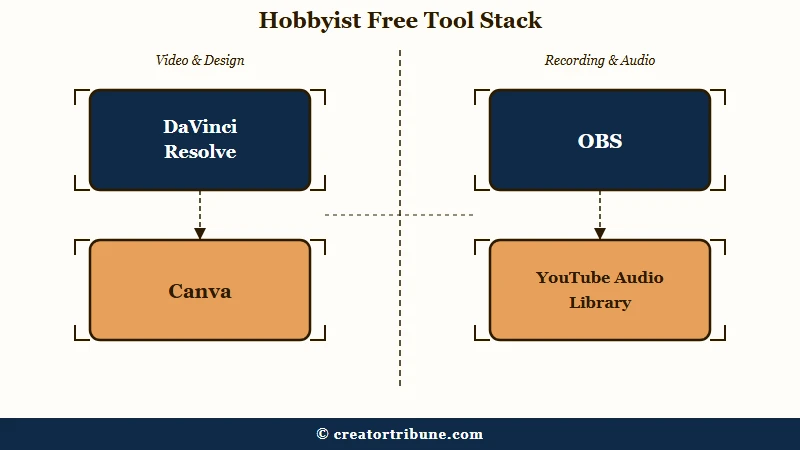
The free stack that covers 95 percent of hobbyist needs:
- Editing: DaVinci Resolve (free) for desktop, CapCut (free) for mobile. Both export at 4K and handle multi-track audio.
- Thumbnails: Canva (free tier) or Photopea (free, browser-based). The free tier of Canva includes most templates you need.
- Music and audio: YouTube Audio Library is free and royalty-cleared for monetized use. Audacity (free) for cleaning up voiceovers.
- Screen recording: OBS Studio (free) for capture, the built-in screen recorder on Mac or Windows for quick clips.
- Storage: A 1TB external drive (one-time cost, around $50) instead of a cloud subscription.
The only $10 to $15 a month I would consider at this tier is a basic Epidemic Sound or YouTube Premium subscription if the YouTube Audio Library catalogue starts feeling repetitive. Even that can wait until videos are getting consistent views.
Vague: “I need editing software.”
Specific: “I need to cut, color-grade, and add basic motion graphics to weekly long-form video. DaVinci Resolve free does all three on the same machine I already own.”
The vague version sends people to a $50-a-month Adobe sub before they have published 10 videos. The specific version puts the actual job first and reveals that free tooling already covers it.
What Does The Side Hustle Tier Buy?
The side hustle tier buys speed and quality at the points where the channel is losing viewers.
At $40 to $90 a month, every paid tool should map to a specific retention or production-time problem the free tier cannot solve.
In my experience this is the tier where most creators get the budget wrong. The trap is paying for tools that feel professional but do not change the viewer experience.
A custom thumbnail font subscription does not save a video with weak audio. A premium analytics dashboard does not fix a slow first 15 seconds.
The side hustle stack I would prioritize, in order:
- One paid editor or AI editor: Descript ($24/mo) for podcasts and dialogue-heavy content, or Adobe Premiere Pro ($22.99/mo) for cinematic edits. Pick one, not both.
- A music subscription: Epidemic Sound ($15/mo personal, $25/mo creator) or Artlist ($16.60/mo annual). Royalty-free music with claim protection is worth the spend the moment a video gets monetized.
- One AI tool: ChatGPT Plus ($20/mo) for scripting and ideation, OR Opus Clip ($19/mo) for repurposing long form into shorts. Not both unless one is paying for itself.
- Cloud backup: Google Drive 200GB ($2.99/mo) or Backblaze ($9/mo unlimited). Losing raw 4K footage costs more than the subscription ever will.
That stack totals about $60 to $80 a month if you pick one editor, one music sub, one AI tool, and storage. Anything above that range is creep, not strategy.
A useful internal benchmark: if a paid subscription cannot point to a specific viewer-side improvement (higher retention, faster turnaround, better thumbnails getting more clicks), it does not belong in the side hustle stack. The posting cadence and consistency you can sustain matters more than the tools you use.
When Does Going Full-Time Make Cost Sense?
Full-time tier ($150 to $400/mo) makes sense only when the channel covers its own overhead plus a meaningful share of living costs.
Going full-time on tooling without full-time revenue is the fastest way to torch a side project.
The way I would think about the full-time stack: it adds three things on top of the side hustle tier. A deeper AI suite (multiple subs working in sequence), premium libraries (uncapped stock footage, expanded music catalogue), and business infrastructure (accounting software, separate business banking, contractor payments if you hire editors).
A realistic full-time monthly map:
| Category | Tools | Monthly |
|---|---|---|
| Editing suite | Adobe Creative Cloud full plan | $60 to $65 |
| Music plus stock | Epidemic Sound plus Storyblocks or Shutterstock | $45 to $60 |
| AI stack | ChatGPT Plus, Opus Clip, ElevenLabs starter | $60 to $80 |
| Infrastructure | Cloud storage 2TB, business email, accounting | $30 to $50 |
| SEO and growth | VidIQ Boost or TubeBuddy Legend | $10 to $40 |
That comes out to roughly $200 to $300 a month at the conservative end. Add an editor on Fiverr or Upwork for finishing passes and the number climbs into the $400 to $700 range, but at that point the channel is operating as a real business with payroll, not a hobby.
The decision rule I would use: if the channel is generating at least 3x your monthly tool spend in revenue, the stack is justified. If revenue is below 1x the spend, you are paying for a job, not getting paid for one.
Where Are Creators Overspending Right Now?
Most creators are overspending on AI subscriptions and underspending on audio and scripts.
The AI stack creeps from $20 to $150 a month before anyone notices, while a $40 podcast mic and 30 minutes of scripting time would do more for retention than any of it.
The single biggest waste pattern I notice in 2026 is the AI sampler plate: ChatGPT Plus, Claude Pro, Midjourney, ElevenLabs, Opus Clip, HeyGen, Descript Pro, Vizard, all running at once. Each costs $20 to $30 a month.
Five of them stacked is $125 minimum. Most creators use two or three of them and forget about the rest.
The other side of the same coin is under-investment. From what I have seen, three areas where creators consistently spend too little for the return:
- Audio quality: Viewers tolerate mediocre video but click away from bad audio within 10 seconds. A $40 to $80 podcast mic and basic acoustic foam beat any editing upgrade.
- Script and idea research: Most channel growth comes from picking the right topics, not editing the chosen ones better. Time on Google Trends, AnswerThePublic, or a YouTube keyword tool returns more than premium editing software.
- Thumbnail quality: Thumbnails decide click-through rate, which decides whether the algorithm shows the video at all. A free Canva account and 20 extra minutes per thumbnail beats $50 a month on a thumbnail-specific subscription.
Before: “Subscribe to five AI tools and one cheap mic.”
After: “Subscribe to one or two AI tools and buy a proper podcast mic. The audio upgrade is the change viewers notice first.”
To make the trade-off easier to see, here is the overspend-versus-underspend pattern in one quick reference:
| Common overspend | Better place for that money | Why it matters |
|---|---|---|
| Five overlapping AI subscriptions | One AI tool plus a $40 podcast mic | Audio quality drives the first 10 seconds of retention |
| Premium analytics dashboard | 30 minutes weekly on Google Trends and YouTube search | Topic selection beats editing polish for growth |
| Custom thumbnail subscription | A free Canva account and 20 extra minutes per thumbnail | Click-through rate decides whether videos get shown at all |
| Stock-footage Pro plan with cap | Free YouTube Audio Library plus selective $29 stock | Most channels use less than 10 percent of paid catalogues |
This pattern shows up in creator burnout and recovery cases too. The financial stress of an overweight tool stack compounds the time stress of editing every video.
How Do You Calculate Your Breakeven Views?
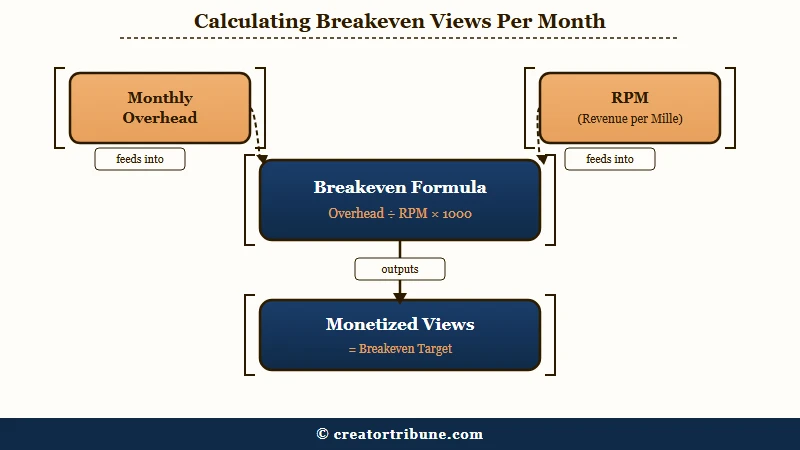
Your breakeven views per month equal monthly overhead divided by your effective RPM, multiplied by 1,000.
That single calculation tells you exactly when the channel is paying for itself.
The way I would frame the math: a creator should use their own historical RPM (revenue per 1,000 monetized views) from YouTube Studio rather than a category average if they have one.
According to Statista’s 2025 creator economy data, the average YouTube long-form RPM in English-language content sits between $3 and $8, depending on niche, with finance, B2B, and tech reaching $12 to $25 and lifestyle or vlog content closer to $2 to $5. The official YouTube Partner Program documentation details how RPM is calculated and which views count.
Run the formula like this, with worked examples:
Breakeven views per month = (Monthly overhead / RPM) x 1,000

Example A (hobbyist):
$15 overhead / $3 RPM x 1,000 = 5,000 monetized views per month

Example B (side hustle):
$80 overhead / $4 RPM x 1,000 = 20,000 monetized views per month

Example C (full-time, tech niche):
$300 overhead / $12 RPM x 1,000 = 25,000 monetized views per month

Example D (full-time, lifestyle):
$300 overhead / $3 RPM x 1,000 = 100,000 monetized views per month
Run that math before adding any new subscription. If the channel is not on track to clear the breakeven number, the new tool needs to either replace an existing one or wait. The same logic applies to deciding whether your current monetization status is a tool problem or a content problem.
A second number worth tracking: cost per published video. If five paid tools save you four hours of editing per video and you publish four videos a month, that is 16 hours saved. At a notional $25 per hour of your time, the tool stack saves you $400 in time even before revenue, which often justifies the spend when revenue is still small.
What Are The Hidden Monthly Costs Creators Forget?
The hidden monthly costs are cloud storage, business infrastructure, music licensing renewals, and AI add-on credits.
Each is small on its own. Together they often add 20 to 30 percent to the total.
In my experience these are the ones most creators leave out of the calculation:
- Cloud storage above the free tier: 4K raw footage fills 200GB faster than expected. Google One 2TB runs $9.99/mo, iCloud 2TB runs $9.99/mo, Backblaze unlimited runs about $9/mo.
- Newsletter or link-in-bio: Beehiiv free tier covers small lists; once subscribers grow, $42/mo. Linktree Pro is $9.99/mo.
- Business banking and accounting: A separate business account is free at most banks; QuickBooks Self-Employed runs $20/mo, Wave is free with paid add-ons.
- Music license renewals: Epidemic Sound and Artlist renew annually but bill monthly; a missed renewal can mean retroactive copyright claims.
- AI add-on credits: ElevenLabs voice cloning, Midjourney faster generations, Opus Clip extra credits, ChatGPT API usage beyond the Plus tier. These charges land separately and are easy to miss.
- Domain and website: $12 to $20 a year on the domain, $10 to $30 a month if hosting a portfolio or newsletter site.
- Software updates and hardware amortization: A $1,200 camera replaced every three years is $33 a month of true cost, even if no subscription is involved.
A creator with a $300 monthly tool stack often has another $60 to $90 of these costs they have not counted. That puts the real overhead closer to $400, which changes the breakeven math materially.
What Counts As A Business Expense For Tax Purposes?
Any tool used to produce content for a monetized channel typically qualifies as a deductible business expense.
That includes software subscriptions, music licenses, cameras, microphones, lighting, and a portion of internet, storage, and home office space.
I am not a tax professional, but the principle is straightforward as I understand it: if you can show the expense was incurred to produce the content that generated income, it is generally deductible against that income. The Internal Revenue Service publishes guidance for self-employed individuals at IRS Schedule C instructions, which covers most US creators operating as sole proprietors.
Two categories are worth understanding properly:
- Recurring subscriptions: Adobe, Descript, Epidemic Sound, ChatGPT Plus, cloud storage. These are typically deductible in full in the year you pay them.
- Capital expenses: Cameras, lenses, computers above a certain price. These are usually depreciated over several years rather than deducted in one. Section 179 lets US small businesses deduct the full cost in year one for qualifying equipment, which often applies to creators.
This single point shifts the math. A $65-a-month Adobe sub at a 25 percent effective tax rate has a real after-tax cost closer to $49.
A $1,200 camera deducted under Section 179 effectively costs $900 after a 25 percent tax saving. Run the cost calculation on the after-tax number when the channel is monetized, not the sticker price.
If the channel earns regularly, a 30-minute call with a small business accountant pays for itself the first year. From what I have seen, many creators leave $1,000 to $3,000 of deductions on the table by not separating personal and business spend.
The same kind of follow-through that builds views into subscribers applies to budgeting. Small habits compound, and the creators who win are the ones who track.
Frequently Asked Questions
The most common questions about YouTube channel costs cover startup investment, monthly tools, breakeven views, and which AI subscriptions are worth keeping.
How much does it cost to start a YouTube channel?
Starting a channel is free. The realistic startup investment for a serviceable setup ranges from $100 for a basic mic and tripod to $1,200 for a mid-range camera, mic, and lighting kit. Most channels do not need to spend more than $300 up front.
Can I run a YouTube channel for $0 a month?
Yes, indefinitely. DaVinci Resolve, CapCut, Canva, the YouTube Audio Library, Audacity, and OBS Studio cover every production need at zero cost. Most successful hobby channels spend nothing on monthly tools.
What is the average monthly cost for a serious YouTuber?
Side hustle creators typically spend $40 to $90 a month. Full-time channels with consistent revenue often run $150 to $400 a month once AI tools, premium music, and business infrastructure are included.
Is Adobe Premiere Pro worth the monthly subscription?
For weekly publishers earning revenue, yes. For hobbyists, no. DaVinci Resolve free handles the same color grading, multi-track audio, and motion graphics that Premiere does, and the workflow difference is small once you adjust.
How many views do I need to cover my monthly tool spend?
Use this calculation: monthly overhead divided by your RPM, multiplied by 1,000. A $50 monthly stack at a $4 RPM means 12,500 monetized views per month to break even on tools alone.
Should I pay for AI tools as a new creator?
Pick one and only if it solves a specific bottleneck. ChatGPT Plus helps with scripting. Opus Clip helps with repurposing long form to shorts. Subscribing to four or five at once is the most common waste pattern in 2026.