Should You Delete Videos Before a Monetization Appeal
Should You Delete Videos Before a Monetization Appeal
Delete videos before a YouTube monetization appeal? The right move depends on whether you are appealing or reapplying. Here is the rule that saves your channel.
- 1Appeal vs Reapply and Why the Distinction Decides Your Move
- 2Why YouTube Tells You Not to Delete Videos Before an Appeal
- 3What to Delete or Unlist Before You Reapply
- 4Reused Content vs Inauthentic Content: What the 2026 Policy Actually Flags
- 5The Public Watch-Hour Trap
- 6What to Do During the 30 or 90-Day Waiting Period
- 7What If Your Reapply Is Also Rejected
- 8Frequently Asked Questions
- Should I delete videos before appealing a YouTube monetization rejection?
- How long do I have to wait before I can reapply for YouTube monetization?
- Does making videos private count the same as deleting them for reapply purposes?
- Can YouTube tell me exactly which videos caused the monetization rejection?
- Do I lose my YouTube Partner Program eligibility if my reapply fails?
- Can I appeal a reapply rejection too?
- How long does YouTube take to review a monetization reapplication?
TL;DR: The “delete videos before monetization appeal” question has one critical fork. If you are APPEALING a rejection (claiming YouTube made a mistake), do NOT delete anything. The reviewer needs the videos in their flagged state to confirm your claim. If you are REAPPLYING (30 days after a first rejection, 90 days if it is not your first or you have reapplied before, and YouTube’s appeals page cites 90 days where an appeal was involved, so follow your notice), delete or unlist every video that plausibly tripped the “reused” or “repetitive content” policy before resubmitting.
YouTube monetization appeals fail at the highest rate when creators mix up two completely different processes that share the word “appeal” in casual conversation. The Reddit threads this week are full of people about to torch their channel because they got the order of operations wrong.
The fix is unglamorous but specific: figure out whether you are appealing or reapplying, then do the right thing for that path, never the other.
The advice creators trade with each other on this question is split roughly down the middle, half saying “delete everything before you appeal” and half saying “don’t touch a thing.” Both are right, but for different processes. Mixing them up is how creators end up auto-rejected.
This guide separates the two paths cleanly, walks through what to delete vs unlist vs keep for each, and covers the specific categories of content that get a YouTube monetization application denied in 2026 even when the rest of the channel is clean.

Appeal vs Reapply and Why the Distinction Decides Your Move
A monetization appeal is a 21-day window where you ask YouTube to re-review a rejection because you believe it was a mistake. A reapplication is a fresh application submitted 30 or 90 days after the rejection, where you have changed the channel to fix the issues.
The two are not interchangeable, and the right move on your video library is the opposite for each.
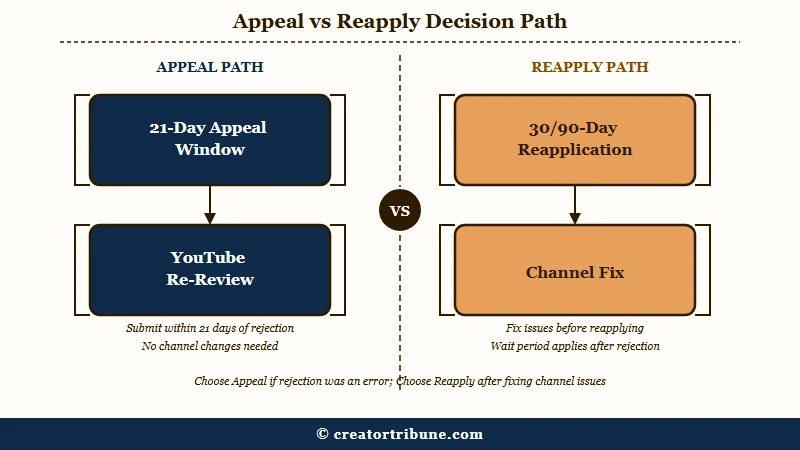
From what I have seen in the support docs and the threads, this distinction is the single most important thing to lock in before touching a single video. The appeal is “I disagree, please look again.” The reapply is “I heard you, I fixed it, please look again.”
Here is the practical breakdown:
| Process | When to use | Time window | What to do with videos |
|---|---|---|---|
| Appeal | You believe the rejection was wrong, content already meets policy | 21 days from the rejection decision (7 before a scheduled suspension) | Do NOT delete anything; reviewer needs original state |
| Reapply (first rejection) | You accept the rejection, want to clean up and try again | 30 days after rejection | Delete or unlist violators before submitting |
| Reapply (repeat rejection) | You have already reapplied once and were rejected again | 90 days after previous decision | Same as first reapply but be stricter on the audit |
YouTube documents 21 days to appeal a rejection, 30 days to reapply after a first rejection, and 90 days after a later one. If you received a scheduled suspension notice instead, the appeal window is 7 days before the suspension date. If the notice in your account states a different date, follow the notice.
For broader context on YouTube monetization decisions across both paths, our YouTube monetization denied guide covers the policy categories that produce the rejection in the first place.
Why YouTube Tells You Not to Delete Videos Before an Appeal
YouTube’s official policy is that appeals assess the channel in its current state, which means deleting videos that were flagged removes the reviewer’s ability to verify whether the original decision was correct.
YouTube states this outright on its appeals page: when it reviews an appeal, your channel is assessed in its current state, so you should not delete videos before submitting. What it does not publish is what happens if you delete them anyway, so leave them up for the full 21 days.
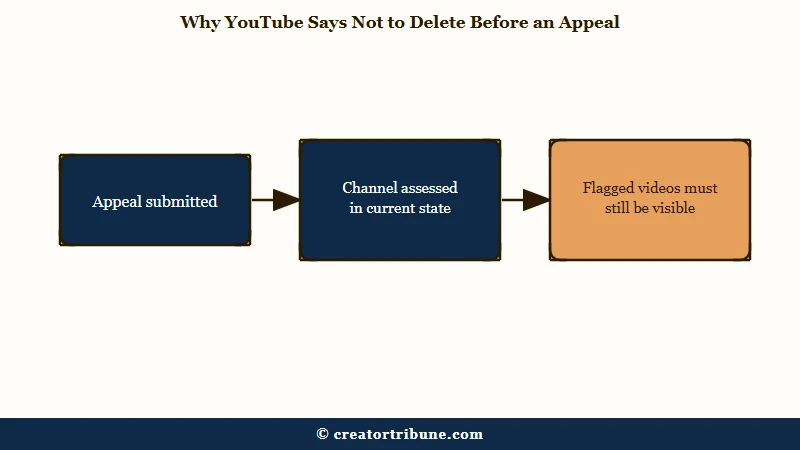
The way I would think about this: an appeal is a request for a human to overrule the algorithm. The human needs to see what the algorithm saw. If the video is gone, the human reviewer cannot evaluate whether the original “reused content” or “repetitive content” flag was accurate, and the default response is to uphold the rejection.
What this means practically:
- Do not delete any flagged videos during the 21-day appeal window. Even if you know one specific video tripped the policy, leave it up.
- Do not make flagged videos private or unlisted. Same logic; private videos are inaccessible to the reviewer too. The appeal flow needs the videos in their original public state.
- Do not change titles, thumbnails, or descriptions on flagged videos. Whether YouTube reads an edit as an admission is undocumented, but rewriting the metadata under review makes it harder for a reviewer to check the original call.
- Do continue uploading new content as long as it clearly meets policy. YouTube’s wording puts “keep uploading original content” on the reapply branch rather than the appeal branch, so treat this as optional during an appeal. It costs nothing, and it helps if you end up reapplying. Avoid anything in the same category as the flag.
If the appeal succeeds, monetization restores and you can keep or delete videos as normal. If the appeal fails, you move into the reapply window, where the playbook reverses completely.
What to Delete or Unlist Before You Reapply
Before reapplying, delete or unlist every video that plausibly violates the reused-content, repetitive-content, or misleading-metadata policies, since the next reviewer assesses your channel in its NEW current state.
This is the inverse of the appeal rule, and applying the appeal rule here is the second-biggest reason reapplications get denied.
In my experience, the audit goes faster when you sort uploads by view count, oldest first, and treat anything that fits these categories as a delete candidate:
- Compilation videos with minimal commentary. A 10-minute compilation of clips with text-on-screen captions and no voiceover reads as reused content even if you edited the clips. Delete or unlist.
- Reaction videos where the source plays with little added commentary. YouTube lists “Reaction videos where you comment on the original video” as allowed and publishes no runtime percentage anywhere in the policy, so judge the commentary rather than a stopwatch. Re-cut the thin ones instead of deleting them.
- Slideshow videos with stock footage and text-to-speech narration. Classic “low-effort AI content” pattern. The 2024-2026 enforcement wave specifically targets this format. Delete.
- Misleading thumbnails or titles. Videos where the thumbnail promises something the content does not deliver. Either fix the thumbnail and title, or delete.
- Repurposed short-form content stitched together as long-form. Posting your TikToks as a 12-minute YouTube video without new framing reads as repetitive. Delete or re-record with new context.
Before: Channel has 47 reaction videos averaging 8 minutes, of which 6 minutes per video is the source video playing. Reapply with all 47 still public.
After: Audit identifies 31 of the 47 as carrying almost no commentary of their own. Unlist 20 of the weakest, fully delete 11 with low view counts. Re-record commentary over 5 of the strongest, then reapply with 16 reaction videos and 5 re-cut ones that each make a clear original point.
The After path takes a weekend of work and gets the reapply approved. The Before path almost never does.
Unlisting versus deleting is mostly a personal call once the videos are off public view. The reviewer cannot see either, so both serve the policy-cleanup purpose. Unlisting preserves the URLs for old embeds, which can matter if you have brand sponsorships or external sites linking to specific videos. Delete is cleaner if you have no use for the URLs.
For the related case where the issue is not content but a channel-wide demonetization wave that hit you alongside thousands of other creators, our YouTube AI slop demonetization writeup covers the May 2026 enforcement pattern.
Reused Content vs Inauthentic Content: What the 2026 Policy Actually Flags
YouTube splits the originality problem into two policies, and knowing which one flagged you decides what you cut. Reused content covers redistribution like clips, compilations, and reaction videos with little added value. Inauthentic content, renamed from repetitious content on July 15 2025, covers mass-produced or templated videos that are easily replicable at scale.
The July 15 2025 update was the biggest change to this rule set in years, and most guides still use the old wording. YouTube kept the reused-content policy unchanged, so commentary, clips, compilations, and reactions are judged the same as before, but it sharpened the separate policy that targets low-variation, high-volume output. A video made with a template and little to no variation is the pattern reviewers now apply that label to.
YouTube publishes worked examples for each side, and they are more permissive on reactions than the community assumes. Allowed: clips used for critical review, reaction videos with commentary, edited footage with an added storyline, sports replays with the moves explained, and movie scenes with rewritten dialog. Not allowed: clips edited together with little narrative, content that gets views from mostly non-verbal reactions without added voice commentary, collections of songs by different artists, material downloaded and posted without modification, readings of work the creator did not write, and songs altered only by pitch or speed.
This matters for your audit because the two policies point at different videos. If your rejection cited reused content, the fix lives in your reaction and compilation catalog. If it cited inauthentic or repetitious content, the fix lives in your slideshow, text-to-speech, and templated uploads.
YouTube has said plainly that AI tools are welcome in the workflow, as long as the finished video carries unique human-added value, so an AI-assisted video is not automatically a violation. When you are unsure which bucket a video falls in, check it against YouTube’s official channel monetization policies before you decide to keep, unlist, or delete it.
The Public Watch-Hour Trap
YouTube asks for 1,000 subscribers and 4,000 qualified watch hours in the last 12 months, and its own list of what does not count is longer than most creators expect. Private videos, unlisted videos, deleted videos, ad campaigns, Shorts, and livestreams that are unlisted, deleted or never converted to VOD all fail to count toward that total.
Shorts run on a separate track. YouTube also admits channels with 1,000 subscribers and 10 million qualified Shorts views in the last 90 days, so a Shorts-heavy channel is not locked out by the watch-hour rule.
This is the trap that catches creators who unlist too aggressively before reapplying.
What I would suggest: before unlisting or deleting anything, pull your YouTube Analytics watch-hour breakdown by video. Identify your top 10 watch-hour contributors and protect them unless they are clearly policy violators.
Removing a single 200-hour-contributing video to clean up the channel is a mistake if it drops you below 4,000 hours and locks you out of eligibility entirely.
Here is the order I would work through:
- Pull your qualified watch hours for the last 12 months from YouTube Studio Analytics. Confirm you are comfortably above 4,000. A buffer of a few hundred hours is worth carrying, since the audit itself will remove some.
- List every video that contributes 50+ hours. Treat these as protected unless they are obvious policy violators (reused content, misleading metadata).
- List every video that contributes under 5 hours. These are the safe-delete pile, though deleted hours stop counting as well, so the total only ever moves down.
- Mid-tier videos (5 to 50 hours) are the judgment call zone. Delete if they pattern-match a violation; unlist if you are unsure.
- Verify post-cleanup that qualified watch hours are still 4,000+ before you submit the reapply.
For sustained recovery context after the reapply succeeds, our YouTube channel terminated guide covers the rebuilding stage if termination came alongside the demonetization.
What to Do During the 30 or 90-Day Waiting Period
The waiting period between rejection and reapply is the most important time to upload only high-quality, undeniably original content that builds a fresh signal for the next reviewer.
What you upload during this window often matters more than what you delete from before it.
The way I see it, the waiting period is auditioning yourself to the next reviewer. They look at the channel in its current state, which means the most recent 10 to 20 uploads dominate the impression they form. Stack those with your best work.
Specific moves during the waiting period:
- Upload 1 to 2 high-quality videos per week. Consistency matters more than volume, and YouTube publishes no upload-rate rule tied to monetization review, so treat this as a working cadence rather than a limit.
- Make every new upload undeniably original. Original commentary, original footage, original analysis. Treat the bar as “would I be embarrassed to show this to the reviewer as my best work?”
- Update channel-level metadata. Refresh the channel banner, About section, and featured video. The reviewer reads these.
- Engage actively in comments. Channels with active comment threads on recent videos read as legitimate audience-driven communities, which weights positively.
- Skip the temptation to upload more frequently to “make up for lost monetization.” High-volume sprints during this window are the most common reason a reapply fails for a second time.
For an external authority view on the YouTube Partner Program eligibility rules and recent enforcement changes, Search Engine Journal’s YouTube category tracks confirmed policy updates from Google’s official statements.
What If Your Reapply Is Also Rejected
A second rejection moves you into the 90-day waiting window for the next attempt and signals that the audit was not strict enough.
The right move is a more aggressive cleanup, not a panicked appeal of the second rejection.
From what I have seen, creators who get rejected twice usually under-delete on the first reapply because they overvalued their old uploads emotionally. The reviewer reads the same patterns the algorithm flagged the first time and rejects again. The fix is to assume your judgment of “this video is fine” was wrong on the borderline cases and remove them.
After a second rejection:
- Wait the full 90 days. Reapplying earlier means automatic dismissal.
- Do a stricter audit. Every borderline video you talked yourself into keeping last round goes this round.
- Consider whether the channel’s primary format is monetizable in 2026 at all. Reaction-heavy, compilation-heavy, and AI-narrated channels face progressively tougher enforcement. If your format fits one of these, the path forward may be a full pivot rather than another reapply.
- Ship 15 to 20 high-original-effort videos during the 90 days. The next reviewer needs to see a substantially different channel than the one rejected twice.
If the third reapply also fails, the realistic options are starting a fresh channel with a different format, or accepting that the existing channel will run unmonetized while you build a new monetizable one alongside it. Our YouTube monetization denied guide has the broader playbook for that scenario.
Frequently Asked Questions
Should I delete videos before appealing a YouTube monetization rejection?
No. Appeals require the channel to stay in its current state so the reviewer can verify the original flag. YouTube’s appeals page says directly that you should not delete videos before submitting an appeal, because your channel is assessed in its current state.
How long do I have to wait before I can reapply for YouTube monetization?
If this is your first rejection, you can reapply 30 days after the rejection email. If you have been rejected and reapplied before, the wait extends to 90 days. The clock starts on the date of the most recent rejection, not the date of your original application.
Does making videos private count the same as deleting them for reapply purposes?
For policy review purposes, yes. The reviewer cannot see private or unlisted videos, so both achieve the same cleanup goal. The difference is that neither private nor unlisted videos contribute qualified watch hours, and deleted videos do not either, so check the total before you clear anything out.
Can YouTube tell me exactly which videos caused the monetization rejection?
No. YouTube provides a general reason (“reused content”, “repetitive content”, “spam”) but does not identify specific videos. You audit your own catalog and remove anything that pattern-matches the cited policy.
Do I lose my YouTube Partner Program eligibility if my reapply fails?
Not automatically. You remain eligible to keep applying as long as you continue to meet the 1,000 subscribers and 4,000 qualified watch hours thresholds. A failed reapply moves you to a 90-day waiting window before the next attempt.
Can I appeal a reapply rejection too?
Technically yes, but only if you believe the second rejection was a mistake. If you cleaned up the channel and reapplied honestly and were still rejected, the realistic next step is a stricter cleanup and a 90-day wait, not another appeal that will likely be dismissed.
How long does YouTube take to review a monetization reapplication?
Plan for about 30 days. YouTube’s standard review runs up to a month, and a reapplication with prior reused or inauthentic-content history often lands at the longer end because it triggers a manual human review rather than an automated pass. Do not resubmit inside the 30 or 90 day waiting window either, since applying before it ends causes an automatic dismissal.