Why YouTube Says You Are Not Eligible for a Play Button
Why YouTube Says You Are Not Eligible for a Play Button
Hit 100k but YouTube says you are not eligible for a Play Button? Here is what blocks it and the exact steps to fix your standing.
- 1Why YouTube Says You Are Not Eligible for a Play Button
- 2What Counts as Good Standing for a Creator Award
- 3The Three Blockers YouTube Lists That Almost Nobody Checks
- 4How to Check Your Play Button Eligibility Step by Step
- 5Why the Review Stalls Even When You Qualify
- 6How Long the Play Button Really Takes
- 7Frequently Asked Questions
- Why am I not eligible for a Play Button after hitting 100k?
- Does a copyright strike block my Play Button?
- How long does the Play Button review take?
- Do I need to be monetized to get a Play Button?
- Can I get the award after a strike expires?
- Can a fully AI-generated channel get a Play Button?
- 8Quick Takeaways
TL;DR: YouTube says you are not eligible for a Play Button because the award is a manual human audit, not an automatic reward. The usual blockers are a Community Guidelines strike in the last 365 days, active copyright strikes, reused or compilation content, or fake subscriber growth. Fix your standing, wait out the strike clock, and request a review in YouTube Studio.
You crossed 100,000 subscribers, refreshed YouTube Studio for the redemption code, and got nothing. No notification, no email, no plaque. Just a quiet “your channel is not eligible” where the celebration was supposed to be.
Here is the part most creators do not realize until it happens to them. The Play Button is not handed out by a counter that flips at 100k.
It is a manual review run by real people, and the plaques are built by Society Awards, the same New York firm that makes the Emmy and the Golden Globe. That is the level of scrutiny your channel is being held to.
So “not eligible” almost never means the subscriber count is wrong. It means something in your channel’s standing failed the audit. This guide walks through every common blocker and the exact steps I would take to fix each one and get the review moving again.
Why YouTube Says You Are Not Eligible for a Play Button
You are not eligible because hitting the subscriber milestone only puts your channel into a manual review queue, and your channel failed one of YouTube’s standing checks. The number gets you in line; the audit decides the rest.
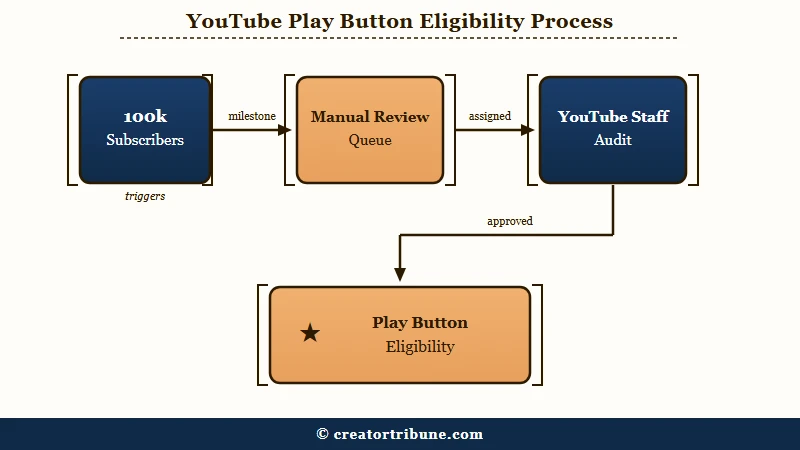
What is a Creator Award: YouTube’s Play Button plaques, awarded at 100k (Silver), 1M (Gold), 10M (Diamond), and 100M (Red Diamond) subscribers after a manual eligibility review.
The scale here is part of why the review is strict. The biggest channels run into the hundreds of millions of subscribers, with MrBeast topping the global rankings, and YouTube treats the plaque as a genuine honor rather than a participation trophy. That means a human looks at your channel before anything ships.
The way I see it, the “not eligible” message is YouTube being deliberately vague so it does not tip off bad actors. Your job is to work backward through the known disqualifiers and find which one applies. Most of the time it is one specific, fixable thing.
What Counts as Good Standing for a Creator Award
Good standing means no active strikes, no Community Guidelines violation in the last 365 days, original content, organic growth, and a channel active within the last six months. YouTube’s published list runs longer still, and it hands the award at its own discretion.
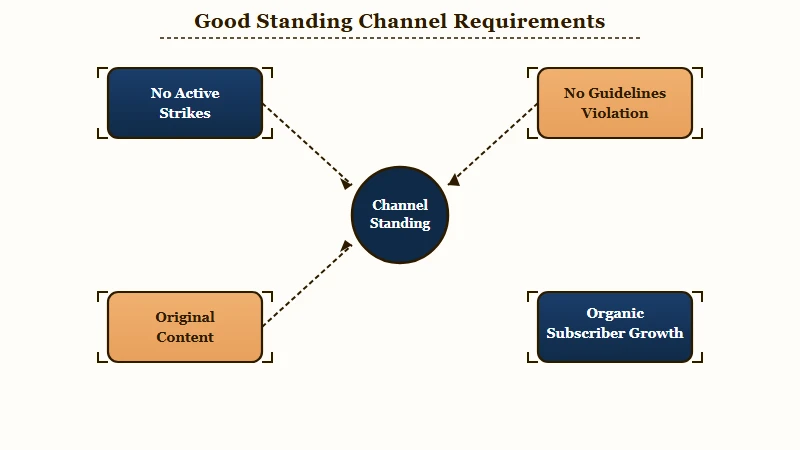
Here is the honest part nobody tells you at 100k: a single Community Guidelines strike inside the past year silently blocks the plaque, even if everything else is perfect. YouTube’s own wording is that your channel must be “in good standing, free from copyright strikes, Community Guidelines violations, and artificially inflated subscriber counts”. The clock is 365 days from the strike, not from when you noticed it.
| Symptom | Likely cause | Fix |
|---|---|---|
| Hit 100k, no notification | Channel in manual review or failed a standing check | Work through each blocker below, then request a review |
| “Not eligible” message | Active strike or violation in last 365 days | Resolve or wait out the strike clock, then recheck |
| Eligible then it vanished | Switched to a Brand Account or renamed mid-review | Revert account changes, contact Creator Support |
| Review stuck past 10 days | Hidden copyright or guideline warning | Check Studio for warnings, escalate to support |
What I would check first is your strike history. Open YouTube Studio and look for any community guideline or copyright warning, including ones that look expired. The eligibility audit counts a Community Guidelines strike for a full 365 days, so a strike from ten months ago is still holding your plaque.
You also do not need to be monetized to qualify, which surprises a lot of creators. YouTube states it plainly, “You don’t have to be a member of the YouTube Partner Program (YPP) to be eligible for an award”, though you must never have been rejected or suspended from it. If your standing is the problem, my walkthrough on what to do when monetization is denied covers the same policy checks that gate the award.
The Three Blockers YouTube Lists That Almost Nobody Checks
YouTube publishes eight Creator Award requirements, and three of them go unmentioned in almost every guide to the award: your channel must not be linked to a terminated account, you must not run content that is deceptive, spammy, or a scam, and you must be in compliance with the Terms of Service. All three are easy to fail without ever seeing a warning.
The linked-account rule reaches beyond the channel you are checking. YouTube’s official Creator Awards criteria require that your channel is not “terminated or linked to an account that has been terminated”, so a second channel you abandoned years ago, or a Google account you share with someone else, can hold up a plaque on a channel that is spotless by itself.
The second blocker sits apart from the originality test that catches compilation channels. YouTube lists “deceptive, spammy, or a scam” content as its own disqualifier, which in practice is where misleading thumbnails and titles, engagement bait, and giveaway or crypto promotions get caught. A channel can pass the originality check and still fail this one.
Compliance with YouTube’s Terms of Service is listed as a requirement in its own right as well. If you have already worked through strikes, originality and upload activity without finding the blocker, these three criteria are the ones most guides leave out entirely.
How to Check Your Play Button Eligibility Step by Step
To check eligibility, audit your strikes, confirm your content is original, verify recent uploads, then request a review through YouTube Studio or the Help Center. Standing, not your subscriber count, is almost always what holds the plaque.
Here is the sequence I would walk through before assuming YouTube made a mistake:
- Open YouTube Studio and check the dashboard for any active copyright or Community Guidelines strike, including ones near expiry.
- Confirm you have uploaded at least one new video in the last six months, since an inactive channel is held automatically.
- Review your recent content for compilation, reupload, or fully automated AI patterns that trip the originality check.
- Look for the Creator Awards or redemption prompt in Studio, and use the interactive eligibility tool in the YouTube Help Center if none appears.
- If 10 days pass after 100k with no notification in Creator Studio, contact Creator Support and ask them to confirm your review status.
Before: “I hit 100k three weeks ago and nothing happened, so YouTube must be broken.”
After: “I hit 100k three weeks ago, found an active copyright strike from a music clip in Studio, disputed and cleared it, then requested a review through the Help Center.”
The originality check is the one that catches clip and compilation channels off guard. If your channel leans on other people’s footage, my breakdown of how AI and low-effort content gets flagged explains the same scrutiny that now blocks awards for automated channels.
Why the Review Stalls Even When You Qualify
The review often stalls because of a structural account change you made yourself, not because you failed a policy. This is the trap that wastes the most time.
Switching your channel to a Brand Account, changing your channel name, or moving Google accounts during the review window is the change creators most often blame when an award goes quiet. YouTube does not document this behavior anywhere in its Creator Awards criteria, so treat it as a reported pattern rather than a confirmed rule. If you made one of those changes right around hitting 100k, it is still worth raising with Creator Support when you get in touch.
There is also a timing reality worth setting expectations on. YouTube publishes the actual window, and it is shorter than the two weeks most guides quote: if your channel passes the eligibility review, you receive a notification in Creator Studio within 10 days of hitting a milestone.
Passing the review is what starts that 10 day clock. Silence past day 10 says something about your standing rather than about queue speed, and what I would not do is keep tweaking the channel while you wait, since changes can reset the clock.
If day 10 passes with nothing in Creator Studio, contact Creator Support with your channel URL and the date you hit the milestone. A channel recovering from a deeper standing problem may need more work first, and my guide on rebuilding a channel’s trust signals covers the broader cleanup that makes the next review pass cleanly.
How Long the Play Button Really Takes
YouTube gives two overlapping figures for the same wait: 2 to 4 weeks to build and ship your award, and approximately 2 to 3 weeks to deliver it, both counted from the moment you submit your shipping details. Eligibility approval and physical delivery are separate waits, so budget about a month after redemption rather than adding the two figures together.
Once approved, you get a redemption code in Studio and by email, which you enter on the Society Awards site with your shipping details and the exact channel name to emboss. Get the channel name right, because it is etched into the plaque.
Where you live is the one variable YouTube itself names. YouTube ties the build and ship window to geography in its own wording, “depending on where you live”, and still puts the whole range at 2 to 4 weeks. Longer waits are common in creator reports but are not a figure YouTube publishes, so a slow arrival on its own is not a sign that anything is wrong with your award.
One detail that throws creators: in August 2024 YouTube quietly shrank the Silver and Gold plaques, so creators comparing the two report that the new 1M plaque is about the size the old 100K one used to be. If your award looks smaller than the ones in old unboxing videos, that is the new standard rather than a counterfeit. A copyright strike can also delay a channel between milestones, and my fix guide on removing a YouTube copyright strike is the fastest path back to good standing.
Frequently Asked Questions
Why am I not eligible for a Play Button after hitting 100k?
Hitting 100k only puts you in a manual review queue. The award is held if you have an active strike, a Community Guidelines violation in the last 365 days, reused or automated content, signs of fake subscribers, or no upload in the last six months.
Does a copyright strike block my Play Button?
Yes. Your channel must have no active copyright strikes during the review. Dispute or wait out the strike, confirm Studio shows a clean record, then request a review again.
How long does the Play Button review take?
YouTube says that if your channel passes the eligibility review, you receive a notification in Creator Studio within 10 days of hitting the milestone. If day 10 passes with nothing there, check for hidden warnings and contact Creator Support.
Do I need to be monetized to get a Play Button?
No. YouTube’s award criteria say directly, “You don’t have to be a member of the YouTube Partner Program (YPP) to be eligible for an award.” You must only be in good standing and never have been suspended or rejected from the program.
Can I get the award after a strike expires?
Yes. A Community Guidelines strike blocks eligibility for 365 days from the strike date. Once a full year passes with no new violations, your channel can become eligible again.
Can a fully AI-generated channel get a Play Button?
It is getting harder, and YouTube’s own criteria are why: your main content must be original, and you must not run content that is deceptive, spammy, or a scam. YouTube does not publish denial rates by channel type, so reports of rising rejections are anecdote rather than data. A faceless or AI-assisted channel can still qualify, as long as each video adds genuine original value rather than reposting or templating the same output at scale.
Quick Takeaways
- The Play Button is a manual human audit, not an automatic reward, so hitting 100k only puts you in the review queue.
- The most common silent blocker is a Community Guidelines strike inside the last 365 days, even one you thought had expired.
- Creators widely report that switching to a Brand Account or renaming mid-review freezes the audit, and YouTube does not document it either way, so lock account settings before 100k.
- YouTube notifies eligible channels within 10 days, so day 10 is the point to check Studio for hidden strikes and escalate to Creator Support.