Descript Review and Why Media Minutes Hide the Real Bill
Descript Review and Why Media Minutes Hide the Real Bill
Descript review for creators in 2026. Pricing, Overdub, Studio Sound, and the media minute trap that catches busy podcasters mid-month.
- 1What Descript Does for Spoken-Word Creators
- 2Descript Pricing Tiers in 2026
- 3What Overdub, Studio Sound, and Underlord Deliver
- 4The Pricing Trap Most Reviews Skip
- 5Who Descript Is For and Who Should Skip
- 6How Descript Compares to Riverside, CutFast, and CapCut Pro in 2026
- 7Verdict
- 8Frequently Asked Questions
- Is Descript free to use?
- How much does Descript cost in 2026?
- What are Descript media minutes?
- Is Overdub safe to use?
- What is Descript Underlord?
- Is Descript better than Riverside?
- 9Quick Takeaways
Bottom Line: Descript is the best document-style video and podcast editor for spoken-word creators in 2026 if you respect the new media-minute meter. Pricing flipped from transcription hours to media minutes plus AI credits in September 2025 and busy months can quietly triple your bill. Worth it for podcasters, YouTubers, and course creators who edit by reading.
I have spent more time inside Descript over the last two years than any other editor I touch, including Premiere and CapCut for short-form work. The product still does the one thing nobody else does as well: edit video by editing a transcript.
What changed in the last twelve months is the bill. Descript moved from a transcription-hour model to a media-minute and AI-credit model in September 2025, and the new meter punishes the way most creators work, which is upload first and decide what to use second.
This Descript review covers what the tool is good at in 2026, what the new pricing costs in practice, what Overdub and Studio Sound and Underlord deliver versus what their marketing pages claim, and which creators should pick something else. Numbers in the pricing table below come from Descript’s live pricing page and three independent 2026 reviews of the same tiers.
What Descript Does for Spoken-Word Creators
Descript is a document-style editor that turns video and audio into a transcript you can edit like a Google Doc. Delete a sentence in the transcript, the video drops with it. Move a paragraph, the cut moves with it.
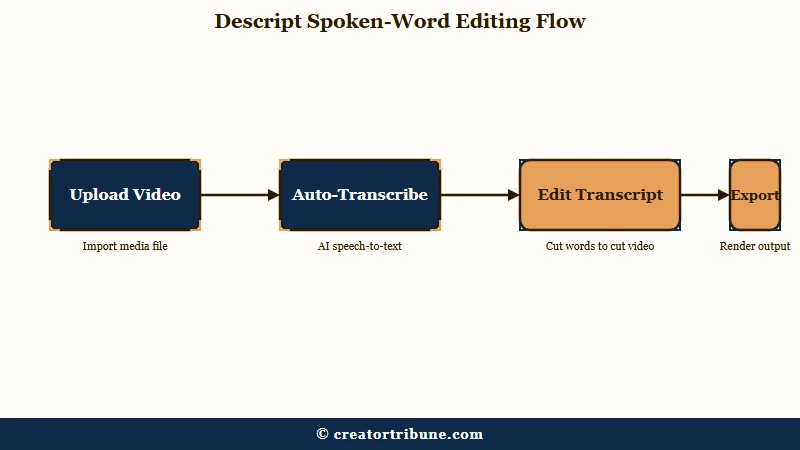
The interface is faster than a timeline editor for any project where the content is people talking. That means podcasts, YouTube essays, course videos, talking-head shorts, and webinar repurposing.
On top of the document editor sits a stack of AI features that the company keeps adding to. The most useful are Studio Sound for cleaning up rough audio, Overdub for cloning your own voice to patch mispronunciations, and Underlord as a co-editor that removes filler words and finds clip candidates on its own.
In my testing the transcript editor remains the load-bearing reason to pay for the tool. The AI features are good and I use them, but I have shipped entire episodes when Underlord was offline and never shipped one when the transcript editor was broken. Treat the AI stack as the sweetener, not the entree.
The non-obvious thing about Descript is that the workflow it forces on you is the workflow that wins. Editing by reading is faster than editing by scrubbing, even if you have been a timeline editor for ten years. The activation energy to relearn is real and you should expect a week of being slower before you get faster.
Descript Pricing Tiers in 2026
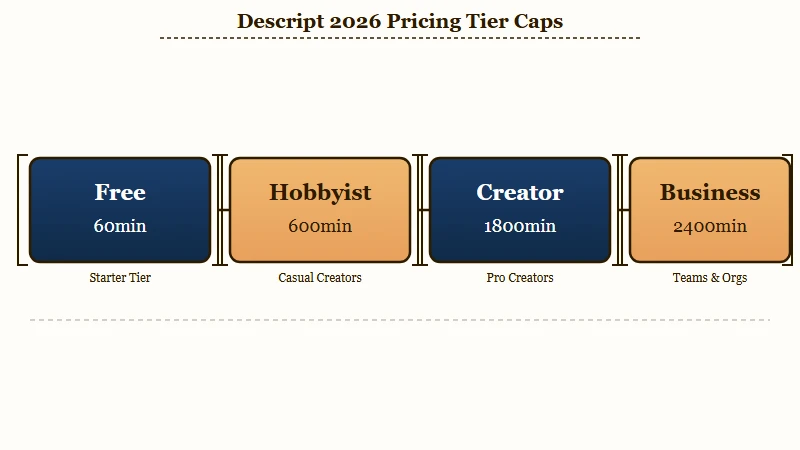
Descript pricing in 2026 runs Free, Hobbyist at $24 a month, Creator at $35 a month, and Business at $65 a month, with discounts on annual billing.
What flipped under the hood is what you are buying. The old plans sold “transcription hours”.
The new plans sell media minutes and AI credits. Media minutes count against any upload or recording. AI credits count against any AI action.
The shift happened on September 24, 2025, and Descript still does not communicate it well. Every tier has separate counters for media minutes per month and AI credits per month, and unused balances do not roll over into the next month. Top-up packs are available on Creator and Business but expire twelve months after purchase.
| Tier | Monthly / Annual | Media minutes | AI credits | Export quality |
|---|---|---|---|---|
| Free | $0 | 60 mins | 100 one-time | 720p, watermarked |
| Hobbyist | $24 / $16 | 600 mins | 400 per month | 1080p, no watermark |
| Creator | $35 / $24 | 1,800 mins | 800 per month | 4K, no watermark |
| Business | $65 / $50 | 2,400 mins | 1,500 per month | 4K, no watermark |
From what I have seen, the tier most creators land on is Creator at $24 a month on annual billing. The Hobbyist tier sounds attractive at $16 a month annual until you realise 600 media minutes covers maybe ten weekly episodes of an hour-long podcast plus zero room for re-recordings, b-roll, or any video you upload and decide not to use.
The other gotcha is that media minutes burn even on uploads you never transcribe. If you drop a raw 90-minute recording into a project and decide ten minutes in that you hate the take, you have already spent 90 minutes against your monthly cap. The lesson is to pre-trim aggressively in QuickTime or your DAW before you ever touch Descript.
What Overdub, Studio Sound, and Underlord Deliver
The three AI features carry real weight but every action burns credits, and credits are the part of the bill that breaks first.
Overdub clones your voice for short corrections. Studio Sound removes room noise and levels volume.
Underlord acts as a co-editor that strips filler words, identifies clip candidates, and writes show notes.
Overdub is genuinely impressive for short patches. Mispronounced a name? Type the correction in the transcript and Descript inserts a synthesised version of your own voice in the gap.
Quality is high on three-to-five word fixes and degrades on longer passages. The eligibility gate is the Creator plan or higher, and the safety policy requires a Live Voice ID consent script before you can clone your own voice.
Studio Sound costs 10 AI credits per run and is the closest thing to magic in the product. From what I have seen running rough conversational audio through it, hum and room echo drop substantially without the over-processed digital-radio sound that plagues older audio cleanup tools.
Here is the worked example that always sells creators on Studio Sound versus the manual alternative.
Vague: “make my audio sound better”
Specific: “Run Studio Sound at 60 percent enhancement on the host track only, leave the guest track at 40 percent because their mic is already broadcast quality, then run a single pass of Underlord filler-word removal on both tracks”
The second prompt is the version that gets a publishable episode in three clicks. The first one runs Studio Sound at default settings on every track and burns roughly 40 AI credits on the same project.
Underlord is where the credit math gets dangerous. Every Underlord action consumes credits, and a single project can easily eat 100 credits across multiple passes if you run filler removal, clip identification, summarisation, and social-post generation in sequence.
The way I see it, Underlord pays for itself on agency or multi-show creator work where the time savings dwarf the credit cost, and is a bad fit for hobbyists running one show a week.
The Pricing Trap Most Reviews Skip
The biggest Descript pricing trap is that busy months hit the cap mid-week and force a top-up or a forced upgrade.
A creator running a weekly podcast plus a fortnightly YouTube essay plus occasional short-form clips can comfortably stay inside Hobbyist most months and then blow past the cap in any month with a guest interview backlog or a launch week.
The pattern shows up consistently across creator coverage of Descript pricing. Monthly bills jumping from $30 to a few hundred dollars during busy production cycles is a recurring story, with creators reporting that the upgrade prompts feel coercive when you hit the cap mid-edit and need to ship.
The way I see it, the rational play is to do three things at once.
- Pre-trim every recording aggressively in your DAW before uploading to Descript, ideally to within 10 percent of final length.
- Buy a top-up pack on Creator at the start of any month you know will be heavy (a launch, a guest backlog, a campaign) rather than waiting to be capped mid-edit.
- Reserve Underlord for episodes you know will go out, not for first-pass experimentation. Run Studio Sound and filler-word removal on the version you have already cut down, not on the raw take.
Doing all three pushes the realistic monthly cost on Creator from a nervous $35 toward a steady $40 to $50, which is still cheaper than Adobe Premiere plus a separate transcription service and far cheaper than hiring an editor for the same throughput.
The other piece of the bill nobody talks about is the lack of an offline mode. Descript is Electron-based and requires a live connection.
If your internet drops mid-edit, your editor stops. This is a real limitation for traveling creators and worth pricing in if you record on the road.
Who Descript Is For and Who Should Skip
Descript fits podcasters, YouTubers, course creators, and marketing teams who edit by reading. It does not fit visual editors, colorists, or anyone doing motion graphics work.
The product is purpose-built for spoken-word video and audio.
Trying to use it for narrative film, music video editing, or cinematic colour grading is the wrong shape of tool for the job. Global podcast listenership is on track to top 650 million in 2026 per Statista’s podcasting overview, and that is the audience Descript optimised the workflow for.
Concrete pros and cons in numbered form, with at least four items per side.
Pros for spoken-word creators:
- Transcript editing remains the fastest workflow on the market for any project where talking is the content.
- Studio Sound is the best one-click audio cleanup in the consumer tier, even at 10 credits a run.
- Overdub voice cloning is good enough for short corrections that would otherwise require a re-record.
- Underlord automates the tedious cleanup pass (filler words, clip candidates, show notes) better than any standalone tool I have tested in 2026.
Cons for any creator considering the tool:
- The media-minute meter punishes uploads you never use, which is how most creators work.
- No offline mode means a flaky connection stops your edit dead.
- The Electron desktop app lags noticeably on 4K projects over 120 minutes.
- Free tier exports add a Descript watermark, which is fine for testing but useless for any client work.
If you are a videographer who paid for Premiere because of motion graphics and 3D tracking, stay there. If you are a podcaster who built their workflow around scrubbing audio in Audition or Logic, the switch will pay off inside a month.
If you mostly do short-form content for TikTok and Reels, CapCut Pro has a better template library and is cheaper. The trade-off everyone should weigh is whether you would rather edit by reading or by scrubbing.
A clean adjacent workflow that pairs well with Descript is repurposing the long-form output into short-form clips, and the repurpose YouTube videos into Shorts workflow maps onto the Underlord clip-identification feature directly. If you are not yet running that motion, that piece is worth a weekend.
How Descript Compares to Riverside, CutFast, and CapCut Pro in 2026
Descript wins on document-style editing for English-language spoken content, loses to Riverside on remote interview capture, loses to CapCut on short-form templates, and gets out-priced by Sonix on pure transcription.
No single tool wins every dimension, and the right choice depends on the dominant shape of your output.
The simplest way to think about it is by content type. Long-form interview podcasts with remote guests benefit more from Riverside’s local 4K guest capture than they do from Descript’s editor, because the capture quality and the immunity from internet drops during recording matter more than the edit speed. Once captured, you can still bring the file into Descript to edit.
Short-form social creators making vertical TikTok and Reels content get more from CapCut Pro than from Descript. The template library and the dynamic transitions are purpose-built for that format. Descript can do it, but the workflow is not optimised for the volume of edits per second that a viral short demands.
The bilingual workflow is where Descript starts to hurt. From a 2026 comparison test against CutFast on Chinese roundtable audio, Descript hit 78 percent transcription accuracy versus 95 percent on the same file. If your content is not English-dominant, the transcription error rate compounds across every edit pass and the bill of materials goes up.
The other workflow piece I would prioritise alongside Descript is recovery muscle for when one of these platforms decides to break on you mid-launch. The dead account recovery playbook and the right time to repost both apply to anyone whose creator income runs through a few platforms, which is everyone reading this. Tools change, the platform graveyard does not.
Verdict
Descript is worth $24 to $35 a month for spoken-word creators who can respect the new pricing model and skip otherwise. The transcript editor is the best in the category and the AI stack on top of it is genuinely useful, but the media-minute meter and the AI credit caps will catch you if you treat the tool like the old Pro plan and upload everything raw.
Pre-trim before uploading, reserve Underlord for episodes that will ship, and budget for a top-up on launch weeks. Do that and the tool is a no-brainer for podcasters, YouTubers, and course creators in 2026.
A creator running an audio show on top of all this should also keep one eye on hosting reliability and not depend on any one dashboard, especially with the Spotify for Creators outages this May showing what milestone-driven feature launches can do to your analytics surface. Tool choice and platform choice are different problems and you fix them differently.
If you want one more comparison data point before you pull the trigger, the Captions app review and the existing Vizard AI review cover two of the closest mainstream alternatives for short-form-heavy creators.
Frequently Asked Questions
Is Descript free to use?
Descript offers a free plan with 60 media minutes per month, 100 one-time AI credits, 720p exports, and a Descript watermark. The free plan is fine for testing the workflow on a single short project. For any real production cadence you will hit the cap inside a week and need to move to Hobbyist or Creator.
How much does Descript cost in 2026?
Descript costs $0 (Free), $24 a month or $16 a month annual (Hobbyist), $35 a month or $24 a month annual (Creator), and $65 a month or $50 a month annual (Business). Each tier comes with a separate cap on media minutes and AI credits.
What are Descript media minutes?
Media minutes are a usage meter that counts against any audio or video you upload or record in Descript, transcribed or not. Hobbyist gets 600 per month, Creator 1,800, Business 2,400. Unused minutes do not roll over.
Is Overdub safe to use?
Descript requires Live Voice ID consent before you can clone your own voice, and synthesised audio carries an invisible watermark. You cannot clone someone else’s voice without their consent. Used for short corrections to your own voice, it is the safest commercial voice cloning tool available in 2026.
What is Descript Underlord?
Underlord is a built-in AI co-editor that removes filler words, finds high-potential social clip candidates, generates YouTube descriptions and show notes, and rewrites scripts. Every action consumes AI credits. Available on the Creator plan and higher.
Is Descript better than Riverside?
Descript wins on document-style editing speed. Riverside wins on remote interview capture quality and resilience to flaky guest internet. Many creators record on Riverside and edit in Descript. They are not direct competitors as much as complementary tools.
Quick Takeaways
- Descript is the best document-style editor for spoken-word video and podcast creators in 2026.
- Pricing flipped to media minutes plus AI credits in September 2025 and busy months can triple your bill if you do not pre-trim.
- Studio Sound is the standout AI feature, Underlord is powerful but credit-heavy, Overdub is safe for short corrections only.
- Pick Creator at $24 annual if you ship weekly content, Hobbyist if you ship monthly, Free only for testing.
- Pair Descript with a recovery playbook for the platforms you publish to, because dashboard outages will eat your week eventually.